Forum Replies Created
-
AuthorPosts
-
Hi,
Sorry for the late reply! If your case is urgent, please add “urgent” to your title description and we will try to look into it as soon as we can. When you reply to your own threads, it is changing order in our queue.
That being said, you can add following code to bottom of Functions.php file in Appearance > Editor to set “from” mail address
function change_cf_from() {
    return " (Email address hidden if logged out) ";
}
add_filter('avf_form_from', 'change_cf_from', 10);
Also, please refer to this post – https://kriesi.at/documentation/enfold/contact-form/#captcha and enable captcha. You can also consider using an anti-spam plugin.
Best regards,
YigitHi,
Bundled version should not show up in plugins list. Could you please try de-activating it in plugins list and check if that helps? If it does not, please re-install the theme. Check your PHP version and upgrade it if it is older than 7.x. Try de-activating all active plugins.
If none of the above helps, please create a testing environment and share logins details in private content field so we can look into it.
Best regards,
YigitHi,
@PabloCirre your website looks really nice! You seem to forgot to update one section though – http://todoenmimochila.com/contacto/#av_section_1Thanks for sharing! :)
Best regards,
YigitHey,
That is because you have following custom CSS code
@media screen and (max-width: 1600px) and (min-width: 1367px) {
#fullscreen_slider_1 {
    max-height: 600px !important;
    max-width: 1210px !important;
    margin-left: 12%;
}}
Please let us know why you have added the code and we might be able to offer you an alternative solution :)
Best regards,
YigitMarch 2, 2020 at 5:57 pm in reply to: Cookie Consent Message Bar pops up every time I reload the page #1189487Hi,
Thanks for your kind message.
I was not aware of your other thread. Just checked it as well but it too works fine on my end. I attached 2 screenshots in private content field.
If there was anything we can do for previously visited visitors, we would do. Since it is working fine now, maybe you could add a notification asking your visitors to flush browser cache in case they still experience the issue?
Best regards,
YigitMarch 2, 2020 at 5:34 pm in reply to: Code of icon list visible on frontend live site after Enfold update, text gone?? #1189486Hi Barb!
“>” character you used in icon list titles were breaking HTML. I edited your page and used HTML name code instead
>Please see – https://kriesi.at/documentation/enfold/intro-to-layout-builder/#using-special-characters and also alternatively – https://www.rapidtables.com/web/html/html-codes.html
Could you please flush browser cache and review your website? :)
Regards,
YigitHey,
Please add following code to Quick CSS as well
#fwcs .avia-image-container-inner, #fwcs img {
    width: 100%;
}
That is because image width is currently 1500px so on screens wider than 1500px. Using CSS code above might make your image blurry on wider screens so please upload wider image if possible, if not, code above should help :)
Cheers!
YigitHi,
You are welcome! :)
For your information, you can take a look at Enfold documentation here – https://kriesi.at/documentation/enfold/
If you have any other questions or issues, feel free to start a new thread under Enfold sub forum and we will gladly try to help you :)
Best regards,
YigitHi BigBatT,
Thanks for your contribution! It is definitely appreciated :)
We will be including updated version of Italian language files in upcoming release.
Best regards,
YigitHey,
Thanks for contacting us!
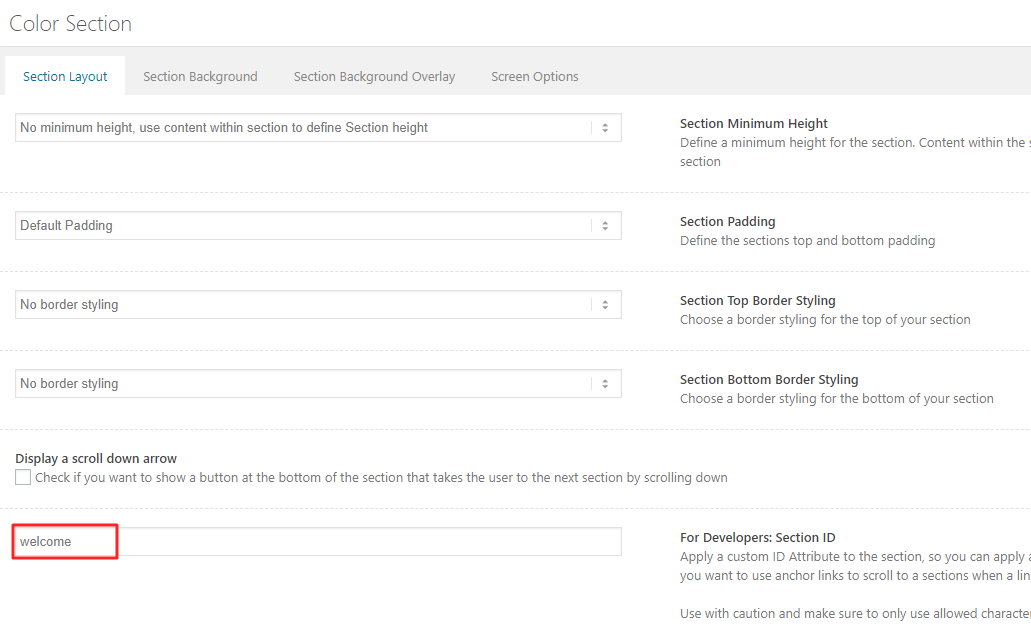
You have inserted custom CSS code in ID section of your image. I edited your page and deleted it from your image element and gave unique ID (“fwcs”) to your Color Section – https://kriesi.at/documentation/enfold/wp-content/uploads/sites/22/2018/08/anchors.png and then added following code to Quick CSS in Enfold theme options > General Styling tab
#fwcs .container {
    margin: 0;
    padding: 0;
    max-width: 100%;
}
#fwcs .content { padding: 0!important; }
If there are any other sections where you would like to display edge to edge, you can insert your content into Color Section element and use the same ID “fwcs”.
Please review your website :)
Cheers!
YigitHi,
Thanks for contacting us!
Since your installation is on localhost, could you please post screenshots and show the issue? You can upload your screenshots on imgur.com or Dropbox public folder and post the links here :)
Best regards,
YigitHey,
Thanks for contacting us!
1- You can go to Enfold theme options > Header > Header Size and increase it. Your logo would adapt to header height.
2- Please go to Enfold theme options > Advanced Styling and edit “Main menu links” and increase font size :)Cheers!
YigitHi,
Yes, you can download pre-built Enfold child theme here – https://kriesi.at/documentation/enfold/child-theme/. After installing and activating the theme, you can go to Enfold child theme options > Import & Export and Import parent theme settings. You may need to save theme options after that.
1- Please add following code to Quick CSS in Enfold theme options > General Styling tab
.avia-image-container.av-hover-grow .avia-image-overlay-wrap:hover {
    -webkit-transform: scale(1);
    transform: scale(1);
}
2- Please go to /enfold/includes/admin/ in Appearance > Editor and replace the content of register-backend-advanced-styles.php file with this one – https://raw.githubusercontent.com/KriesiMedia/enfold-library/master/temp_fixes/Enfold_4_7_3/register-backend-advanced-styles.php
Due to IP restriction, I am not able to login to your dashboard.Best regards,
YigitHi,
Yes, you can download pre-built Enfold child theme here – https://kriesi.at/documentation/enfold/child-theme/. After installing and activating the theme, you can go to Enfold child theme options > Import & Export and Import parent theme settings. You may need to save theme options after that.
1- Please add following code to Quick CSS in Enfold theme options > General Styling tab
.avia-image-container.av-hover-grow .avia-image-overlay-wrap:hover {
    -webkit-transform: scale(1);
    transform: scale(1);
}
2- Please go to /enfold/includes/admin/ in Appearance > Editor and replace the content of register-backend-advanced-styles.php file with this one – https://raw.githubusercontent.com/KriesiMedia/enfold-library/master/temp_fixes/Enfold_4_7_3/register-backend-advanced-styles.php
Due to IP restriction, I am not able to login to your dashboard.Best regards,
YigitMarch 2, 2020 at 2:02 pm in reply to: LAERGE GAP between fullwidth slider and content: av-content-full alpha units #1189427Hi Partecipant,
It seems like you have added some elements and chose to hide them on desktop. Could you please try adding your content inside a Color Section element and chose to hide that section? That would be a better solution.
If you would like a quick fix, please add following code to Quick CSS in Enfold theme options > General Styling tab
@media only screen and (min-width: 990px) {
.home #after_submenu {
    display: none;
}}
Best regards,
YigitMarch 2, 2020 at 1:57 pm in reply to: Cookie Consent Message Bar pops up every time I reload the page #1189426Hey,
I tested your website on both desktop and mobile however I cannot reproduce the issue. Once I accept cookies, it does not popup on each page when I navigate, as expected.
In your last message you mentioned that issue was still there. Have you tried clearing cache on the mobile device you tested? It should work correctly after clearing browser cache but unfortunately there is no way to flush your visitors browser cache.
Regards,
YigitHi Mohan,
Thanks for the information!
I noticed some of the options were missing in Enfold theme options > Performance tab so I re-installed the theme and then deleted cache files on your server. Then I edited your gallery elements and chose to start animation on page load to make sure they load correctly for all visitors.
I checked your website on Chrome, Firefox, Opera and Safari on my mac and Safari on my iphone.
– Opacity (white transluscent shade) issue is no longer there (previously it was only on Safari for me)
– Updated your homepage and confirmed it is the same on desktop as it is on mobile.Could you please check both cases and report back? :)
Best regards,
YigitHi,
You are welcome and no worries! Let us know if you have any other questions or issues :)
Best regards,
YigitHi,
Thanks for providing testing installation!
I tried deleting the content of your functions.php file and that seems to help. I left it as is and added backup of your functions.php file in private content field. Since this is not a theme related issue, it would be great if the person who modified the theme revisited their customizations :)
Best regards,
YigitHi,
You are welcome Marcy! Please feel free to contact us again if you have any questions and enjoy your weekend!
Best regards,
YigitHi,
You are welcome! Let us know if you have any other questions or issues and enjoy your weekend :)
Best regards,
YigitHi,
No, there are no yearly payments for Enfold. Once you purchase a license, you get lifetime updates and 6 months of support. When your support period expires, you can extend it however it is optional.
You can register your theme by referring to this post – https://kriesi.at/documentation/enfold/theme-registration/#how-to-generate-a-envato-personal-token. After registering your theme, you will receive a notification whenever we release an update and you will be able to update the theme with a few clicks in WordPress dashboard.You would need to pay yearly to your hosting provider for hosting services. They usually offer discount to their first time users. I attached a link in private content field where you can find comparison between different hosting companies.
Let us know if you have any other questions :)
Best regards,
YigitHi Marcy,
Thanks for contacting us!
Yes, you would need hosting for your site. You can buy hosting plan from GoDaddy as well or consider other options such as SiteGound, BlueHost etc.. Most hosting providers offer one click WordPress installation so you could easily set up WordPress and then install Enfold theme, import one of Enfold demos – https://kriesi.at/themes/enfold-overview/ in Enfold theme options > Demo Import with a single click within a few minutes and start working on your website right away.
As far as I know, you are able to upload premium themes on WordPress.com as well however I am not sure if you would need to change your plan for that.
I hope that helps! Let us know if you have any other questions :)
Regards,
YigitHi Colin,
Thanks for contacting us!
We sell premium WordPress theme Enfold and provide support to our users. Website you shared is using Enfold theme. You would need to contact website owners for any changes on their website.
If you need support with your Enfold theme, we can gladly help :)
Cheers!
YigitHi,
My motivation has always been fixing the issues, Mohan, so please stop threatening me with posting comments on ThemeForest.
I read your posts, I am clear on the issues you are having. Please you too read my posts. I have already wrote that “I could only reproduce the issue on Safari”. I attached the screenshots from Firefox and Chrome in private content field.
Lastly, you have not even addressed the issue where, after updating, the updated pages show up correctly in an iphone but not on a macbook. I have sent you the screenshots through dropBox.
Answer #1 is for this issue exactly. Especially “you could have disabled mobile cache in one of the plugins so you would be seeing cached version on desktop and not mobile” part. Have you checked my screenshots from Safari desktop and Safari mobile?
Please share FTP logins here privately as well and let us know if we can de-activate all active plugins for testing purposes. I did not want to de-activate any plugins or test around without your consent.
I will share this thread with my teammates as well.
Best regards,
YigitHi,
I realized I numbered answers incorrectly. I just edited my post above and corrected it. Sorry for the confusion. Other than that, I am not sure why do you think we are not taking the issue seriously. I will elaborate a bit more as my explanations were actually not unhelpful at all :)
1- I attached two screenshots in private content field, one from my iphone and other from my mac. They are both the same as in backend, because you de-activated both plugins. You should not have such issues when cache is clear. Also, you could have disabled mobile cache in one of the plugins so you would be seeing cached version on desktop and not mobile.
2- I added the code in Quick CSS field to fix opacity (white transluscent shade) issue on Safari desktop version. I attached the link of the page where I confirmed. So that should be fixed already. If you are still seeing the images in the gallery with low opacity, that also points to cache. Please clear cache on Safari on mac as well. This is not a known issue and I could not reproduce it on my local installations. Hence, I think this is related to one of the plugins you are using.
Best regards,
YigitHi,
Can we temporarily activate Enfold parent theme and de-activate all active plugins for testing purposes?
Best regards,
YigitFebruary 27, 2020 at 7:46 pm in reply to: Avia layout builder not saving, weird errors, can't change anything on page! #1188591Hi Barb,
That is new! We recently found out about a rare case (I have seen only 3 times in ~7 years) where certain words broke Text Block element due to mod security rule. We even added it to docs – https://kriesi.at/documentation/enfold/intro-to-layout-builder/#layout-builder-is-not-loading-properly but I would not guess that would happen on Animated Numbers element too.
So yes, please send it to us so we are informed. I wonder what is causing the conflict.
Thanks! :)
Best regards,
YigitHi,
Glad we could help! :)
For your information, you can take a look at Enfold documentation here – https://kriesi.at/documentation/enfold/
If you have any other questions or issues, feel free to start a new thread under Enfold sub forum and we will gladly try to help you :)
Best regards,
Yigit -
AuthorPosts