

Forum Replies Created
-
AuthorPosts
-
Hi,
Sorry for the late reply, I added this css to your Quick CSS to create two columns. You won’t be able to choose the brake point because it’s automatically set by the css.ul#av-burger-menu-ul { display: inline-block !important; columns: 2; padding: 50px 150px !important; }Please clear your browser cache and check.
Best regards,
MikeHi,
Entschuldigung für die verspätete Antwort und vielen Dank für die Anmeldung. Viele der oben genannten Fehler sind darauf zurückzuführen, dass beim Importieren der Demo kein Woocommerce installiert ist. Dies ist in Ordnung und wird Ihnen keine Probleme bereiten. Sie werden die Produkte einfach nicht importieren lassen. Ich habe mir Ihre Site angesehen und festgestellt, dass Ihr Enfold-Design nicht aktiviert ist. Deshalb habe ich Ihren LayerSlider aktiviert und importiert, Ihre Menüs angepasst und Ihre CSS aktualisiert. Die Demo wird nun korrekt angezeigt. Bitte leeren Sie Ihren Browser-Cache und prüfen Sie.— Translated with Google —
Sorry for the late reply and thank you for the login. Many of your errors above are from not having woocommerce installed when importing the demo. This is ok and will not cause you problems, you just won’t have the products imported.
I took a look at your site and found your Enfold theme was not activated, so I activated and imported your LayerSlider and adjusted your menus and updated your css. The demo is now showing correctly, Please clear your browser cache and check.Best regards,
MikeJuly 6, 2019 at 8:39 pm in reply to: Icon list animation not working in tab section when clicking on a link #1116333Hi,
Sorry for the late reply, I tried to see the issue but I don’t see the icon list, did you replace it with a bullet list?
I see that you are using Enfold v4.5.4, please try updating to v4.5.7The easiest and safest way to do this is to download the newest version from Theme Forest and rename your current theme to “enfold-old” via ftp then upload the new “enfold” and check that your site is working correctly.
Once you are happy you can delete the “enfold-old” via ftp, (not the WP theme page)
Should for some reason you wish to roll-back to the old version, it’s easy to do, simply rename the new “enfold” to “enfold-new” via ftp and then rename “enfold-old” to “enfold” then refresh your page.
Please don’t try to overwrite the theme folder, as this will leave old files behind and cause errors.Best regards,
MikeHi,
Thank you for sharing your solution. We will close this now. Thank you for using Enfold.For your information, you can take a look at Enfold documentation here
For any other questions or issues, feel free to start new threads in the Enfold forum and we will gladly try to help you :)Best regards,
MikeJuly 6, 2019 at 8:17 pm in reply to: Place the last two lines at the end of the of the html body. #1116328Hi,
Glad Rikard could help, we will close this now. Thank you for using Enfold.For your information, you can take a look at Enfold documentation here
For any other questions or issues, feel free to start new threads in the Enfold forum and we will gladly try to help you :)Best regards,
MikeHey Bassmann,
Yes this can be adjusted using media queries for mobile only, such as:@media only screen and (max-width: 767px) { .your_class { your: rule; } }If you would like some help with the css please link to your site so we can be of more assistance.
Best regards,
MikeHi,
Glad we were able to help, and thanks for the kind words, we will close this now. Thank you for using Enfold.For your information, you can take a look at Enfold documentation here
For any other questions or issues, feel free to start new threads in the Enfold forum and we will gladly try to help you :)Best regards,
MikeHey danielbarbarini,
It seems that your site is down right now, please check.Best regards,
MikeHi,
Glad Ismael could help, unless there is anything else we can help with on this issue, shall we close this then?Best regards,
MikeHi,
Sorry for the late reply, I believe you are not seeing this setting because you are using Enfold v4.4.1 & WordPress v5.2.2
Please try updating your site to the Enfold version v4.5.7The easiest and safest way to do this is to download the newest version from Theme Forest and rename your current theme to “enfold-old” via ftp then upload the new “enfold” and check that your site is working correctly.
Once you are happy you can delete the “enfold-old” via ftp, (not the WP theme page)
Should for some reason you wish to roll-back to the old version, it’s easy to do, simply rename the new “enfold” to “enfold-new” via ftp and then rename “enfold-old” to “enfold” then refresh your page.
Please don’t try to overwrite the theme folder, as this will leave old files behind and cause errors.Best regards,
MikeHi,
Glad Ismael could help, unless there is anything else we can help with on this issue, shall we close this then?Best regards,
MikeHey Niky67,
Sorry for the late reply, In the Private Content area is a beta version with the latest fixes which has solved many IE & Edge issues so perhaps this will help you also.
The easiest and safest way to test the beta version is to rename your current theme to “enfold-old” via ftp then upload the new “enfold” and check that your site is working correctly.
Once you are happy you can delete the “enfold-old” via ftp, (not the WP theme page)
Should for some reason you wish to roll-back to the old version, it’s easy to do, simply rename the new “enfold” to “enfold-new” via ftp and then rename “enfold-old” to “enfold” then refresh your page.
Please don’t try to overwrite the theme folder, as this will leave old files behind and cause errors.Best regards,
MikeHi,
Sorry for the late reply, In the Private Content area is a beta version with the latest fixes which has solved many IE & Edge issues so perhaps this will help you also.
The easiest and safest way to test the beta version is to rename your current theme to “enfold-old” via ftp then upload the new “enfold” and check that your site is working correctly.
Once you are happy you can delete the “enfold-old” via ftp, (not the WP theme page)
Should for some reason you wish to roll-back to the old version, it’s easy to do, simply rename the new “enfold” to “enfold-new” via ftp and then rename “enfold-old” to “enfold” then refresh your page.
Please don’t try to overwrite the theme folder, as this will leave old files behind and cause errors.Best regards,
MikeHey Sonja,
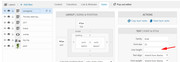
Sorry for the late reply, have you tried changing the line-height in the slide layer under styles?
Best regards,
MikeJuly 6, 2019 at 6:31 pm in reply to: Cannot login to woocommerce with enfold theme activated ! #1116311Hi,
Thanks for the login, please enable the WordPress > Appearance > Editor so we can see your child theme files, or you can include ftp access in the Private Content area.Best regards,
MikeHi,
Sorry for the late reply, I was not able to login with the password, please check.
I would like to try updating your site with a beta version that has some fixes for IE & Edge
If this is OK then also include FTP access in the Private Content areaBest regards,
MikeHey netfex,
Thank you for the link, Please try this code in the General Styling > Quick CSS field or in the WordPress > Customize > Additional CSS field:.main_color .footer_color h3,.main_color .footer_color div .news-headline,.main_color .footer_color .news-time { color: #fff !important; }Best regards,
MikeJuly 6, 2019 at 5:26 pm in reply to: Urgent: Avia Editor is pasting in shortcodes arbitrarily #1116303Hey Gavin,
Please include an admin login in the Private Content area and a link to a test page where we can see this error.Best regards,
MikeJuly 6, 2019 at 5:24 pm in reply to: How to change the background color of the contact form? #1116302Hey BlueSolution,
Please include the url to the page in question so we can take a closer look.Best regards,
MikeHi,
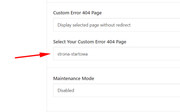
Thanks for the login, your home page is set as your custom 404 page so it will give the 404 code, please change your custom 404 page to a different page:
Best regards,
MikeHi,
Glad Rikard could help, unless there is anything else we can help with on this issue, shall we close this then?Best regards,
MikeJuly 6, 2019 at 5:10 pm in reply to: Removing Upper Case on Blog Headers for Modern Business Blog Style #1116299Hey MadRhino,
Thanks for the links, your merged css styles don’t match between the sites, one has this css:h3 { font-size: 55px; line-height: 1.075em; text-align: center; text-transform: none !important }the other doesn’t.
Please try disabling your Enfold Theme Options > Performance > JS & CSS file merging and compression and check the option at the bottom of the page to Delete old CSS and JS files then save the options and reload your site and clear your browser and site cache. Then enable your JS & CSS file merging and compression again to see if your css rule is added.
Otherwise, try to add this css:.html_elegant-blog .avia-content-slider .slide-entry-title { text-transform: none !important; }Best regards,
MikeHey mattrum,
Thank you for the login and ftp access, which demo would you like to import?
Which webhost are you using?Best regards,
MikeHey Daniel,
Please check that the setting at Enfold Theme Options > Performance > Disable Template Builder Elements is set to: Always load all elements
If this doesn’t help please include the url to the page in question so we can take a closer look at the error.Best regards,
MikeJuly 6, 2019 at 4:22 pm in reply to: Cannot Update Post With .pdf Contained in The Text, Showing 404 Error #1116291Hi,
Sorry, the site seemed to be working correctly after I restored it. It seems that it is also working now, did you find the issue?Best regards,
MikeHi,
Please include an admin login in the Private Content area so we can take a closer look.Best regards,
MikeHi,
Thank you for the login, I was able to create and publish a new test post using the Advanced Layout Builder, and then I was able to edit again. I then tested each of your templates and found only one that would crash the Advanced Layout Builder with this error:/wp-admin/admin-ajax.php Failed to load resource: the server responded with a status of 403 (Forbidden)It is the Informes PE template, the button gives the same error when trying to edit. So this button is corrupt, I tried to debug but couldn’t add the debug code to your functions.php, your site requires it to be added via ftp. Can you add this to line nuber 18, right after the line: if(isset($avia_config[‘use_child_theme_functions_only’])) return; ?
//set builder mode to debug
add_action('avia_builder_mode', "builder_set_debug");
function builder_set_debug()
{
	return "debug";
}
Also please ask your webhost if there is any server rules against the pdf file type. Try editing one of your posts to cause the error just before you contact them so you can tell them a time so they can check the server logs for the error, and hopefully see the cause.
Best regards,
MikeHi,
Thanks for the feedback, I see that the css is not working for you as it is for me, Please see the screenshot in Private Content area. Please include an admin login in the Private Content area so we can examine closer.Best regards,
MikeHi,
@Guenni007 Thank you, I will need to add more documentation. This is a plugin, my thought was that this would be easier for people. But good point I will add a “child-themes/shortcodes” folder version.Best regards,
MikeHey kikosanchezestudio,
Try adding this code to the end of your functions.php file in Appearance > Editor:function flip_script(){ ?> <script> jQuery(window).load(function(){ jQuery( '#header_meta' ).each(function() { jQuery( this ).find( 'div.phone-info' ).insertBefore( jQuery(this).find('nav.sub_menu') ); }); }); </script> <?php } add_action('wp_footer', 'flip_script');Best regards,
Mike -
AuthorPosts
