

Forum Replies Created
-
AuthorPosts
-
August 24, 2019 at 5:53 am in reply to: advanced layerslider elements in mobile view not appearing until I scroll #1130546
Hi,
@nmckelvey sorry I do not see the same issue or your site, please explain further about your issue so we can be sure we are on the same page.Best regards,
MikeHi,
Glad to hear this helps,
To target only IOS devices is a little tricky but it can be done, here are some articles:
http://stephen.io/mediaqueries/The problem is that there is not just one way to do this for all IOS devices, you will need to use one solution for mobile devices and another for desktop Mac’s
To understand the special symbols in css, please read this article:
I was able to create a template of your frontpage:
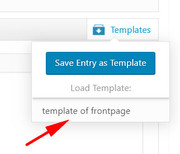
this is what you ment by “clone” correct?
Perhaps there is one page that is giving you an error, please tell us which page this is so we can take a look.Best regards,
MikeHi,
Sorry for the frustration, I have taken another look at your site and see that you do not have a child theme.
One reason your font customization in the advanced styling is not changing the font size is because I added this css to make your font size 19px as you had asked:#top .all_colors p,#top .all_colors .toggle_content li { font-size: 19px !important; }The advanced styling panel doesn’t offer the option to adjust the font size of the bullet list. When I adjusted the bullet list with the css was 19px wrong? Sorry, I don’t understand why you didn’t like it.
Anyways the other issue you are running into is your caching plugin, while you are creating your site please disable any caching and minifying, because this delays your ability to see your changes right away, and it can cause frustration as you may believe that changes are not taking effect.
Please also clear your browser cache as you make changes.Best regards,
MikeHi,
Thank you for the login. I looked at your test slider page but the background color doesn’t show until the page is scrolled, and then the whole page flashes. But this also occur without the css. You are right about the steep learning curve, I didn’t know about this transition.
Perhaps try this css in the Quick CSS field for the background color to show before scrolling:#top.page-id-11675 .ls-slide-backgrounds { width:100%; height:100%; color:black; font-weight:bold; animation: myanimation 10s infinite; } @keyframes myanimation { 0% {background-color: red;} 25%{background-color:yellow;} 50%{background-color:green;} 75%{background-color:brown;} 100% {background-color: red;} }Best regards,
MikeHey GRC1,
Please include an admin login in the Private Content area so we can investigate further.
What version are you using and have you tried disabling any plugins?Best regards,
MikeHi,
Thanks for the login, I took a look at your site but it looks like you or Rikard were able to upload the theme and activate it.
Please check and let us know if we can assist further.Best regards,
MikeHey MadRhino,
Sorry, when I look at your page I only see a blank white screen and the cookie notice bar. I see that you are getting a server error 500 for the simple facebook plugin. Please try to disable and include an admin login so we can examine further.Best regards,
MikeHey Dzimnikov,
1: Sorry IOS blocks auto play on mobile devices, Apple has made many press releases about this, your best option is to adjust the text that overlays the play button so your visitors can press play on the video.
2: The black bar is due to padding from the text above pushing down, to correct please try this code in the General Styling > Quick CSS field or in the WordPress > Customize > Additional CSS field:@media only screen and (max-width: 767px) { #infotophelmet > div > div.container > main { padding-bottom: 25px !important; } }3: Your css was very close, please try this css instead:
@media only screen and (max-width: 766px) {
  #contactarea .entry-content-wrapper {
  display: flex !important;
  flex-wrap: wrap !important;
  }
  #contactarea .flex_column.first {
      order: 2 !important;
      display: flex !important;
  }
  #contactarea .flex_column.vermap {
      order: 1 !important;
      display: flex !important;
  }
}
Then clear your browser cache and check.
4: To remove “Enfold WordPress Theme by Kriesi” from the footer, please add the [nolink] shortcode in the copyright field
5: Your links to the “Privacy Policy” and “Terms of Use” are both “http” please change to “https”Best regards,
MikeHi,
Glad we were able to help, we will close this now. Thank you for using Enfold.For your information, you can take a look at Enfold documentation here
For any other questions or issues, feel free to start new threads in the Enfold forum and we will gladly try to help you :)Best regards,
MikeHi,
Glad to hear this worked for you. I tested your maintenance plugin by logging out and going to a few known page url’s and the plugin hid them from me, so your plugin is working well and I can’t think of a better one. Enfold does offer this functionality in the theme settings, but since you have the plugin in place you should go ahead and use it.The images of guitars are actually products, to not have them not show on your “Shop” page, aka, your store, I found this function in the woocommerce documentation, and I added it to your child theme functions.php:
/**
 * Exclude products from a particular category on the shop page
 */
function custom_pre_get_posts_query( $q ) {

    $tax_query = (array) $q->get( 'tax_query' );

    $tax_query[] = array(
           'taxonomy' => 'product_cat',
           'field' => 'slug',
           'terms' => array( 'acoustic-guitars' ), // Don't display products in the clothing category on the shop page.
           'operator' => 'NOT IN'
    );


    $q->set( 'tax_query', $tax_query );

}
add_action( 'woocommerce_product_query', 'custom_pre_get_posts_query' );
Best regards,
MikeHi,
Glad to hear that this worked for you, I have removed the old version of the theme for you.
Shall we close this thread then?Best regards,
MikeAugust 23, 2019 at 5:27 am in reply to: Page content loading in front of Revolution Slider slideshow instead of below it #1130188Hi,
Thank you for the feedback, to correct the white space, Please try this code in the General Styling > Quick CSS field or in the WordPress > Customize > Additional CSS field:@media only screen and (max-width: 1238px) { #top.home #layer_slider_1 { min-height: 0 !important; } }After applying the css, Please clear your browser cache and check.
Best regards,
MikeHi,
We can add a custom link title with a jQuery function added to your functions.php, but assuming you would like a different title to each link we will first add a custom class to the container of the link. I’ll assume that you have the custom class field enabled in your theme options at: Enfold Theme Options > Layout Builder > Show element options for developers.
For this example, we’ll add a link in a text field of an icon box element, using the WordPress link option:
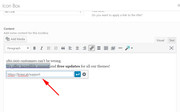
Then we will add the custom class “link-title” to the icon box element, which is the link container.
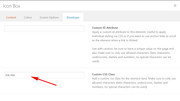
Now we will add this function at the end of your functions.php:function custom_link_title(){ ?> <script> (function($){ $(document).ready(function(){ $(".link-title").each(function(){ $(this).find("a").attr("title", "my link title"); }); }); })(jQuery); </script> <?php } add_action('wp_footer', 'custom_link_title');Please note that in the code the title will be “my link title”, you can adjust to suit your needs.
Now when you hover over the link the title will show:

Now I’ll assume that you will want to add more than one link title, so you can expand the function by adding another rule to the script, this is the rule to copy:
  $(".second-title").each(function(){
    $(this).find("a").attr("title", "my second title");
  });
Please note the new class for the next link “.second-title” and the new title “my second title”
when done it should look like this:function custom_link_title(){ ?> <script> (function($){ $(document).ready(function(){ $(".link-title").each(function(){ $(this).find("a").attr("title", "my link title"); }); $(".second-title").each(function(){ $(this).find("a").attr("title", "my second title"); }); }); })(jQuery); </script> <?php } add_action('wp_footer', 'custom_link_title');So you can add as many as you like to the same function.
If this doesn’t work for you, please ensure that you copied the code from the support forum and not an email that you may get from the forum because copying from an email may convert the quotes in the code to “curly quotes” that will break the code.
Please let us know if this helps.Best regards,
MikeHi,
To add a screenshot please try using https://postimages.org/ and pasting the image URL in your post.
I tried to take a look at your link to the Google search, but I’m not sure what is wrong. Google does spider image alt titles and most SEO suggests to use keywords in your alt titles to take advantage of this.
Perhaps I’m not understanding correctly?Best regards,
MikeHi,
I see that you have added the css because it is working for me, please clear your browser cache and check.For a background-color hover effect, please try this css:
#top.page-id-673 .avia-buttonrow-wrap a:hover {
	    background-color: red !important;
}
Or to have the button text change on hover, try this css:
#top.page-id-673 .avia-buttonrow-wrap a:hover {
	    color: red !important;
}
Please adjust the colors to suit, and then clear your browser cache and check.
Best regards,
MikeHi,
For your test page, one way to add an overlay color on hover to your grid row cells is to use a filter, the filters are a little limited but if you use a mixed filter generator you can create some nice effects.
So I see that your first two cells have the custom class “teaser”, so as an example try this css in your Quick CSS:.teaser:hover { filter: invert(9%) sepia(100%) saturate(5581%) hue-rotate(246deg) brightness(101%) contrast(147%); }For your hotel page the white border is actually the white background showing in between the cells, to correct please try this css:
#top.page-id-952 #teaser {
	 background-color: #324a7a !important;
}
On this page applying a hover color would be like this:
#top.page-id-952 #teaser .flex_cell:hover {
	background-color: #327a38 !important;

}
I hope this helps.
Best regards,
MikeHi,
I took a look at your landing page and found that the hr above your button row has a negative margin which is covering the button row, and the content section below your button row is also covering your buttons. This is why you can not click the buttons, so to correct we can use this css to lower the z-index:#top.page-id-673 hr.el_before_av_buttonrow,#top.page-id-673 #after_section_1 { z-index: 0 !important; }Now I see that your buttons have a white background so they don’t show, did you want to have a hover effect for the styling of the buttons?
Best regards,
MikeHi,
Sorry for the late reply and thank you for the login, I followed @Guenni007 suggestion and added this css into your Enfold Theme Options > General Styling > Quick CSS field and now your font size on your home page is 19px
Please clear your browser cache and check.#top .all_colors p,#top .all_colors .toggle_content li { font-size: 19px !important; }Best regards,
MikeHi,
Thank you for the login & ftp access, I took a look at your site and found that you were using an old version of the header.php in your child theme.
I uploaded the updated version and new your magnificPopup works correctly and you do not have the error.
In your old header.php I didn’t see any customizations so I’m not sure why you have added it to your child theme, but you will find the file in your child theme renamed as header.php-old so if you do have customizations you will be able to get your code and move it to your new header.phpBest regards,
MikeAugust 21, 2019 at 10:54 pm in reply to: Masonry gallery – title below image and new image effect #1129801Hi,
Sorry about that it looks like in the top rule I should have had the class “.av-masonry-entry” instead of “.av-masonry” like this:#top .av-masonry-entry:hover figcaption h3.av-masonry-entry-title { font-family: Gilroy-Bold !important; font-size: 16pt !important; } #top .av-masonry figcaption h3.av-masonry-entry-title { font-family: Gilroy-Semibold !important; font-size: 16pt !important; }After replacing the css, Please clear your browser cache and check.
If this doesn’t correct, please remove this css so I can try again, it’s a little hard to test when the wrong css is in place.Best regards,
MikeHi,
Thank you for the FTP access, I have uploaded v4.5.7.1-beta-4 which has our latest fixes. I checked your site and it seems to be working good with no errors, please check yourself.
Please let us know after you check and I will remove your old theme so it won’t cause any confusion in the future, but there is no hurry to do this. So please take a few days, if needed, to check your site well.
Please note that I didn’t see any custom functions in your functions.php to move to your updated theme, but please let us know if you know that you have any function customizations so we can move it before we delete the old theme.Best regards,
MikeHey entrepreneurgirl,
Sorry for the late reply, the error you are seeing on your homepage is because you have a layerslider element on your homepage, but you have no sliders. To correct please remove the element from your page:

As you customize your site with new images or text you won’t need to worry about losing these changes when the site updates. As you make customizations in the “advanced stylings” panel you won’t lose any of those settings when you update either.

If you make css customizations and add the css to the Quick CSS field, this will also be safe from updates:

But if you plan to add functions in the functions.php file you will lose this when your site updates, so in this case installing the child theme will protect your changes when you add the functions to the child theme functions.php.
Please use our prebuilt Child Theme here.
For the preloader, you can have it show only on the homepage with a function, but we don’t have a function to show it only once per session. Please see this solution or this solution.
Please let us know if this helps.Best regards,
MikeHi,
Thanks for the feedback, I have asked the team for ideas to achieve this. Thank you for your patience.
I did find a WPML documentation for translating your mailchimp forms, but as I understand your question you want to create two different lists, but I thought I would include this just in case this would be an alternative solution.Best regards,
MikeHi,
Thanks for the feedback, is the red logo in my screenshot the correct one? I couldn’t login to see why this css was not working for you like it is in my test, please renew the temp login token above so I can investigate further.One reason it may not work for you is if you copied the css from an email instead of the support page and the quotes in the code turned into curly quotes, or if some of your other css has a missing bracket causing this css to be void. I’ll know better once I can test.
Best regards,
MikeAugust 21, 2019 at 6:10 am in reply to: Need to download Enfold again and not on theme forest downloads #1129441Hi,
Glad to hear you have it resolved, we will close this now. Thank you for using Enfold.For your information, you can take a look at Enfold documentation here
For any other questions or issues, feel free to start new threads in the Enfold forum and we will gladly try to help you :)Best regards,
MikeAugust 21, 2019 at 5:52 am in reply to: Page content loading in front of Revolution Slider slideshow instead of below it #1129429Hi,
The dev team created a beta version of Enfold to correct some issue with the Revolution Slider not displaying correctly, this may also correct this issue too. Please try the version in the Private Content area.The easiest and safest way to test this version is to rename your current theme to “enfold-old” via ftp then upload the new “enfold” via ftp and check that your site is working correctly.
If this helps and you wish to use it you can delete the “enfold-old” via ftp, (not the WP theme page)
If it doesn’t help and you wish to roll-back to the old version, it’s easy to do, simply rename the new “enfold” to “enfold-new” via ftp and then rename “enfold-old” to “enfold” then refresh your page.
Please don’t try to overwrite the theme folder, as this will leave old files behind and cause errors.Best regards,
MikeHey Chris,
Thank you for the link to a mock-up, this can be created by using a grid row element with two cells set at 100% visual height,

each cell with a background image, and the sidebar, footer, header, and title bar all set to hidden in the “layout” option for the page:

For a gray scale background image that changes to color on hover, use this css:.left-side-split,.right-side-split { filter: grayscale(1); } .left-side-split:hover,.right-side-split:hover { filter: grayscale(0); }please note the custom classes for the two cells, the classes are added to via the Enfold Theme Options > Layout Builder > Show element options for developers setting.
Frontend results:

You can then add logos, text, and links to each cell.
The tricky part will be to create a 45 degree edge between the two images, but there are many css tutorials that can help with this, such as this video: https://youtu.be/A11xEtSNDr8
I hope this helps to get you started with this.Best regards,
MikeHey FotoStyle_ro,
Sorry, with v4.4.1 you must update manually via ftp, this is due to a change in the Theme Forest API at that time.
The easiest and safest way to do this is to download the newest version from Theme Forest and rename your current theme to “enfold-old” via ftp then upload the new “enfold” and check that your site is working correctly.
Once you are happy you can delete the “enfold-old” via ftp, (not the WP theme page)
Should for some reason you wish to roll-back to the old version, it’s easy to do, simply rename the new “enfold” to “enfold-new” via ftp and then rename “enfold-old” to “enfold” then refresh your page.
Please don’t try to overwrite the theme folder, as this will leave old files behind and cause errors.If you don’t feel comfortable with this we can assist if you include admin login and ftp access in the Private Content area.
Best regards,
MikeAugust 21, 2019 at 4:24 am in reply to: Page content loading in front of Revolution Slider slideshow instead of below it #1129409Hey kgalatz,
Thank you for the screenshot and the link, but I can not recreate your error as shown in your screenshot, for me the header/menu is fixed and the slider/content scrolls up.
Please see the screenshot in Private Content area.
Is there something I need to change to see the error?Best regards,
Mike -
AuthorPosts
