

Forum Replies Created
-
AuthorPosts
-
Hi,
Thanks for your feedback, I adjusted the loop-index again so the category would show on it’s own line below the title and above the date. I then added this css to hide the read more link.#top.blog h2.post-title.entry-title,#top.single h1.post-title.entry-title { padding-bottom: 0 !important; margin-bottom: -20px !important; } #top.blog .post-entry a.more-link { display: none !important; }Please clear your browser cache and check.
Best regards,
MikeSeptember 6, 2019 at 6:52 am in reply to: Add font-display to entypo-fontello and custom fonts #1134748Hi,
@ramotzkie Thank you for sharing & thank you for using Enfold.Best regards,
MikeHi,
Thanks for the feedback, so if the special heading underneath didn’t change the solution would be good? Please remove the css so we can try again.Best regards,
MikeSeptember 6, 2019 at 6:20 am in reply to: Icon list animation not working in tab section when clicking on a link #1134735September 6, 2019 at 6:13 am in reply to: Create a Blog for the first time! Some questions… #1134733Hi,
I believe that I solved the missing blog page, it seems at some point the blog page had been selected as a custom footer for your site, and then the setting was changed but not cleared in Enfold > Footer > drop-down options I cleared the option choice and checked in another browser that was not logged in and your blog page showed.
Please log out and clear your browser cache and check.Best regards,
MikeHi,
I tried to research this some more but only found one explanation that the Umlaute may contain some formating if it was copied from another document, so I cut the line in question and pasted into a plain text editor and then copied back to your Elementor builder. But I’m unable to check if it worked because it seems my Mac has been updating for the last half hour and is stuck at 50% :( I may have to check your site tomorrow.
I was also going to try some other fonts in an Enfold Advanced Layout Builder text element to see if there is a difference to your Elementor builder, can you please give this a try?Best regards,
MikeSeptember 6, 2019 at 4:44 am in reply to: "Maps were disabled by the visitor on this site." How to disable it? #1134711Hi,
@dognwolf & @grafixstudio this topic is over a year old, I respectively submit that your issue is most likely corrected with the v4.6.1 fix that was released today, please try updating. Please note that the download at Theme Forest may say v4.6, but this was a typo.
If you continue to have this issue please open a new thread with admin access in the Private Content area so we can assist. When you post in someone else’s thread you can not see anything we post in the Private Content area, and the original author can see your login info. Thank you for your understanding.Best regards,
MikeHi,
Thanks for the login, I created a copy of your slider on a test page so I could make adjustments and not risk your original, please see the link in the Private Content area.
So I adjusted the Layout | sizing & position of your layers to 34% – 33% – 34% with “Calculate positions from sides of the screen”
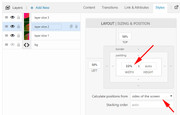
It seems the layerslider doesn’t accept 33.33%, only whole numbers, this is why I made the first and last 34%, please see the screenshot in Private Content area.Best regards,
MikeSeptember 6, 2019 at 3:45 am in reply to: google listing showing the original wordpress install information #1134703Hi,
Glad this is sorted out now, we will close this now. Thank you for using Enfold.For your information, you can take a look at Enfold documentation here
For any other questions or issues, feel free to start new threads in the Enfold forum and we will gladly try to help you :)Best regards,
MikeSeptember 6, 2019 at 3:42 am in reply to: "Read more" button on cookie bar after 4.6 update #1134702Hi,
Enfold 4.6.1 has been released at Theme Forest, please note that the version number may still say v4.6, this was just a typo.
Please read more here
Please don’t try to overwrite the theme folder, as this could leave old files behind and cause errors.Best regards,
MikeHi,
Glad to hear your screen reader can now read the mobile menu button, when the menu is open can it also read the menu items?
You wrote:One thing I’ve noted the menu is not visible upfront in that I have to press a button to expand for items to appear. Could it be set to always show?
This is the nature of the mobile menu, it is created like this on most sites because otherwise, the menu on mobile devices would take up too much room. But if you only had a few items, such as 3 or 4 you might be able to use a standard menu. Enfold doesn’t have a built-in option to show the mobile menu as a standard menu, this may require a plugin or considerable customization.
How would you like to proceed?Best regards,
MikeHi,
Thank you for the ftp access, well this is very odd I have added the same code to your site as I have on mine where the Yelp icon works using your icon zip, and I can’t seem to get your site to show the option for Yelp. I also tried uploading the theme again thinking there was an error in a file somewhere, but this didn’t help either. So, for now, I replaced the VK icon with your Yelp icon so it will show on the front end, I hope this will be ok for a temp solution. I will try to investigate further. Please clear your browser cache and check, and let me know if you want the icon colors adjusted for the vk/yelp icon.Best regards,
MikeHi,
I was able to see and login to your site fine again, but I did see a common JetPack plugin error so I disabled it for you. Please try again.Best regards,
MikeHi,
When I test the play-by-scroll demo on the Kreatura website I see the same error as you are describing, so I don’t believe that this is an Enfold issue.Best regards,
MikeSeptember 5, 2019 at 5:39 am in reply to: "Read more" button on cookie bar after 4.6 update #1134192Hi,
The dev team is investigating this and creating a fix. Thank you for your patience.
@darioferbor please create a new thread as it becomes complicated to address issues from multiple members in the same thread, thank you for your understanding.Best regards,
MikeHi,
Sorry for the late reply, I researched some more and believe that your “Voiceover” screen reader is not finding the mobile menu because the text “Menu” has been given “display: none” which screen readers do not read. So I adjusted the css to this:.av-hamburger strong { display: table !important; color: transparent !important; }Please clear your browser cache and check if your mobile “Voiceover” screen reader can find “Menu” and try opening it to find the menu inside.
Above you spoke of only finding a link called “geeksmodo”, I believe this is your logo in the left side of your mobile header.
By the way, I notice your desktop menu is now a mobile burger icon, did you want that? Is it working for your desktop screen reader?Thank you for your patience.
Best regards,
MikeSeptember 5, 2019 at 4:27 am in reply to: Create a Blog for the first time! Some questions… #1134171Hi,
Sorry for the late reply, I have adjusted the blog script and added it to your theme it seems to be correct now, please clear your browser cache and check. Also please see the screenshot in Private Content area.
This is the updated function:function blog_custom_script(){ ?> <script> (function($){ $(document).ready(function(){ $( 'article.post-entry' ).each(function() { $( this ).find( '.blog-categories.minor-meta' ).css({'color':'#969696','font-size': '17px','font-weight': 'bold','margin-top':'20px','letter-spacing': '2px'}).insertBefore( $(this).find('h2.post-title.entry-title ') ); $( this ).find( '.post-meta-infos' ).css({'border-top':'2px solid #b41528','color':'#969696','font-size': '17px','font-weight': 'bold','margin-top':'0px','letter-spacing': '2px'}).insertBefore( $(this).find('h2.post-title.entry-title ') ); }); }); })(jQuery); </script> <?php } add_action('wp_footer', 'blog_custom_script');You will note that I added 2px letter-spacing, please let us know if you want more spacing.
Once this part is set we can start working on your other requests.Best regards,
MikeHi,
Thank you for the feedback and installing the plugin, I first tested your SMTP plugin which has a test function, and this worked well, I received the email and it was logged.
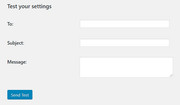
then I created a test page with a simple contact form and the email was logged going outbound.
I then tested your “Quick Scan” form, but it didn’t work, until I copied your form and removed the “Ik ga akkoord met de algemene voorwaarden” which had HTML (a link in the title).
Please give this a test and let us know if you received any of the emails.Best regards,
MikeHi,
Glad we were able to help, and it’s working well for you, we will close this now. Thank you for using Enfold.For your information, you can take a look at Enfold documentation here
For any other questions or issues, feel free to start new threads in the Enfold forum and we will gladly try to help you :)Best regards,
MikeHi,
Thank you for pointing this out, it looks like @Günter is working on this:[…] For the rest of this topic I will look into asap and make the adjustments.
Best regards,
MikeHi,
Thank you for the feedback, I tried to check these points and I can confirm that this occured for the language “Deutsch (Sie)”
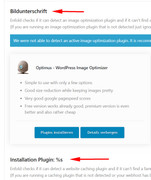
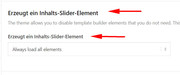
I will report this to the dev team, thanks again for pointing this out.Best regards,
MikeHi,
Sorry, I’m not sure what they may have meant by “update the font through safari” it sounds like adding the font to the browser, I found this article but that doesn’t sound like a good solution because you may see the font well, but your visitors will not see it the same as you unless they do the same, which is doubtful.I was able to check the “ERDE deine großartigen energetischen Fähigkeiten” on a Mac and Safari and the umlaute was showing for me.
Please see the screenshot in Private Content area.Best regards,
MikeHi,
Glad we were able to help, we will close this now. Thank you for using Enfold.For your information, you can take a look at Enfold documentation here
For any other questions or issues, feel free to start new threads in the Enfold forum and we will gladly try to help you :)Best regards,
MikeHey bobfurgo,
Sorry for the late reply, to remove the padding to the left of your sub-menu items please try this css:#top .av-main-nav ul a { padding: 8px 15px 8px 0 !important; }Then clear your browser cache and check.
Please see the screenshot in Private Content area.Best regards,
MikeHey ahanauer,
Sorry for the late reply, yes you can hide single pages or even the whole blog, But there are many ways to do this depending on your goals. Please explain further, do you want to hide from casual visitors, aggressive competitors, certain countries, or Google?
Often an easy solution is to add a password to a page so only some people can see it, or to change the status to draft so no one can see the page.Best regards,
MikeHey skynandi,
Sorry for the late reply, Please try this code in the General Styling > Quick CSS field or in the WordPress > Customize > Additional CSS field:.sub_menu_socket li.menu-item a:hover { color: red !important; }please adjust the color to suit, if this doesn’t work for you please include a link to your site so I can check the classes.
Best regards,
MikeSeptember 2, 2019 at 4:36 am in reply to: New cookie rules by judgment of the European Court of Justice 29. Juli 2019 #1132793Hey vectorcriz,
I assume that your post is from before the v4.6 update? v4.6 addresses GDPR / DSGVO.Best regards,
MikeHey saschapi,
Sorry for the late reply, can you give us some examples of shortcodes that are not working?
v4.6 was quite a large update so there is a chance that shortcodes created to solve issues may no longer work or be needed.
Also please list any mixups in translations strings that you have found so we can address.Best regards,
MikeHey Guenter,
Thank you for all of your help and freely sharing your work and knowledge, I have learned quite a lot from you, and I know we all have a huge amount of respect and gratitude for you.Best regards,
MikeHi,
I think that I misunderstood your issue with the mobile menu, does your screen reader tell you that there is a menu icon in the top right corner of the header that if you click a full-screen menu shows?
Since your menu is only 3 items I believe we could show the desktop menu always and your screen reader will find the links.
Are you going to add more links?I added the footer menu and fixed your copyright info.
What demo info is in the contact link?
Best regards,
Mike -
AuthorPosts
