I am trying to follow your document to create a custom element button – https://kriesi.at/documentation/enfold/custom-element-templates/
However, it is not working as expected. I created my button in the custom element section but when I drag the button on my page I do not see a red closed padlock left of the “Delete” icon as mentioned in your document. (so this means it is not a custom element although I dragged it from the custom element tab)
What am I doing wrong? Please assist
see login info below
Thanks in advance
Hi Philippe,
Thanks for reaching out to us, and for using Enfold. Everyone has their own preferences as to what they think is appealing on a website, but most things are possible to set and change in the theme options. If you want to change the fonts and sizes, then you can do so under Enfold->General Styling->Typography for example, and further settings can be made under Enfold->Advanced Styling.
You should need further help, then please let us know what you would like to change on your sites. Please share screenshots with us if possible, since it makes it easier for us to understand what you are trying to achieve.
Best regards,
Rikard
Hi Franz,
Thanks for that. Are you running Enfold on the site? You can try this CSS in order to hide the menu on desktop:
@media only screen and (min-width: 1000px) {
#site-navigation {
  display: none;
}
}
Best regards,
Rikard
 BERRIN Philippe
Guest
Hi there,
This is not a support question but a general feeling I wanted to give you.
Then forgive me if my remark is silly, but since I’ve used Enfold to make several sites, the first thing that all my clients tell me is that “everything is too big”. Fonts are too big, images are too big, default margins, default sections, etc… Everything is too big.
In fact, it would be necessary to be able to zoom the pages back a notch so that they are more comfortable to consult because otherwise they are much too aggressive. (I don’t know if I’m making myself understood).
So I suspect that it would be necessary to change lots of settings everywhere before even starting a site, but I don’t really know where and it’s probably tedious. And I’m not even sure we can change everything.
Any idea, any advice for me?
I don’t want to change the theme
and editor because I’m too used to Enfold and I’m not a developer at all.
Thanks.
http://www.greenplus.mc
http://www.osteopathie.mc
http://www.mondeploiement.com
BERRIN PhilippeGuest
Hi there,
This is not a support question but a general feeling I wanted to give you.
Then forgive me if my remark is silly, but since I’ve used Enfold to make several sites, the first thing that all my clients tell me is that “everything is too big”. Fonts are too big, images are too big, default margins, default sections, etc… Everything is too big.
In fact, it would be necessary to be able to zoom the pages back a notch so that they are more comfortable to consult because otherwise they are much too aggressive. (I don’t know if I’m making myself understood).
So I suspect that it would be necessary to change lots of settings everywhere before even starting a site, but I don’t really know where and it’s probably tedious. And I’m not even sure we can change everything.
Any idea, any advice for me?
I don’t want to change the theme
and editor because I’m too used to Enfold and I’m not a developer at all.
Thanks.
http://www.greenplus.mc
http://www.osteopathie.mc
http://www.mondeploiement.com
BERRIN PhilippeGuest
Hi there,
This is not a support question but a general feeling I wanted to give you.
Then forgive me if my remark is silly, but since I’ve used Enfold to make several sites, the first thing that all my clients tell me is that “everything is too big”. Fonts are too big, images are too big, default margins, default sections, etc… Everything is too big.
In fact, it would be necessary to be able to zoom the pages back a notch so that they are more comfortable to consult because otherwise they are much too aggressive. (I don’t know if I’m making myself understood).
So I suspect that it would be necessary to change lots of settings everywhere before even starting a site, but I don’t really know where and it’s probably tedious. And I’m not even sure we can change everything.
Any idea, any advice for me?
I don’t want to change the theme
and editor because I’m too used to Enfold and I’m not a developer at all.
Thanks.
http://www.greenplus.mc
http://www.osteopathie.mc
http://www.mondeploiement.com
Hi,
Thank you for your patience and the login to your site, so for the page linked below where you added the custom class roundbutton, I don’t find any css in your Enfold Theme Options ▸ General Styling ▸ Quick CSS field or in your child theme ▸ style.css.
It looks like you mostly add your custom css to the WordPress ▸ Customize ▸ Additional CSS field, which is good, but I don’t find the customization that Ismael recommended anywhere, so I assume that you have removed it. I see that instead of using custom css you are using the element Advanced ▸ Position ▸ Image Position, which is good.

but please note that this was for the desktop resolution only, for the other sizes the position is using the same desktop position:
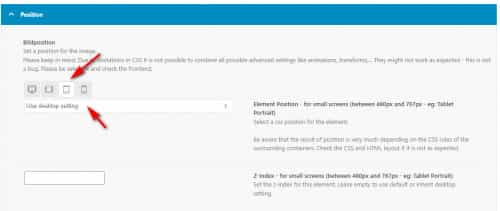
so you will want to set each resolution size position option, for example for small screens (between 480px and 767px – eg: Tablet Portrait) I set it to top -40 & left -40

and now the position is better:
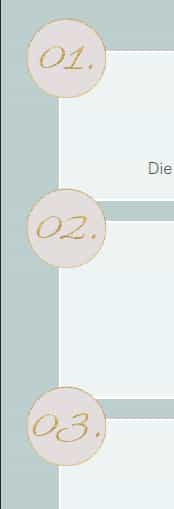
for the smallest screens you have the element hidden, so there is no need to set the position:

and for medium sized screens (between 768px and 989px – eg: Tablet Landscape) the current desktop position seems to work fine, so there is no need to set the position:
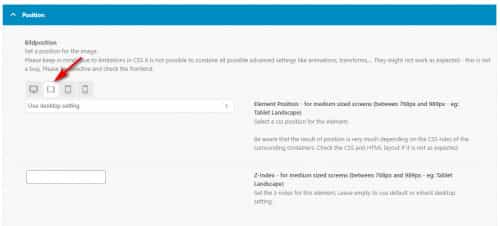
please clear your browser cache and check this page and if you find it working now please adjust your other pages accordingly.
Best regards,
Mike
Hi Rikard,
yes it’s correct, when I turn WP debug mode off the warnings are suppressed on frontend.
But I am sure that the warnings appeared since upgrade to newer version of Enfold, when I restore to previous (older) Enfold version there are no warnings.
Finally:
Is this the final solution that I have to set debug mode off for enfold versions in the future?
Do you close the ticket? If yes, I can inform my provider to shut on the IP-access-protection?
And are you always working on weekend :-) ?
Best Regards,
Bernhard
Hey Jack,
Did you copy the shortcodes from the Law demo? If not, then you can enable debug mode, which will enable you to see the layout builder shortcodes: https://kriesi.at/documentation/enfold/intro-to-advanced-layout-builder/#debug-mode. If that is not the problem you are having, then please try to explain what you need help with a bit further.
Best regards,
Rikard
Thanks for your quick response. Sorry, there is no switch to change languages in the theme options menu of Enfold vers 5.1.1. WordPress is set to German, formal. The left hand menu items are listed in German, on some pages on the right are mixed English/German. On Privacy & Cookie as well mixed language.
Hi,
@carlosquispehernandez wants you to test if your WordPress installation is able to send emails, you can test that by requesting a new password from the login screen. You can also check the suggestions listed here: https://kriesi.at/documentation/enfold/contact-form/#my-contact-form-is-not-sending-emails-
Best regards,
Rikard
i use this in my child-theme functions.php:
function enfold_customization_switch_fonts() {
global $avia;
$avia->style->print_extra_output = false;
}
add_action( ‘init’, ‘enfold_customization_switch_fonts’ );
but since Enfold 4.4.1. there is that filter – and i guess you can use that either.
function my_output_google_webfonts_script( $activate ){
  return false;
}
add_filter( 'avf_output_google_webfonts_script', 'my_output_google_webfonts_script', 10, 1 );
by the way, I don’t know if Google Fonts support is now disabled by default in the advanced Layerslider. So please have a look there as well on Layerslider Settings Page.
-
This reply was modified 3 years, 3 months ago by
 Yigit.
-
This reply was modified 3 years, 3 months ago by Yigit.
Hello,
I would like to use the Theme Law (Demo) Boxes at https://kriesi.at/themes/enfold-law/ that shows Insurance Litigation, Real Property Litigation, Construction Litigation, and Add Get In Touch Button from the Rop Right Side (With Round Corners Shape) in Enfold Classic Theme. For example, see the image at https://ibb.co/KX2Y9PK
I have copied the boxes from Law Theme and Top Right Side Button and pasted them in the layout of Classic Theme to give you a demonstration.
Please let me know how to do it through the code so the layout doesn’t get changed when I update my theme from WordPress Dashboard. Thank you.
,
Hey
Let’s do a simple discardment to see if it’s an Enfold problem or no, can tou try resetting your password from the login screen? see if you get the recovery mail in your inbox.
Never Mind – Sort of.
Now and work as expected.
I got it to work but I would appreciate clarification on both Special Charater and The Translation Plugin
I did install the plugin but not certain I needed to.
I have been using the WooCommerce Mix and Match Products List plugin with Enfold for years. It recently shows a conflict. The product page and login info is below within private details.
I am currently displaying as a grid, set through Appearance > Customize > Woocomerce > Mix and Match Products. I cannot switch to list, which I have been using for years. I also cannot set the grid to any number of columns except 3. I do not see anything in custom CSS or functions.php relating to this.
I also see the sidebar is shifted to the bottom of the single products page. How can I eliminate that sidebar from the single product pages?
Hi Rikard,
I have no idea how to get on.
I prefer to finish for this week .
Do you know about problem fixing at other users with same problem?
If we cannot solve this next week, the last way is to restore the old (previous) version if Enfold. In this case I Never can upgrade to newer versions☹️.
Do you habe another idea?
Best Regards,
Bernhard
Hi,
Thanks for that. Please try the following in Quick CSS under Enfold->General Styling:
h2.gform_submission_error {
  font-size: 16px;
}
Best regards,
Rikard
Hey marscui,
You should be able to edit the text for each language individually in the theme options. Please check under Enfold->Privacy and Cookies. You can switch between languages on top of the left menu in the theme options.
Best regards,
Rikard
Hey whdsolutions,
Could you try updating the theme to the latest version (5.1.1) to see if that helps please? https://kriesi.at/documentation/enfold/how-to-install-enfold-theme/#theme-update. If not, then please post admin WordPress login details in private, so that we can have a closer look.
Best regards,
Rikard
Hi,
Thanks for letting us know, I’ll close this thread for now then. Please open a new thread if you should have any further questions or problems.
Best regards,
Rikard
Ich habe das Enfold Theme ganz klassisch ohne viel Kinkerlitzchen up and running (sehr zufrieden!) ich möchte nun aus dem Menü eine kleine Python Applikation aufrufen, die keinerlei wordpress Interaktion hat, keinen Datenaustausch, nichts. Nur Aufruf von einem Menüpunkt aus, und nachdem die Screens geschlossen sind, soll es in WP weitergehen. Nach kleinerer Recherche im Netz finde ich hier nur einen Ansatz, der sagt: Python-Flask per REST API aufrufen.
Gibt es bessere Ideen, Möglichkeiten?
Vielen Dank!
JR
I’ve used Text in other areas of Enfold without it breaking anything. But trying to use it in alternating table rows, it bolded text where I didn’t use Text :-(
At the bottom of this page Special Character do I need to use this plugin Translation plugin and then use ###lt###Text###gt### to Bold?
But what about the “/” in ###gt### to close the element?
I’ve spent hours trying to figure this out.
I grabbed this from the forum and use it in Quick css
`// CSS – Pricing Table
//————————————–*/
/* Heading */
#top .pricing-table li.avia-heading-row,
#top .pricing-table li.avia-heading-row .pricing-extra {
background-color: #1379cb!important;
font-size: 14px;
/* color: #000000; */
border-color:#1379cb;
}
/* Pricing rows */
#top .pricing-table li.avia-pricing-row {
background-color: #ff892f!important;
font-size: 24px;
color: #000000;
border-color:#1379cb;
}
-
This topic was modified 3 years, 7 months ago by
 wildturkeyway. Reason: update
I’m using Enfold in German. The default text for Modal Popup Window is in German and I’d like to edit it. When I activate the Modal Window Custom Content switch a default text appears in English. Where can I find the German default text including the shotcuts? Thanks for info.
Hi itayverchik,
I tried to check your site and it seems that there’s a js error.
The error is now fixed (it seems to be a caching issue) and as for the header animation when scrolling down, I just unchecked sticky header in the Enfold settings.
Please review your site.
Best regards,
Nikko
Hi Mike,
Sorry my english ; )
The website have 3 idioms (Spanish, catalonian and english)
If I set a new alternative menú for mobile in enfold. How I can set the different idioms?
Thanks advance,
BR,
Antonio.
Hi,
Thanks for letting us know, I’ll close this thread for now then. Please open a new thread if you should have any further questions or problems.
Best regards,
Rikard
Hi Guido,
You can start a new thread by following this link, or if you click this button: https://imgur.com/a/AnoSPNb.
Best regards,
Rikard
Hi Havi,
It’s a pleasure to help you :D
Thank you as well for using Enfold and have a great weekend!
Best regards,
Nikko



