Viewing 30 results - 121 through 150 (of 244,634 total)
  • Author
    Search Results
  • #1496620

    Hey xeovision,

    Thank you for the inquiry.

    The SVG is displaying at its natural size because there’s no constraint applied to it. The quickest fix is to wrap it in a div with a custom width. You can do this by adding an html element in a Text or Code Block and place your SVG inside a wrapper div like this:

    
    <div style="width: 60px; height: 60px;">
      <img src="/path/to/your-icon.svg" style="width: 100%; height: auto;" /></div>
    

    Adjust the width and height values to whatever size works best for your layout.

    Alternatively, if you’re displaying an icon, you can use the built-in Icon element instead, which gives you full size control directly in the element settings without any custom code. For more details on the Icon element, see:

    https://kriesi.at/documentation/enfold/icon/

    Let us know if you have more questions.

    Best regards,
    Ismael

    Hi,

    Thank you for the update.

    What happens if you modify the enfold/includes/config-enfold/functions-framework.php and replace line 213

    if( function_exists( 'wp_cache_clear_cache' ) )
    		{
    			wp_cache_clear_cache( 'all', false );
    		}
    

    .. with the following code?

    		if( function_exists( 'wp_cache_clear_cache' ) && function_exists( 'get_blog_option' ) )
    		{
    			wp_cache_clear_cache( 'all', false );
    		}
    

    Best regards,
    Ismael

    #1496616

    In reply to: Remove excessive space

    Hey soniavoice,

    Thank you for the update.

    Please add this css to reduce the height of the section containing the 3 boxes.

    
    .avia-section.av-mnfxwls2-93b37da24b8b24863c42e12e957151f8 {
        height: 0px;
        overflow: visible;
    }
    

    You can add this under Enfold > General Styling > Quick CSS. If you’d prefer a cleaner approach, you can also replace that long auto-generated selector by assigning a custom css class to the section and targeting that instead.

    https://kriesi.at/documentation/enfold/add-custom-css/#enable-custom-css-class-name-support

    Please make sure to purge the cache before testing. Let us know if the issue persists.

    Best regards,
    Ismael

    Mika Pakarinen
    Guest

    I am writing to request a written clarification regarding Enfold license requirements for a specific WordPress Multisite project, before we proceed with the build. I would appreciate a clear answer I can retain on file.

    About the organisation:
    The client is a registered non-profit religious association. The association operates a network of local churches across severa locations). All of these churches belong to the same single legal entity and share the same mission, branding, and governance. No revenue is generated from the websites; they exist to serve the association’s religious and community work.

    Planned technical architecture:
    We are planning a WordPress Multisite network with the following characteristics:

    – One single domain:
    – Subdirectory structure:
    – One WordPress installation, one database, one Multisite network
    – One shared Enfold parent theme installed at the network level
    – One shared custom child theme used by all sites in the network (identical header, footer, navigation, branding and styling across all sites)
    – All subsites serve the same association and the same overall purpose: presenting the local congregations

    The websites are not sold, licensed, or transferred to third parties. Each local congregation is an internal part of the same association – they are not separate clients or customers. The purpose is to provide each congregation with its own local content area (events, contact details, pastor information) within the shared association website.

    My question:
    For this specific architecture: single domain, single WordPress Multisite installation, single Enfold parent theme, single child theme, single non-profit association, does one single Regular License cover the entire Multisite network, or does ThemeForest / Kriesi require a separate Regular License for each subsite in the network?

    I have seen varying interpretations in your support forum over the years, and I want to ensure we act correctly and in compliance with your licensing terms from the start. A written confirmation from you of the correct interpretation for this specific scenario would be very helpful.

    Thank you for your time and for the excellent theme. I look forward to your reply.

    Kind regards,

    • This topic was modified 3 weeks, 1 day ago by Rikard.
    • This topic was modified 3 weeks, 1 day ago by Rikard.

    It looks that there is an ENFOLD issue because when clicking on SAVE under ENFOLD settings there is an error message Impossible to save and asking to reload. BUT the save is made correctly.
    Can you go forward and/or give me tech info that i can provide to my hoster.
    Or provide me thinks i can test ? I already desactivated all plugins, reset by default the htaccess

    #1496604

    Hi Ismael,
    After a lot of testing, my import is now working, but there’s still one issue.
    I run the import, changes are applied, or new posts are created if necessary. In the back end, the imported posts look exactly the same as manually entered posts. Only in the front end are the imported posts empty. When I edit the post and save it manually, the post becomes visible.
    Apparently, this is a common issue with WP All Import, but I can’t find a working solution. I’ve tried the following code in functions.php:

    add_action('pmxi_saved_post', function($post_id) {
        $post = get_post($post_id);
        if (!$post) return;
        
        // remove Enfold builder cache
        delete_post_meta($post_id, '_aviaLayoutBuilderClean');
        
        // Save the content again via wp_update_post
        wp_update_post(array(
            'ID'           => $post_id,
            'post_content' => $post->post_content,
            'post_status'  => $post->post_status,
        ));
        
        // Force Enfold to rebuild the builder cache
        update_post_meta($post_id, '_aviaLayoutBuilderClean', $post->post_content);
    });

    It would be great if you can help with this last step.

    Thanks in advance,
    Ariane

    Hi,

    Enfold is displaying that since the server is returing a 500 internal server error, Enfold does not control your server.

    Best regards,
    Rikard

    #1496587

    Topic: Masonry portfolio

    in forum Enfold
    spitsdesign
    Participant

    How do I create a masonry portfolio with category filter?
    example: https://kriesi.at/themes/enfold/portfolio/masonry-portfolio/

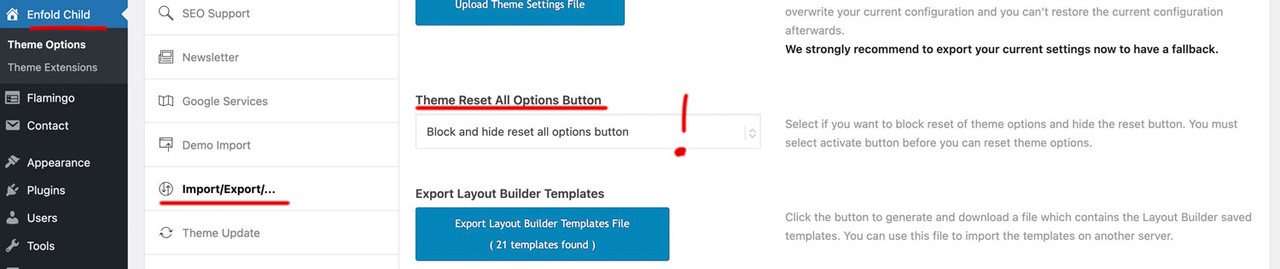
    Dear Mike, could you please suggest that the setting under “Enfold Child – Import/Export/… ‘Theme Reset All Options Button’” be set to “Block and hide reset all options button” by default, so that users must actively enable this option to perform the reset.

    Unfortunately, this happens time and again—newcomers to Enfold fall into this trap, even despite the warning pop-up. You know how many people actually read what’s in pop-ups.

    Hey Quazione,
    The Token needs specific permissions to verify the purchase and link your Envato account. If these are not correct you will receive an error, also note at Envato limits the number of checks a day across all of your licenses, so in some cases you will need to wait 24 hours before checking again. Above you write about a API key, which Envato no longer uses, so if you have a old version that asks for a API key, or some v4-v5 you will need to manually update before the Token will work.

    To manually update your version of Enfold you will need to download the latest installable WP version from your Theme Forest account and upload it to your WordPress ▸ Appearance ▸ Themes ▸ Add Themes ▸ Add New
    after you choose the zip file and click install, you will see a This theme is already installed message because you are updating, you can continue,
    then you will see the Theme updated successfully message.
    After which you can go to your Theme Forest account and create a new Token for future automatic updates.

    Best regards,
    Mike

    #1496578

    Hey kpamela24,
    I see that your WordPress site health is also not loading. I see that you have a Search Replace plugin, perhaps using this broke something. Try resetting your site and do a fresh install of WordPress & Enfold to see if this works. If so try the Duplicator plugin to migrate from your localhost to your server.

    Best regards,
    Mike

    Ok thanks to study my issue but I need to solve it very quickly.
    Has I said: I can’t update plugins, can’t save enfold settings, can’t set Google recaptcha.
    Because of enfold message.

    Thanks for your help!

    #1496570

    Hi,
    Glad to hear that you have sorted this out, if you have further questions please open a new thread and we will try to help. Thanks for using Enfold.

    Best regards,
    Mike

    Quazione
    Participant

    Hello Kriesi Team,

    After accidentally using the Enfold “Reset” option, we experienced a major issue with our media.

    What happened:

    • Immediately after the reset, all images and graphics disappeared from the website.
    • The WordPress Media Library is now empty.

    Current findings:

    • All media files still physically exist on the server.
    • Verified via FTP (FileZilla) under:
      • <i>/wp-content/uploads/</i>
    • Files are present in their original folders (year/month structure).
    • File names are unchanged and match what was previously uploaded.

    Conclusion so far:

    • This appears to be a database/media index issue, not actual file deletion.
    • It seems the Media Library entries (attachments) were removed or disconnected during the reset.

    What we need help with:

    • Is it possible that the Enfold reset removed or affected WordPress media database entries?
    • What is the recommended way to re-sync or rebuild the Media Library from existing files?
    • Is there a known Enfold-related process that could have triggered this behavior?

    Additional context:

    • This occurred at the same time as a full theme options reset.
    • No manual deletion of media files was performed.
    • The issue impacts all existing content that previously referenced these images.

    This has effectively broken all visual elements across the site, so any guidance on restoring the Media Library from existing files would be greatly appreciated.

    Thank you,<br>
    Armen

    Quazione
    Participant

    Hello Kriesi Team,

    I’ve been unable to register the Enfold theme for automatic updates via Envato, despite multiple attempts using different tokens and methods.

    Setup Steps Completed:

    • Installed Envato Market plugin
    • Created OAuth app + API key via Envato
    • Generated multiple Personal Tokens (basic + full permissions)

    Issue:

    • Envato connects, but purchased items do not display
    • Theme cannot be registered for updates

    Error Output:

    • Connected to Envato successfully
    • Purchases accessible
    • Username & Email not accessible
    • username Errorcode 403 – <i>not_authenticated</i>
    • email Errorcode 403 – <i>not_authenticated</i>

    Context:

    • This issue has persisted for years (even with a new license)
    • Previously assumed license ownership issue → resolved by buying new license
    • Problem remains unchanged

    Questions:

    • What is the correct current method to register Enfold with Envato?
    • Are specific token permissions required?
    • Should this use OAuth or Personal Token?
    • Why would Envato return 403 for username/email but still partially connect?

    Any guidance would be greatly appreciated.

    Thank you,<br>
    Armen

    • This topic was modified 3 weeks, 4 days ago by Quazione. Reason: html code issues
    Quazione
    Participant

    Hello Kriesi Support Team,

    We encountered a critical issue while working within the Enfold theme and are seeking guidance on recovery.

    What happened:

    • We were troubleshooting an issue where the Enfold theme was not updating properly.
    • During this process, we clicked the “Reset” button, assuming it would clear cached/token-related data.
    • Instead, this action reset/deleted all Enfold theme options globally.

    Current situation:

    • All Enfold theme settings (layout, styling, header, footer, etc.) have reverted to defaults.
    • All media files disappeared immediately after the reset.
    • We do not have a direct export/backup of the Enfold theme options.
    • We do have a full website backup in .zip format.

    What we have already checked:

    • Searched the backup archive for Enfold-related configuration or option files.
    • Reviewed wp-content (themes, uploads, etc.) but did not find identifiable option storage files.
    • Looked for database-related content expecting to find theme settings (e.g., wp_options entries), but could not locate a usable database or clearly identifiable Enfold settings.

    What we need help with:

    1. Are Enfold theme options stored in the WordPress database (wp_options) or in files?
    2. If stored in the database, what specific option names or prefixes should we look for (e.g.,avia_*)?
    3. Can theme options be restored from a backup without restoring the entire site?
    4. From a full .zip backup, which specific files or database tables are required to restore Enfold settings?
    5. Any guidance on recovering the missing media files would also be appreciated.

    Important feedback:

    • The “Reset” button appears to reset all global theme options without a clear warning of the full impact.
    • This behavior is extremely destructive in a production environment.
    • We strongly recommend:
      • Moving this function to a separate, clearly labeled section, and/or
      • Adding a prominent confirmation warning explaining that ALL theme settings will be permanently reset.

    This action resulted in a complete loss of configuration and media unexpectedly, so any assistance in recovery would be greatly appreciated.


    Thank you;
    Armen

    #1496552
    bilithul
    Participant

    Enfold 7.1.4
    Wordpress 6.9.4
    Block Editor

    Hi team, I think I found an uncaught issue created by wrong user input. If I insert a youtube block at a page and type in this wrong URL https://www.youtube.com/embed/u0ynt7CK2og , then wordpress converts the block to an usual embed block, but without enfold there are no display issues. With Enfold active, the video thumbnail looks only half-height, and a space to the bottom end of the block. At the rendered page, there is a huge space at the bottom of the video.
    The solution is to use the correct link https://www.youtube.com/watch?v=u0ynt7CK2og
    I don’t need support here, only FYI.
    best regards

    • This topic was modified 3 weeks, 4 days ago by bilithul.
    • This topic was modified 3 weeks, 4 days ago by bilithul. Reason: Added some notes

    Hi rik
    On this same server I have 2 websites with enfold. The one in www work well for save or update.
    The one in www2 have this issue so it can’t be a server error?

    werbeagenturlauf
    Participant

    Hi @enfold!
    another Menue-Question to the full width sub-menue: https://kosmetikstudio-nuernberg-jescava.de/portfolio-item/mezotix-unreine-grossporige-vernarbte-haut-oder-pigmentflecken-entfernen/
    I use “Build simple custom menue” but would like to “use existing menue”. But again like before I dont get the 4 menuepictures in one row: https://kosmetikstudio-nuernberg-jescava.de/portfolio-item/tixel/

    Thanks again for your feedback
    Have a nice day
    Best regards
    Michael F

    #1496542

    Hi,

    For the avia_analytics_js issue, please edit the themes/enfold/config-rank-math/config.php file, look for this code around line 28:

    if( is_null( $screen ) || $screen->post_type == '')
    {
        return;
    }

    Replace it with:

    if( is_null( $screen ) || $screen->post_type == '' || ( $screen->base != 'post' && $screen->base != 'post-new' ) )
    {
        return;
    }
    

    Let us know the result.

    Best regards,
    Ismael

    #1496540

    Hey valerieh,

    Thank you for the inquiry.

    Do you have any scheduled tasks or cron jobs running on your site? For example, automated backups, cache clearing plugins, optimization plugin or any custom scripts that run on a schedule? Some of these can accidentally strip inline styles or regenerate css files in a way that drops custom color settings from your sections.

    It would also help to know if you’re using any plugin that modifies or minifies css, such as Autoptimize or a similar tool. Disabling file compression temporarily via Enfold > Performance > File Compression can help rule out the theme’s own css merging as a factor.

    Let us know the result.

    Best regards,
    Ismael

    #1496539

    Hey bemodesign,

    Thank you for the inquiry.

    For the submenu text color and a few other improvements, try to add this to the Enfold > General Styling > Quick CSS field:

    
    #av-burger-menu-ul .av-submenu-indicator{
        display: none;
    }
    
    #av-burger-menu-ul .sub-menu li a {
        color: #45a5dd !important;
    }
    
    #av-burger-menu-ul .av-width-submenu > a::after {
        content: "›";
        display: inline-block;
        margin-left: 20px;
        transform: rotate(90deg);
        font-size: 0.9em;
    }
    

    Please make sure to purge the cache before testing.

    Let us know the result.

    Best regards,
    Ismael

    #1496534

    Hey morijksen,

    The update to 7.1.4 has to be done manually from the version you are running, please refer to my replies in this thread: https://kriesi.at/support/topic/enfold-4-5-theme-update-update-failed-download-failed-a-valid-url-was-not-pro/#post-1021541
    You can either update manually via FTP: https://kriesi.at/documentation/enfold/how-to-install-enfold-theme/#theme-update, or upload the theme as if it was new under Appearance->Themes->Add New Theme.
    If that doesn’t work then please try to delete the whole theme folder, then replace it with the new version. Make sure that you have backups of the site before starting updating.
    Also please read this after you have updated: https://kriesi.at/documentation/enfold/theme-registration/

    Best regards,
    Rikard

    Ismael
    I still have issue:
    Plugin updates errors.impossible to update
    Google captcha errors (tested new keys same errors)

    Due to I think : mpossible to save under enfold settings pages.

    Thk for help!
    You have credentials to check

    #1496530

    installed the hook in the functions.php: https://kriesi.at/support/topic/not-registered-dependencies-for-enfold-css-and-js/#post-1495556
    I replaced the whole enfold/config-templatebuilder/avia-template-builder/php/class-save-buildertemplate.php

    And still have this notification in wordpress Pages-Media and Blogs: on top of the page
    Notice: Functie WP_Scripts::add werd verkeerd aangeroepen. Het script met de handle “avia_analytics_js” is in de wachtrij gezet met afhankelijkheden die niet zijn geregistreerd: avia_builder_js. Lees Foutopsporing in WordPress voor meer informatie. (Dit bericht is toegevoegd in versie 6.9.1.) in /var/www/vhosts/denbreejenhoveniers.nl/httpdocs/wp-includes/functions.php on line 6131

    Translation:
    Notice: Function WP_Scripts::add was called incorrectly. The script with the handle “avia_analytics_js” was queued with dependencies that are not registered: avia_builder_js. See Debugging in WordPress for more information. (This post was added in version 6.9.1.) in /var/www/vhosts/denbreejenhoveniers.nl/httpdocs/wp-includes/functions.php on line 6131

    #1496529
    morijksen
    Participant

    Hi all,

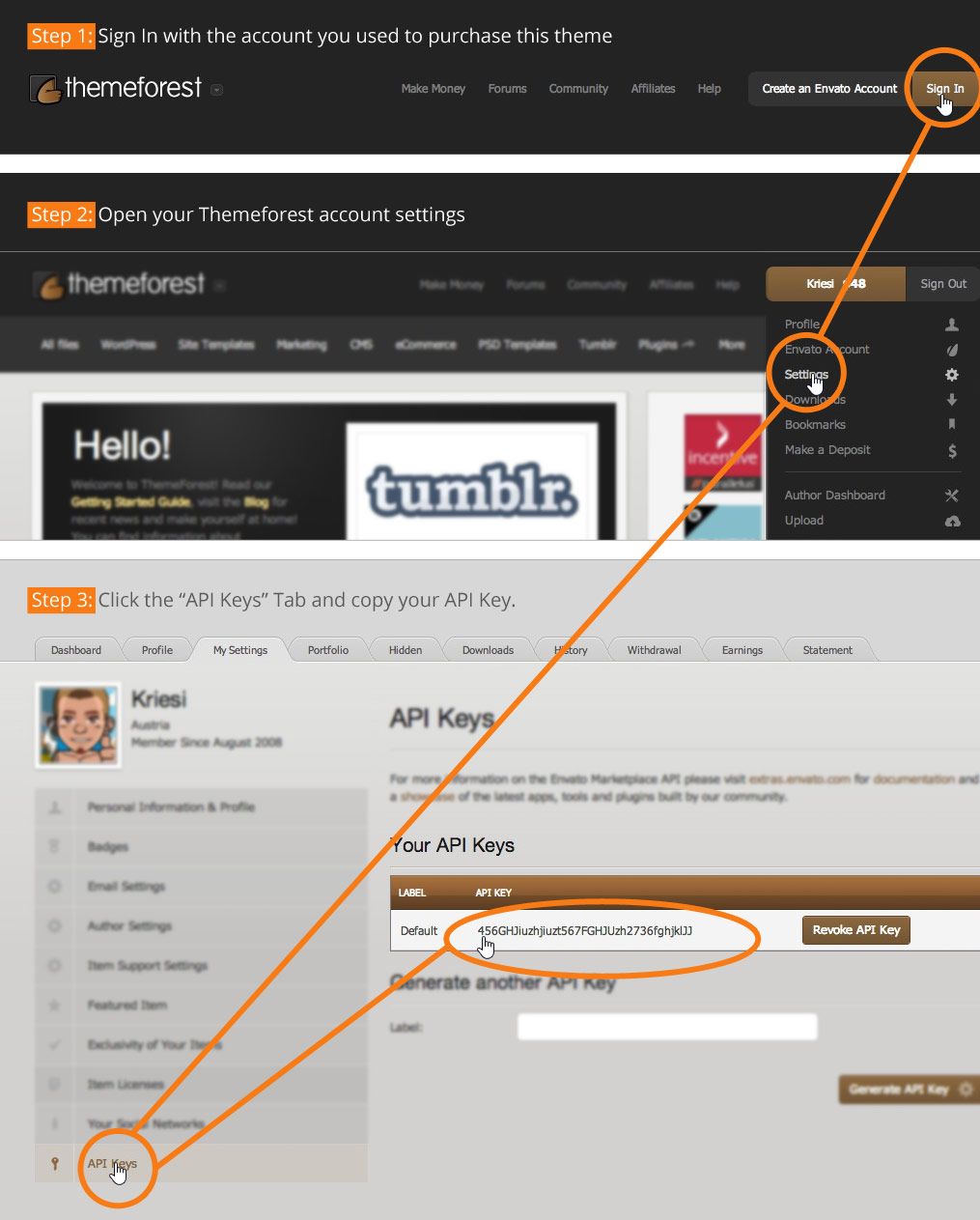
    I’ve bought the Enfold template through themeforest. However, the instructions from the plugin (https://moniquerijksen.nl/wp-content/themes/enfold/framework/images/layout/FIND_API.jpg) are not up to date anymore. I cannot upload my license to the plugin settings, because the fields don’t match.

    Does anyone know how I can add my license to update the plugin? I cannot update my php version now because the site keeps crashing. I’ve mailed Kriesi support a bunch of times but got no answer whatsoever. Any answer is highly appreciated.

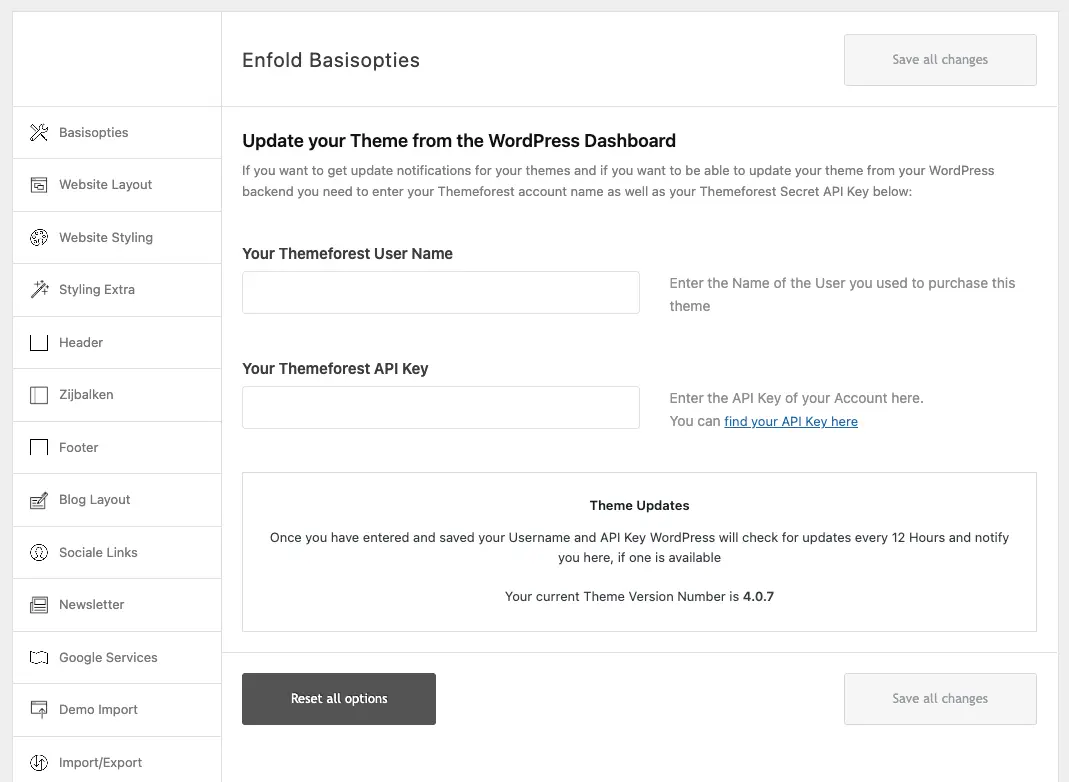
    This is the current set up: https://moniquerijksen.nl/wp-content/uploads/2026/04/screenshot-2026-04-02-at-11-14-45.webp

    Thank you very much.

    #1496527

    Thk but this page hook isn’t so clear even for me.
    Isn’t it possible to put my google code in the Enfold/Google services setings?

    #1496526

    Topic: Remove excessive space

    in forum Enfold
    soniavoice
    Participant

    Good morning, I’m building the homepage of my website http://www.casapumua.com
    starting from an Enfold demo.

    The problem is that I can’t remove the excessive space below the three text boxes (two white ones on the sides and a beige one in the center).

    There’s a large empty space left underneath. Please give me instructions on how to remove it. It’s linked to the three boxes—there isn’t any additional element creating that space.

    I’ll share the website access details with you so you can fix the issue.
    Thanks

    #1496525

    Ismael in case you want to support and help, instead of presuming I don’t know how to update Enfold.

    All plugins have been disabled. On datepicker works on every pages but not the one in Private Content.

    Thank you for having a look.

    Xavier

    Hi,

    The fix was included in the latest version of the theme, 7.1.4. Please make sure to upgrade the theme if you haven’t done so. Let us know if the issue persists.

    https://kriesi.at/documentation/enfold/changelog/

    Best regards,
    Ismael

Viewing 30 results - 121 through 150 (of 244,634 total)