

-
AuthorPosts
-
April 3, 2026 at 9:17 am #1496544
Hi @enfold!
another Menue-Question to the full width sub-menue: https://kosmetikstudio-nuernberg-jescava.de/portfolio-item/mezotix-unreine-grossporige-vernarbte-haut-oder-pigmentflecken-entfernen/
I use “Build simple custom menue” but would like to “use existing menue”. But again like before I dont get the 4 menuepictures in one row: https://kosmetikstudio-nuernberg-jescava.de/portfolio-item/tixel/Thanks again for your feedback
Have a nice day
Best regards
Michael FApril 3, 2026 at 9:51 pm #1496562Hey Michael F,
I only see three images, not four. One is much larger than the other two. Please use images that are the same size, preferably small.Best regards,
MikeApril 12, 2026 at 3:18 pm #1496744Sorry Mike for leting you wait so long with an answer.
in the private content you will find the links. If you mouse over on the mainmenue “Jescava Behandlungen” you can see that the distance between the subs are not equal from the width. Have you got aCss-for this?
You already gave me this:
/* ANFANG Mega Menü Größe*/
#top #header .avia_mega_div > .sub-menu {
display: flex;
flex-wrap: wrap;
}#top #header .avia_mega_div > .sub-menu > li {
display: block;
width: 25% !important;
}
/* ENDE Mega Menü Größe*/Same is with the 5 picts at the link1
Thanks for your feedaback!
Best regards
Michael F KrausApril 12, 2026 at 4:17 pm #1496748Hi,
I’m not sure that I understand, do you mean that the images are not lined up?
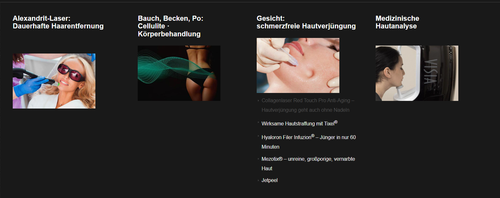
You write about the width, but all menu items & images are the same width
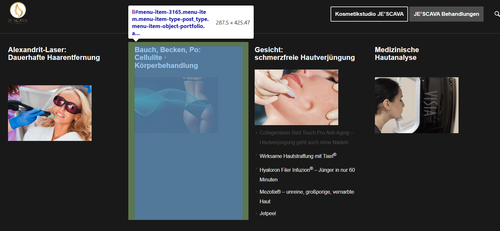
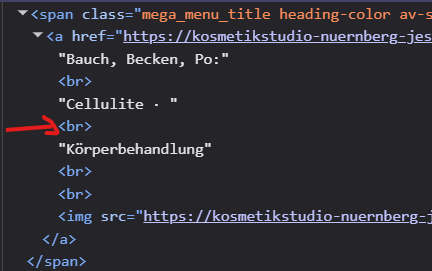
In the image above you have manual line breaks between the words, probably so the long word would not break and be hard to read
So this might make the space look larger, but it’s really not.Best regards,
MikeApril 14, 2026 at 6:56 am #1496780Hi Mike,
you are right, it is the line break. Depending how large the Browser window is you get line brakes. Is it possible to have it fix – so never mind what size the browser window is – words and pictures stand all in the same line with the same space between word and picture so i don’t need line brakers any more?That would be a great help. thanks for that
Best regards
Michael FApril 14, 2026 at 7:25 am #1496782Hi,
We can’t find any layout issue on the page. Would you mind providing a screenshot of the issue? You can use platforms like FreeImage, ImgBB, PostImages or Dropbox to upload and share the screenshot. Here are the steps to follow:
1.) Visit the website of your chosen platform, such as Savvyify, ImgBB, PostImages or Dropbox.
2.) Locate the option to upload a file or an image.
3.) Select the screenshot file from your computer or device and upload it to the platform.
4.) After the upload is complete, you will be provided with a shareable link or an embed code.
5.) Copy the link or code and include it in your message or response to provide us with the screenshot.Thank you for taking the time to share the screenshot. It will help us better understand the issue you’re facing and provide appropriate assistance.
Best regards,
Ismael -
AuthorPosts


- You must be logged in to reply to this topic.