

Tagged: Backup FTP Files, Enfold Theme Reset, Lost Options, Recover, restore
-
AuthorPosts
-
April 3, 2026 at 6:10 pm #1496560
Hello Kriesi Support Team,
We encountered a critical issue while working within the Enfold theme and are seeking guidance on recovery.
What happened:
- We were troubleshooting an issue where the Enfold theme was not updating properly.
- During this process, we clicked the “Reset” button, assuming it would clear cached/token-related data.
- Instead, this action reset/deleted all Enfold theme options globally.
Current situation:
- All Enfold theme settings (layout, styling, header, footer, etc.) have reverted to defaults.
- All media files disappeared immediately after the reset.
- We do not have a direct export/backup of the Enfold theme options.
- We do have a full website backup in .zip format.
What we have already checked:
- Searched the backup archive for Enfold-related configuration or option files.
- Reviewed wp-content (themes, uploads, etc.) but did not find identifiable option storage files.
- Looked for database-related content expecting to find theme settings (e.g., wp_options entries), but could not locate a usable database or clearly identifiable Enfold settings.
What we need help with:
- Are Enfold theme options stored in the WordPress database (wp_options) or in files?
- If stored in the database, what specific option names or prefixes should we look for (e.g.,avia_*)?
- Can theme options be restored from a backup without restoring the entire site?
- From a full .zip backup, which specific files or database tables are required to restore Enfold settings?
- Any guidance on recovering the missing media files would also be appreciated.
Important feedback:
- The “Reset” button appears to reset all global theme options without a clear warning of the full impact.
- This behavior is extremely destructive in a production environment.
- We strongly recommend:
- Moving this function to a separate, clearly labeled section, and/or
- Adding a prominent confirmation warning explaining that ALL theme settings will be permanently reset.
This action resulted in a complete loss of configuration and media unexpectedly, so any assistance in recovery would be greatly appreciated.
Thank you;
ArmenApril 4, 2026 at 12:47 pm #1496580Hey Quazione,
Sorry to hear that you have experienced this setback, clicking the Reset button gives this warning:
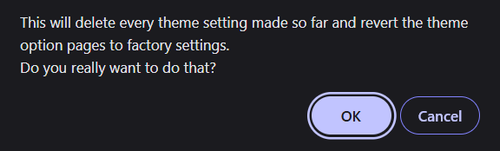
We also have a theme option to hide this button:

But unfortunately once you have approved of the reset there is no recover method, you will need to preform a site restore from your full backup.
You will not be able to restore a partial database.Best regards,
MikeApril 4, 2026 at 1:23 pm #1496583Dear Mike, could you please suggest that the setting under “Enfold Child – Import/Export/… ‘Theme Reset All Options Button’” be set to “Block and hide reset all options button” by default, so that users must actively enable this option to perform the reset.
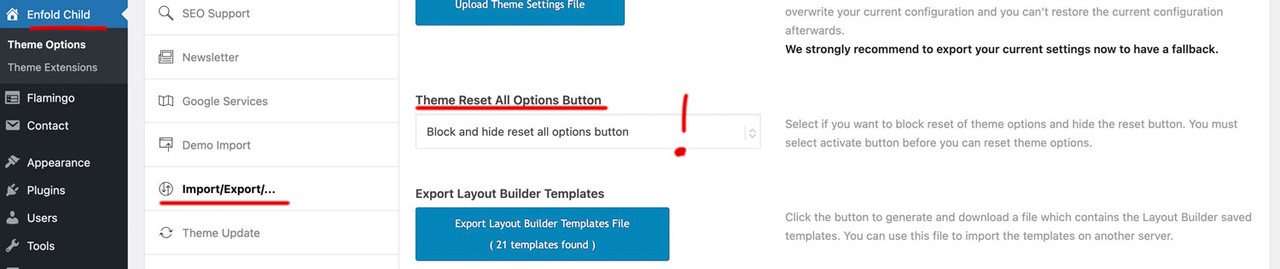
Unfortunately, this happens time and again—newcomers to Enfold fall into this trap, even despite the warning pop-up. You know how many people actually read what’s in pop-ups.
April 4, 2026 at 1:41 pm #1496585 -
AuthorPosts


- You must be logged in to reply to this topic.