It feels worse and worse. Enfold is slowly becoming a thankless divi theme.
This dropdown: why? Where does that come from? Because it’s modern? Does high-performance work like this? These things that happen in the slider headings or these dropdowns: Why don’t you let the consumers vote on it? Describe it please, with the Pro and Cons? With examples? Rather than with cryptic descriptions of what will come, that hardly anyone understands. These are hard interventions in the design. If a normal consumer updates the theme and thinks everything is OK. And if the normal user takes no look again, is all ok and then the headings have the design in the examples in the postings before. It’s needs more and more time to checking page for page, what is the influence of Kriesi’s updates.
As before: It is in my eyes an impossible behavior towards your customers. This was the same, as you have “optimize” the uppercase customer css and some other hard examples from the past. I don’t update any of my customers. Because it takes hours or days of rework for me.
And what is missing at the many sliders, which you offer? (I will not understand, why all three are not combined):
Options: easy buttons to set the heading in a right way. Many options are not there.
View post on imgur.com
Hello,
we want to have a sticky bottom Bar at mobile version. With Contact buttons as you can see in the example.
So even if you scroll, it is there.
Any way to do this with enfold?
Example:

Website:
http://www.neckarglueck.com
Hey DivaNails,
Please try adding the css to the Enfold Theme Options > General Styling > Quick CSS field.
After applying the css, Please clear your browser cache and check.
If this works then you have the css & js file merging enabled, while making your css edits directly into the child theme style.css.
The merged files only update then the theme settings are updated, such as clicking the big blue button “save all changes”, saving the style.css file doesn’t update the merged files.
So you could save the theme settings to force re-building the merged file, if the button is not clickable, try adding a blank space into the Quick CSS field to activate the button.
For best results, try disabling the merged css & js, and disable any caching plugin, and enter your css into the “Quick CSS” field while you are creating your site. Once you are done you can move all of your css to the style.css and enable your caching & merging.
I hope this helps explain what is happening.
If this doesn’t help, please include an admin login in the private content area so we can be of more assistance.
Best regards,
Mike
Hi,
I managed to put a buton on my page but i dont see how to create a form popup window when i click on this button.
Also i wish that in the popup the product name is already filled in.
Do i need to do this with a popup plugin or Add-ons for the form or do enfold already have this installed ?
In private content i sent you a example from other website, click on enquere and you see that a popup opens
Second question
Can I place a button that when you click on it take you to the next productpage ?
-
This reply was modified 6 years, 2 months ago by
 karel.
I’m trying to limit the previous + next buttons of a portfolio grid / lightbox to the current active filter (category).
So fare, I’ve added this code-snippet:
/* make previous-next buttons stay within the relevant portfolio category (multiple portfolios) */
add_filter( 'avia_post_nav_entries', 'enfold_customization_postnav', 10, 2);
function enfold_customization_postnav($entries, $settings)
{
if($settings['type'] == 'portfolio')
{
$settings['same_category'] = true;
$entries['prev'] = get_next_post($settings['same_category'], $settings['excluded_terms'], $settings['taxonomy']);
$entries['next'] = get_previous_post($settings['same_category'], $settings['excluded_terms'], $settings['taxonomy']);
}
return $entries;
}
It limits the lightbox to all selected entries (portfolio grid settings / content / select entries).
But I like to limit lightbox to the current active category (filter). Is there a way to achieve this by chance ?
Many thanks in advance.
_______________________________________________________________
EDIT: After a weekend of fiddling around I found a workaround:
1. Add Layout Elements / Tab Section
2. Create tabs according to your categories.
3. Add Content Elements / Portfolio Grid to each tab
4. In Portfolio Grid / Content / Select Entries choose the related category
5. Activate Lightbox (Porfolio Grid / Advanced / Link Settings / Display the big image in a lightbox)
6. Repeat this for each individual tab.
7. Add code from above to your theme-function.php
To the devs: It would be really nice, if the portfolio grid and lightbox would be extended in the future.
btw, I’ve bought the theme a week ago and I have fallen in love, already :-) Awesome job, keep it up!
-
This topic was modified 6 years, 2 months ago by
 Pivou.
Hallo,
I have recently purched Enfold and imported the Enfold Healthcoach demo. As my site will be in Italian I am translating the various writings. I have also replaced the homeslider photo with temporary photos of mine just to get accustomed to how it works. But I have not been able to find how to change the writings in the fullscreen slider buttons. Can you help?
Also, I have replaced the Enfold Health logo with my own logo but it appears only when I scroll the page down. Is that because my logo is not transparent? Also, there is no padding in the upper side of my logo. Is that because it is too big or is there a way to adjust that without changing the logo size?
I provide a link to my temporary website.
Thank you for your help!
Elena
Hi,
Thank you for the update.
Where can we see the toggles? Please post the URL of the page.
If you want to duplicate the toggles, edit the enfold\config-templatebuilder\avia-shortcodes\toggles\toggles.php file and look for this code around line 864:
$output .= ' <span class="vert_icon"></span><span class="hor_icon"></span></span>';
That is the toggle buttons. You can insert it again after the content, and only display it when the toggle is active.
            $output .= '<div class="toggle_content invers-color '.$inherit.'" '.$markup_text.' '.$colors.' >';
            $output .=					ShortcodeHelper::avia_apply_autop( ShortcodeHelper::avia_remove_autop( $content ) );
            $output .= '</div>';
Best regards,
Ismael
Hi,
Here’s a link to screen grabs.
View post on imgur.com
View post on imgur.com
The black button is the default block editor.
The red ones are styled via the Enfold theme settings. Ideally we want to be able to get the block edior button to adopt the enfold settings so we don’t have to style each one manually every time.
Hope that makes sense.
Thanks
Phil
Hi
I use LiteSpeed Cache and there is a cache clearing button at the top just to the right of “Insights”.
But I have used that and even if it is not immediate, I can look at the sites behavior with an other browser and device to see the results. However I do not see a change in the font size for my shops Nav bar? All I want to do is have the fonts to be the same size as they are in the default Enfold Shop Demo without going crazy to figure it out :-)
I have updated my theme Version: 4.7.1 in hopes that the WooCommerce plugin would work properly and it still does not work right. Product Category displays properly but when the product details are clicked to either learn more or add to cart there are no buttons. It seems that the Woo plugin doesn’t event exist on the inner details page. The add to cart on the product root works and displays correctly but the details does not.
This is a huge issue that I need help with since we use your theme and Woo together for a TON of our clients.
This page displays correct: http://harvestmeatmarket.flywheelsites.com/meat-packs/
This [age is where the WOO issue is: http://harvestmeatmarket.flywheelsites.com/product/beef-pack/
Hi Carl,
There is an error in JavaScript and so the “add to the Gallery” button does not work.
Please update the theme to the latest version. That should fix any issues you are currently experiencing :)
To update to the latest version follow the simple instructions here. (Or if you want the super detailed explanation you can read this blog post)
Best regards,
Victoria
see f.e. here some sort of glassy buttons – styled from enfold buttons with light-transparent setting and with custom-classes set.
https://webers-testseite.de/buttons/
the classes are set in the button-alb itself (Developer tab)
By the way : on Dashboard – Menu the classes input field for each menu-item are not visible on default.
You can activate to show different things on that page if you open the flyout on top of the menu dialog: “Screen Options”
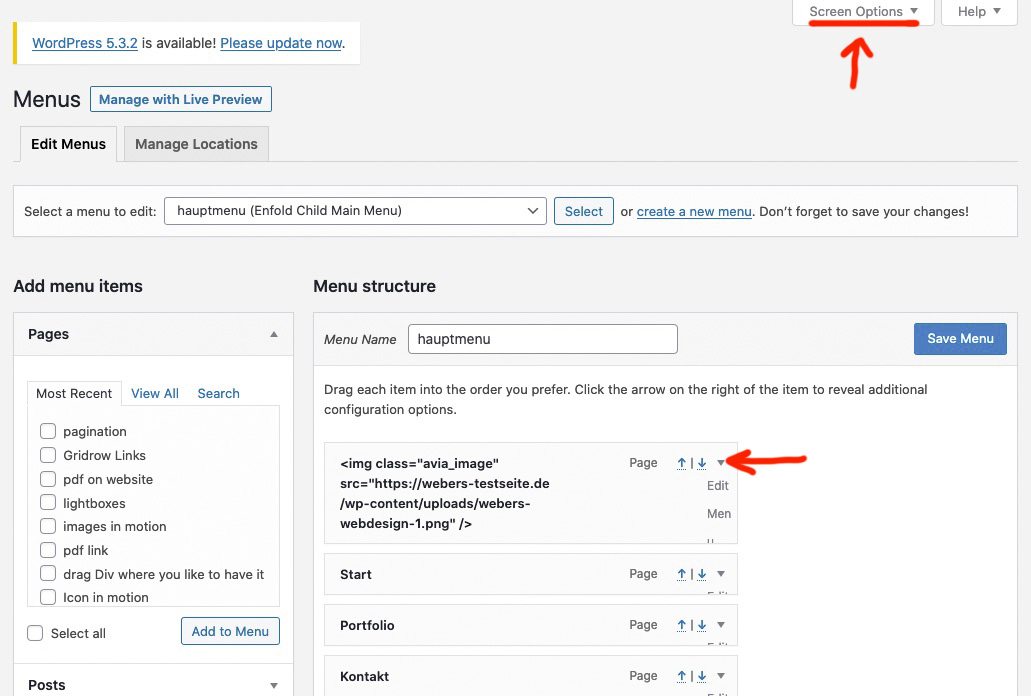
you can mark the things you like to have – and then each menu-item option can be seen on toggling that littel arrow on the right side of the menu-item
-
This reply was modified 6 years, 2 months ago by
 Guenni007.
Hi,
I just updated to the latest Enfold and when I tried to link a button to an external web page, I went to advanced and selected “open in new window” but it doesn’t open in a new window… it opens in the same window…
Can you please check this out.
Thanks,
Lisa
Hi there,
generally, I know how to customize a button. Give it a class/ID and apply CSS to it.
However, how can I apply custom CSS to the button which you can insert into a menu inside a header? And how can I customize a button which is inserted via shortcode (eg. in the footer)?
More generally, how can I change the default style of the enfold button?
Thank you for your support. Best regards,
peter
Mike,
I removed the comments because they only show as part of the builder, which automatically goes above the Mark Complete button like you said. I want them to display automatically on the post like they do in other themes with this plugin. I didn’t realize Enfold had this limitation.
I added them back in the builder on this lesson (feel free to add and remove them from the builder on any lesson post type for testing purposes if that helps) so that you can see them, but seeing them or not shouldn’t solve the problem of them appearing above or below the Mark Complete button. I’m looking to have them included at the very bottom of a post as is naturally done on post types in WordPress, so removing the override that places the builder above it by default and having them included automatically instead of in the builder.
I also added 5 comments manually to this post so that we can see about collapsing them to 3 posts though I would greatly prefer if the post types would automatically display comments even with the builder as on other themes. Do you see how a user would have to scroll through all of the comments to move on with the way this is working when using the builder component? It’s not good for UX at all. Test page URL below.
Hi,
I tried to reproduce the problem on my dev server – not able. It works fine for me also when refusing cookies.
I see js errors from a button plugin.
Also I see, that paypal is adding and deleting cookies.
Try to disable all plugins except Enfold and WooCommerce – clear server and browser cache and check. Then enable one plugin after the other and check.
And also have the developer console open and check for js errors.
Best regards,
Günter
Hi dear people at Kriesi.at
I’ve had the pleasurable experience of using Enfold for several websites, but never experienced this issue before:
The social media share buttons have gone missing.
How can I get them back?
And how can I turn them off entirely (i.e. no “Share this entry” text + clickable icons)?
See this link: http://aarhus-syd-taekwondo.dk/nyheder/moga-yoga-for-maend/
Regards
Metin
I already tried to add a single comment on a post to see if that forced them to display, and it did not.
The comment element does work, but it shows above the “Mark Complete” button and I absolutely need it to show below that element, which I cannot move or place in the builder as a shortcode (tried to see if that was possible already too). If I use the builder element for comments and place them above the Mark Complete button, a user will have to scroll through every comment to get to the bottom of the post to move on to the next lesson. From a UX perspective that’s simply awful. Is there a way to get only 3 comments to show up and have the rest be expandable with the comment builder element maybe? I’m trying to think of alternative solutions for this. From their last course (which was built on Kajabi), I saw 20-30 comments per lesson, it’s just not reasonable to expect someone to scroll through that many on each lesson to get to the Mark Complete button to move forward.
Also, the only reason I used the advanced builder vs the standard was because the sidebar wasn’t displaying as a sidebar (it was displaying full-width at the bottom of the page instead), so I changed to using the builder and using a widget element for the sidebar. It’s seemed like every time I fix one problem with Enfold and Learndash together, I find a new one.
I’ve honestly spent 10-15 hours trying to figure out a way around this already and purchased a new support license on my own account just to try to get some developer theme support on this. Comments below Mark Complete work just fine on other themes and I really really really don’t want to have to scrap all the time I’ve spent on this project already to build it on a new theme because this one little thing is not possible within Enfold. Is there any other help you can give me to resolve this?
Hello and thanks in advance for your help.
Please go to https://3das.com/gallery/ & click “load more” button in the “3D Exterior Renderings” masonry gallery items. You will see that a 3D rendering is repeating and other renderings are incorrectly being sorted.
Here is how the renderings should be sorted: https://www.screencast.com/t/Ko7CyK3pU – area in red is where the next rendering should be placed. Here’s the current placement (red box shows the incorrect starting of placement): https://www.screencast.com/t/aOxiUNZv.
This all started when I wanted to sort my posts manually and I used the script provided by Kriesi at https://kriesi.at/documentation/enfold/blog-post/#toggle-id-26. It seems that this is only happening after “load more” option is used. Turning this off or using pagination seems to be working correctly.
Hey,
Here is the English version of default text – https://imgur.com/a/LEQh5Rn. I hope this is going to be more clear.
First button has to be enabled or otherwise cookie settings will not be saved and cookie bar will pop up each time when you navigate to other pages. It has to be enabled to store cookie settings.
Second button is to enable/disable essential cookies. Essential cookies are the cookies needed by the site to work properly e.g. Enfold cookies for WooCommerce the cart, for WPML etc. If essential cookies are not accepted, some features would not work correctly.
Cheers!
Yigit
Hi adGroupMarketing,
Can you try adding this CSS code:
@media only screen and (max-width:767px) {
.responsive #top.page-id-5629 #sub_menu1 {
    position: fixed !important;
    top: 116px !important;
  }
}
As for replacing menu for ‘Supermarket Shop’, we suggest using a child theme first since any modification will be lost in the parent theme during a theme update, here’s the link where you can download and find instructions on how to use the child theme: https://kriesi.at/documentation/enfold/child-theme/
Then override the fullwidth submenu, by following the instructions in: https://kriesi.at/documentation/enfold/intro-to-layout-builder/#add-elements-to-alb
Next copy enfold > templatebuilder > avia-shortcodes > menu folder to the shortcodes folder of the child theme, then modify menu.php (enfold-child > shortcodes > menu > menu.php), in line 588 (Enfold 4.7.1) you will find this code:
$mobile_button = $mobile == 'active' ? "<a href='#' class='mobile_menu_toggle' " . av_icon_string('mobile_menu') . "><span class='av-current-placeholder'>" . __( 'Menu', 'avia_framework' ) . '</span></a>' : '';
replace Menu with Supermarket Shop.
Hope this helps.
Best regards,
Nikko
Hi,
I’m trying to update my Enfold child theme (currently 4..6.3.1) to the latest version, but clicking the Update Now button in the Theme Update tab yields an error page, in Dutch: “Je hebt geen toestemming om deze pagina te bekijken” (an English translation of this message would be something like: ” you don’t have permission to view this page”)
Please advise.
Kind regards,
Theo
I updated to last Enfold version. I still continue to don’t have social icons in my website. They disapperaed from footer, form menu bar and also in share buttons.
I need to solve this issue. Thank’s
My website is http://www.easyzanzibar.com
We are having the same issue with the Masonry Gallery, with Enfold v4.7.1 (and before with 4.6.x.x). We are using WP version 5.3.2 and php version 7.3
I can rearrange and delete the images, but I cannot add new images from the Media Library. Just a blank screen and a dimmed blue button…
Hi,
Thank you for the clarification.
You can use columns to separate the image and the button, edit the column containing the button, apply a custom css class attribute to it (e.g custom-column-button-class), then use this attribute to adjust the style of the column. You can pull the button column towards the image by applying a negative left margin value to it.
.custom-column-button-class {
   margin-left: -300px;
}
// https://kriesi.at/documentation/enfold/add-custom-css/
Best regards,
Ismael
Hi Rikard,
same is on enfold documentation site: https://kriesi.at/documentation/enfold/social-share-buttons/
Thanks for a solution
Hi Rikard,
maybe it’s related to the Enfold update. Even in the Enfold documentation https://kriesi.at/documentation/enfold/social-share-buttons/ there are no more social share buttons since the update.
Is there a workaround for this problem?
I’m not sure I understand clearly what you mean.
When I’m in the style.css file in appearance/theme-editor I only have a button saying “updating changes”.
Anyway don’t worry, the styling code is duly accepted in the 2 other ways, you gave me Enfold Theme Options > General Styling > Quick CSS field
and WordPress > Customize > Additional CSS.
You can close the issue. :)
 Dimitar Georgiev
Guest
Dear Enfold support team,
I understand that this is a presales form, but still I think there is an issue with the theme that we have purchased (and whose support has ran out so it looks like I can’t post in the forum).
Our theme used to work fine on version 3.8.4 (I think), but then I upgraded it to the latest available version and the icons became broken. For reference, please see the social media buttons at the bottom of our website – https://www.mnemonica.bg . There are other icons throughout the website that are also broken.
I played around and it looks like reverting the wp-content/themes directory resolves the issue, but it also rolls back the version of the theme (expected).
I believe that this is an issue that should be supported without support since this concerns a core functionality of the theme that we’ve purchased.
Looking forward to your reply.
Best regards,
Dimitar
Hello
many Enfold users have issues, trouble and problems at least with the cookie-solution you provided – and so do i.
At least there are these problem:
– translations are weird or simply not understandable (“activate to deactivate” and more)
– danger of beeing sued because of “unknown usage”-issue
– the “Additional Custom Cookies” seems not to work
– and even more…
To (hopefully) fix all these issues, to get a correct understanding of what & where & how i set up a testing environment you find under:
ich-will.org
On this testwebsite i will add pages containing videos, Google-captchas and so on to see if the disabling/enabling of these functions do work or not.
(but this will happen in one of the next steps – not now)
Since there are so many people having issues with that i invite every one who is interested to take part on this thread.
First task/question:
I want to have a cookie message on the bottom of the page.
In this message there should be three buttons
1: Acccept all (this button makes the user opt-in into all cookies and services used on the entire website)
2: Refuse all (this button makes the user opt-out from all cookies and services)
3: Open the settings page (the place where the user is able to decide what to accept and what to refuse)
An example of where the message should be placed and how many buttons/links it should contain you can see here:
e-recht24.de/
Maren
PS: I dont want to be “supported” by Shannon or Victoria.



