Sorry for the confusion. I thought you were using button or button with border menu styles on your desktop menu and their styling was not applying on burger menu. We have fixed this and will include in upcoming version.
I edited “Menu Links in overlay/slide out” in Enfold theme options > Advanced Styling tab. Styling defined for desktop and mobile menu items are separate. Please review your website :)
Sorry for the confusion. To open a new thread or ticket, please visit the https://kriesi.at/support page, then go to the Enfold forum. At the very top of the page, you should see a huge button that when clicked will lead you to the very bottom of the page and directly to the form where you can post your inquiry. You can also bookmark this link https://kriesi.at/support/forum/enfold/#new-post.
since Enfold 4.7.3, masonry item for showing the posts (blog) with showing the sort option:
A) clicking on a category give me 2 posts as a result. But there are 25 to show and the setting is: show 16 posts per page. So the masonry gives the button “load more”. After clicking I get 6 more. (that are still not 16 but 8, so the user has to click again “show more”… and so on)
-> why is the first result not showing 16, then showing 9 more (=25)?
-> in other categories it’s quite the same (instead of 16 posts 4 or 5 are shown even if there are over 200 posts)
B) I have a shaky masonry blog overview, when clicking on the “load more” button. A second scrollbar is showing up for some seconds on the right side and the post images are flaring up for 1-2 seconds.
Thanks for help.
Nautrino
This topic was modified 6 years, 1 month ago by nautrino.
Thanks for the login details, I see the same problem on my end. It doesn’t work using the button, but manually navigating to that page is fine. First off, could you try updating the theme to the latest version (4.7.3) to see if that helps please? https://kriesi.at/documentation/enfold/how-to-install-enfold-theme/#theme-update
Hi,
Glad to hear this is working for you, the trigger to open the popup is a link with the URL #test-popup that also has the class open-popup-link so to add this to a masonry gallery image, add this jQuery to a code block on your page:
You will need to adjust the masonry ID you yours, and clone this code for every link, if you need help finding it please link to your page so we can inspect.
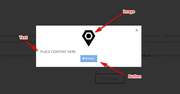
You can add image and button shortcodes from the shortcode wand to the popup and it will work, here is an example:
Best regards,
Mike
The volume control or button is hidden, so you can’t use it but you can press the up / down arrows to increase to decrease the volume.
As for the videos where you can’t change the volume slider, this HTML5 video player is the WordPress built-in “mejs-mediaelement” and the text for the volume control is hidden, but it says this:
Utilisez les flèches haut/bas pour augmenter ou diminuer le volume.
Use the up / down arrows to increase or decrease the volume.
which is not much help if you can’t see it.
@Mike
Thank you very much, his is working perfectly on links i add to texts ..
However
1- i want to have the link applied on a masonry gallery image , meaning when someone clicks on an image, he will get the pop up lightbox
is that possible ?
2- i can benefit from your solution elsewhere on the site, not only with what mentioned above, so my next question is, can the pop up include images and buttons ? i tried adding a shortcode from within Enfold inside the code block but it didnt work
Greetings
Is it possible to have a lightbox that can contain text block ?
I am using a Masonry Gallery and i want to click on the photo and have a window that contains images, text, and buttons with links
Is this available in Enfold ? if not can you recommend a solution
Thank you
What a frustrating experience to find the link to create a new forum topic. We paid, we are logged in and still, the button to ask for support or create a new topic in the forum is nowhere to be found. Why don’t you make it more obvious? Put it in the menu as “Ask a support question” or “report a malfunction” or “propose a new feature”. Then you can write there that a login is required, or that you want money or whatever. But don’t make us search and browse through unstructured forum entries for hours. We come to this website because we are your clients and we build websites with the wonderful Enfold theme. And every once in a while we have something to communicate with you guys.
Please, be a bit more corporate …
1- I played around with options a bit however it is going to take some time. Could you please create another slider for mobile and display it on mobile instead? :)
2- I edited your page and placed your section inside a Color Section element with “mobile-contact” ID – https://kriesi.at/documentation/enfold/menu/#toggle-id-137 and then edited your button layer and linked it to “#mobile-contact”.
I want to have:
a. The form field to be 200px wide
b. The form field and button to be centered.
2. I have inherited this site and I’m not 100% sure on where all the custom CSS is. I know about these locations:
a. Enfold Child >> General Styling >> Quick CSS
b. Custom CSS >> “Custom”
Is there a 3rd area any custom styling is coming from?
1.) went to Admin > Enfold Child > Theme Update. This brings me to a page that requires that I enter My Themeforest Username, and my Themeforest API key.
2.) went to Themeforest, and clicked on “generate API key” button
3.) went back to Admin > Enfold Child > Theme Update page, and finished entering the information, and then clicked on “Save all changes button”
After this I cleared my cache, and loaded the gallery page, but am still getting the grey thumbnail images.
The Blog Posts element has a list layout that looks like the magazine element and it supports the link post format. Have you tried it? Insert a Blog Posts element and select one of the 3 last List Style options in the Blog Style settings. If you need more info, please open a new thread/ticket. We’ll close this one for now.
Well, It is not the same, when you use the 3 last List Style options you can’t see the image. Please, any solution?
Super Thanks!!
This works great, I guess if I want to remove or hide another category I just use the same CSS code with the .xyz_sort_button
Another time I have to say I like enfold very much and your support is great.
Have a nice day, greetings Claudia
Have you tried activating only WooCommerce and not its extensions? There are many users using Enfold with WooCommerce but we have not received such report before that is why i am thinking maybe it is related to one of WooCommerce extensions.
When i try to edit your “home” page in Pages > All Pages, it works so only edit button on WP bar does not seem to work.
The button feature is not working (not available) on any of the easy sliders for this site. It works for the Layer Slider but for nothing else. In the past all of easy sliders had a tab on each pic/slide called “caption” where I could add basic buttons. It’s not here now.
This video show how the PAST way of adding a button. These control are NOT on the current sliders. (any version).
I guess what I’m trying to say is that there are missing options for the buttons.
I added an example page link in the privates content area. Please log in, click on the elements for the full width and the full screen examples and you will see what I mean.
I specifically downloaded the “imdb” icon from http://fontello.com/. I uploaded the zip file to the icon font manager. The website I am updating is using a child theme so I entered the script to fuctions.php.
I replaced the “fontello” name with “effra” and replaced the code “ue800” with “62168” as that is the code for the imdb icon. I refreshed the site and cleared the cache and still do not see the new icon as an option on social profiles.
Can you please advise? Let me know if you need any more credentials. Thanks!
Hi I can´t manage to activate “button” in fullwidth sub menu. I have tried all kind of combinations and alternative.
Set manually – with a https-adress, in combination with # and name. By choosen page and scrolled to the pagename….and so forth. Are there something else you can recommend me to do?
Thanks Mike for your suggestion: that’s exactly what I would like to understand and do. I would like to understand how to add a custom class to an element, using, as indicated in your image, CUSTOM CSS Class. I wish I could use this method where possible: create a class in quick css and use the class name in the developer settings, but I didn’t understand how to do it. I also looked at the guide
that I would put in the field indicated in your image (in the Developer Settings of my button element), how do I change the CSS that I put in my Enfold Child?
you have on that place in your page used a plugin to generate these three buttons: “E-Mail, Name, Subscribe”
these three butttons are in a container which has a margin-bottom value of 20px.
If you colorize your enfold columns – you can see that they have same height – but do not center vertically the content (apparently) but they are centered (including the margin-bottom value).
try this to your quick css:
#top .thrv_lead_generation_container form {
    margin-bottom: 0 !important;
}
What causes the set properties to jump back to the default values I cannot say. But I see that the columns already have the same height on your site
I just installed Enfold and the caption/button controls for the easy sliders are not there. I cannot add buttons. This is what I see – Link to my Google Drive with screen shots attached.
Yes, I know…one complete page ist easy to protect. ;-) But my customer only would like
to protect the download-buttons or as you said – only the link. So, it seems that I have
to look for an plugin, don’t I ? :-) Or I link the links to a subpage, which I protect complete.
Maybe that is an alternative. But please, take my question as an suggestion for a next
upgrade of enfold…that would be nice! And I think, that I’m not the only one, which would
be happy about this. :-) And if you do think of something, I would be happy to receive
your feedback!
Already tried that. I’ve also removed the custom CSS that was added in the Quick CSS section of Enfold. Same issues.
All plugins except TEC and ECP are now currently deactivated, I’m leaving them deactivated until I hear back from you. (This is for the fatr.spi…. domain. The other site is live.)
Here is an example of the issue again – http://fatr.spidercreations.net/event/live-music-sweet-surrender-acoustic-duo/
Steve
The removed CSS is included here for reference:
/* GENERAL */

/* The following class will SHOW elements when width is below --px, more in functions.php   [sjm 20180601]*/
@media only screen and (min-width: 671px) {
.show-mobile { display: none; }}

/* The following class will HIDE elements when width is below  --px, more in functions.php  [sjm 20180601]*/
@media only screen and (max-width: 670px) {
.hide-mobile { display: none; }}

/* the following will just hide an element that is on a page. This is good for seasonal stuff. */
.hide { display: none !important; }

/* HEADER */

.header_color .header_bg{background-color: rgba(255,255,255,.7);}

#top .av_header_glassy.av_header_transparency #header_main {
background-color: rgba(255,255,255,0.7);
}

/* This moves the logo over to the LEFT, when selecting Logo & Menu Centered in the settings */
.html_header_top.html_logo_center .logo {
    left: 0;
    -webkit-transform: none;
    -ms-transform: none;
    transform: none;
}

/* Placement of the two widget added in header [sjm 20180712]*/
div#text-2 {
  left: 50%;
  padding-top: 0;
  position: absolute;
  top: 18px;
  z-index: 999;
}
div#text-3 {
 right: 7%;
float: right;
  padding-top: 0;
  position: absolute;
  top: 24px;
  z-index: 998;
}

/* MAIN NAVIGATION MENU */

/* Let's change the small highlight line under main menu to the light bronze color */
.avia-menu-fx {
    background: #db8a58 !important;
}
.html_header_top .header_color .main_menu ul:first-child >li > ul, .html_header_top #top .header_color .avia_mega_div > .sub-menu {
border-top-color: #ac2e28 !important;
}

/* SLIDER ADJUSTMENTS FOR HOME PAGE */

/* Let's remove the white space under the home page slider */
#revolutionslider_1 {
min-height: 0px !important;
}

/* CONTENT, BLOG POSTS, AND PAGES */

/* Underline links in the content */
.avia_textblock a {
text-decoration: underline;
}

/* Let's remove the image at the top of every blog post. We're removing the image for BOTH Enfold options  [sjm 20180530]*/
.small-preview{ display: none !important; }
.post-entry .big-preview{ display: none !important; }

/*Change the default blog post from centered and full justify to left justify, filling 90% of page width   [sjm 20180530]*/
#top .fullsize .template-blog .post .entry-content-wrapper > *, #top .fullsize .template-blog .post .entry-content-wrapper { max-width: 90%; text-align:left;}

/* Let's add the underlink for links on page and post content */
.entry-content a {
text-decoration: underline !important;
}

/* In the slider on the home page, this reduces the font size for the headline */
.wprpsp-recent-post-carousel h2.wprpsp-post-title a, .wprpsp-recent-post-slider h2.wprpsp-post-title a, .wprpsp-gridbox-slider h2.wprpsp-post-title a {
    font-size: 18px !important;
}

/* FOOTER WIDGETS */
.widget ul li a {
font-size: 16px !important;
line-height: 1.0;
}

/* SPECIAL ELEMENTS - CLASSES for HIGHLIGHTS */
.highlight1 {
background-color:rgba(255,255,0,0.3);
}

/* Font size for the buttons - Large */
.avia-button {
font-size: 18px !important;
}

/* Notification box change from uppercase to normal */
.avia_message_box_content {
    font-size: 18px;
    text-transform: none;
}

/* Edit the tabs on the left Trail Report page */
.js_active .tab {
      padding: 50px 16px;
      font-size: 1.8em;
}

/* Let's make the image a square on the events carousel and the event page itself. Actually, this code just makes it fit. */
#ect-carousel-wrapper .ect-carousel-image {
background: #fff !important;
}

.ect-carousel-image img {
object-fit: contain !important;
}

/* Solve the issue with the home page slider layover [20190128 sim] */
.html_header_transparency #top .avia-builder-el-0.avia-layerslider {
    height: auto !important;
}
Author
Search Results
Viewing 30 results - 2,671 through 2,700 (of 11,217 total)