Hi,
Please try this code in the General Styling > Quick CSS field or in the WordPress > Customize > Additional CSS field:
#top.page-id-2864 .main_color .avia-builder-el-77 .avia-color-theme-color.avia-button {
    background-color: #ffffff;
    border-color: #ffffff;
    border-style: solid;

}
#top.page-id-2864 .main_color .avia-builder-el-77 .avia-color-theme-color.avia-button:hover {
    background-color: #24305e;
    border-color: #24305e;
    border-style: solid;
    color: #ffffff;
}
#top.page-id-2864 .main_color .avia-builder-el-77 .avia-color-theme-color.avia-button > span.avia_iconbox_title {
	color: #24305e;
}
#top.page-id-2864 .main_color .avia-builder-el-77 .avia-color-theme-color.avia-button:hover > span.avia_iconbox_title {
	color: #ffffff;
}
this css only works with the one button you linked to above and uses the temp class “avia-builder-el-77” but this could change if you move elements around on your page. Please try adding custom classes to your buttons, which will not change:
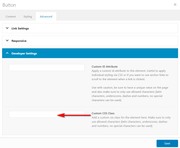
and you can use the same custom classes for all of the buttons with the same style, such as blue-hover
Best regards,
Mike
This reply has been marked as private.
Hello team,
The WordPress version of the site upgraded and once that happened I got an error when I try to access the site’s dashbaord via wp-admin.Once I enter my logins I get the following error.
The thing is that I tried to edit the site’s PHP version from 5.6 to 7.4 and none of them fixed the fatal error. I also setup a new htaccess file just in case but still no avail. Is it possible to check if the theme is compatible with the new WP version and make the needed modifications or at least note some requirements that should be edited or changed on Hosting end so I can provide them to my hosting company.
Thank you
Fatal error: Uncaught TypeError: Argument 1 passed to aviaShortcodeTemplate::set_frontend_developer_heading_tag() must be of the type array, string given, called in /home/customer/www/biobasedbusiness.com/public_html/wp-content/themes/enfold/config-templatebuilder/avia-shortcodes/iconbox/iconbox.php on line 498 and defined in /home/customer/www/biobasedbusiness.com/public_html/wp-content/themes/enfold/config-templatebuilder/avia-template-builder/php/shortcode-template.class.php:1540 Stack trace: #0 /home/customer/www/biobasedbusiness.com/public_html/wp-content/themes/enfold/config-templatebuilder/avia-shortcodes/iconbox/iconbox.php(498): aviaShortcodeTemplate::set_frontend_developer_heading_tag(”, Array) #1 /home/customer/www/biobasedbusiness.com/public_html/wp-content/themes/enfold/config-templatebuilder/avia-template-builder/php/shortcode-template.class.php(890): avia_sc_icon_box->shortcode_handler(”, ”, ‘av_icon_box’, Array) #2 /home/customer/www/biobasedbusiness.com/public_html/wp-includes/shortcodes.php(325): avia in /home/customer/www/biobasedbusiness.com/public_html/wp-content/themes/enfold/config-templatebuilder/avia-template-builder/php/shortcode-template.class.php on line 1540
Hi Terve,
Here is the code you can put in Enfold > General Styling > Quick Css, if it does not work, put into themes/enfold/css/custom.css
@media only screen and (min-width: 768px) {
  .av_one_third .iconbox_content {
    height: 400px;
    min-height: 400px;
  }
}
If you need further assistance please let us know.
Best regards,
Victoria
First go to enfold options : layout builder and select your needed settings – my advice do activate all three custom id and classes and selecting the header tags.
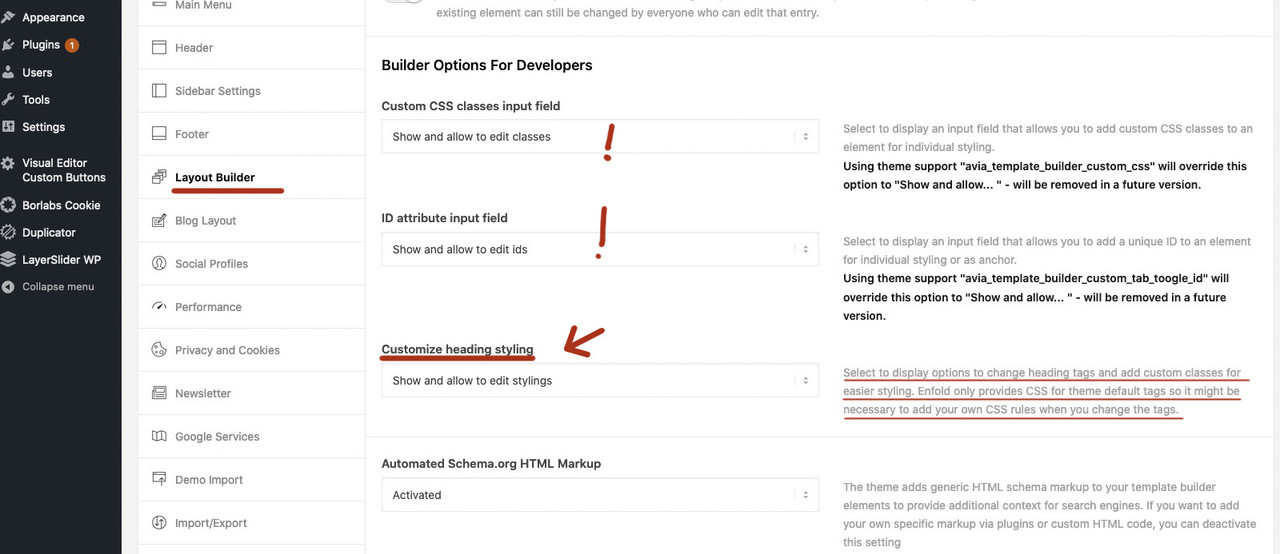
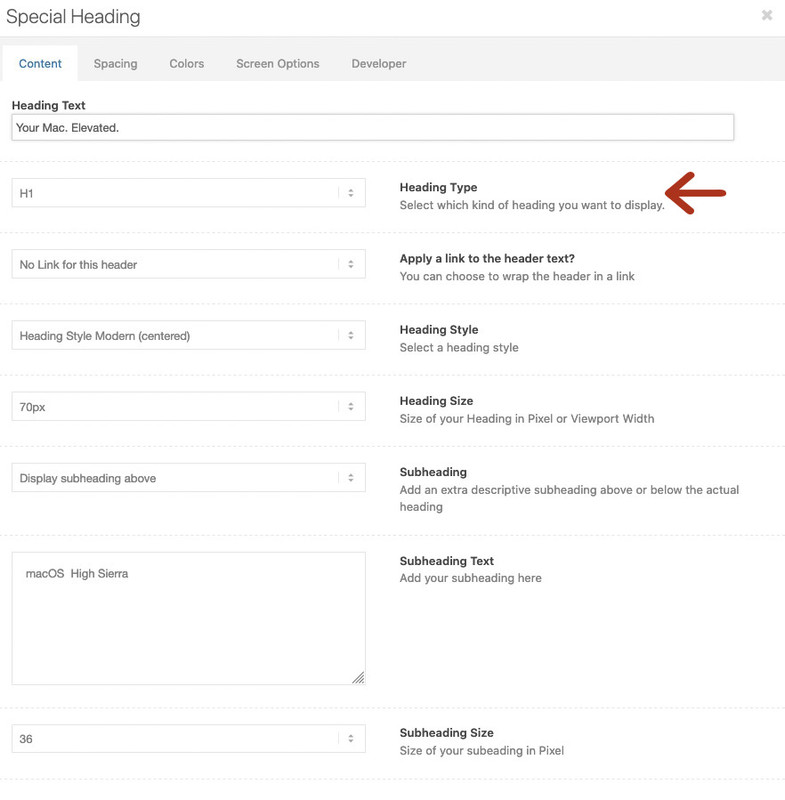
but for headings element – you don’t need to do that – here the choose of heading tag is still activated without those settings:
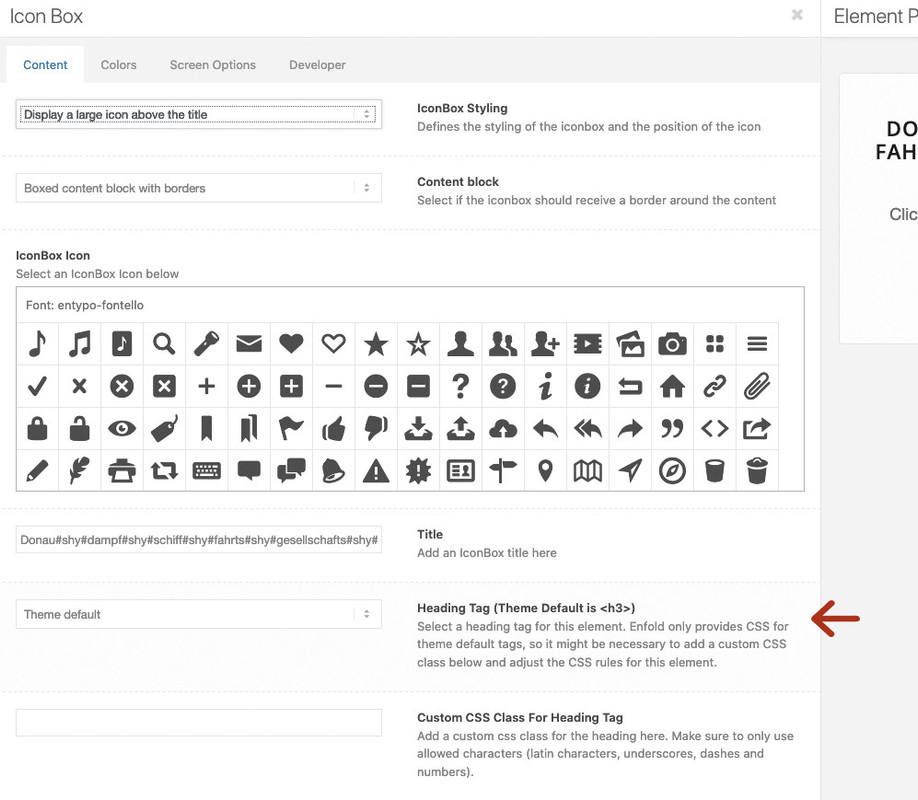
but with the settings above you will have on a lot of other alb elements the possibility to choose headings tag! f.e. iconbox etc. pp:
 kc
kcParticipant
Hi,
ich habe auch schon alle codes aus dem Forum probiert, um die Hintergrundfarbe eines iconelements (mit Rahmen) zu ändern.
Jeglichen Code die ich in Quick.css, oder dann in Entwickleroptionen css beim Icon-element, oder in die custom.css machte, hat überhaupt keine änderung gemacht – cache habe ich auch immer gelöscht.
gibt es da einen anderen Ansatz bitte?
Danke für eure Hilfe hierzu. 
lieben gruß
carsten
Hi,
Sorry for the late reply, thanks for the login, if I understand correctly you should add a custom class to your element such as “gf-icon-box” and then use the css Jordan gave you with the custom class like:
.gf-icon-box h3.iconbox_content_title{
font-size:10px!important;
}
then this would work wherever it was posted. Please note have the custom class for the element is all lowercase letters and there is no preceding dot, but in the css there is a preceding dot.
The page you linked to above returned a 404 so I couldn’t demonstrate. Sorry but I can’t help with your CPTUI questions, I’m not that sure with it.
Best regards,
Mike
Hi there,
On the page provided below I use 3 icon lists. the first block I can edit perfectly (green background), but the two other blocks don’t seem to change when I alter the colors. I have tried using a custom CSS code, but that doesnt seem to be working:
.page-id-755 .main_color.iconbox_top .iconbox_icon { background-color: #649d64; color: #ffffff; border-color: #507210; }
With kind regards,
Kjaer
-
This topic was modified 6 years, 4 months ago by
 Kjaer1. Reason: content was not accurate enough
Hi,
When creating a lightbox popup with the Magnific Popup script you must add a trigger class to the link that matches the script, in your case it’s inline_popup, so for a simple link you had it correct in your example code above, but th problem is that the shortcode for a button doesn’t have a place for the class to be added to the “a” tag, which is the link of the button. The “custom_class” placeholder that you saw is actually for the button container, not the link.
So the solution is to use this button code below to create your lightbox popup buttons and adjust to suit.
<div class="avia-button-wrap avia-button-center"><a class="avia-button avia-icon_select-no avia-color-theme-color avia-size-small avia-position-center inline_popup" href="#wheeloflife"><span class="avia_iconbox_title">WheelOfLife</span></a></div>
Best regards,
Mike
if these are icons from ALB elements ( Iconbox, Iconlist etc. pp) you have the possiblity to define your custom colors on the extra Tab and choose
Icon Colors. and “define custom colors” set all colors to identical values.
On a standalone icon these settings are missing. But …
you can use Iconbox with big icon above – and no Title no Content !
https://webers-testseite.de/guenni/inline-buttons/
-
This reply was modified 6 years, 4 months ago by
 Guenni007.
Hi, and thank you for your help.
For Want tool I understood thanks.
Still referring to the popup, I created two buttons, with class inline_popup and mpf_hide. The first through Content Element -> Button and the second with a simple link.
Here the two codes used:
The first is a shortcode:
[av_button label = 'test1 WheelOfLife' link = 'manually, https: //mywebsite/#wheeloflife' link_target = '' size = 'small' position = 'center' label_display = '' title_attr = '' icon_select = 'no' icon = 'ue800' font = 'entypo-fontello' color = 'theme-color' custom_bg = '# 444444' custom_font = '# ffffff' id = '' custom_class = 'inline_popup' av_uid = ' av-jaznb 'admin_preview_bg =' ']
The second is a simple link:
<a class="inline_popup" href="#wheeloflife">
<span class = "avia_iconbox_title"> Whee of life </span>
</a>
While the second code is working correctly, the first one does not open the popup. Why?
-
This reply was modified 6 years, 4 months ago by
 famarinu.
a very elegant method is to use the flex box modell:
the align-items: stretch made the trick
put the three iconboxes in a 1/1 container ! give to this 1/1 container the custom class: flex-iconboxes
now put this to your quick css:
/* mediaquery width depends on your settings ( maybe 768px) */

@media (min-width: 990px) {
  .flex_column.flex-iconboxes {
  display: flex;
  flex-flow: nowrap row;
  justify-content: space-between;
  align-items: stretch;
}

.flex_column.flex-iconboxes::before, .flex_column.flex-iconboxes::after {
    display: none;
}

.flex-iconboxes .iconbox {
  flex: 0 1 30%;
  background-color: #e8e8e8 !important;
  border-radius: 5px;
  margin-bottom: 0 !important;
}

.flex-iconboxes .iconbox_content {
  box-shadow: none !important;
}
}
result see here : https://webers-testseite.de/iconboxes-with-equalheight/
if you got more than 3 boxes play with the 30% value ( 4 boxes : less than 24% ) etc
Hi,
We wanted to create this thread as a channel to share the fixes that will be included in upcoming updates and known issues that are being worked on.
Current fixes for upcoming version 4.7.4.1 are as following (last update 2020-05-12)
- Feature: New alignment options ALB element “Special Heading”
- Feature: input field to add custom subject text for ALB contact form autoresponder email
- Feature: Option for transition effect speed in ALB Easy Slider, Fullwidth Easy Slider, Fullscreen Slider
- Feature: Added options for custom title and alt attribute in ALB image element
- fixed: accordion slider hides some slide item after closing the lightbox
- fixed: small typo instgram
- fixed: WC 4.0 bug grouped products and quantity button not working
- fixed: Transparent logo missing alt and title attr when attachment URL instead ID
- fixed: bbPress and custom footer page not showing correctly on some pages
- fixed: CSS bug Accordion hidden below Special Heading in Color section
- fixed: WP 5.4 Block editor breaks ALB layout in backend
- fixed: removed wrong href in div id=”av-cookie-consent-badge”
- fixed: removed wp_nonce check in reCaptcha V3 to avoid problems with caching plugins
- fixed: bug switching ALB back to Classic Editor broken layout and js errors (WP 5.4 related ?)
- fixed: CSS problem with equal height after individual height columns forming a grid
- fixed: WP 5.4 block editor using ALB – scroll bug dragging ALB elements
- fixed: added a check that $posts is an array in helper-assets.php – caused by 3rd party plugins
- fixed: shifted values in color picker (theme options page)
- fixed: type errors in message text
- Fixed: Plugin conflict calling filter display_post_states incorrectly
- added: filter avf_transparency_logo_data: modify transparency logo url, title, alt attributes
- added: class post-format-{$post_format} to article in postslider.php
- added: filter avf_attachment_copyright_text – allows to filter copyright text in ALB image element
- tweak: new option “Remove query string from static resources” in Performance->Show advanced options
- tweak: Link settings moved to content tab for all ALB button elements
- tweak: ensure function aviaFontManagementBase::get_font_list returns an array
- updated: Italian language files
- updated: Dutch language files
- added: Greek language files
- tweak: All language files have been synchronised – obsolete strings removed
In Pull Requests:
- feature: New demo importer with download of demos from external server
In Progress:
- Responsive images – adding scrset attribute to images
Fixes for released version 4.7.4:
- fixed: catalog CSS not enqueued with ALB WC product elements
- fixed: ADA compliance aria-hidden, aria-label for MOBILE Hamburger menu
- fixed: ALB seperator whitespace with icon: limit width to 45% container width for each ruler
- fixed: small typo tempalte
- fixed: CSS bug icon grid with display tooltip and mobile
- fixed: CSS ALB Gridrow – 1 column with link column not fullwidth
- fixed: CSS indent bug in nested sidebar menus (left/right sidebar, widget menus)
- fixed: Fullwidth Easy Slider issue where auto rotate stops working in Safari after a video slide
- feature: Add custom ID and CSS class to timeline milestones
- feature: Integrate Smash Balloon Instagram Feed plugin (free and pro version)
- Feature: ALB magazine element supports post-format link
- tweak: Option to disable adding timestamp to compressed css and js files
- tweak: Advanced Styling selectors more strict to override standard selectors from stylesheets and custom css
- tweak: ajax search support for WC option “Hide out of stock items from the catalog”
- tweak: use get_title instead of inconsistent use of direct access to post_title in various places
- added: title attribute to postslider link in ALB element
- added: filter avf_postslider_link_title_attr: modify title attribute for link in ALB postslider
- added: filter avf_show_option_toggles_advanced: Adds an extra select option to hide section headers in ALB
- added: filter avf_ajax_search_woocommerce_params: allows to change displaying products out_of_stock, featured and hidden
- added: filter avf_legacy_suppress_wp_filter_post_title: allows a fallback for unfiltered post_title where direct access was used previously
- removed: deprecated classes hentry and vcard (microformats.com)
- updated: French language file – equal alb options translation, “Google” services translated as “Mailchimp”
- updated: Dutch language files
- updated: German language files
- updated: Italian language files
Fixes for version 4.7.3 are as following
- improved: theme options to disable ALB modal popup options toggles (revert to old ALB design)
- fixed: Blog multiauthor preview image links to author and not to post
- fixed: ADA compliance aria-hidden for social icons and social share buttons
- fixed: social share buttons added with filter no longer shown in 4.7.1.1
- fixed: CSS for reCaptcha V3, added classes for reCaptcha V2 and reCaptcha V3 to form
- fixed: ALB contact form datepicker throws js error when jQuery is loaded in footer
- fixed: ALB editor Add Cell/Set Cell Size buttons not responsive for translations
- fixed: Custom pages query to exclude hiding a page when same page object is queried
- fixed: small typo in Iconbox element
- fixed: Easy Slider caption sizes reverting back to “use default” after making custom settings
- fixed: Google vocabulary.org schema is deprecated
- fixed: Content partially cut off in Cookie modal window on mobile Safari
- added: filter avf_merged_files_unique_id: allows to remove/customize added unique id for merged files
- added: filter avf_folder_security: customize folder security from 755 on folder creation
- tweak: Column links open in new window and not in new tab for some browsers (e.g. FF)
- tweak: Developer fields missing in fullwidth sub menu element
- tweak: improved creation of avia folders and security
- tweak: schema.org markup for testimonials
- Improved GPDR:
- feature: new option Accept essential cookies on pageload, user must opt in for other cookies
- added: Cookie info message now supports starts with, ends with, contains for cookie names (filter avf_privacy_cookie_infos)
- added: description text for some essential WP, WPMLcookies
- fixed: bug with custom wildcard cookies and path not /
- fixed: bug in option allow all cookies and services on pageload
- Updated: Old Instagram icon to new one in social profiles
- Updated: background color for social yelp icon to #d32323 on hover
- updated: German language files, , de_DE GDPR translation adjustments
- updated: Italian language file
- updated: Dutch language files
- updated: French language file – equal alb options translation
Regards,
Yigit
P.S.: Please do not report issues here, instead start a new thread.
-
This topic was modified 5 years, 9 months ago by
 Yigit.
Hi,
For your first question, changing the iconbox title to H1, we can help you with this with a custom function, but first, are you sure you want to do this? Because for good SEO each page should only have one H1 & H2, you can have many H3. You can change the font size of your headings to any size with no issues, but you should still only have one H1 on each page.
Now for the second part of your first question, it looks like you are using Enfold v4.5.3 without a child theme, so any customizing functions we offer will be lost when you update to our latest version 4.6.2 I would recommend installing the child theme, so your changes will not be lost with future theme updates Read about it & Get it here
For your second question about the font size of your iconbox title, it is not set by the heading size, H3, it is set by the “.iconbox_content_title” class, to change this please try this code in the General Styling > Quick CSS field or in the WordPress > Customize > Additional CSS field:
#top #wrap_all .iconbox .iconbox_content .iconbox_content_title {
	font-size: 20px !important;
}
please adjust the font size to suit.
Best regards,
Mike
Yes Enfold > Layout Builder > Builder Options For Developers options ARE ENABLED to “show and allow” as stated ^ above
And Yes – the css classes ARE IN the Developers tab. the class appears but the css is being ignored.
the “more books” and “media mentions” button have class in developers tab subtledbvdb
the class appears in the html
`<div class=”avia-button-wrap avia-button-center avia-builder-el-10 el_after_av_hr el_before_av_hr subtledbvdb“><span class=”avia_button_icon avia_button_icon_left ” aria-hidden=”true” data-av_icon=”” data-av_iconfont=”entypo-fontello”></span><span class=”avia_iconbox_title”> More book reviews</span></div>
the child theme has the style.css:
.subtleDbvdb.avia-button.avia-size-medium {
color: #7CA0b6;
font-size: 16px;
font-weight: bold;
}
The css that has been working until 4.6.2 is being ignored.
and “more books” area = Partner/logo element has a custom class dbvdbMoreBooks in developers tab that kept the images the same height and the background transparent
the child theme style.css:
/* book display */
.dbvdbMoreBooks .slide-image {
background-color: transparent !important;
}
.dbvdbMoreBooks img{
max-height: 250px !important;
}
This css also was working until 4.6.2 is being ignored.
Please advise how to fix it.
I want to replace all the icons with images. I’ve enabled custom classes but couldn’t make them work. I need some help
-
This topic was modified 6 years, 5 months ago by
 athen49.
Thank you. I got the iconbox to work, but not the icon grid.
I put the following CSS into CSS box:
.avia-icongrid.custom-icongrid li:nth-child(1) .icongrid-char:before {
content: “”;
background-image: url(https://bp.domain.com/wp-content/uploads/2019/08/1-Start.png);
background-repeat: no-repeat;
background-size: contain;
background-position: center;
width: 50px;
height: 50px;
display: inline-block;
position: relative;
border-radius: 50%;
}
Then, I put custom-icongrid into the custom CSS class field.
Thank you again for your help.
This reply has been marked as private.
Yes – best would be to see the site you are talking about.
then – i would not set the background on the .iconbox_icon but substitute the before content.
where does the number come from? .iconbox_icon1 ???
you can replace before content by declaring it to “” empty:
and place then the background-image. You can play with height and width of that:
.custom-iconbox .iconbox_icon:before {
  content: "";
  background-image: url(https://path-to-your-image.jpg);
  background-repeat: no-repeat;
  background-size: contain;     /*** or cover is better if your image has 1:1 aspect ratio ***/
  background-position: center;
  width: 50px;
  height: 50px;
  display: inline-block;
  position: relative;
  transform: translate(-50% , -50%);
  left: 50%;
  top: 50%;
  border-radius: 50%;
}
Advantage is in additon that you can have with png files the background-color of your theme.
I am trying to follow the directions in previous posts about using custom CSS to use an image instead of an icon in an icon box. Clearly, I am missing something obvious because it does not work for me. Can you help?
I added this to my CSS block: (I am subsituting myurl in the string for the actual URL)
.custom-iconbox .iconbox_icon1:before { display: none; }
.custom-iconbox .iconbox_icon1 { background-image: url(https://bp.myurl.com/wp-content/uploads/2019/08/1-Start.png); background-repeat: no-repeat; background-position: 50% 50%; background-size: contain; }
In the Custom CSS box of the icon box, I added the following:
iconbox_icon1
What did I do wrong here? I am sure it is a simple CSS mistake.
The other thing is that I would really like to use four images to replace four icons in an icon grid. Is there any way to do that?
Thank you
To all those who used my edited Enfold ALB elements. Herewith I end the further support. I have delivered these small changes within the ALB long enough. I am happy that now these features have been added to the new update. So heading tag selection and ID assignment to the elements. I think that the missing array in the full-width and full-screen slider will be delivered soon in an update. Obviously a careless mistake.
Since it was of course implemented differently than I did, the users of my modified ALB elements unfortunately have no other choice than to rework the pages that were created with it. So headings in the iconboxes and iconlists and captions in the sliders. IDs on whitespace Separator etc. pp.
I’m glad that these features have found their way into the theme, because I think they’re really good and that with every Enfold update I’m now just a user and no longer a “developer”.
That was always really a little extra work. Here again the link to my page, in case someone is wondering what this is all about. The page will disappear into the archive soon. https://webers-testseite.de/edited-enfold-alb-elements/
Thank you
Günter (the other one)
PS: you should remove now that one link ( CUstom Element Options… ) in your : https://github.com/KriesiMedia/enfold-library/#online-resources-from-third-party-developers
Anyway the link you gave to us – could be used f.e. to make a whole iconbox clickable. Iconboxes can have link on Icon and Title.
The first link in it will be tranformed to the iconbox itself. In this case you had to give that custom-class to the iconbox.
I tried this on my home page and named the classes .custom-iconbox1 , .custom-iconbox2 , and .custom-iconbox3 and they don’t seem to be working :(. My link is https://chillfxcbd.com/
-
This reply was modified 6 years, 6 months ago by
 ryane2222.
Hi bobperrinairoaero,
The credentials didn’t work for me as well.
I believe you are using an iconbox and the page you’re referring is the one in private content.
When you edit the iconbox, there are 3 tabs (Content, Colors, Screen Options), click Colors.
In Icon Colors, set this to Define Custom Colors, you should be able now to change the background color (as well as font/icon color and border color).
Hope this helps.
Best regards,
Nikko
Hi,
Thank you for the feedback, I took a closer look and found that you have a few css rules that target the homepage only like this that adds a gap between the left hand set with icons and the right hand:
.home .axp-iconBox1 .flex_column.av_one_full.flex_column_div.av-zero-column-padding.first.avia-builder-el-26.avia-builder-el-no-sibling.sintra-max-fixed-half.alignright {
    padding-right: 87px;
}
but the issue is that your translated page /en/homepage/ doesn’t have the class “.home” because only one page can have the class. The transated page is “.page-id-2130” so creating a second rule would correct this:
.page-id-2130 .axp-iconBox1 .flex_column.av_one_full.flex_column_div.av-zero-column-padding.first.avia-builder-el-26.avia-builder-el-no-sibling.sintra-max-fixed-half.alignright {
    padding-right: 87px;
}
or it looks like your rules are specific enough that you could remove the “.home” without trouble.
Please take a look at your custom css and try to adjust to remove the .home or copy and add the .page-id-2130
Best regards,
Mike
so a bit offtopic: these font-icons are nice to have and a quick way to style buttons etc. with icons. You are alway resticted to monchrom usage.
So if you only have to work with some or – always the same icons you can replace the inserted icon from entypo-fontello by a png or svg – if you like.
give a custom-class to the container where you want to replace the icons. —- in my case it is : spezial-icon
CSS code is a bit different if you got chart or icons
here i replace that little bell icon – you find the code to insert on hovering the icon on the select field. you will find for the bell: \ue83d
erase the “u” in it. (by the way the backslash on mac keyboards is on shift+option+7 – on pc there is an extra key for it)
you have to look what you like to replace
.spezial-icon .av-icon-char[data-av_icon="\e83d"]::before,
.spezial-icon .iconlist-char[data-av_icon="\e83d"]::before,
.spezial-icon .iconbox_icon[data-av_icon="\e83d"]::before {
    content: " ";
    display: inline-flex;
    width: 1.4em;
    height: 1.4em;
    background-size: contain;
    background-repeat: no-repeat;
    background-image: url("//the-path-to-your-image/image.svg");
    position: absolute;
    top: 50%;
    left: 50%;
    transform: translate(-50% , -50%);
}

.spezial-icon .av-icon-char[data-av_icon="/e83d"]::before {
    position: relative;
    top: 0 ;
    left: 0 ;
    transform: none;
}
the width and height is set by relative values to the font – so it is synchonized with the font-size of the entypo-fontello font icon.
Play a bit with these values.
-
This reply was modified 6 years, 8 months ago by Guenni007.
Dear Enfold-Team,
I’m trying to get a hoveranimation working. The goal is to at least let the avaia-buttons animate. With or without Icon, that is not too important.
So, this is my Code:
.my-custom-button .avia-button .avia_iconbox_title {
    margin: 10%;
    text-align: center;
}

.my-custom-button .avia-button .avia_iconbox_title {
    color: #fff;
    text-align:center;
    border: none;
    background-size: 300% 100% !important;

    border-radius: 50px;
    moz-transition: all .4s ease-in-out;
    -o-transition: all .4s ease-in-out;
    -webkit-transition: all .4s ease-in-out;
    transition: all .4s ease-in-out;
}

.my-custom-button:hover .avia-button:hover .avia_iconbox_title {
    background-position: 100% 0 !important;
    moz-transition: all .4s ease-in-out;
    -o-transition: all .4s ease-in-out;
    -webkit-transition: all .4s ease-in-out;
    transition: all .4s ease-in-out;
}

.my-custom-button .avia-button:focus .avia_iconbox_title {
    outline: none;
}

.my-custom-button .avia-button {
    background-image: linear-gradient(to right, #29323c, #485563, #2b5876, #4e4376);
    box-shadow: 0 4px 15px 0 rgba(45, 54, 65, 0.75);
}
Basically its workin. I have a Gradient-BG in the buttons, but I cant get them to be grey to even more grey on idle to blue-voilet on hover. Is there a solution or is it just impossible?
And if it possible, can I add this Animation to nearly every Link? Like the main-menu, social-media-buttons and the send buttons in contactforms?
Thanks for your time and i wish you a nice day!
Best regards,
Videmi
by the way – don’t know if it is important:
on my customization i now changed back the position of initialisation to enfold former sequence.
then it works as expected.
these lines here:
$this->icon_html_styling = '';
$this->title_styling = '';
$this->content_styling = '';
$this->content_class = '';
$this->title_class = '';
$this->iconlist_styling = '';
comes after the
extract( shortcode_atts( array( …
on iconboxes too.
This reply has been marked as private.
Great ! Thank you Ismael.
I defined the custom CSS to my gallery so that it’s not displayed on page load, ok. I added the script toggle in my functions.php but I need to define an ID to the div of buttons and galleries like that : How I can add an ID to buttons and Galleries ?
<div class="avia-button-wrap avia-button-left  avia-builder-el-8  el_after_av_hr  el_before_av_hr  " id="galleryButton">
    <a href=" my link" class="avia-button   avia-icon_select-no avia-color-theme-color avia-size-large avia-position-left " target="_blank">
               <span class="avia_iconbox_title">Text of my button</span>
    </a>
</div>
So that my script will working great with ID :
$( "#galleryButton" ).click(function() {
  $( "#myGallery" ).toggle( "slow", function() {
    // Animation complete.
  });
});
Thank you by advance



