

Forum Replies Created
-
AuthorPosts
-
July 17, 2019 at 4:30 am in reply to: How to migrate Enfold setting from A website to B website? #1119371
Hey thomasvr4,
You could do a phpMyAdmin search and replace, please see this article.Best regards,
MikeHey adamghart,
Please try this code in the General Styling > Quick CSS field or in the WordPress > Customize > Additional CSS field:.logo img { height: 100% !important; }Best regards,
MikeHey michaeldgilbert,
I took a look at your homepage, but the only thing that I could find left-justified was the text of one section about halfway down.
Does this sound correct? If not left-justified, how would you like it?Best regards,
MikeHey ryanblackstock,
This means that the code has been deprecated, it can no longer work. Please update the theme via FTP, look for the “enfold” folder at /wp-content/themes/enfold/ and rename to “enfold-old” then upload the new version as the folder “enfold”
Please don’t try to overwrite the theme folder, as this will leave old files behind and cause errors.
Once you have cleared your browser cache and tested that your site is working correctly, you can delete the old folder “enfold-old”.
If for some reason you want to go back to the old version, simply remove the new folder and change the name of “enfold-old” back to “enfold”Best regards,
MikeHey Henry Pelmas,
Sorry, I have not seen this before, can you post a screenshot and an admin login so we can try to recreate the issue.Best regards,
MikeHi,
The Private Content area is just below each post, please try logging in to your support account to see the link.
The Enfold file path is: /wp-content/themes/enfold/Best regards,
MikeJuly 16, 2019 at 1:46 pm in reply to: Child Theme Style.css does not effect main theme styles #1119147Hi,
Please include an admin login in the Private Content area, and point out one css style that is not working in your style.css so we can check.Best regards,
MikeHi,
That is odd, sounds like the zip password is not working for you, please try this new file below.Best regards,
MikeHey RonnyE2019,
In the Private Content area is a beta version with the latest fixes which has solved many IE & Edge issues so perhaps this will help you also.
The easiest and safest way to test the beta version is to rename your current theme to “enfold-old” via ftp then upload the new “enfold” and check that your site is working correctly.
Once you are happy you can delete the “enfold-old” via ftp, (not the WP theme page)
Should for some reason you wish to roll-back to the old version, it’s easy to do, simply rename the new “enfold” to “enfold-new” via ftp and then rename “enfold-old” to “enfold” then refresh your page.
Please don’t try to overwrite the theme folder, as this will leave old files behind and cause errors.Best regards,
MikeHey charger70,
Please try this code in the General Styling > Quick CSS field or in the WordPress > Customize > Additional CSS field:#top .main_color .onsale { background-color: red !important; }Best regards,
MikeJuly 16, 2019 at 5:31 am in reply to: Child Theme Style.css does not effect main theme styles #1119036Hey Enis,
When you add css to style.css please try adding a blank space to the “quick css” field and save, then clear your browser cache and check.Best regards,
MikeHey Lara,
Thanks for the login, that was your title bar, I changed it’s settings so it will be hidden. Please clear your browser cache and check.Best regards,
MikeHi,
Thanks, I found that we can add the commas to the links with this css:.blog-categories.minor-meta a + a:before{content:', ';}but this doubles some of the commas, are you able to remove the the custom taxonomies commas?
Best regards,
MikeHi,
Glad we were able to help, we will close this now. Thank you for using Enfold.For your information, you can take a look at Enfold documentation here
For any other questions or issues, feel free to start new threads in the Enfold forum and we will gladly try to help you :)Best regards,
MikeHi,
Thanks for the login, Please try this code in the General Styling > Quick CSS field or in the WordPress > Customize > Additional CSS field:#top #header .av-main-nav > li > a .avia-menu-text { color: #000 !important; } .html_header_glassy #top #header .av-main-nav > li > a .avia-menu-text { color: #fff !important; } .html_header_glassy #top #header.header-scrolled .av-main-nav > li > a .avia-menu-text { color: #000 !important; }Best regards,
MikeHi,
Please ensure that your Enfold Theme Options > Performance > Disable Template Builder Elements > Always load all elements is set.Best regards,
MikeHi,
I took a look at your div that is not acting as a link, and found that the div is not wrapped with “a” it’s actually like this:<div class="box wide tall"> <a href="www.yoursite.com"></a> <div>This is a Div element inside A link element but it does not act as a link</div> </div>Best regards,
MikeHey ESWEENEY113,
Sorry, I have not heard of the issue, please link to the site so we can see.Best regards,
MikeHi,
Please try this code in the General Styling > Quick CSS field or in the WordPress > Customize > Additional CSS field:.button-img:hover { opacity: 1 !important; } .image-overlay .image-overlay-inside:before { display: none !important; }Best regards,
MikeHey Kali,
Thanks for the login, when I look at your pages I see the sidebar options
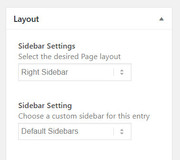
If I understand correctly you would like to change your menu, logo, and topbar to the other site you linked to, Please see the screenshot in Private Content area.Best regards,
MikeHey claha,
Do you mean “turn off” the background image for mobile? If so we should be able to do that, please link to your page.Best regards,
MikeHi,
I have taken a look at your site, but I don’t see any errors. I did login to your GA account and saw the errors.
Please try disabling your Poptin plugin and see if that solves.Best regards,
MikeHey jyonguwern,
Thanks for the login, but it didn’t work for me. Please check.
Please try this code in the General Styling > Quick CSS field or in the WordPress > Customize > Additional CSS field:#top.home .grid-entry a.grid-image { opacity: 1 !important; }Best regards,
MikeHi,
I made a template of your page and then created a new test page. I then replaced the full-width slider with the full-screen slider, and this seems to behave as you described.
Please see the link in the Private Content area.Best regards,
MikeHey Rami,
Please try adding fonts at Enfold Theme Options > Import/Export > Custom Font Manager, Enfold includes the Advanced Layout Builder, we don’t recommend any other builders.Best regards,
MikeHi,
Please try this instead:function custom_script(){ ?> <script> (function($){ $(document).ready(function(){ $("#top.post-type-archive-tribe_events h1.main-title.entry-title").text("Kalender mit Ereignissen"); }); })(jQuery); </script> <?php } add_action('wp_footer', 'custom_script');Best regards,
MikeHi,
Sorry I didn’t know the links would be hidden, I’ll try to post them again belowhttps://themeforest.net/item/enfold-responsive-multipurpose-theme/4519990?ref=Kriesi
Best regards,
MikeHi,
I only wrote this:Sorry for the late reply and thanks for the compliment, Please check out this free tool
You can read about the Enfold performance settings here and about our speed tweaks here. If your interested in seeing the full list of what Enfold offers, please see here.you couldn’t see this in the earlier post?
Best regards,
MikeJuly 14, 2019 at 4:23 pm in reply to: Enfold and Woocommerce; "Downloads remaining" and "Product expires" #1118498Hi,
For the checkout page please try this code in the General Styling > Quick CSS field or in the WordPress > Customize > Additional CSS field:#top.woocommerce-checkout th.download-expires, #top.woocommerce-checkout td.download-expires, #top.woocommerce-checkout th.download-remaining, #top.woocommerce-checkout td.download-remaining { display: none !important; }Best regards,
Mike -
AuthorPosts
