

Forum Replies Created
-
AuthorPosts
-
Hi,
Please try this code in the General Styling > Quick CSS field or in the WordPress > Customize > Additional CSS field:@media only screen and (min-width: 767px) and (max-width: 989px) { #top #main .avia-section .template-page { width: 100% !important; border: none; margin-left: auto; padding-left: 0; margin-right: auto; } .av_one_full.avia-builder-el-6 { margin-left: 6%; width: 29.333333333333332% !important; float: right; } }Best regards,
MikeHi,
Glad to hear you got it sorted out, sorry I have not looked into Schema plugins or seen any reviews in the forum.Best regards,
MikeHi,
Glad we were able to help, we will close this now. Thank you for using Enfold.For your information, you can take a look at Enfold documentation here
For any other questions or issues, feel free to start new threads in the Enfold forum and we will gladly try to help you :)Best regards,
MikeHey ahouglum,
Good news, this is available, to enter “distraction free” mode click on the X that looks like 4 arrows in the builder top bar:
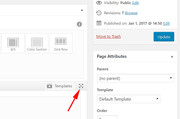
then the elements menu sticks to the top of the screen:
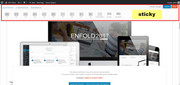
Best regards,
MikeHi,
I’m sorry I must have read through this too quickly, I thought it was a duplicate.
Anyways, to add a custom class to the shortcode above look for this part of the code:custom_class=''and add your class like this:
custom_class='myclass'and to fix your icon above please try this css:
.avia-icon-pos-left {
    float: none !important;
    display: inline !important;
}
I recommend adding a custom class to these so if you have other icons on your site the “display: inline” doesn’t mess them up.
Please clear your browser cache and check.Best regards,
MikeHi,
I took a look at your button font weigh and first changed your Advanced Styling weigh from “light” to “200” sometimes this helps, then upon further examination, I found that the current font weight is set by “csshero”

please try disabling this css or change it to the weigh you want, and Then clear your browser cache and any cache plugin, and check.Best regards,
MikeHey Stephanie,
This is the css I added to your Quick CSS, Please clear your browser cache and check, and feel free to make any adjustments needed:@media only screen and (min-width: 1101px) { #top .avia-content-slider-element-container .avia-slideshow-dots { left: -3% !important; text-align: center !important; top: 300px !important; } .avia-content-slider-element-container.avia-builder-el-33 { min-height: 280px !important; } } @media only screen and (min-width: 767px) and (max-width: 1100px) { #top .avia-content-slider-element-container .avia-slideshow-dots { left: -3% !important; text-align: center !important; top: 220px !important; } .avia-content-slider-element-container.avia-builder-el-33 { min-height: 200px !important; } } @media only screen and (max-width: 766px) { #top .avia-content-slider-element-container .avia-slideshow-dots { left: -3% !important; text-align: center !important; top: 130px !important; } } .avia-slideshow-dots a.goto-slide.active { background-color: #4B3E2D !important; } .avia-slideshow-dots a.goto-slide { background-color: #4B3E2D !important; opacity: 25%; } #top .avia-smallarrow-slider .avia-slideshow-dots a { border-style: none !important; } .avia-slideshow-dots a { height: 9px !important; width: 9px !important; border-radius: 9px !important; margin: 0 8px !important; }Best regards,
MikeHi,
To correct the icon on the buttons I added this css to your Quick CSS:.av-icon-on-hover .avia_button_icon { overflow: visible !important; }Please clear your browser cache and check.
Best regards,
MikeHi,
Typically that occurs when you try to update but the token info is not quite right. Please create a new token and allow all permissions and then wait 24 hours before checking again.Best regards,
MikeHey shrinkray,
Sorry for the late reply, I unchecked your “load jQuery in the footer” performance setting, and disabled your merged JS & CSS to clear the cache. Now the animation is working.
Please clear your browser cache and check.Best regards,
MikeHey Kyle,
Sorry for the late reply, please link to the element so we can examine closer.Best regards,
MikeJuly 14, 2019 at 1:21 am in reply to: Hilfe in DEUTSCH bitte: Anzeige Blogposts falsch + Schriftart Footer #1118420Hey Wondergirrrl,
Vielen Dank für die Anmeldung. Zunächst untersuchen wir Ihre Homepage. Der Grund dafür, dass der Auszug nicht angezeigt wird, liegt darin, dass Ihr Beitrag mit dem Erweiterten Layout-Generator erstellt wurde. Sie müssen Ihren Auszug also manuell hinzufügen. Schauen Sie in die Seitenleiste des Editors, um einen Auszug hinzuzufügen. Bitte siehe Bild 1.
Der Grund, warum der Titel und das Bild Ihres Blogs nicht auf der Post-Seite angezeigt werden, ist, dass der Post mit dem Advanced Layout Builder erstellt wurde. Bitte fügen Sie diese Elemente Ihrem Beitrag hinzu
Der Grund, warum der Advanced Layout Builder diese Elemente nicht automatisch hinzufügt, besteht darin, dass Sie mehr Kontrolle über Ihr Layout haben.
Um die Schriftart in der Fußzeile zu ändern, probieren Sie diesen Code im Feld Allgemeines Styling> Schnelles CSS oder im Feld WordPress> Anpassen> Zusätzliches CSS aus:#footer h3.widgettitle,#footer .widget a { font-family: sans-serif !important; }Bitte passen Sie die Schrift an.
Probieren Sie diese CSS-Datei für Ihre Sidebar-Schriftart aus und passen Sie sie wie oben an.sidebar h3.widgettitle,.sidebar .widget a,.sidebar .widget li { font-family: sans-serif !important; }— Translated with Google —
Thank you for the login, first, we will investigate your homepage the reason excerpt is not showing is because your post was created with the Advanced Layout Builder, so you must add your excerpt manually, please look in the editor sidebar to add an excerpt. Please see image 1.
The reason your blog title and image is not showing on the post page is because the post was created with the Advanced Layout Builder. Please add these elements to your post
The reason the Advanced Layout Builder does not add these elements automatically is to give you more control over your layout.
To change the font in the footer, Please try this code in the General Styling > Quick CSS field or in the WordPress > Customize > Additional CSS field:#footer h3.widgettitle,#footer .widget a { font-family: sans-serif !important; }Please adjust the font to suit.
For your sidebar font, please try this css and adjust as above:.sidebar h3.widgettitle,.sidebar .widget a,.sidebar .widget li { font-family: sans-serif !important; }Best regards,
MikeHey Steven Braun,
Sorry for the late reply and thanks for the compliment, Please check out this free tool
You can read about the Enfold performance settings here and about our speed tweaks here. If your interested in seeing the full list of what Enfold offers, please see here.Best regards,
MikeJuly 13, 2019 at 11:24 pm in reply to: Icon list animation not working in tab section when clicking on a link #1118415Hi,
Thank you, please try updating to v4.5.7, there has been many fixes and improvements since your version.
Does your webhost cache your site also, can this be turned off while we investigate?Best regards,
MikeHi,
Thank you for the login, I have taken a look at your element and found that you had disabled the blog under the performance settings, which disabled the blog.css from loading. I enabled it and now the element works correctly, please clear your browser cache and check.Best regards,
MikeJuly 13, 2019 at 9:54 pm in reply to: Include icons with css [after] – not working for icons #1118403Hey simran1982,
Thanks for the url and code, it looks like the icon you are using is a single star, did you want 5 stars in a row? Would you want to use a single custom icon instead?
Here is an example of the CSS you can use to add the stars:.comment-header::after { content: url('https://img.icons8.com/ios-glyphs/30/F1C40F/5-star-hotel.png'); display: inline; } .comment-header .comment-meta.commentmetadata { display: inline !important; }Best regards,
MikeJuly 13, 2019 at 9:21 pm in reply to: RevSlider 6 breaks down ENFOLD -> still having problems #1118398Hey Carmen,
Thanks for the login, I see that you are using Enfold v4.3.1 which should be updated, you wrote that updates failed to solve your issue, or did you mean that updating failed?
The easiest and safest way to update this version is to download the newest version from Theme Forest and rename your current parent theme to “enfold-old” via ftp then upload the new “enfold” and check that your site is working correctly.
Once you are happy you can delete the “enfold-old” via ftp, (not the WP theme page)
Should for some reason you wish to roll-back to the old version, it’s easy to do, simply rename the new “enfold” to “enfold-new” via ftp and then rename “enfold-old” to “enfold” then refresh your page.
Please don’t try to overwrite the theme folder, as this will leave old files behind and cause errors.Best regards,
MikeJuly 13, 2019 at 8:55 pm in reply to: 404 and 403 errors from the Pagination bullet link at the bottom of pages #1118394Hi,
Thanks for the WP login, I was able to login, but when I login to sftp I see the directories /lamp0 & /private but I don’t see your WP install, what folder is it in?
Once we find your install can we try updating to a beta version with the latest fixes to see if this helps?
I assume that you have tried to disable your plugins to ensure there is not a conflict? Please also disable Autoptimize while we are trying to sort this out.Best regards,
MikeHi,
I took a look at your page and the script on line 28 that has some of your info in it is in between the source code comments:<!-- This site is optimized with the Yoast SEO plugin --> ... <!-- / Yoast SEO plugin. -->and has the class “yoast-schema-graph” so I believe this is coming from your Yoast plugin.
Best regards,
MikeHi,
I took at look at your page and found that you had a hidden error:404 Failed to load plugin url: /wp-content/plugins/social-warfare/assets/js/sw-shortcode-generator.jsand that your top left column with the buttons had the column link set to “manual link” with an empty link field:
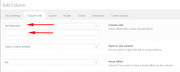
I set this to “no link” and now the error doesn’t occur, please clear your browser cache and check.
I recommend disabling the “social-warfare” plugin which is giving the 404 error above.Best regards,
MikeHey Jaispirit,
Thanks for the login, when I look at your homepage for iPad (768px) resolution I see the logo centered like screenshot #1 and for the iPad Pro (1024px) resolution I see the logo to the right over a button, please see screenshot #2.
So the 1024px resolution (actually 989px) is the beginning of the desktop break, if you want this to change, at what size do you want this to occur at?Best regards,
MikeJuly 13, 2019 at 7:15 pm in reply to: Modifying the Color Secton on WooCommerce default Shop page and Autoresponder #1118370Hey phausner,
Thanks for the login you can change your shop header background color at Enfold Theme Options > Shop Options > Shop Banner Image Color Overlay
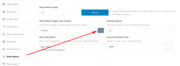
Another option would be to try this code in the General Styling > Quick CSS field or in the WordPress > Customize > Additional CSS field:#av_product_description .av-section-color-overlay { opacity: 1 !important; background-color: #f15b5b !important; }Best regards,
MikeJuly 13, 2019 at 6:51 pm in reply to: Error Message: The site is experiencing technical difficulties… #1118369Hey Jagrav,
Thanks for the login, I tried updating your page and got this with your error:Failed to load resource: the server responded with a status of 500 ()I created a template from your contact page so this I could create a test page and try removing elements to find one causing the error, but the page saves and updates without issue, please try editing for yourself, url is in the Private Content area.
Perhaps the original contact page is damaged somehow?Best regards,
MikeHey ual84,
Sorry for the late reply, Try adding this code to the end of your functions.php file in Appearance > Editor:function custom_script(){ ?> <script> (function($){ $(document).ready(function(){ $("h1.main-title.entry-title").text("Kalender mit Ereignissen"); }); })(jQuery); </script> <?php } add_action('wp_footer', 'custom_script');Best regards,
MikeHey M1000000,
The “place mode” is used by default, the option in the map element is called “roadmap”.
My last understanding was that Google was going to track the account “usage” and then apply the “discount” in the billing.
Do you have many API’s on one account, or are they linked to a manager account?Best regards,
MikeJuly 13, 2019 at 5:22 pm in reply to: change the height of the category image that appears above products? #1118362Hey ColinWalton,
Sorry for the late reply, if I understand correctly, you have category images that show over your product images, (perhaps like badges?) but I didn’t see this on your site, is this currently active?Best regards,
MikeHey agavinho,
Sorry for the late reply, I have not used this plugin, TablePress, but it allows import/export of csv and it can be displayed with a shortcode, which you can add to your pages in a code block element.
So it sounds like it’s worth a try.
There are many more in the WordPress repository
Please let us know which one you end up using.Best regards,
MikeHey claha,
Sorry for the late reply, Please try this code in the General Styling > Quick CSS field or in the WordPress > Customize > Additional CSS field:.menu li.menu-item-has-children > a:after { content: ' ▾'; } .menu li > a:only-child:after { content: ''; } @media only screen and (max-width: 990px) { li.av-width-submenu > a > span.dropdown_available:after { content: ' ▾'; } }If this doesn’t work for you please include a url to your site so we can adjust.
Best regards,
MikeJuly 13, 2019 at 2:50 pm in reply to: Enfold and Woocommerce; "Downloads remaining" and "Product expires" #1118329Hi,
Thanks for the link, I see that you have a few test orders but I don’t see where I can view the download page as in your screenshot so we can adjust the table. Please provide the link or explain the “test” account details so I can create a test purchase and examine the download page.Best regards,
MikeHey garretfw,
This is a duplicate question, let’s please continue in the other thread.h1 > .av_font_icon { display: inline-block !important; }Best regards,
Mike -
AuthorPosts
