

Forum Replies Created
-
AuthorPosts
-
Hi,
Thanks for the login, I added the above css and it seems to work fine on the links you provided. I checked some of your other portfolio items, but they didn’t have animated numbers.
Please try clearing your browser cache, and checking again.As a side note, I also see that you are using Enfold v4.0.7, this is quite outdated, please consider updating to v4.5.7
Best regards,
MikeHi,
Please include an admin login in the Private Content area so we might adjust.Best regards,
MikeHi,
To make the number “4” white, please look in your custom css for this css:.avia-animated-number span.avia-single-number { opacity: 0.5 !important; }and replace with:
.avia-animated-number span.avia-single-number {
    opacity: 1 !important;
    color: #fff !important;
}
Then clear your browser cache and any cache plugin, and check.
Best regards,
MikeHi,
Glad to hear you might have found the issue, we will keep this thread open to hear back from you after some more testing.Best regards,
MikeHi,
Happy Birthday!! :) Yay!!
So I created a test page and published and updated again, but I found no “Failed to initialize plugin: avia_builder_button” error, visually on the backend, or in the browser console. When you see the error is it in the console?
Please see the link in the Private Content area.But I do see that you are getting a 400 error in admin-ajax.php and the 403 for Jetpack, these are both server errors, and would be corrected by deactivating the plugins.
Please try deactivating your plugins and activate them one at a time to find the conflicts, I believe you will find issues with Jetpack, & TinyMCE Advanced, perhaps others like Sucuri.The Jetpack error is something Jetpack has been working on but so far no clear solutions other than deactivating it.
Did you know that we have included the “Classic Editor” in the theme options at Enfold Theme Options > Select Your Editor? This will allow you to remove your “Classic Editor” plugin and possibly a conflict.
Sorry, I didn’t get this sorted out today, but please try deactivating your plugins to see if you can isolate the conflict.
Best regards,
MikeHi,
It seems that your site is working now and I can see that the site has been started, but I assume that you still wish to have a “Coming Soon”, or “maintenance page” while you work on the site.
Unfortunately, I’m still unable to login to your WordPress. I get an error “Invalid username”:
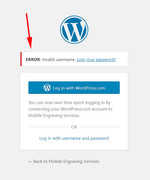
But adding a “Coming Soon” or “maintenance page” is an easy step, please see our documentation about it here.
We would be happy to assist further, if you wish.Best regards,
MikeHi,
Please try this code in the General Styling > Quick CSS field or in the WordPress > Customize > Additional CSS field:#top.single-post #wrap_all h1, #top.single-post #wrap_all h2, #top.single-post #wrap_all h3, #top.single-post #wrap_all h4, #top.single-post #wrap_all .post-entry p, #top.single-post #wrap_all .post-entry a, #top.single-post #wrap_all .entry-content { font-family: 'noticia text', serif !important; color: #333 !important; font-weight: 400 !important; text-transform: none !important; }Then clear your browser cache and check.
Best regards,
MikeHi,
Thank you for your patience, I have added this css to your Quick CSS and now the button is working correctly:#top #wrap_all .header_color.header-scrolled #menu-item-109.av-menu-button-colored > a .avia-menu-text { background-color: #0077ff !important; color: #ffffff !important; } #top #wrap_all .header_color #menu-item-109.av-menu-button-colored > a .avia-menu-text { background-color: #ffffff !important; color: #0077ff !important; }Please clear your browser cache and check.
Best regards,
MikeHi,
Thanks for the login, I added your social icons to your footer via a HTML widget by copying your header social icons. Please review the code in the widget.
To have the icons show correctly, I included this css in your Enfold Theme Options > General Styling > Quick CSS field:#custom_html-2 .social_bookmarks li { float: none !important; display: inline !important; }To remove the transform scale from the image, I added this css your your Quick CSS.
#top.home .avia-image-container.av-hover-grow img:hover,#top.home .avia-image-container.av-hover-grow .avia-image-overlay-wrap:hover {
    -webkit-transform: scale(1) !important;
    transform: scale(1) !important;
}
Please clear your browser cache and check.
Best regards,
MikeHi,
Sorry for the late reply, I cropped your new image and added it. Please clear your browser cache and check.Best regards,
MikeHi,
Please ask your webhost to check if your secure PHP settings are off: “allow_url_fopen, “allow_url_include” and “register_globals”
Please try removing the secure options, import the demo and activate secure options again.
If this doesn’t help, please let us know what webserver you are using, some managed WP services block imports, and include admin login and FTP access in the Private Content area so we can assist.
Unfortunately, this is not your thread, so I recommend including all of this info in a new thread, as this is not your thread so your login info will not be private here.Best regards,
MikeHi,
Glad to hear that this works, somewhat.
Please explain what elements the css above is not including so we can adjust, perhaps you would like the whole site to be this font except a couple of elements? Sometimes it helps to look at it this way.
As for:so that there are no only uppercase letters (in all posts)
Do you mean that you want no uppercase headings, or that only some should be uppercase?
It may be better to have no forced uppercase so that if you want an uppercase you can type it, is that your thought?Best regards,
MikeHi,
Thanks for the feedback, I reviewed your site and the page in the Private Content area and since you wish only some elements on some pages to be justified I recommend adding a custom class to the elements.
So, in this case, I added the custom class “just” to your text block element, like this:
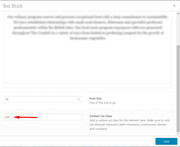
Then I added this css to your Quick CSS:.just p { text-align: justify !important; }Now the justification is working on the first text block element, please try adding the custom class to the other text block elements on your pages as you wish and then clear your browser cache and any cache plugin, and check.
This will give you control over where you wish justification to occur and you won’t have to add more css.
Please let us know if we can assist further.PS: after you add the class “just” to the text element on the first page above, you can remove the first css I posted.
Best regards,
MikeHi,
Thanks for your feedback. I took a look at your site for the error, but I only found a JetPack plugin error:WebSocket connection to 'wss://public-api.wordpress.com/pinghub/wpcom/me/newest-note-data' failed: Error during WebSocket handshake: Unexpected response code: 403I also checked your OptinMonster pages (on the backend) but didn’t see an error in the console. How can we reproduce this error?
Best regards,
MikeHi,
@havi, you should be able to see the option at the top of the page, but there was a couple of issues with some versions such as 4.5.5
Are you using the latest version? If not please update, if you are using the latest version but use IE or Edge as your browser then this is a different issue and we will ask you to try a beta version that corrects IE & Edge issues.
If you can include an admin login we can check better, thanks.Best regards,
MikeHi,
Odd, this seemed to be working before, but now when I disable your css merging in Enfold Theme Options > Performance > JS & CSS file merging and compression your css merging is still showing.
I have now removed the script I posted and commented out the css to have a clean start and try again but I’m still seeing the merged css file, Your server is well known for it’s cache, but typically the test domains from your server (such as yours) are not cached.
So, I’m going to wait a few hours to see if this clears up, and try again.
Please reply to this so it will show up for me again and I can work on this some more. (we only see open topics), I hope this makes sense to you :)
Anyways, I’m sure we can sort this out, right now it looks like a cache issue. Please ask your webhost if they are caching, and if they are, please ask to clear it, otherwise, I’ll try again later.
Thank you for your patience.Best regards,
MikeHi,
I see that you are using Enfold v4.5.4, Please update the theme via FTP, look for the “enfold” folder at /wp-content/themes/enfold/ and rename to “enfold-old” then upload the new version as the folder “enfold” via ftp.
Please don’t try to overwrite the theme folder, as this will leave old files behind and cause errors.
Once you have cleared your browser cache and tested that your site is working correctly, you can delete the old folder “enfold-old”.
If for some reason you want to go back to the old version, simply remove the new folder and change the name of “enfold-old” back to “enfold”Best regards,
MikeHey Angelo_Sule,
Try adding this code to the end of your functions.php file in Appearance > Editor:function custom_script(){ ?> <script> (function($){ $(document).ready(function(){ $("#top.woocommerce-cart .coupon input#coupon_code").attr("placeholder", "Coupon Code"); $('#top.woocommerce-cart button.button[name="apply_coupon"]').text('Apply Coupon'); }); })(jQuery); </script> <?php } add_action('wp_footer', 'custom_script');Please adjust the text “Coupon Code” & “Apply Coupon” to suit, Then clear your browser cache and any cache plugin, and check.
Best regards,
MikeHi,
Thanks for sharing your solution, we will close this now. Thank you for using Enfold.For your information, you can take a look at Enfold documentation here
For any other questions or issues, feel free to start new threads in the Enfold forum and we will gladly try to help you :)Best regards,
MikeHey Webguy1234,
Thanks for the login, I see that your webhost doesn’t have the PHP ZipArchive Extension enabled, this is needed so your site can extract zip files, please ask them to enable then reset your site with a reset plugin and try installing the demo again.Best regards,
MikeHey mayamaria,
Please try this code in the General Styling > Quick CSS field or in the WordPress > Customize > Additional CSS field:#top.page-id-6668 #av-layout-grid-1 > div.flex_cell.no_margin.av_three_fifth.avia-builder-el-3.el_after_av_cell_one_fifth.el_before_av_cell_one_fifth > div > section:nth-child(4) > div > p { text-align: justify !important; }Then clear your browser cache and check.
Best regards,
MikeHi,
Thanks for the login, I see now that this is a category page which has quite a few custom fields. I was able to confirm what you wrote above, the video links don’t work on the category page, but they do elsewhere. I have reviewed your theme settings and didn’t find anything amiss there. I recommended disabling your plugins to see if you can find the conflict.
Unfortunately, when there are no errors in the console, much of the debugging is trial and error. Things to look for are plugins or scripts that redirect links or if they have a built-in lightbox / modal popup.Best regards,
MikeJuly 29, 2019 at 12:26 am in reply to: A different CSS style for mobile only for a part of the site ? #1122596Hi,
Sorry for the late reply, for mobile please try this code in the General Styling > Quick CSS field or in the WordPress > Customize > Additional CSS field:@media only screen and (max-width: 766px) { #top.home .av-layout-grid-container .flex_cell.avia-builder-el-first,#top.home .av-layout-grid-container .flex_cell.avia-builder-el-last { background-size: contain !important; } #top.home .av-layout-grid-container .flex_cell.avia-builder-el-3,#top.home .av-layout-grid-container .flex_cell.avia-builder-el-8,#top.home .av-layout-grid-container .flex_cell.avia-builder-el-13 { min-height: 100px !important; } #top.home .av-layout-grid-container .flex_cell.avia-builder-el-10,#top.home .av-layout-grid-container .flex_cell.avia-builder-el-2,#top.home .av-layout-grid-container .flex_cell.avia-builder-el-7,#top.home .av-layout-grid-container .flex_cell.avia-builder-el-12,#top.home .av-layout-grid-container .flex_cell.avia-builder-el-15,#top.home .av-layout-grid-container .flex_cell.avia-builder-el-5 { min-height: 600px !important; } }Then clear your browser cache and check.
Best regards,
MikeJuly 28, 2019 at 11:26 pm in reply to: Headline in colorsection – Type flashes short time bold #1122592Hey GaWi,
Sorry for the late reply, this is due to this css:h1,h2,h3,h4,h5,h6 { font-weight: 600; }Please check your Enfold Theme Options > Advanced Styling options and remove the “All Headings h1-h6” rule.
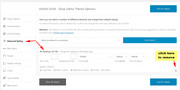
Best regards,
MikeHi,
Thanks for sharing your solution, I assume we can close this now?Best regards,
MikeHi,
Sorry for the late reply, Please try this code in the General Styling > Quick CSS field or in the WordPress > Customize > Additional CSS field:.special_amp { font-family: inherit; font-style: inherit; font-size: inherit; line-height: inherit; font-weight: inherit; color: inherit !important; }Then clear your browser cache and check. If this doesn’t work for your please try adding !important; to each line of code like the last line.
Best regards,
MikeHi,
To apply css to only posts please start your css rules with:#top.single-post #wrap_allfor example:
#top.single-post #wrap_all h1,
#top.single-post #wrap_all h2,
#top.single-post #wrap_all h3,
#top.single-post #wrap_all h4,
#top.single-post #wrap_all .post-entry p,
#top.single-post #wrap_all .post-entry a,
#top.single-post #wrap_all .entry-content {
	font-family: 'Noticia Text', serif !important;
}
You may not need to use #wrap_all, but it can’t hurt. You also may want to add rules for “strong” & “li”, it depends on your posts.
Best regards,
MikeJuly 28, 2019 at 10:15 pm in reply to: "Fullwidth Sub Menu" with internal links creates scroll and anchor conflicts #1122583Hey peernet,
Sorry for the late reply, thanks for the images, since we can not examine your site I tried to recreate your issue on my localhost but using your css above with sub-menus seemed to work after adjusting the top px for my page, although there seemed to be a lag between clicking the anchor link and the smooth scroll effect.
replacing the “id” in the anchor with “name” solved this lag and using a slightly different css landed on the anchor correctly even though I placed the anchor below the target on the page, when I place the anchor above the target no css was needed other than the smooth scroll.
I see that you already tried moving the anchor, so please try this anchor:<a name="gogo"></a>and this css:
html {
scroll-behavior: smooth;
}

*[name]:before
{
  display: block;
  content: " ";
  margin-top: -190px;
  height: 190px;
  visibility: hidden;
}
Best regards,
MikeHey Kevin,
Sorry for the late reply, to make your video links open in a lightbox please add this to the end of the link:?iframe=trueso the full link would look like this:
https://www.youtube.com/watch?v=eJ7al3jXx0c?iframe=trueIf this doesn’t work for you then possibility the lightbox option is turned off in your theme options, please check here:
Enfold Theme Options > Theme Options > Lightbox Modal WindowBest regards,
Mike -
AuthorPosts
