

Forum Replies Created
-
AuthorPosts
-
Hi,
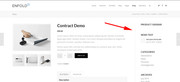
Sorry for the late reply, Try adding this code to the end of your functions.php file in Appearance > Editor://add right sidebar to woo product page add_action('init','ava534345953_init', 50); function ava534345953_init() { add_action( 'woocommerce_after_single_product_summary', 'avia_add_sidebar', 25); } function avia_close_image_div() { global $avia_config; echo "</div> "; } function avia_add_sidebar() { if(is_product()) { $avia_config['currently_viewing'] = "shop_single"; get_sidebar(); } }Then add this code in the General Styling > Quick CSS field or in the WordPress > Customize > Additional CSS field:
.single-product-main-image {
    width: 25%;
}

.single-product-summary {
    overflow: hidden;
    width: 45%;
    float: left;
    margin-right: 5%;
}

.single-product .sidebar {
    width: 25%;
}
Best regards,
MikeAugust 10, 2019 at 9:51 pm in reply to: Lay the category page out the same as the blog page. #1126543Hi,
Sorry for the late reply, I added this function to my child theme functions.php to achieve the small image to the left:add_filter('avf_blog_style','avia_change_category_blog_layout', 10, 2); function avia_change_category_blog_layout($layout, $context){ if($context == 'archive') $layout = 'single-small'; return $layout; }
The trick is that you need to have the sidebar on the archive pages:
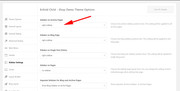
If you don’t want the sidebar, then please try this css in your Enfold Theme Options > General Styling > Quick CSS field/*remove sidebar from single author blog layout*/ #top.archive .container main.av-content-small.units { width: 100%!important; } #top.archive #main .sidebar { display: none !important; } #top.archive .container main.content { border-right-style: none !important; border-right-width: 0px !important; }
Best regards,
MikeHey kristenangel,
Sorry for the late reply, I took a look at the pages and see that the teeth page makes the element sticky by setting the “top” to 200px while the page scrolls.
Your site sets the “top” to a dynamically changing value that continues to change even after I stop scrolling, for a little bit, and also seems to lag a little bit when I start to scroll.
So perhaps you can adjust your javascript to a fixed value instead of what it is now.
Or perhaps you can add the css value “scroll-behavior: smooth;” to your javascript, which may mask the dynamically changing value some, but I’m not sure.
I hope this helps.Best regards,
MikeHey Jan,
Sorry for the late reply, the dev team has begun working on a completely new cookie opt-in system that must be accepted by users for site services, but there is no way of knowing when this will be done. Thank you for your patience.Best regards,
MikeHey FA123,
Sorry for the late reply, please see the link to the beta in the Private Content area.
After installing the beta it will update as normal once the next full update comes out, so there is nothing special you will need to do, but you will need to upload the beta via FTP or through your “file manager” in your webhost cPanel.
Below I will explain the steps, but if you are not sure how to use FTP or the cPanel you may still find it challenging.
I can assist with this if you include an admin login & FTP access, or webhost cPanel access in the Private Content area.Here are the steps:
The easiest and safest way to do this is to go to your theme folder via ftp at /wp-content/themes/enfold/ and rename your current theme to “enfold-old” via ftp then upload the new “enfold” and check that your site is working correctly.
Once you are happy you can delete the “enfold-old” via ftp, (not the WP theme page)
Should for some reason you wish to roll-back to the old version, it’s easy to do, simply rename the new “enfold” to “enfold-new” via ftp and then rename “enfold-old” to “enfold” then refresh your page.
Please don’t try to overwrite the theme folder, as this will leave old files behind and cause errors.Best regards,
MikeHi,
Sorry for the late reply, I took a look at your page /food-drink/ and your homepage, but I didn’t find anything like your screenshot.
I also checked both of your menus at mobile but they didn’t contain any ( | ) such as in your main menu for desktop.
Please see the screenshots in Private Content area.
Did you already resolve this?Best regards,
MikeHi,
Sorry for the late reply and thank you for the login and screenshots. I removed this css from your Quick CSS:h3.av-special-heading-tag { padding-left:40px!important; } .home #after_full_slider_1 .container { padding:0 !important; }I then added this css:
@media only screen and (min-width: 1310px) {
#top.home #after_full_slider_1 > div.container {
	margin: 0 !important;
}
}
@media only screen and (max-width: 767px) {
#top.home #after_full_slider_1 > div.container {
	margin: 0 !important;
	padding-left: 55px !important;
}
}
Please clear your browser cache and check.
Best regards,
MikeAugust 10, 2019 at 6:56 pm in reply to: Contact form: how to change 'from' name and email address? #1126509Hey FeedXL2019,
Sorry for the late reply, please see this post for a list of functions to change the “from” address and autoresponder address, one of these should help, perhaps the first one.Best regards,
MikeHi,
Sorry for the late reply, I see that your site is still using the Enfold v4.5.5 and not the beta v4.5.7.1-beta-4, but your slider seems to be working for me.
I assume that you were having trouble updating to the beta so I renamed your current theme to “enfold-old” via ftp then upload the new “enfold” and checked that your site is working correctly, please see if this helped with your slider.
Once you are happy you can delete the “enfold-old” via ftp, (not in the WP theme page)
Should for some reason you wish to roll-back to the old version, it’s easy to do, simply rename the new “enfold” to “enfold-new” via ftp and then rename “enfold-old” to “enfold” then refresh your page.
Please note that overwriting the theme folder, will leave old files behind and cause errors.Best regards,
MikeAugust 10, 2019 at 6:19 pm in reply to: Ausblenden für bestimmte Geräte funktioniert nicht richtig #1126488Hi,
Sorry for the late reply, and thanks for the links. I believe that you wish to hide a section for mobile only, but I don’t understand which section you wish to hide even when I compare each page at different sizes.
Please include a screenshot for what section to hide at mobile, you can add screenshots by uploading your images to a service such as postimages.org and pasting the html code given in your post.For “EINSZWEI – TEAM” I believe you are asking why at mobile the team columns are 4 columns wide and not 1 column wide, do I understand correctly? Please see the screenshot in Private Content area.
I assume that there is a custom css that is conflicting with this, but without taking a look at your backend I’m not sure where this conflict is. But you could use this css to correct:@media only screen and (max-width: 767px) { #top #av_section_10 .flex_column.av_one_fourth { width: 100% !important; } }Please give this a try and clear your browser cache to see if the css will match the screenshot.
Best regards,
MikeHi,
I’m so glad to hear that these issues are resolved and your site is finished.
We will close this now. Thank you for using Enfold.For your information, you can take a look at Enfold documentation here
For any other questions or issues, feel free to start new threads in the Enfold forum and we will gladly try to help you :)I wish you a happy life also :)
Best regards,
MikeHey Ampower,
Sorry for the late reply, I had not seen Q2W3 before, but it looks nice, but as you have seen the color sections are full width and other elements are forced below.
So when I create a page with a sidebar I have a sidebar divider:

If your content area, or sidebar was a slightly different background color, or if it had a background image would this achieve what you are looking for?
If your page & sticky sidebar is much different, can you link to a test page so we can assist?Best regards,
MikeHi,
Oh, I see, vertical row :)
So on ÜBER MICH the two sections are actually two different column blocks with text blocks in each, so the STUDIUM UND AUSBILDUNG block has a 50px top margin:

On RAHMENBEDINGUNGEN both “am Ende der Sitzung in bar zu bezahlen” AND the next ROW starting with PSYCHOTHERAPIE, MUSIKTHERAPIE. are actually in one text block, so there is no 50px top margin, it has a 42px top margin for the H2 heading:
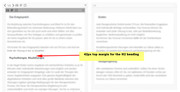
I hope this helps explain why the two pages are a little different, but we can adjust them so they are the same with css.
Please try this code in the General Styling > Quick CSS field or in the WordPress > Customize > Additional CSS field:#top.page-id-2 .flex_column.avia-builder-el-4,#top.page-id-2 .flex_column.avia-builder-el-6,#top.page-id-2 .flex_column.avia-builder-el-8 { margin-top: 0 !important; }This css is for the ÜBER MICH page only so that it doesn’t affect other pages, please let us know if there are other pages you would like this to work on so we can help.
Then clear your browser cache and check.For your homepage slider, each slide is the same size for me on Windows Chrome & Firefox. So I assume that this issue is only occurring on Safari, correct?
Please include a couple of screenshots of the slides in your Safari browser.Best regards,
MikeHi,
I tried the solution on my localhost by adding the code snippet to “single.php” and then added the file to the child theme directory so this will not be lost in updates and it’s working.

Perhaps it didn’t work for you because when you pasted the code the quotes converted to curly quotes, this is a common error, please check.Best regards,
MikeHi,
Sorry, I should have been clearer, you will need to find your new purchase code for the additional 6 months, and enter it in the support register page as if this was your first time and create a new support account.
Please note that this is only for the support forum, it doesn’t affect your Theme Forest account.I don’t believe that I can renew your current support account with your new purchase code, I took a look and don’t see this option, but perhaps it’s just because I don’t have that authority.
I can ask one of our senior members to advise if you like. I just wanted to reply quickly for you if you didn’t care about the old user ID and email address and just wanted to get into the support forum quickly.
If you want me to ask, please include your new purchase code, so the senior member can help the next time they are online, as I don’t see anyone else online right now.
Best regards,
MikeHi,
Please include an admin login in the Private Content area so we can check.Best regards,
MikeHi,
To find your purchase code please see this infographic, which is also linked on the register page:
https://kriesi.at/wp-content/uploads/2013/09/registration_steps.jpg
To register your new purchase code please enter it here:Thank you for using Enfold.
Best regards,
MikeAugust 9, 2019 at 7:07 am in reply to: how to create a line sperator with text in the middle #1126107Hi,
Glad we were able to help, we will close this now. Thank you for using Enfold.For your information, you can take a look at Enfold documentation here
For any other questions or issues, feel free to start new threads in the Enfold forum and we will gladly try to help you :)Best regards,
MikeHi,
Thank you for the ftp access, I checked your error_log and found this error:Allowed memory size of 41943040 bytes exhaustedwhich is about 42mb, you have:
WP Memory Limit: 256 MB
PHP Post Max Size: 8 MB
Max Upload Size: 2 MB
PHP Max Input Vars: 1000
PHP Time Limit: 30I tried to activate Enfold and got a crash and this error:
Failed to load resource: the server responded with a status of 500 () themes.phpwhich I believe is due to the exhausted memory.
I tried researching the error but found no solutions, but adjusting your settings might solve.
Please ask your webhost to adjust to:
PHP Post Max Size: 20 MB
Max Upload Size: 20 MB
PHP Max Input Vars: 3000
PHP Time Limit: nolimitI tried uploading our latest beta, and the frontend of the theme worked, but only after disabling your Yoast & system check plugins.
I found a post on WP about a similar issue where this happened no matter how much memory was allowed and it turned out the database was damaged.AUTO_INCREMENT for many (possibly all) tables had been set to NULL, and would not accept being manually reset.
If the changes above don’t help, can you try reinstalling WP with the softilicious app in cPanel? I don’t think it would make a difference, but it’s worth a try.
Best regards,
MikeHi,
Sorry for the late reply, for the checkbox please try this css:#top.home .avia_ajax_form input#avia_5_1[type="checkbox"] { margin-top: 10px !important; }For your checkbox label, I see your top and bottom 30px margin, but the top margin is overlapping the field above almost as if “position: absolute;” or section max-height is being applied, but I didn’t find it in your css.
Nonetheless, this css will add the top 30px to the checkbox label:#top.home .avia_ajax_form p#element_avia_3_1 { margin-bottom: 30px !important; }After adding these please clear your browser cache and any cache plugin, and check.
About where to add the css, the child theme style.css is typically the preferred place most people like to use, and that is fine, but, because the performance setting for css merging the merged file is not updated until the theme settings are saved. So if you are testing css and checking the site it may not show for you. To avoid this happen please go to the theme settings each time and use the blue button at the top “Save all changes”.
Now if you are testing a lot of css while building your site, this extra step may be a pain, so using the Quick CSS option in the theme settings would be easier because you have to use the same button to save the Quick CSS.
Sometimes if you are still having issues, perhaps from caching or css specificity conflicts or a missing bracket from an earlier rule, testing or using the “WordPress > Customize > Additional CSS” is good because it has the highest priority.
After you are done with your site you can move all of your css to the child theme stylesheet, save your theme settings, and clear your site cache without issue.Best regards,
MikeHi,
Step 2 is so you will have a backup of the theme settings “just in case”
so in step 3 please import your parent theme settings from: Enfold Theme Options > Import/Export > Import Settings from your Parent Theme you won’t see this button until the child theme is activated.
Please don’t do step 4, there is no renaming the child theme in these steps.
In step 5, you may need to select the correct menu to show, not always, but only if the correct menu is not showing.
Step 6 is only if your css is not showing correctly.
Please review this documentation about the child theme.Best regards,
MikeHi,
@orechste, I replied to your other post about this issue here:Please see if that helps, if not then Please include an admin login & FTP access in the Private Content area in a new thread, because as these threads are not yours, others will see your admin and ftp access info.
Best regards,
MikeHi,
Sorry, but the differences I can find between the two pages is yours is not using the css above, which is a direct copy from the other site.
I see you are still using the autoptimize plugin, please try disabling it and the css merging in the theme settings.Best regards,
MikeHi,
Glad to hear above worked out for you, thank you for the feedback :)
So I looked at your columns and see that the space between the column “Arbeitsschwerpunkte” and your image is technically the same as on the “RAHMENBEDINGUNGEN” page.
But the difference is that on the “RAHMENBEDINGUNGEN” page there is more text in the left column to fill the space and in the “ÜBER MICH” page the left column has a bullet list with a small amount of text.
To adjust this we could float the bullet list towards the image, but then you will have more space on the left of the bullet list, so I’m not sure if this would be an improvement? Or we could add more space between the bullets and the text, this might make it look like there is not as much empty space.
What do you think?
Please see the screenshots in Private Content area.Best regards,
MikeHi,
Sorry for the late reply, and thanks for the login. Please try this code in the General Styling > Quick CSS field or in the WordPress > Customize > Additional CSS field:@media only screen and (max-width: 760px) { .av-layout-tab-inner .one_sixth #attachment_5233.wp-caption { width: 100% !important; } .av-tab-section-inner-container { width: 500vw; justify-content: space-between; display: flex !important; } }If this interferes with other tab sections on your site then we can add a page class to the rules so it will only target this one element.
Please clear your browser cache and check.Best regards,
MikeHi,
@bonbuttercup glad to hear, thank you for using Enfold.@Aurora, has your issue also been resolved?
Best regards,
MikeHi,
Sorry for the late reply, it looks like the columns are not going 100% wide for your mobile device, as they should.
I also see you are using Enfold v4.4.1 with WordPress v5.2.2, on both of your sites, this is why you don’t see the Classic Editor option in the theme panel.
Please update your theme to v4.5.7 and check again.Best regards,
MikeHi,
Sorry for the late reply, when I examine your text that looks gray, I find that it is actually blue except the font weight is 100, which is very light making the text hard to see the color. I do note that checking the page out in Firefox shows the blue text a little better than in Chrome.
Try changing the font-weight to something like 300 just as a test to verify.Best regards,
MikeAugust 7, 2019 at 3:25 am in reply to: issue with a black line showing around masonry tiles #1125358Hi,
Sorry for the late reply, please try this css in the Quick CSS:a.av-masonry-entry.isotope-item { border-color: transparent !important; }Then clear your browser cache and any cache plugin, and the Enfold Theme Options > Performance > JS & CSS file merging and compression and check.
Best regards,
MikeAugust 7, 2019 at 2:52 am in reply to: Error Message: The site is experiencing technical difficulties… #1125348Hi,
Glad we were able to help, we will close this now. Thank you for using Enfold.For your information, you can take a look at Enfold documentation here
For any other questions or issues, feel free to start new threads in the Enfold forum and we will gladly try to help you :)Best regards,
Mike -
AuthorPosts

