

Forum Replies Created
-
AuthorPosts
-
Hi,
I’m told that the system updates automatically in the background, so you should be able to login by now, please give this a try.Best regards,
MikeHi,
Thanks, sorry this has been frustrating, I tried testing again without changing anything just so I could see the error before trying to isolate the issue, but editing Advanced Layout Builder pages, posts, portfolios all worked well without errors.
Perhaps you could make a screencast video of the error so we can see it and maybe it will give us a clue.
I’m using Chrome on Windows, are you using a Mac?Best regards,
MikeHi,
Glad to hear it’s working for you.
This is a general fix because I still can not see your site, the hosts file edit doesn’t seem to be working for me, although this has worked for me with other sites. Please try adding a custom class to the table or add the page ID to the beginning of the rules so this css will only apply to this one table. Please let us know if you would like to see an example on how to do this.
Future updates will not break this css as long as you have placed it in the Quick CSS field or your child theme stylesheet, if future updates change the table element then this css will do nothing so you should have nothing to worry about.Best regards,
MikeAugust 13, 2019 at 7:21 am in reply to: IconFont Manager: Uploading fontello font server error #1127091Hi,
@MHUW Thank you for the login, I see that your webhost has the “PHP ZipArchive Extension” disabled, please ask to have it enabled, it is needed to extract the zip file that you upload.Best regards,
MikeHi,
Thanks for the feedback, although I’m not clear what your fix was, but glad that it is. I tried to reproduce the error on my localhost before I replied, but could not, so this is why I made the recommendations.
Please let us know should you experience this again.Best regards,
MikeHi,
@AwiIlanKali thank you for the link, I took a look at your buttons and adjusted the css for your buttons that were using some different classes and it seems to work now. Please try this code in the General Styling > Quick CSS field or in the WordPress > Customize > Additional CSS field:#top .main_color .btn a.avia-button.avia-color-custom { color: rgba(255,255,255,0.9) !important; border-radius: 50px !important; background: linear-gradient(-45deg, #FFA63D, #FF3D77, #338AFF, #3CF0C5) !important; border-color: transparent !important; background-size: 600% !important; animation: anime 16s linear infinite; } @keyframes anime { 0% { background-position: 0% 50%;} 50% { background-position: 100% 50%;} 100% { background-position: 0% 50%;} }Here is the result:
via GIPHYBest regards,
MikeHi,
@gilvfr Sorry, I’m not sure what the dev team had changed at the time, but this was from April and it was included in the following version, which was at least 3 versions ago, so if you are using the latest version of Enfold you would have it.
Please open a new thread and explain your issue and how we can see it on your site with admin login in the Private Content area so we can examine. Please also try disabling your plugins to see if the error continues.Since this is not your thread posting your login here will not be private and you will not see anything we write in the Private Content area.
Best regards,
MikeAugust 13, 2019 at 5:31 am in reply to: Problem in the HTML tag between two multisite versions (different classes) #1127061Hi,
Glad we were able to help, we will close this now. Thank you for using Enfold.For your information, you can take a look at Enfold documentation here
For any other questions or issues, feel free to start new threads in the Enfold forum and we will gladly try to help you :)Best regards,
MikeAugust 13, 2019 at 5:24 am in reply to: Contact form: how to change 'from' name and email address? #1127059Hi,
I changed the function to include a name and email in the from line of the email header and it seems to be working on my localhost mail server, but for some reason, the last letter of the name, “support” in this case, is dropped, so add an extra letter like “supportt”add_filter('avf_form_from', 'enfold_contact_form_change_from', 10, 3); function enfold_contact_form_change_from($from, $new_post, $form_params) { global $enfold_visitor_from; $enfold_visitor_from = $from; $from = 'supportt'.'<'. (Email address hidden if logged out) ' .'>'."\r\n"; return $from; } add_filter( 'avf_form_mail_header', 'enfold_contact_form_add_replyto', 10, 3 ); function enfold_contact_form_add_replyto( $header, $p1, $p2 ) { global $enfold_visitor_from; $header .= 'Reply-To: ' . $enfold_visitor_from . "\r\n"; return $header; }here’s a screenshot of the resulting header:

Best regards,
MikeHi,
Sorry, please try this instead:@media only screen and (max-width: 767px) { .avia-table td:before { display: none !important; } .avia-data-table tr:first-child th { display: block !important; } }Best regards,
MikeAugust 12, 2019 at 2:58 am in reply to: Jumping to anchors from other pages does't work well #1126694Hi,
Sorry for the late reply, I took a look at your two sites and what stands out to me on the site that has the issue has a lazy-load plugin & autoptimize, which typically is at the root of many issues. Neither of these are showing on the site that is working correctly, but the issue could be something else, it’s really hard to say because there is no way to test for this that provides feedback, you would need to disable everything including scripts and then test everything one at a time. Unfortunately once the issue is found, most people don’t want to go without whatever plugin or script is causing it and start looking for a way around it.I can recommend the plugin Page scroll to id to solve this issue, whether it direct linking to an anchor from off-site, same page anchors, or page to page anchors. I’m certain that it will help you. There are a lot of options in it, but the one that seems to help the most is the one that allows it to wait before smooth scrolling to the ID, usually about 300 milliseconds does the trick, it’s just about when the images load so you don’t even know you were waiting.
Best regards,
MikeHi,
Sorry for the late reply and thanks for the shortcode from your table, first you ask if there is an easier way to get your shortcodes, and using the Avia Layout Builder Debugger would be easier to get and share your code. The function in the link will create a box under your builder with the page shortcodes:
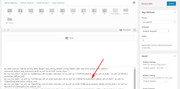
Anyways, I have seen this before and it is explained that for mobile devices with large complex tables this would make it easier to read as you scrolled down. But we can correct this with css. I tried adding your site to my hosts file but it didn’t work without rebooting, which I can’t do right now, so normally I would include a page ID and maybe a section ID, but this will work as-is. Please add this to your Quick CSS and then clear your browser cache and any cache plugin, and check.@media only screen and (max-width: 767px) { .avia-table td:before { display: none !important; } }Best regards,
MikeAugust 12, 2019 at 12:13 am in reply to: Problem in the HTML tag between two multisite versions (different classes) #1126685Hi,
Sorry for the late reply and thank you for the login. I took a look at the two sites side-by-side and see that the English site had “No Transparency” for the header of the homepage:
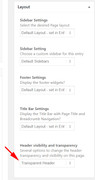
I went ahead and changed it for you, assuming that is ok, now the sites look the same. I don’t know why this happened but I have had drop-down options change on me if it was in focus and I used my mouse wheel, just a thought.Best regards,
MikeAugust 11, 2019 at 11:48 pm in reply to: Can I use different "Extra Elements" content with different menus? #1126680Hi,
Glad we were able to help, we will close this now. Thank you for using Enfold.For your information, you can take a look at Enfold documentation here
For any other questions or issues, feel free to start new threads in the Enfold forum and we will gladly try to help you :)Best regards,
MikeAugust 11, 2019 at 11:44 pm in reply to: Can I use different "Extra Elements" content with different menus? #1126678Hi,
Thank you for the great feedback and for sharing your css for future users, that is one of the reasons I included the function here because that thread was so deep it was hard to find :)
Anyways thanks again for your patience, shall we close this then?Best regards,
MikeHey maxfox167,
Sorry for the late reply, let us start with post navigation, the css below restores the navigation to the mobile screen and makes it darker:@media only screen and (max-width: 767px) { .responsive #top .avia-post-nav { display: block !important; } } #top .avia-post-nav { background: rgba(0,0,0,0.5) !important; }For the arrows, when the navigation is closed the arrows are in the center of a small area and when we hover you will note that the arrows stay in that position while the post preview “grows” from it if you would like to try having the arrow to the other side of the image, please try this css:
#top .avia-post-nav:hover.avia-post-prev .label {
    left: 260px !important;
}
#top .avia-post-nav:hover.avia-post-next .label {
    right: 260px !important;
}
Please try these codes in the General Styling > Quick CSS field or in the WordPress > Customize > Additional CSS field, Then clear your browser cache and any cache plugin, and check.
I see that you are using Enfold v4.4.1 which had a few issues with the WordPress v5 and WPML, so I recommend upgrading to see if this helps with your other issues. Please try the beta version in the Private Content area because the dev team has fixed a lot of issues recently. The easiest and safest way to do this is to rename your current theme in /wp-content/themes/enfold/ to “enfold-old” via ftp then upload the new “enfold” and check that your site is working correctly.
Once you are happy you can delete the “enfold-old” via ftp, (not the WP theme page)
Should for some reason you wish to roll-back to the old version, it’s easy to do, simply rename the new “enfold” to “enfold-new” via ftp and then rename “enfold-old” to “enfold” then refresh your page.
Please don’t try to overwrite the theme folder, as this will leave old files behind and cause errors.If you don’t feel comfortable with this I can assist, but I will need an admin login & ftp access, then we can see if you still need help with the other issues.
Best regards,
MikeHi,
@hunter_ncmed Please start a new thread so we can link to the file for you, as this is not your thread you will not see the Private Content area.
Please reply here with the link to your thread so I can find it.Best regards,
MikeAugust 11, 2019 at 9:36 pm in reply to: Contact form: how to change 'from' name and email address? #1126671Hi,
Thanks for the feedback, Try adding this code to the end of your functions.php file in Appearance > Editor:add_filter('avf_form_from', 'enfold_contact_form_change_from', 10, 3); function enfold_contact_form_change_from($from, $new_post, $form_params) { global $enfold_visitor_from; $enfold_visitor_from = $from; $from = "info@<domain>"; return $from; } add_filter( 'avf_form_mail_header', 'enfold_contact_form_add_replyto', 10, 3 ); function enfold_contact_form_add_replyto( $header, $p1, $p2 ) { global $enfold_visitor_from; $header .= 'Reply-To: ' . $enfold_visitor_from . "\r\n"; return $header; }please be sure to change the email address in the code and test on a current version, I tested on v4.5.7 and it works correctly.
Best regards,
MikeAugust 11, 2019 at 9:28 pm in reply to: Masonry gallery – title below image and new image effect #1126669Hi,
Sorry for the late reply, Please try this code in the General Styling > Quick CSS field or in the WordPress > Customize > Additional CSS field:#top .av-masonry figcaption.av-inner-masonry-content.site-background { background: #cde5e6 !important; } #top .av-masonry figcaption.av-inner-masonry-content.site-background .avia-arrow { display: none !important; } #top .av-masonry-entry .av-masonry-entry-title { text-align: center; } #top .av-fixed-size .av-masonry-entry .av-inner-masonry-content { bottom: -4px !important; padding: 3px 0 0 0 !important; } #top .av-large-gap.av-fixed-size .av-masonry-entry .av-inner-masonry { right: 20px !important; bottom: 3px !important; } #top .av-hover-overlay-grayscale .av-masonry-entry .av-masonry-image-container { -webkit-filter: none !important; filter: none !important; background-size: contain !important; background-repeat: no-repeat !important; } #top .av-masonry-entry:hover .av-masonry-image-container { -webkit-transform: none !important; transform: none !important; opacity: .5; background-color: #cde5e6; }Then clear your browser cache and check.
Please see the screenshot in Private Content area.Best regards,
MikeHi,
Sorry for the late reply, Please try this code in the General Styling > Quick CSS field or in the WordPress > Customize > Additional CSS field:#top #termine.main_color .avia-table.avia-table-4 tr.avia-heading-row th { border: solid 1px #fff !important; } #top #termine.main_color .avia-table.avia-table-4 tr:nth-child(3) { border: solid 1px #cde5e6 !important; } #top #termine.main_color .avia-table.avia-table-4 tr:nth-child(2) > td:nth-child(1),#top #termine.main_color .avia-table.avia-table-4 tr:nth-child(3) > td:nth-child(1) { border-right: solid 1px #cde5e6 !important; }Then clear your browser cache and check.
Best regards,
MikeHi,
Sorry for the late reply, when using several anchors for the same page in your menu the top most anchor will be highlighted as the anchor for the page on page load, it is viewed as the “home” anchor aka “#top”. If you don’t want to have a “home” in the menu but also don’t want the top most menu item highlighted then we will do this trick:Please create a custom menu item with this as the url: #top
and name it anything, “top” as an example, then hide it with this css in your Quick CSS or stylesheet:#menu-item-3235 { visibility: hidden; }note that the “#menu-item-3235” is the ID of the menu item (li), so please adjust to suit. The item will not show or have a clickable blank area in the menu, but the other items will only highlight when they are in view.
What @Vinay was pointing to in the documentation for One Page sites is our “One Page” menu option which adjusts for this issue:
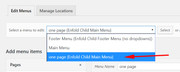
this also works and will not highlight the top most item on page load, but once in a while if you are at the top most item which is close to the top and you scroll up a little to the top the highlighted item doesn’t change back, in this case please use the trick above.
I hope this helps.Best regards,
MikeAugust 11, 2019 at 6:24 pm in reply to: Contact form: how to change 'from' name and email address? #1126644Hi,
Thanks for the feedback, I have tested the default email header for Enfold v4.5.7 and confirm that the from address is correct.
So I checked your site and see that you are using Enfold v4.0.7 which is very outdated.
Please try updating your theme to correct this.Best regards,
MikeAugust 11, 2019 at 5:20 pm in reply to: Can I use different "Extra Elements" content with different menus? #1126639Hi,
Thanks for the login, I added this function to your child theme functions.php:if(!function_exists('avia_append_search_nav')) { //first append search item to main menu add_filter( 'wp_nav_menu_items', 'avia_append_search_nav', 10, 2 ); add_filter( 'avf_fallback_menu_items', 'avia_append_search_nav', 10, 2 ); function avia_append_search_nav ( $items, $args ) { if(avia_get_option('header_searchicon','header_searchicon') != "header_searchicon") return $items; if(avia_get_option('header_position', 'header_top') != "header_top") return $items; global $avia_config; ob_start(); get_search_form(); $form = htmlspecialchars(ob_get_clean()) ; $items .= '<li id="menu-item-search" class="noMobile menu-item menu-item-search-dropdown"> <a href="?s=" rel="nofollow" data-avia-search-tooltip="'.$form.'" '.av_icon_string('search').'><span class="avia_hidden_link_text">'.__('Search','avia_framework').'</span></a> </li>'; return $items; } }This will add the search icon ajax search to zen menu logic plugin by overriding the parent avia_append_search_nav function and it will make sure to append the search icon to all menus regardless of location. You should be able to use this in all of your installs.
Please check.Best regards,
MikeHey jillinnemann,
Sorry for the late reply, and thanks for the link and screenshot. Unfortunately there is not a good way to do this that will work for all screen sizes because these are really 4 different tables next to each other, not 1 table, so the height of each cell in each column has to be set. Yet these would have to be re-calculated for each screen size because a percentage won’t work.
If it was one table then the content of the first column cells would set the whole row, think of a spreadsheet.
But if you would like to give it a try I can explain what css to use, we will look at the first cell that is larger “Angebote, Aufträge, Lieferscheine, Rechnungen”, so to make all of the cells in that row the same use this css:#top.page-id-1346 div.avia-table.main_color.avia-pricing-table-container ul > li:nth-child(8) { height: 72px !important; }then all you need to do is chage the nth-child number for each cell after that one working down, skipping the cells that are not larger, and also change the height for each one to match your text.
now you will want the icons to be centered, so use this css:#top.page-id-1346 div.avia-table.main_color.avia-pricing-table-container ul > li:nth-child(8) img { position: absolute; top: 50%; left: 50%; transform: translate(-50%, -50%); }and just match the nth-child numbers you came up with.
Please see the screenshot in Private Content area.
If you test the css above, be sure to clear your browser cache.I would recommend re-wording your text and maybe making the font smaller to fit the cells, or use an on-hover popup to show your full text.
I hope this helps.Best regards,
MikeHey thehorsestore,
Sorry for the late reply, Please try this code in the General Styling > Quick CSS field or in the WordPress > Customize > Additional CSS field:#top .onsale { top: -17rem !important; position: absolute !important; }Best regards,
MikeHey zeadZeven,
Entschuldigung für die verspätete Antwort, danke für den Link, aber ich sehe, dass Ihre beiden Buttons Linkfehler haben:
/?page_id=3576/#homewerwirsind
/?page_id=3576/#contact
bitte korrigieren an:
#homewerwirsind
#contact
Dadurch rollen Ihre Links reibungslos.
Wenn sich der Link in der Adressleiste ändert, können wir dies nicht ändern. Dies ist normal.
Sie könnten versuchen, ein Plugin wie Zur ID blättern zu verwenden. Ich glaube, es behebt dieses Problem.— Translated with Google —
Sorry for the late reply, thanks for the link, but I see that your two buttons have link errors:
/?page_id=3576/#homewerwirsind
/?page_id=3576/#contact
please correct to:
#homewerwirsind
#contact
this will make your links scroll smooth.
for having the link in the address bar change, we can not change this, it is normal.
You could try using a plugin such as Page scroll to id, I believe it addresses this.Best regards,
MikeHi,
Sorry for the late reply, Please try this code in the General Styling > Quick CSS field or in the WordPress > Customize > Additional CSS field:#top.page-id-1072 .avia-logo-element-container .slide-entry.av_one_fourth { height: 104px !important; } #top.page-id-1072 .avia-logo-element-container .slide-entry.av_one_fourth img { margin: 0; position: absolute; top: 50%; left: 50%; transform: translate(-50%, -50%); }Then clear your browser cache and check.
Best regards,
MikeHi,
Thanks for the feedback, I took a look at your site and found that you have this custom css hiding it:.woocommerce.woocommerce-page .sidebar.sidebar_sidebar_right.alpha.units { display: none!important; }please look for this and remove it, Please see the screenshot in Private Content area.
Best regards,
MikeAugust 11, 2019 at 2:03 am in reply to: Can I use different "Extra Elements" content with different menus? #1126555Hi,
Sorry for the late reply, I took a look at your page but it looks like your search icon has been disabled at Enfold Theme Options > Main Menu > Append search icon to main menu please check and enable.
Once it is enabled we can move it to the end of your menu next to the word “English” that is where you would like it?Best regards,
MikeHi,
Sorry for the late reply, and thanks for the login and screenshot, we have seen this error a couple of times before and disabling the autoptimize plugin and enabling Enfold Theme Options > Performance > Disable Template Builder Elements > Always load all elements solved. Please give this a try.
I tried copying one of your products to my localhost and then added a blog post element and it worked without error, I also tried the different blog layouts from your image and changing the “Disabling of template builder elements” to “load used elements only” and this also worked.
I see that you are also using “FooEvents for WooCommerce” so I wonder if this is part of the conflict, as you know from the message in your product page back end:Please note that the Advanced Layout Builder for products will not work with all WooCommerce ExtensionsI looked at your products but didn’t find one with a blog post element, is this page with the error still available to see?
Best regards,
Mike -
AuthorPosts
