

Forum Replies Created
-
AuthorPosts
-
Hi,
Glad we were able to help, we will close this now. Thank you for using Enfold.For your information, you can take a look at Enfold documentation here
For any other questions or issues, feel free to start new threads in the Enfold forum and we will gladly try to help you :)Best regards,
MikeHi,
Glad to hear that the css worked for you, for your new request I wrote this script which will apply the css overflow-y:hidden; to the page so that it will not scroll, but I had to include a one-second delay for the mouse clicks that trigger it. It may work with a faster delay such as a half-second (500), feel free to test. When the overflow-y:hidden; takes effect the browser scroll bar will disappear, that is just how it works.
This is set to work on any page, but if you find any conflicts we can set it to work on only one page, please check and let us know.Try adding this code to the end of your functions.php file in Appearance > Editor:
function prevent_scrolling_lightbox(){
  ?>
  <script>
(function($){
 $("a.av-masonry-entry").click(function(){
 	setTimeout(function () {
 if	($("body").hasClass("mfp-zoom-out-cur")) {
$("html").css("overflow-y","hidden");
}
else {}
 }, 1000);
});
$(document).click(function(){
 	setTimeout(function () {
 if	(!$("body").hasClass("mfp-zoom-out-cur")) {
$("html").css("overflow-y","visible");
}
else {}
 }, 1000);
});
})(jQuery);
</script>
<?php
}
add_action('wp_footer', 'prevent_scrolling_lightbox');
Best regards,
MikeSeptember 24, 2019 at 4:36 am in reply to: Parent and page itself as active in navigation – Fix please #1141194Hi,
Glad we were able to help, we will close this now. Thank you for using Enfold.For your information, you can take a look at Enfold documentation here
For any other questions or issues, feel free to start new threads in the Enfold forum and we will gladly try to help you :)Best regards,
MikeHi,
Thank for the login, I found your issue is your plugin Hummingbird while the caching is off the minifying is on, if you look at the admin bar for your site you will see a option “see this page unminified” and if you click it the css will work.
Please see the screenshots & link in the Private Content area.
So please clear this or disable it.Best regards,
MikeSeptember 23, 2019 at 2:55 am in reply to: Theme update error ('unable to copy some files') #1140804Hey FeedXL2019,
Thanks for the screenshot and pastebin, you could check your file permissions which would not hurt, but they are probably correct, from your screenshot I see that you have two security plugins, perhaps the encrypted update link set off a false positive and they tried to protect you? Maybe not but you could try disabling them and try again.
I would recommend updating via ftp, like this:
The easiest and safest way to update is to download the newest version from Theme Forest and rename your current theme to “enfold-old” via ftp, then upload the new “enfold” via ftp and check that your site is working correctly.
Once you are happy you can delete the “enfold-old” via ftp, (not the WP theme page)
Should for some reason you wish to roll-back to the old version, it’s easy to do, simply rename the new “enfold” to “enfold-new” via ftp and then rename “enfold-old” to “enfold” then refresh your page.
Please don’t try to overwrite the theme folder, as this will leave old files behind and cause errors.Best regards,
MikeHi,
Thank you for the good details, I tried to follow along and I believe I understand, so looking only at your homepage #av_section_3 I see that the column-reverse is working correctly because you have disabled the Equal height so now the issue is at 768px the image in the first column is not vertically aligned.
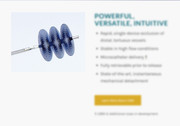
I found this article that offers a way to center the column vertically with flex and I applied it to your situation:@media only screen and (min-width: 767px) { #av_section_3 .entry-content-wrapper { display: flex; align-items: center; justify-content: center; } #av_section_3 .entry-content-wrapper .flex_column.first { max-width: 50%; } }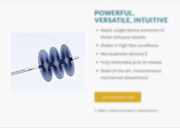
Please give this a try and use !important; where needed and clear your cache.Best regards,
MikeHi,
Thank you for bringing this up, I’m sure it won’t be too long before this becomes a new standard, but we will have to wait for iPhone to support it then WordPress will probably push it.
We will close this now. Thank you for using Enfold.For your information, you can take a look at Enfold documentation here
For any other questions or issues, feel free to start new threads in the Enfold forum and we will gladly try to help you :)Best regards,
MikeHi,
Thank you for the feedback, I have definitely learned a lot about accessibility while helping you and already see the dev team making changes internally. Thank you for your patience and using Enfold.Best regards,
MikeHey Maneu,
We can do this for you, I see 3 topics and 24 replies, shall I do this?Best regards,
MikeHi,
Glad to hear, your logo is looking good now :) *happy face*
shall we close this then?Best regards,
MikeHi,
Sorry for the late reply, first let’s look at the footer social icons, typically the icons have a font color until hover when the circles show:

for this please use this css:#top #socket.socket_color .social_bookmarks a { color: #fff !important; }If you would prefer to have the hover colors always show so they stand out better:

use this css instead:#top #wrap_all #socket .av-social-link-twitter a { color: #fff; background-color: #46d4fe; } #top #wrap_all #socket .av-social-link-facebook a { color: #fff; background-color: #37589b; } #top #wrap_all #socket .av-social-link-instagram a { color: #fff; background-color: #a67658; } #top #wrap_all #socket .av-social-link-youtube a { color: #fff; background-color: #a72b1d; }I was not sure which way you would want it.
These also work for the mobile footer:

For your top social icons I adjusted the css posted above by adding a !important; so they will show on mobile, please clear your browser cache and check. Please note that some mobile browsers can be hard to clear, so try a few times:

Now your your cart icon, search icon, and mobile menu on very small mobile devices I wrote this css to work up to 425px, which offered plenty of room. I added this css for you and cleared your site cache, but you still need to clear your browser cache, probably a few times.

@media only screen and (max-width: 425px) {
.responsive #top #wrap_all #header_main > .av-logo-container {
	width: 95% !important;
    max-width: 95% !important;
}
.responsive #top #wrap_all #header_main > .av-logo-container #menu-item-shop .cart_dropdown_link {
    padding: 0 10px 0 20px !important;
}
}
I note that at tablet width (768px) you need to change your menu to mobile burger style because it’s to large for your header or we can hide half of them until laptop width (1024px), it’s up to you.
Thank you for your patience.Best regards,
MikeHey jihoonjang,
Sorry for the late reply, you can turn off the performance settings at: Enfold Theme Options > Performance > JS & CSS file merging and compression Please try disabling both and also change the setting: Enfold Theme Options > Performance > Disable Template Builder Elements > Always load all elements you will want it to be set to Always load all elements Then check that your jQuery is loading in the header, it does by default:

Naturally you will also disable any caching plugins to ensure this is not your issue.
Unfortunately, we can not support this third party plugin, but this is all of the settings I can think of that might cause an issue.Best regards,
MikeHi,
Sorry for the late reply, to enable them on mobile and also disable the flyout animation, Please try this code in the General Styling > Quick CSS field or in the WordPress > Customize > Additional CSS field:@media only screen and (max-width: 767px) { .responsive #top .avia-post-nav { display: block !important; } .responsive #top .avia-post-nav:hover .entry-info-wrap { width: 0 !important; } }Best regards,
MikeHey kstidham,
Sorry for the late reply and thanks for the login, your version of Enfold v3.4.3 is not WordPress v5.x ready
your best option to update is to update via ftp following these steps:The easiest and safest way to update is to download the newest version from Theme Forest and rename your current theme to “enfold-old” via ftp then upload the new “enfold” via ftp and check that your site is working correctly.
Once you are happy you can delete the “enfold-old” via ftp, (not the WP theme page)
Should for some reason you wish to roll-back to the old version, it’s easy to do, simply rename the new “enfold” to “enfold-new” via ftp and then rename “enfold-old” to “enfold” then refresh your page.
Please don’t try to overwrite the theme folder, as this will leave old files behind and cause errors.I see that you have the “WPBakery Visual Composer” installed, we do not recommend or support this plugin so if you built pages with it I’m unsure what will happen. There is a good chance all will be ok, but I recommend disabling the Gutenberg editor from within the Enfold options at Enfold Theme Options > Select Your Editor
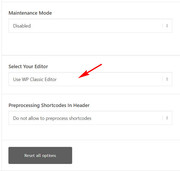
Please let us know how this goes for you.
Best regards,
MikeSeptember 22, 2019 at 10:31 pm in reply to: Center the "Phone Number or small info text" in Header #1140784Hi,
Sorry for the late reply, I took a look at your Quick CSS and found that you had a rouge bracket:.phone-info {font-size: 20px; } }notice the third bracket, I removed it for you and cleared your cache, please clear your browser cache and check if this helped.
Best regards,
MikeSeptember 22, 2019 at 10:17 pm in reply to: Parent and page itself as active in navigation – Fix please #1140781Hey mynick,
Sorry for the late reply, I see that “Ons aanbod” becomes the “current_page_parent” of the other pages, we can correct this with some css. Please try this code in the General Styling > Quick CSS field or in the WordPress > Customize > Additional CSS field:.current-menu-parent.current_page_parent .avia-menu-text { color: #fff !important; }Best regards,
MikeSeptember 22, 2019 at 10:01 pm in reply to: Enfold Image Content Type to show PDF preview image #1140775Hey itchybrain,
Sorry for the late reply, I see that the pdf’s are in a image element but when I try to recreate this I can not choose a pre existing pdf from the library, and if I upload a pdf from the element it will not show.
Also the media library is not creating thumbnails for the uploaded pdf.
I did this testing on a clean install, so I guess that perhaps your client had a pdf plugin installed or an image plugin?
Sorry, wish I could have been more help.Best regards,
MikeHey KosmetikAndNails,
Sorry for the late reply, Please try this code in the General Styling > Quick CSS field or in the WordPress > Customize > Additional CSS field:.av_promobox.avia-button-yes > div > a.avia-button { background-color: #000 !important; border-color: #444 !important; }Then clear your browser cache and check.
Best regards,
MikeSeptember 22, 2019 at 9:24 pm in reply to: Change a h3 into div in the comments section – in which file? #1140770Hey coolicious,
Sorry for the late reply, I’m not sure I’m looking at the correct H3 I found “Leave a Reply”
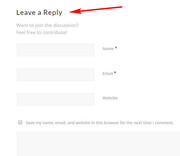
in this case please edit: \enfold\comments.php
lines 186 & 163, look for text:$default_heading = 'h3';
in both cases.
Best regards,
MikeHi,
Glad to hear, I removed the sub-title, but I’m not sure about the menu H2, the menu is set up differently and I’m not sure how it will affect our modifications.
By the way, did you know your logo image is not showing now, I believe the image file name has changed, please try re-choosing it in the settings.Best regards,
MikeHi,
Very good, glad you are using a child theme. Try adding this code to the end of your child theme functions.php file in Appearance > Editor:function replace_tags_with_tags(){ ?> <script> (function($) { $(document).ready(function(){ function replaceElementTag(targetSelector, newTagString) { $(targetSelector).each(function(){ var newElem = $(newTagString, {html: $(this).html()}); $.each(this.attributes, function() { newElem.attr(this.name, this.value); }); $(this).replaceWith(newElem); }); } replaceElementTag('h3.iconbox_content_title', '<h2></h2>'); }); }(jQuery)); </script> <?php } add_action('wp_footer', 'replace_tags_with_tags');It will change all h3 iconbox titles to h2
You don’t need to update if all is working fine for you right now.
If you have trouble with this please ensure that your jQuery is loading in the header, that is uncheck Enfold Theme Options > Performance > Load jQuery in your footer
Best regards,
MikeHey Manuela,
Sorry for the late reply, thanks for the link, but it looks like this has been resolved, is this correct?Best regards,
MikeSeptember 22, 2019 at 7:47 pm in reply to: Videos dont open in lightbox anymore after Theme-Update #1140723Hey Tyger-Tyger,
Sorry for the late reply, thanks for the link and the shortcode, please add ?iframe=true to the end of your video link it will then open in a lightbox.[av_codeblock wrapper_element='' wrapper_element_attributes='' codeblock_type='' av_uid='av-k0v9pdi0' id='' custom_class=''] [av_icon_box position='top' icon_style='' boxed='' icon='ue806' font='entypo-fontello' title='Nadine & Robert' link='' linktarget='' linkelement='' font_color='' custom_title='#eeee22' custom_content='' color='custom' custom_bg='#f8f8f8' custom_font='#ffffff' custom_border='' av-medium-font-size-title='' av-small-font-size-title='' av-mini-font-size-title='' av-medium-font-size='' av-small-font-size='' av-mini-font-size='' av_uid='av-3ogx77' admin_preview_bg=''] <a href="https://hochzeitsfotograf-im-harz.eu/videos/Nadine-Robert.mp4?iframe=true"><img class="alignnone size-full wp-image-1013" src="https://hochzeitsfotograf-im-harz.eu/wp-content/uploads/2016/07/video-rob-nad.jpg" alt="Video von Nadine und Robert" width="500" height="281" /></a> <div class="kleiner-text">Equipment: 3 x Canon 5D MKII | Team: 3 Kameramänner | Dauer: 6 Stunden</div> [/av_icon_box] [/av_codeblock]Best regards,
MikeHi,
Sorry for the late reply, and thanks for sharing your solution, shall we close this then?Best regards,
MikeHey Annettebirkmann,
sorry for the late reply, thanks for the link, Please try this code in the General Styling > Quick CSS field or in the WordPress > Customize > Additional CSS field:@media only screen and (min-width: 760px) { span.copyright { width: 100%; text-align: center; } #socket .sub_menu_socket { width: 100%; } #socket .sub_menu_socket #avia3-menu { display: flex; justify-content: center; } }Then clear your browser cache and check.
Best regards,
MikeHi,
sorry for the late reply, the setting is above the featured image in the layout box:
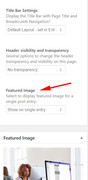
Best regards,
MikeHi,
Glad we were able to help, we will close this now. Thank you for using Enfold.For your information, you can take a look at Enfold documentation here
For any other questions or issues, feel free to start new threads in the Enfold forum and we will gladly try to help you :)Best regards,
MikeHi,
For your first question, changing the iconbox title to H1, we can help you with this with a custom function, but first, are you sure you want to do this? Because for good SEO each page should only have one H1 & H2, you can have many H3. You can change the font size of your headings to any size with no issues, but you should still only have one H1 on each page.
Now for the second part of your first question, it looks like you are using Enfold v4.5.3 without a child theme, so any customizing functions we offer will be lost when you update to our latest version 4.6.2 I would recommend installing the child theme, so your changes will not be lost with future theme updates Read about it & Get it here
For your second question about the font size of your iconbox title, it is not set by the heading size, H3, it is set by the “.iconbox_content_title” class, to change this please try this code in the General Styling > Quick CSS field or in the WordPress > Customize > Additional CSS field:#top #wrap_all .iconbox .iconbox_content .iconbox_content_title { font-size: 20px !important; }please adjust the font size to suit.
Best regards,
Mike -
AuthorPosts
