

Forum Replies Created
-
AuthorPosts
-
September 22, 2019 at 4:58 pm in reply to: The entire Enfold interface is no longer visible on my site #1140650
Hi,
Thank you for the login, the first issue I see is that your child theme has an old header.php that may be contributing to your issue, please try renaming this file to header.php.old so the current header.php in the parent theme can be called. Another issue I see is your SEO Redirection Free plugin which is redirecting many js files.
I recommend deactivating all of your plugins to try to restore your site, and then reactivate them one at a time.Best regards,
MikeHi,
Glad we were able to help, we will close this now. Thank you for using Enfold.For your information, you can take a look at Enfold documentation here
For any other questions or issues, feel free to start new threads in the Enfold forum and we will gladly try to help you :)Best regards,
MikeHi,
Thanks for your feedback, I did some more research and changed the code again, I feel more confident with this one so please clear your browser cache and check. Please note that your iPhone could be trickier to clear so please try a couple of times.function custom_share_titles(){ ?> <script> (function($){ $(document).ready(function(){ $('a[aria-label="Share on Facebook"]').attr({title:'Share on Facebook','aria-hidden':'false'}); $('a[aria-label="Share on Twitter"]').attr({title:'Share on Twitter','aria-hidden':'false'}); $('a[aria-label="Share on WhatsApp"]').attr({title:'Share on WhatsApp','aria-hidden':'false'}); }); })(jQuery); </script> <?php } add_action('wp_footer', 'custom_share_titles');Best regards,
MikeHi,
For the category banner, this is as close as I could get it as it’s a different element than on your shop page, Please try this code in the General Styling > Quick CSS field or in the WordPress > Customize > Additional CSS field:#av_product_description,#av_product_description > .av-parallax { transform: none !important; height: 173px !important; } #av_product_description .av-section-color-overlay { opacity: 0.1 !important; background-color: #1b4b7b !important; } #av_product_description > .av-section-color-overlay-wrap h1 { float: left !important; font-size: 35px !important; color: #1b4b7b !important; font-weight: 600 !important; } #av_product_description .av-parallax-inner.av-parallax-woo { background-position: 100% 50% !important; background-repeat: no-repeat !important; background-size: contain !important; } #av_product_description > div.av-section-color-overlay-wrap > div.container > main { padding-top: 30px !important; }Then clear your browser cache and check. Please see the screenshot in Private Content area.
I’m not sure about your next question but you can only have one banner per category.
If you are asking about putting banners on individual product pages, this is possible but with a custom function that you will have to manually add the image url and product or page id. This example adds a banner to any product, note that the image url is from my localhost so you will have to change it. Also the above css is required to style it like the following screenshot.add_action('ava_after_main_container', 'add_banner_before_breadcrumb'); function add_banner_before_breadcrumb() { if ( is_product() ) { echo'<div id="av_product_description" class="avia-section main_color avia-section-large avia-no-border-styling avia-full-stretch av-parallax-section av-section-color-overlay-active avia-bg-style-parallax container_wrap fullsize" data-section-bg-repeat="stretch" style="color:#000000;">'; echo'<div class="av-parallax avia-full-stretch active-parallax" data-avia-parallax-ratio="0.3"><div class="av-parallax-inner av-parallax-woo" style="background-image: url(https://test.test/wp-content/uploads/2019/09/bildleiste_isc_produkte_neu-1500x170.jpg); main_color background-attachment: scroll; background-position: 50% 50%; background-repeat: no-repeat;"></div></div><div class="av-section-color-overlay-wrap">'; echo'<div class="container"><main class="template-page content av-content-full alpha units"><h1><p>'. get_the_title() .'</p></h1></main></div></div></div>'; } }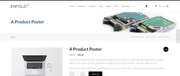
Best regards,
MikeHi,
@cyahome glad this beta helped, this is now built-in to v4.6.2, thanks for using Enfold.Best regards,
MikeHi,
Sorry for the late reply, please link to your site that is having issues with the revolution slider, if you are using Enfold v4.6.2 then the beta fix is built-in, the only other issue I have seen is some extra space below the slider which this css may correct:#top.home #revolutionslider_1 { min-height: 0 !important; }if this is not your issue please explain in more detail because your link loops
Best regards,
MikeHi,
Sorry for the late reply, thanks for the login, I found some misplaced brackets in your Quick CSS and I corrected, I also found this css hiding your social icons for mobile, I was not sure if you want to keep this so I left it:@media only screen and (max-width: 990px) { .social_bookmarks { display: none !important; }}I was able to override it and show your social icons for mobile with this css:
@media only screen and (max-width: 479px){
.responsive #top #wrap_all #header .social_bookmarks {
	display: block !important;
	margin-top: 20vh !important;
	margin-right: 8vw !important;
}
}
Please see the screenshot in Private Content area.
Please clear your browser cache and check.
If you want the icons to show after 479px, please remove your other css.Best regards,
MikeSeptember 22, 2019 at 5:00 am in reply to: Says: No Updates, Running Latest Version (but it is not latest version ((v. 3.8) #1140528Hey sevendarks,
Sorry for the late reply, thank you for the login, I see that your theme is now v4.6.2 and everything seems in order, so is this resolved then?Best regards,
MikeHi,
Sorry for the late reply, I have added this function to your functions.php in an attempt to get your screen readers to read the title attribute of the share buttons:function custom_share_titles(){ ?> <script> (function($){ $(document).ready(function(){ $('a[aria-label="Share on Facebook"]').attr('title','Share on Facebook'); $('a[aria-label="Share on Twitter"]').attr('title','Share on Twitter'); $('a[aria-label="Share on WhatsApp"]').attr('title','Share on WhatsApp'); }); })(jQuery); </script> <?php } add_action('wp_footer', 'custom_share_titles');One interesting thing I find, thanks to the article @Ismael linked to, is that the aria-label is ment to have preference over the title and anchor text, but in your case it doesn’t seem to be working that way. Perhaps if this doesn’t work we can try adding the aria-label to the list item (li) that contains the link.
One question, does your screen readers read the H5 heading for the share link group “Share this entry”? Is there anything else that your screen readers tell you about the elements, even if it makes no sense?
Best regards,
MikeHi,
Sorry for the late reply, thank you for the login, I checked your Enfold Theme Options > Advanced Styling > H2 and the font was set to “default” so I changed it to Raleway and now your text shows correctly.
Please clear your browser cache and check.Best regards,
MikeHey tivo_designs,
Sorry for the late reply, Please try this code in the General Styling > Quick CSS field or in the WordPress > Customize > Additional CSS field:#toggle-id-1-container > div > table > tbody > tr { background-color: #0a0a0a !important; border-color: #0a0a0a !important; }Best regards,
MikeHi,
Glad we were able to help, we will close this now. Thank you for using Enfold.For your information, you can take a look at Enfold documentation here
For any other questions or issues, feel free to start new threads in the Enfold forum and we will gladly try to help you :)Best regards,
MikeSeptember 22, 2019 at 2:44 am in reply to: Once Enfold Theme Update – The Website/Page not Loading ( Nothing Found) #1140522Hey Manuela,
Sorry for the late reply, thank you for the login and screenshot, I took a look and apparently the “Accordion & Toggles” doesn’t like an html coded button, so I created your button with the shortcode wand and it works correctly now.[av_button label='Wheel of life' link='manually,https://your-site.com/wheel-of-life?iframe=true' link_target='' size='medium' position='center' label_display='' title_attr='' icon_select='no' icon='ue800' font='entypo-fontello' color='theme-color' custom_bg='#444444' custom_font='#ffffff' av_uid='' id='' custom_class='' admin_preview_bg='']Best regards,
MikeSeptember 22, 2019 at 2:06 am in reply to: Once Enfold Theme Update – The Website/Page not Loading ( Nothing Found) #1140519Hi,
@RapiD3D sorry for the late reply, I checked your site and it is loading well with no errors and not logged in, are you still experiencing this issue?
@ewingmh Please do not use your home page as your 404 page, in the 404 settings it says:Select if you want to use any of your pages as your custom Error 404 Page. This page will be excluded from page lists and search results. You must deselect the page to make it accessible for public again.
The dev team has written on this topic that selecting the homepage as the 404 page is bad practice: custom pages are special pages excluded from search, indexing, sitemaps… we have to stay compatible with plugins like WPML and YOAST
You could copy your homepage and create an identical 404 page if you want, but I would recommend reading: 11 Brilliant 404 Pages To Turn Lost Visitors Into Loyal CustomersBest regards,
MikeHi,
Thank you, I found that you had the Enfold Theme Options > Performance > Load jQuery in your footer
checked, which prevents most jQuery from running, I corrected it for you.
Please clear your browser cache and check.Best regards,
MikeHi,
Sorry for the late reply, to change the color of this HR separator first click the edit icon of the separator which will show when you hover over it:

Then change the color option in the element:
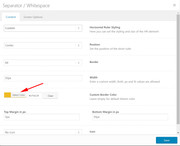
You may still need to clear your browser cache afterwards.Best regards,
MikeHi,
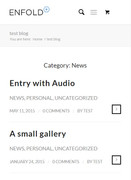
Sorry for the late reply, thanks for the screenshot, you can create this with a blog post element for each category and choose “List layout – simple” but it will still show the meta data for each post which could be hidden with css if you wish. For example:

Best regards,
MikeHi,
Sorry for the late reply, it looks like your code blocks are created with the EnlighterJS plugin, I installed this on my localhost and experimented so as to not destroy your page. The text element in the Advanced Layout Builder uses TinyMCE which in “visual” mode wants to convert angle brackets to > so one option is to turn off the visual editor in your user profile
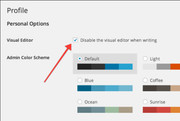
The other option, and probably the best for your case is to use the code block element for your code blocks, it preserves the code even after re-editing the page
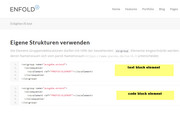
As a side note, I tested the plugin on the default WordPress theme but when trying to re-edit the page the site crashed and I had to re-start the server, probably why the plugin includes the warning “Enlighter Plugin Gutenberg is still BETA software and may have some serious bugs!”Best regards,
MikeHi,
Sorry for the late reply, glad to hear that your contact form is working again, but unfortunately we don’t have a way to compare two email address fields to ensure they are the same.Best regards,
MikeHey legendzero,
Sorry for the late reply, I tested your site with Page Speed Insights and WebPageTest and didn’t get a 404 error.
I was going to suggest looking at your theme settings for the custom 404 page or maintenance page for when you were creating your site, but it seems to be working fine now.Best regards,
MikeSeptember 21, 2019 at 10:18 pm in reply to: Enable preview / thumbnail for webp image files #1140508Hey Ganubis,
Sorry for the late reply, unfortunately, this function doesn’t work for me in showing a thumbnail and my research finds that even with the ability to upload the file type to the media library, which I could, WordPress can not create a thumbnail from the file.
I also tested this in the default WordPress theme but the thumbnail still would not show, interesting webp is not supported in Safari so it may be more trouble than it’s worth at this time. As this is a core WordPress limitation, I’m not sure how we can further help.Best regards,
MikeHi,
Sorry for the late reply, and thanks for the login link. As I see that your site is a single page site you can remove the forward url for a smoother anchor link action, I have done this for you, please clear your browser cache and check.
Please see video in Private Content area.Best regards,
MikeHey Real-3D,
Sorry for the late reply, Please try this code in the General Styling > Quick CSS field or in the WordPress > Customize > Additional CSS field:.mfp-content .mfp-figure .mfp-close,.mfp-content .mfp-figure .mfp-bottom-bar { display: none !important; } .mfp-content .mfp-figure img.mfp-img { padding: 0 !important; }Then clear your browser cache and check.
Best regards,
MikeHi,
Thank you for the link, but the standard WP login is landing on a “Not available” page, do you have a custom login url?Best regards,
MikeHi,
Sorry for the late reply, with the current Enfold v4.6.2 the Whatsapp option is available
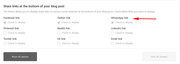
but Instagram is not and it would require quite some customization to add it and the admin opion to control it.
But if you wish you can add the button by editing \enfold\includes\helper-social-media.php
between lines 276 – 284, you will have to research what the link pattern should be to post to Instagram as each network is different.

Best regards,
MikeHey bacoach,
Entschuldigung für die verspätete Antwort, ich habe versucht, dies auf meinem localhost wiederherzustellen, konnte es aber nicht, aber es gibt viele Optionen im Mauerwerk-Element wie Portfolio, Post, Produkt, jeweils mit Kategorien. Bitte geben Sie einen Administrator-Benutzernamen und die URL der Seite in den Bereich für private Inhalte ein, damit wir sie weiter untersuchen können.
Stellen Sie sicher, dass Sie Enfold v4.6.2 verwenden— Translated with Google —
Sorry for the late reply, I tried to recreate this on my localhost but could not, but there are many options within the masonry element such as portfolio, post, product each with categories. Please include an admin login & the page URL in the Private Content area so we can examine further.
Please ensure that you are using Enfold v4.6.2Best regards,
MikeHi,
Glad we were able to help, we will close this now. Thank you for using Enfold.For your information, you can take a look at Enfold documentation here
For any other questions or issues, feel free to start new threads in the Enfold forum and we will gladly try to help you :)Best regards,
MikeHi,
Sorry for the late reply, to change the color of the phone number and remove the hover background color, Please try this code in the General Styling > Quick CSS field or in the WordPress > Customize > Additional CSS field:.special-color a .avia-menu-text { color: #e3622b !important; } .special-color a:hover .avia-menu-text { background-color: transparent !important; color: #e3622b !important; }Then clear your browser cache and any cache plugin, and check.
If this doesn’t help, please include an admin login in the private content area so we can be of more assistance.Best regards,
Mike -
AuthorPosts
