

Forum Replies Created
-
AuthorPosts
-
Hi,
Glad we were able to help, we will close this now. Thank you for using Enfold.For your information, you can take a look at Enfold documentation here
For any other questions or issues, feel free to start new threads in the Enfold forum and we will gladly try to help you :)Best regards,
MikeHi,
@Topkokkies Please open a new thread so we can assist, and include your admin login and ftp access and a DropBox link to your new theme files in the Private Content area, but as this is not your thread your login info will not be private if posted here.
Please post a link to your new thread here so it will be easier to find.Best regards,
MikeHi,
Sorry for the late reply, I’m in the USA but am blocked by WordFence, Please see the screenshot in Private Content area.
In your screenshot I see the main menu is black for the current page, this is how you want the sub-menu to be also, correct?Best regards,
MikeOctober 25, 2019 at 12:30 pm in reply to: Extend support link shows a different price on the email to the website? #1151178Hi,
Glad we were able to help, we will close this now. Thank you for using Enfold.For your information, you can take a look at Enfold documentation here
For any other questions or issues, feel free to start new threads in the Enfold forum and we will gladly try to help you :)Best regards,
MikeHey schwabino,
Sorry for the late reply, I see you are using the “Default(Business)” blog layout, this one doesn’t show the categories, if you use the “Modern Business” it will but the layout is a little different.
To add the categories to the “Default(Business)” blog layout I added this function to the end of your functions.php file, and they are now showing.add_filter('avf_postslider_show_catergories', 'avf_postslider_show_catergories_mod', 10, 1); function avf_postslider_show_catergories_mod($category) { $category = 'show_business'; return $category; }But when editing functions.php you should use the child theme, so your changes will not be lost with future theme updates Read about it & Get it here and then apply this code to your child theme functions.php
I recommend before installing your child theme to save a backup of your “Theme settings export file”.Best regards,
MikeOctober 25, 2019 at 11:17 am in reply to: Extend support link shows a different price on the email to the website? #1151163Hey ColinWalton,
Sorry for the late reply, to extend your support please login to your Envato (Theme Forest) account and go to your downloads tab and next to your item click the “extend” link, then the button will only show the support extension and not the theme.
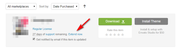
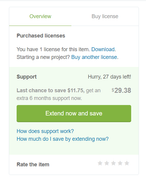
Best regards,
MikeOctober 25, 2019 at 10:47 am in reply to: Updating to ENFOLD Version 4.6.2 from Version 4.2.6 #1151146Hi,
The easiest and safest way to update is to download the newest version from Theme Forest and rename your current theme to “enfold-old” via ftp then upload the new “enfold” and check that your site is working correctly.
Once you are happy you can delete the “enfold-old” via ftp, (not the WP theme page)
Should for some reason you wish to roll-back to the old version, it’s easy to do, simply rename the new “enfold” to “enfold-new” via ftp and then rename “enfold-old” to “enfold” then refresh your page.
Please don’t try to overwrite the theme folder, as this will leave old files behind and cause errors.
If you include FTP access in the Private Content area, and a DropBox link to your theme zip file we can assist.Best regards,
MikeHey HeeHA,
Please look at the bottom of the Video element for the “Lazy Load videos” option and choose “Show in lightbox”
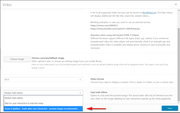
Best regards,
MikeOctober 25, 2019 at 10:16 am in reply to: URGENT: all reviews have empty https:// link added and are visible #1151133Hi,
Yes, you should use a child theme Get our pre-built one here then follow this documentation to add your custom Advanced Layout Builder element.Best regards,
MikeHi,
Glad we were able to help, we will close this now. Thank you for using Enfold.For your information, you can take a look at Enfold documentation here
For any other questions or issues, feel free to start new threads in the Enfold forum and we will gladly try to help you :)Best regards,
MikeOctober 25, 2019 at 10:02 am in reply to: URGENT: all reviews have empty https:// link added and are visible #1151128Hi,
Please edit: \enfold\config-templatebuilder\avia-shortcodes\testimonials\testimonials.php
on line 216 look for:"std" => "http://",and change to"std" => "",
Then clear your browser cache and any cache plugin, and check.Best regards,
MikeHey Metasequ0ia,
Please see our Child Theme Translations documentation.Best regards,
MikeOctober 24, 2019 at 11:51 pm in reply to: URGENT: all reviews have empty https:// link added and are visible #1151035Hi,
Thanks for the explanation, I see that you are using the testimonial element, please check that the “Website Link” field is empty:
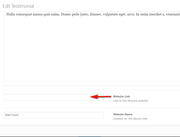
in my tests when this is empty no link should show:
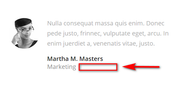
Best regards,
MikeOctober 24, 2019 at 11:17 pm in reply to: Frontend disappears after saving small site changes in Backend. #1151019Hi,
To revert the page back I used the revisions option.Best regards,
MikeHi,
Please try this code in the General Styling > Quick CSS field or in the WordPress > Customize > Additional CSS field:h2.kop-gradient { display: table !important; }Best regards,
MikeHi,
Thanks for the feedback, but it seems your site is down right now, I tried with “www” and not, Please see the screenshot in Private Content area.Best regards,
MikeOctober 24, 2019 at 1:59 pm in reply to: Frontend disappears after saving small site changes in Backend. #1150887Hi,
Sorry you are having these problems, I checked your page and reverted back to the full page and tested with the Avia Layout Builder Debugger I didn’t find any errors even though I added the hashtags and saved and made a few more small changes to try to cause the error again, but couldn’t.
Are you trying to edit the page with the WordPress default editor or the WordPress block editor after building with the Enfold Advanced Layout Builder? Because you can’t use the other editors once it has been built with the Advanced Layout Builder. Can you tell me what edit I should try to cause the error?Best regards,
MikeHi,
Yes I know you want the updated version, I was testing if the Event countdown element would work with the old version to isolate the issue, but unfortunately, it didn’t work. I then switched back to the new version.
Do you have a backup of your site when the countdown worked?
If you look on your Plugins page and click the link at the top that says “Drop-in” you will see the added plugin, this is typically a webhost caching plugin.

Best regards,
MikeHi,
Sorry for the late reply, I took a look at your site and found you were getting javascript errors because of your SG Optimizer plugin, I disabled the typical settings that cause issues and now your site is loading correctly, please clear your browser cache and check.
Here are the settings that typically cause issues:
Lazy Load Images
Load Render-blocking JavaScript Files Asynchronously
Minify JavaScript Files (if they have already been minified)You can turn these back on one at a time a clear your cache each time to narrow down the culprit further.
Best regards,
MikeHi,
Glad we were able to help, we will close this now. Thank you for using Enfold.For your information, you can take a look at Enfold documentation here
For any other questions or issues, feel free to start new threads in the Enfold forum and we will gladly try to help you :)Best regards,
MikeHi,
I temporarily installed versions 4.6 & 4.5.5 and the event countdown worked with neither of them on your site, do you recall what was the version number that did work for you?
I see that you have a “drop-in” plugin called “Erweitertes Caching-Plugin” these are typically installed by the webhost, in your webhost panel do you have a cache clearing option?
I have switched your site back to v4.6.3.1 for now. It might be a little while before another member of the team can offer some advice, thanks for your patience.Best regards,
MikeHi,
@wagwag thanks for the link to your site, while we can offer you some css that will solve this for you, I understand that you would like to be able to adjust this yourself, in which case the instructions above should work. Please include an admin login in the Private Content area so we can take a look at your settings. Since this is not your thread posting your login here will not be private and you will not see anything we write in the Private Content area, so I recommend starting a new thread with admin login info, you can post a link to it here so it will be easier for us to find.Best regards,
MikeHi,
To remove the white background from the header on scroll, Please try this code in the General Styling > Quick CSS field or in the WordPress > Customize > Additional CSS field:.header_color .header_bg, .header_color .main_menu ul ul, .header_color .main_menu .menu ul li a, .header_color .pointer_arrow_wrap .pointer_arrow, .header_color .avia_mega_div, .header_color .av-subnav-menu > li ul, .header_color .av-subnav-menu a { background-color:transparent !important; } .header_color.av_header_transparency .header_bg, .header_color.av_header_transparency .main_menu ul ul, .header_color.av_header_transparency .main_menu .menu ul li a, .header_color.av_header_transparency .pointer_arrow_wrap .pointer_arrow, .header_color.av_header_transparency .avia_mega_div, .header_color.av_header_transparency .av-subnav-menu > li ul, .header_color.av_header_transparency .av-subnav-menu a { background-color:transparent !important; border-color: transparent !important; } #top .header_color #header_meta.container_wrap_meta { background: transparent !important; border-bottom-width: 0 !important; } #top #header_main { border-bottom-width: 0 !important; } #top .av_header_transparency #header_meta { border-bottom: 0 !important; } #top #header_main.container_wrap { border-top-width: 0 !important; }but the burger menu icon still changes to black on scroll, to prevent this, try this css:
    .html_av-overlay-side-classic #top .av-burger-overlay li li .avia-bullet, .html_av-overlay-side #top .av-hamburger-inner, .html_av-overlay-side #top .av-hamburger-inner::before, .html_av-overlay-side #top .av-hamburger-inner::after {
  background-color: #fff !important;
  }
Best regards,
MikeHi,
I took a closer look at this and unfortunately you will have to edit the parent theme. While some files can be added the child theme functions used to point to them, the includes/admin files can not.
This is why the original instructions are for editing the parent theme and probably why your developer ended up doing the same.Best regards,
MikeOctober 22, 2019 at 1:19 pm in reply to: Centered Logo, social icons on right, phone on left #1150179Hi,
I checked your page on my mobile device and it is looking correct for me, Please see the screenshot in Private Content area.
Are you checking from a desktop device and resizing the window? If you are please refresh the screen after resizing, this is a common event but should be fine because an actual device doesn’t change the screen size like this, it is loaded as the actual screen width.
I hope I explained this well.Best regards,
MikeOctober 22, 2019 at 12:37 pm in reply to: Videos dont open in lightbox anymore after Theme-Update #1150154Hi,
Perhaps you are thinking of when you use a video element and choose the option “show in lightbox” in the “Lazy Load videos” option? But you are using an Icon Box element with a self hosted video url in the text box. The?iframe=truehas been our standard way to open videos, and other links in a lightbox for quite a while, I tested this on my site and it works correctly, did you try it?Best regards,
MikeHi,
Glad this helped, please change the above css to this:@media only screen and (min-width: 768px) { #top.page-id-5813 #av_section_2 > div > div > div > div > div > div.avia-data-table-wrap.avia_responsive_table > table > tbody > tr.avia-heading-row > th:nth-child(1), #top.page-id-5813 #av_section_2 > div > div > div > div > div > div.avia-data-table-wrap.avia_responsive_table > table > tbody > tr > td:nth-child(1), #top.page-id-5813 #av_section_2 > div > div > div > div > div > div.avia-data-table-wrap.avia_responsive_table > table > tbody > tr.avia-heading-row > th:nth-child(3), #top.page-id-5813 #av_section_2 > div > div > div > div > div > div.avia-data-table-wrap.avia_responsive_table > table > tbody > tr > td:nth-child(3) { width: 15% !important; } #top.page-id-5813 #av_section_2 > div > div > div > div > div > div.avia-data-table-wrap.avia_responsive_table > table > tbody > tr.avia-heading-row > th:nth-child(2), #top.page-id-5813 #av_section_2 > div > div > div > div > div > div.avia-data-table-wrap.avia_responsive_table > table > tbody > tr > td:nth-child(2) { width: 70% !important; } }This will make not work for mobile devices because the table layout is different for mobile. Is the mobile layout acceptable?
Best regards,
MikeOctober 22, 2019 at 11:49 am in reply to: Full width easy slider scroll down arrow, no function #1150129Hi,
Glad we were able to help, we will close this now. Thank you for using Enfold.
Thanks for the links to your other threads.For your information, you can take a look at Enfold documentation here
For any other questions or issues, feel free to start new threads in the Enfold forum and we will gladly try to help you :)Best regards,
Mike -
AuthorPosts
