

Forum Replies Created
-
AuthorPosts
-
Hi,
Sorry I don’t think we have one, but we do have live demos of all of our demos as examples.Best regards,
MikeHey Moondreamer21,
Thanks for the links, I have adjusted your new page and added all of the necessary css in a code block on the page, it is not in your Quick CSS, it is in a code block so you can copy it in the future, here it is again:.html_entry_id_17448 #main { /*size of page*/ max-width: 80% !important; margin: 0px auto !important; } html.html_entry_id_17448 { /*background of page*/ background: url("https://www.barrelracingtips.com/wp-content/uploads/2018/07/booksbodybg.jpg") #330000 !important; } #top.page-id-17448 #header { /*remove page header*/ display: none !important; } #top.page-id-17448 .container_wrap.title_container { /*remove title container*/ display: none !important; } .html_header_top.html_header_sticky #top.page-id-17448 #wrap_all #main { /*remove padding*/ padding-top: 0px!important; } #top.page-id-17448 #after_full_slider_1.main_color { /*remove background-image after slider*/ background-image: none !important; } @media only screen and (max-width: 430px) { /*mobile adjustment*/ #top.page-id-17448 .avia-slide-wrap { height: 190px !important; } #top.page-id-17448 .avia-slide-wrap img { top: 31% !important; } } @media only screen and (min-width: 431px) and (max-width: 1023px) { /*more mobile adjustment*/ #top.page-id-17448 .avia-slide-wrap { height: 360px !important; } #top.page-id-17448 .avia-slide-wrap img { top: 60px !important; } }Now please note the page id 17448 it is the page id of your new page, if you make another page you will need to change this number in all of the code above.
I also copied the form from your first book page that was in a code block to your new page, just for an example should you want to create a new form in the future, heres the code again:<form id="optin" class="optin" action="https://www.aweber.com/scripts/addlead.pl" method="post" style=" width: 100%;position:absolute; "> <div style="display: none;"><input name="meta_web_form_id" type="hidden" value="1944510671"> <input name="meta_split_id" type="hidden" value=""> <input name="listname" type="hidden" value="stbrsamazon"> <input id="redirect_2f105a715ab5b2b3e16de5031a3d8e13" name="redirect" type="hidden" value="https://www.barrelracingtips.com/free-speed-development-guide"> <input name="meta_redirect_onlist" type="hidden" value="https://www.barrelracingtips.com/already-received"> <input name="meta_adtracking" type="hidden" value="Secrets_to_Barrel_Racing_Success_Free_Gift_Header_Form"> <input name="meta_message" type="hidden" value="1"> <input name="meta_required" type="hidden" value="name,email"> <input name="meta_tooltip" type="hidden" value="name||Name,,email||Email,,custom Amazon Order Number||Amazon Order Number"></div> <div style=" width: 100%; "> <div id="name" class="af2-element" style=" width: 10%; /* max-width: 140px; */ display: inline-block; "><input class="text name" tabindex="600" name="name" required="" type="text" placeholder="Name" style=" background: white; "></div> <div id="email" class="af2-element" style=" width: 10%; display: inline-block; "><input class="text name" tabindex="601" name="email" required="" type="email" placeholder="Email" style=" background: white; "></div> <div id="number" class="af2-element" style=" width: 20%; display: inline-block; "><input class="text" tabindex="602" name="custom Amazon Order Number" required="" type="text" placeholder="Amazon Order Number" style=" background: white; "></div> <div id="submitbutton" class="af-element buttonContainer newbutton" style=" width: 10%; display: inline-block; "><input class="submit" tabindex="603" name="submit" type="submit" value="Send it!" style=" border: solid thin darkgray; background-color: lightgrey; padding: 10px; /* border-radius: 2px; */ color: black; margin: 5px; height: 35px; "></div> </div> <div style="display: none;"></div> </form>and that should be it, please clear your browser cache and check.
Best regards,
MikeHi,
Thanks for the screenshots, but I tested your page with Chrome, Firefox, Edge & IE11 on Windows 10 and didn’t see your error, only like the correct image. I didn’t recognize your browser from the screenshot, is it Safari? Perhaps an old version, I don’t see the 3 top left-hand dots for window management?Best regards,
MikeHi,
Thanks for the link, this looks like a javascript error but I’m not seeing an error code, please ensure that Enfold Theme Options > Performance > Load jQuery in your footer is not enabled and that you don’t have any plugins doing the same or minifying the js.
If this doesn’t help, please include an admin login in the private content area so we can be of more assistance.Best regards,
MikeHey Charlotte,
Please try this code in the General Styling > Quick CSS field or in the WordPress > Customize > Additional CSS field:label.screen-reader-text[for='cat'] { display: none !important; }Best regards,
MikeHey Charlotte,
To hide the categories, Please try this code in the General Styling > Quick CSS field or in the WordPress > Customize > Additional CSS field:#top #main .blog-categories.minor-meta { display: none !important; }To delete the category pages, please see this article.
Best regards,
MikeHey Kurt,
Thanks for the link, you didn’t do anything wrong, it’s not ment to show for desktop, I also see you are using a very old Enfold v3.8 Please try this code in the General Styling > Quick CSS field or in the WordPress > Customize > Additional CSS field:#top #header_main #advanced_menu_toggle,#top #wrap_all #advanced_menu_hide { display: block !important; }After applying the css, Please clear your browser cache and check.
Best regards,
MikeHi,
Glad we were able to help, we will close this now. Thank you for using Enfold.For your information, you can take a look at Enfold documentation here
For any other questions or issues, feel free to start new threads in the Enfold forum and we will gladly try to help you :)Best regards,
MikeNovember 3, 2019 at 4:53 pm in reply to: Burger menu not working for blog post pages on mobile? #1153524Hi,
I tried to reproduce this error on my localhost but couldn’t, but in my tests, I realized that when it is working correctly you lose the ability to use the parent page in mobile, and since every menu item has the arrow next to it its hard to tell which ones have children.
I would recommend unchecking the option “Hide mobile menu sub-menu items” so that people can see the option and perhaps entice them to explore more of your pages, and allow you to keep using the parent pages.
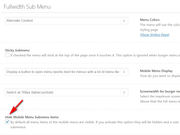
What do you think?
Thanks for the kind words :)Best regards,
MikeHi,
Thanks for the link, the following css will set the width to 400px and then the natural height is 266px, so in the code you will see height set to auto, you can change it to 300px, but then the image is skewed a little, please try both ways and see which you like. I assumed you would want the image centered so I added “margin: auto;” but you can remove this if you wish.
Another option is to use the Simple Image Sizes plugin, this would let you change the image sizes for every type in WordPress, check out this tutorial.
Anyways here is the css, Please try this code in the General Styling > Quick CSS field or in the WordPress > Customize > Additional CSS field:#top #main .big-preview a img { width: 400px !important; height: auto; margin: auto; }Best regards,
MikeHi,
Glad we were able to help, we will close this now. Thank you for using Enfold.For your information, you can take a look at Enfold documentation here
For any other questions or issues, feel free to start new threads in the Enfold forum and we will gladly try to help you :)Best regards,
MikeNovember 3, 2019 at 3:32 pm in reply to: "Update Failed: Could not copy file…" prevents Enfold and plugin updates #1153514Hi,
Glad we were able to help, we will close this now. Thank you for using Enfold.For your information, you can take a look at Enfold documentation here
For any other questions or issues, feel free to start new threads in the Enfold forum and we will gladly try to help you :)Best regards,
MikeHi,
Sorry for the late reply and thanks for the login, I tried to update the “locations” menu expecting to see an error in the console but it successfully updated after adding an item and then removing it:
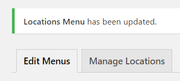
although it did take quite a long time, I found no errors.
What webhost are you using? I see the frontend is loading quickly.
I see your WordPress > Tools > Site Health Status says “Some files are not writable by WordPress”
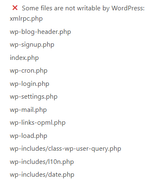
this could explain why the frontend is loading quickly but some of the backend is having issuses.
I don’t see a security plugin, but you have these two warnings:
A plugin has prevented updates by disablingwp_version_check()
WordPress security and maintenance releases are blocked bydefine( 'WP_AUTO_UPDATE_CORE', false );
So with some files not writable and other functions disabled it seems to point towards either a customized WordPress install, some webhosts offer this, or some kind of security / firewall setting perhaps at the server level?So as a test I created a menu on my test install that is about double of yours and it easily saved quickly, so I don’t believe this is due to some menu size limit. I recommend looking into my findings above.
Best regards,
MikeNovember 3, 2019 at 11:15 am in reply to: Search-Form Spam – Javascript being inputted via the search-form #1153481Hi,
Glad to help, we will leave this open for your feedback, thanks for using Enfold.Best regards,
MikeHey Malene,
TheI agree to the terms and conditions laid out in the Privacy Policyis in the theme’s language file, I found it with Poedit, if you translate this I will change it for you and then you can upload to your site.
I assume your language file is “da_DK.po” correct?Best regards,
MikeHey FeedXL2019,
Thanks for the screenshots and link, this is for low vision accessibility because all browsers don’t read the alt tag of images.
To remove the titles Try adding this code to the end of your functions.php file in Appearance > Editor:function custom_script(){ ?> <script> jQuery(window).load(function(){ jQuery('a').removeAttr('title'); jQuery('img').removeAttr('title'); }); </script> <?php } add_action('wp_footer', 'custom_script');Best regards,
MikeHey designyvr,
Thanks for the login, I see that you had the option “Use first slides caption as permanent caption” checked,
If checked the caption will be placed on top of the slider. Please be aware that all slideshow link settings and other captions will be ignored then
I unchecked this for you and now your links work, but you will need to add the caption to two of your slides.Best regards,
MikeHi,
Thanks for the screenshots and the link, Please try this code in the General Styling > Quick CSS field or in the WordPress > Customize > Additional CSS field:@media only screen and (max-width: 767px) { #top.page-id-150 #activities.entry-content-wrapper.avia-builder-el-15 { display: flex !important; flex-wrap: wrap !important; } #top.page-id-150 #activities .flex_cell.avia-builder-el-16.avia-builder-el-first { order: 2 !important; } #top.page-id-150 #activities .flex_cell.avia-builder-el-19.avia-builder-el-last { order: 1 !important; } }After applying the css, Please clear your browser cache and check.
Best regards,
MikeNovember 3, 2019 at 2:28 am in reply to: Single License or Multiple Licenses needed for domain and subdomain #1153431Hey Thomas Martin,
Thank you for asking, your Enfold license is for your root domain, sub-domains are allowed for testing, staging, or even for different parts such as a landing page on the root and a blog on the sub-domain.
Thanks for using Enfold.Best regards,
MikeNovember 3, 2019 at 2:20 am in reply to: Submenu disappears when hovering – but only with Microsoft Edge #1153429Hi,
I checked your page with Edge, but the sub-menu worked correctly, Please see the screenshot in Private Content area.Best regards,
MikeNovember 3, 2019 at 2:14 am in reply to: "Update Failed: Could not copy file…" prevents Enfold and plugin updates #1153428Hey m,
Thanks for the login, I tried to update your theme expecting to see the error, but I didn’t and the theme is now updated.
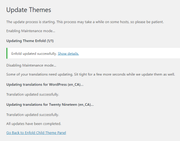
Best regards,
MikeHi,
Sorry for the late reply, I have checked your urls and they are working for me, but it sounds like you moved the files without changing the database, the theme files contain no info about the location, this is in the WordPress config file and the database.
I recommend using a plugin such as duplicator to move your site because it also adjusts your database.Best regards,
MikeNovember 3, 2019 at 1:18 am in reply to: Default Cookie Behaviour in the third option – but Google Analytics is tracking #1153422Hi,
Glad to hear you have found a solution, thanks for using Enfold.Best regards,
MikeNovember 3, 2019 at 1:16 am in reply to: Challenges in combination with The Events Calendar #1153421Hey Ralf,
Sorry for the late reply, I took a look at the language issues and found that Enfold doesn’t provide the language files for “Events Calendar” the plugin provides the language files, but I tried to look at the language files with the hope to edit with Poedit but Events Calendar only adds the “.mo” file which can’t be edited, typically there is a “.po” file which can be edited and used to create a new “.mo” file. So unfortunately the language issues will need to be addressed by the Events Calendar team.
You also asked about “other plugins still show English date format” which plugins are these, I wonder if these plugins are also including their own language file, I looked in the Enfold language file and I didn’t find this.Best regards,
MikeNovember 3, 2019 at 12:37 am in reply to: ADD MAPBOX INSTEAD OF GOOGLE MAP – MUCH NICER STYLE #1153411Hi,
Sharing the code would be very nice to help others test a working example and compare broken code with.
We will leave this open until we hear back from you.Best regards,
MikeHey Christian,
Sorry for the late reply, I took a look at your page but found your actual ID to the contact form is “hochzeitsanfrage” but I see that you have used<div id="hochzeitsanfrage"></div>I recommend removing this and adding the “hochzeitsanfrage” to the color section developer field:
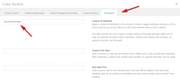
But it looks like you are using a fixed header for mobile so the offset is going to be a little off, but it will be a lot closer. One option is to add 110px padding to the top of your color section to offset where the anchor lands.
If you would like help with this Please include an admin login in the Private Content area.— Translated with Google —
Entschuldigung für die verspätete Antwort, ich habe auf Ihrer Seite nachgesehen und festgestellt, dass Ihre aktuelle ID im Kontaktformular “hochzeitsanfrage” lautet, aber ich sehe, dass Sie verwendet haben
<div id="hochzeitsanfrage"></div>Ich empfehle dies zu entfernen und die “hochzeitsanfrage” in das Farbbereich-Entwicklerfeld einzufügen:
Aber es sieht so aus, als ob Sie einen festen Header für Mobilgeräte verwenden, so dass der Versatz ein wenig geringer ausfallen wird, aber es wird viel näher sein. Eine Möglichkeit besteht darin, den oberen Rand des Farbabschnitts um 110 Pixel aufzufüllen, um die Position des Ankers zu verschieben.
Wenn Sie dabei Hilfe benötigen, fügen Sie bitte ein Administrator-Login in den Bereich Private Inhalte ein.Best regards,
MikeNovember 2, 2019 at 11:58 pm in reply to: Search-Form Spam – Javascript being inputted via the search-form #1153381Hey Paul,
Sorry for the late reply, I would recommend using a plugin such as Blackhole for Bad Bots and BBQ: Block Bad Queries since this looks like the type of attack you are getting. These two plugins are from the same author, Jeff Starr, so they will work together and should work with Enfold.
If you still have attacks Banhammer is also good but requires some hands-on moderating from you.Best regards,
MikeHi,
This is how to add autoplay to the WordPress shortcode:[video width="1280" height="720" autoplay="on" mp4="http://video-url/video.mp4"][/video]I tested this and it is working
Best regards,
MikeNovember 2, 2019 at 11:10 pm in reply to: Removing attribute title from woocommerce product #1153370Hi,
Glad we were able to help, we will close this now. Thank you for using Enfold.For your information, you can take a look at Enfold documentation here
For any other questions or issues, feel free to start new threads in the Enfold forum and we will gladly try to help you :)Best regards,
Mike -
AuthorPosts
