

Forum Replies Created
-
AuthorPosts
-
Hi,
Sorry for the late reply, Jordan’s css worked for me when I tested, I made a couple of adjustments based on your screenshots,
Please try this code in the General Styling > Quick CSS field or in the WordPress > Customize > Additional CSS field:@media only screen and (max-width: 1440px) { nav.main_menu { display: block !important; } #avia-menu .menu-item,#sub_menu1 { display: none !important; } .av-burger-menu-main.menu-item-avia-special { display: block !important; } }After applying the css, Please clear your browser cache and check.
Please see the screenshot in Private Content area.Best regards,
MikeHi,
Sorry for the late reply, Please try this code in the General Styling > Quick CSS field or in the WordPress > Customize > Additional CSS field:#top.page-id-1065 #av_section_1 > div > div > div > div > div.avia-table.main_color.avia-pricing-table-container.avia_show_empty_cells.avia_pricing_default.avia-table-1.avia-builder-el-8.el_after_av_heading.el_before_av_hr > div:nth-child(3) > ul > li.avia-heading-row { background-color: #317B0E !important; border-color: #317B0E !important; } #top.page-id-1065 #av_section_1 > div > div > div > div > div.avia-table.main_color.avia-pricing-table-container.avia_show_empty_cells.avia_pricing_default.avia-table-1.avia-builder-el-8.el_after_av_heading.el_before_av_hr > div:nth-child(4) > ul > li.avia-heading-row { background-color: #9C9D9D !important; border-color: #9C9D9D !important; }Best regards,
MikeHi,
@darnott75 is this what you are trying for:
https://i.postimg.cc/25nqGrRs/2019-11-10-134400.png#top #header_main > .container .main_menu .av-main-nav > li > a { height: 60px !important; line-height: 60px !important; } #menu-item-489 { clear: left !important; }Best regards,
MikeHi,
Sorry for the late reply, is this what you are trying for?
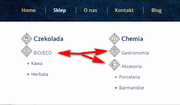
is it only these three items, or all items in the last two rows?
Are you adding any more items to these columns?Best regards,
MikeHey geraldinetay27,
Sorry for the late reply, typically the portfolio items should be shown in the masonry list
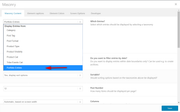
I also see that your portfolio element is not showing the category option, is your theme a first install or did you update from an older version?
Please try deactivating your plugins to see if that solves, if not try reinstalling the theme.The easiest and safest way to do this is to download the newest version from Theme Forest and rename your current theme folder to “enfold-old” via ftp then upload the new “enfold” folder and check that your site is working correctly.
Once you are happy you can delete the “enfold-old” folder via ftp, (not the WP theme page)
Should for some reason you wish to roll-back to the old version, it’s easy to do, simply rename the new “enfold” folder to “enfold-new” via ftp and then rename “enfold-old” to “enfold” then refresh your page.
Please don’t try to overwrite the theme folder, as this will leave old files behind and cause errors.Best regards,
MikeHi,
Sorry for the late reply, have you tried uploading your font in the theme settings “Import” > “Custom Font Manager”?Best regards,
MikeNovember 10, 2019 at 6:33 pm in reply to: How to remove Additional info and SKU from a product page? #1155366Hey gb,
Please try this code in the General Styling > Quick CSS field or in the WordPress > Customize > Additional CSS field:.tabs.wc-tabs,.product_meta { display: none !important; }Best regards,
MikeHey StephanPfluegler,
You can probably get the menu items pretty close by using css to add extra space between the menu groups and changing the font sizes, but each time you add or remove menu items you would need to rewrite the css. The items at the top of the menu would be much tricker, and require some javascript.Best regards,
MikeHey Matteo Bazzani,
Thank you for contacting us, when you buy Enfold at Theme Forest you would have to create an account there and then download it from your account.
So head on over to your account and download it.
Then for technical support please register here kriesi.at/support/register with your item purchase code .
Then go to the support forum at: https://kriesi.at/support/enfold and scroll to the bottom of the page to open a new ticket.Best regards,
MikeNovember 10, 2019 at 5:45 pm in reply to: woocommerce single project page layout official solution #1155355Hi,
Glad we were able to help, we will close this now. Thank you for using Enfold.For your information, you can take a look at Enfold documentation here
For any other questions or issues, feel free to start new threads in the Enfold forum and we will gladly try to help you :)Best regards,
MikeHey Pappasdg,
Thanks for the login, it looks as if the mobile menu is not being created but I can’t tell what is causing this because the login doesn’t seem to have admin access, please check. Meanwhile please try disabling your plugins to see if any of them are causing this.
I see that you are using the Ultimate Member plugin, are you using it’s conditional menus, it seems there used to be an issue with the menus and Enfold, so let us know if disabling it brings the mobile menu back.Best regards,
MikeHi,
Glad to hear, thanks for using Enfold.
For your information, you can take a look at Enfold documentation here
For any other questions or issues, feel free to start new threads under Enfold sub forum and we will gladly try to help you :)Best regards,
MikeNovember 10, 2019 at 1:42 pm in reply to: contact form deavtivated error message Google Recaptcha #1155333Hey mynick,
Sorry for the late reply, I have checked your 3 pages and after the cookie is accepted the contact forms work correctly on reload, I recommend enabling the setting “Auto Reload Page”.
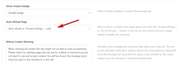
The use of this setting depends on the many other privacy settings that have been selected.
I also note that on two of your sites you have the errorjQuery is not definedthis can also cause the scripts to not run correctly, please check that you are not loading jQuery in the footer, there are many ways this can happen, via a caching plugin, theme settings, or minifying plugins, etc.Best regards,
MikeHi,
Wir entschuldigen uns für die verspätete Antwort und freuen uns, dass Sie ein Update durchführen konnten. Es gab einen bekannten Fehler in der von Ihnen verwendeten Version und ein manuelles Update war erforderlich. Jetzt haben Sie das Richtige Berechtigungen für Ihr Token. Sie sollten keine zukünftigen Probleme haben.— Translated with Google —
Sorry for the late reply and glad you were able to update, there was a known error in the version you had and a manual update was necessary, but now that you have updated and assigned the correct permissions to your token you should have no future issues.
Best regards,
MikeHi,
Sorry for the late reply, from this post it looks like you can add the Currency Switcher with this shortcode[currency_switcher]
Please read the article and give it a try.Best regards,
MikeNovember 10, 2019 at 12:32 pm in reply to: woocommerce single project page layout official solution #1155316Hi,
Thanks for the link and screenshot, so currently the mobile brake point for the page is 767px, so we will change it to 1399px, at that point there is plenty of room for the 3 columns.
Please try this css:@media only screen and (min-width: 768px) and (max-width: 1399px){ #top .sidebar_right.template-shop .single-product-summary,#top .sidebar_right.template-shop .single-product-main-image.alpha { width: 60% !important; } #main > div.container_wrap.sidebar_right.template-shop > div { padding: 0 10px !important; } }After applying the css, Please clear your browser cache and check.
Best regards,
MikeHi,
Glad we were able to help, we will close this now. Thank you for using Enfold.For your information, you can take a look at Enfold documentation here
For any other questions or issues, feel free to start new threads in the Enfold forum and we will gladly try to help you :)Best regards,
MikeHey Hooge-AGS,
Sorry for the late reply, in my tests images in the layerslider are not marked as “attached” and it also seems that some other images may not be too. I do not believe this is an “Enfold” issue, it is how the images are uploaded and how WordPress records this, it seems that if the images are uploaded to the media library and then later used WordPress doesn’t always create an “attachment” page which is were the “attach” comes from. But if the image is uploaded at the time of creation they are “attached”
While I have not fully tested this I didn’t want you to try deleting all of your “unattached” images and files.Best regards,
MikeNovember 10, 2019 at 3:52 am in reply to: woocommerce single project page layout official solution #1155275Hi,
Thank you for the feedback, please include a link to this page so we can test with the same one, also which browser are you using?Best regards,
MikeHey Erwin,
Thank you for the link, this is sort of new, it is coming from the browsers for “A11y” or “ARIA”, for people with visual impairment. So the classic css “reset” used to set “outline” to “none” or zero but now as “we” (as in all developers) are preparing for new “A11y” standards, this practice is discouraged so now the browsers are showing the styles that they have been including in the “agent stylesheet” Anyways, please try this css to remove:#top .main_color .tab:focus { outline: 0 !important; outline: 0 -webkit-focus-ring-color !important; }but perhaps a better solution would be to style it with your sites colors, such as this 1px slightly darker outline, please adjust it to the most you are willing to go keeping in mind of our visually impaired visitors and friends :)
#top .main_color .tab:focus {
  outline: #DBDBDB solid 1px !important;
  outline: #DBDBDB solid 1px -webkit-focus-ring-color !important;
}
Best regards,
MikeNovember 10, 2019 at 2:48 am in reply to: 1 Pixel Line When Using Background Repeat Stretch to fit. #1155271Hey MinsterSC,
Thanks for the link, the “border” was actually the background showing though because the image was set to “bottom center”, seems it put it off a hair, this css should fix:#top.home #av_section_2 { background-position: top !important; }for the other borders in the header, please try this:
#top #header_main, #top #header_meta,#top #header_meta.container_wrap {
    border-bottom-width: 0 !important;
    border-top-width: 0 !important;
}
.avia-menu.av_menu_icon_beside {
    border-right-width: 0 !important;
    border-bottom-style: none !important;

}
After applying the css, Please clear your browser cache and check.
Best regards,
MikeNovember 10, 2019 at 2:17 am in reply to: woocommerce single project page layout official solution #1155267Hi,
Thank you for the feedback, for mobile you will have to allow for full-width, I tried to check but couldn’t find the exact item as in your screenshot, but the ones I saw were correct, sidebar in desktop and full width in mobile.
Please see the screenshots in Private Content area.Best regards,
MikeHi,
Sorry for the late reply, the Classic Editor featured image post option “don’t display post picture” in the new block editor is under the “layout” options.
Please see the video in the Private Content area.Best regards,
MikeHi,
Thanks, Try adding this code to the end of your functions.php file in Appearance > Editor:function custom_script(){ ?> <script> jQuery(window).load(function(){ jQuery( ".widget_icl_lang_sel_widget" ).appendTo( ".main_menu" ); }); </script> <?php } add_action('wp_footer', 'custom_script');Best regards,
MikeHi,
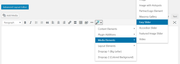
Entschuldigung für die verspätete Antwort, leider habe ich vorher keine Pods verwendet, daher kann ich nicht raten, aber wenn es Ihnen helfen würde, können Sie den Shortcode für den Schieberegler abrufen, indem Sie zum Classic Editor gehen und auf den Shortcode-Zauberstab klicken. Nachdem Sie die Schritte ausgeführt und den Assistenten gespeichert haben, wird der Shortcode in der Nachricht angezeigt, damit Sie ihn kopieren können.
— Translated with Google —
Sorry for the late reply, unfortunately I have not used pods before so I can’t advise, but if it would help you can get the shortcode for the slider by going to the Classic Editor and clicking on the shortcode wand. After you follow the steps and save the wizard, the shortcode will show in the post for you to copy.
Best regards,
MikeHi,
Sorry for the late reply, and thanks for the login. I took a look at the page you posted as an example of double images, but I don’t see double images?
I looked and your theme and it’s up to date.
To clone your site to your localhost, I will assume that you already have a localhost set up, so then I would recommend using the Duplicator plugin from “Snap Creek” (there is a knock-off in the archive) it’s very good, watch the video.Best regards,
MikeHey FA123,
Sorry for the late reply, for question 1, Please try this code in the General Styling > Quick CSS field or in the WordPress > Customize > Additional CSS field:@media only screen and (max-width: 767px){ .responsive #top .av-logo-container .avia-menu { top: -10px !important; } }for question 2, please see our documentation for adding a header widget area
for question 3, I adjusted your css, which only had the transparent mobile header up to 900px and it needed to be 989pxBest regards,
MikeHey bobfurgo,
Sorry for the late reply, I was able to get past your htaccess login, but couldn’t login to WordPress, but it’s ok I was able to examine your site and adjust your css so it will work. Please try this code in the General Styling > Quick CSS field or in the WordPress > Customize > Additional CSS field:#top #wplc_hovercard #wplc_hovercard_bottom #speeching_button, #wp-live-chat-inner #wplc_message_div #wplc_na_msg_btn { border-radius: 0px !important; font-family: lato !important; }After applying the css, Please clear your browser cache and check.
Best regards,
MikeHey Kurt,
Sorry for the late reply and thanks for the login, I adjusted your css from this:p.update-time { width: 340px; margin: auto; font-size: 90%; }to this:
@media only screen and (min-width: 767px) {
p.update-time {
    width: 300px;
    font-size: 90%;
    float: right;
}
}
@media only screen and (max-width: 766px) {
p.update-time {
    width: 340px;
    margin: auto;
    font-size: 90%;
}
}
Please clear your browser cache and check.
Best regards,
Mike -
AuthorPosts

