

Forum Replies Created
-
AuthorPosts
-
November 6, 2019 at 12:19 pm in reply to: Burger menu not working for blog post pages on mobile? #1154249
Hi,
To remove the triangles from the menu, please add this css:@media only screen and (max-width: 767px){ .responsive #top .av-switch-768 .av-menu-mobile-active .av-subnav-menu > li a:before { display: none !important; } }To only have the triangles next to parent items use this css instead:
@media only screen and (max-width: 767px){
.responsive #top .av-switch-768 .av-menu-mobile-active .av-subnav-menu > li:not(.menu-item-has-children) a:before,.responsive #top .av-switch-768 .av-menu-mobile-active .av-subnav-menu > li ul li a:before {
	display: none !important;
}
}
For some reason the blog menu which is created with the code in your functions.php was missing the class “menu-item-has-children” for the parent items, so the css above was not working correctly, so I added the class.
After applying the above css, Please clear your browser cache and check.Best regards,
MikeHi,
I found an odd issue, the da_DK doesn’t contain everything that is in the de_DE file, I guess because I had been working in the de_DE file I had looked there by mistake. So I copied this one string to your da_DK file but I’m not sure it will work.
so, please make a copy of the files at: \enfold\lang\da_DK.po & \enfold\lang\da_DK.mo (just in case)
then replace with the files linked below.
If this works and you want more translations we could work on this with your help, often users help us in this thread but I didn’t find your language there.Best regards,
MikeHi,
Ok, I made this adjustment, the issue was that the original code was targeted at the home page and didn’t include the archive pages such as “tag” & “category” which is what your menu links point to. So I added this code and cleared your cache plugin.#top.archive span.blog-author.minor-meta,#top.archive time.date-container.minor-meta.updated,#top.archive span.comment-container.minor-meta,#top.archive span.text-sep.text-sep-comment { display: none !important; } #top.archive span.post-meta-infos { margin-top: -30px; } #top.single span.blog-author.minor-meta { display: none !important; }This includes a bonus bonus, I noticed that your posts also had the “author” included behind the post title, which was hard to see, but would probably come up with a screen reader :) alternative: 😀
Please clear your browser cache and check.Best regards,
MikeHi,
Thanks for the login, but it doesn’t seem to be an admin account so I can’t adjust the script. Please replace the above script with this:function remove_tooltip_title(){ ?> <script> jQuery(window).load(function(){ jQuery('.av-masonry-image-container').removeAttr('title'); }); </script> <?php } add_action('wp_footer', 'remove_tooltip_title');Then check again
Best regards,
MikeHi,
Glad we were able to help, we will close this now. Thank you for using Enfold.For your information, you can take a look at Enfold documentation here
For any other questions or issues, feel free to start new threads in the Enfold forum and we will gladly try to help you :)Best regards,
MikeHey Hooge-AGS,
If I understand your question correctly, you don’t want example.org directly assemble from shop.example.org, this is possible but it will take some advanced .htaccess programming which is beyond our scope here. Please consider hiring a freelancer to assist you with this.Best regards,
MikeHi,
Glad we were able to help, we will close this now. Thank you for using Enfold.For your information, you can take a look at Enfold documentation here
For any other questions or issues, feel free to start new threads in the Enfold forum and we will gladly try to help you :)Best regards,
MikeHi,
Glad we were able to help, we will close this now. Thank you for using Enfold.For your information, you can take a look at Enfold documentation here
For any other questions or issues, feel free to start new threads in the Enfold forum and we will gladly try to help you :)Best regards,
MikeHi,
Glad we were able to help, we will close this now. Thank you for using Enfold.For your information, you can take a look at Enfold documentation here
For any other questions or issues, feel free to start new threads in the Enfold forum and we will gladly try to help you :)Best regards,
MikeHi,
Glad we were able to help, we will close this now. Thank you for using Enfold.For your information, you can take a look at Enfold documentation here
For any other questions or issues, feel free to start new threads in the Enfold forum and we will gladly try to help you :)Best regards,
MikeHi,
Glad we were able to help, we will close this now. Thank you for using Enfold.For your information, you can take a look at Enfold documentation here
For any other questions or issues, feel free to start new threads in the Enfold forum and we will gladly try to help you :)Best regards,
MikeHi,
Sorry, from your screenshots you showed an empty title field in the media library, so I thought you just wanted to remove the post title, so I didn’t find a solution for this and I’m asking the team for advice. Thank you for your patience.Best regards,
MikeHey webWahine,
Sorry for the late reply, I tried to take a look at your site but it seems down right now, but I was able to achieve this please edit the file /enfold/tags.php and at about line 125 you will find:$label = apply_filters('avf_tag_label_names', $post_type_obj[$key]->labels->name); echo "<{$heading} class='post-title tag-page-post-type-title {$css}'>{$label}</{$heading}>";Please note this code is also at line 75, but you need to edit the code at 125.
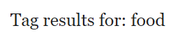
change to:$label = apply_filters('avf_tag_label_names', $post_type_obj[$key]->labels->name); $current_tag = single_tag_title("", false); echo "<h3 class='post-title tag-page-post-type-title'>Tag results for ".$label."<span>: ".$current_tag."</span></h3>";for this result:

to remove the text “Posts” use this code:$label = apply_filters('avf_tag_label_names', $post_type_obj[$key]->labels->name); $current_tag = single_tag_title("", false); echo "<h3 class='post-title tag-page-post-type-title'>Tag results for<span>: ".$current_tag."</span></h3>";for this result:
Best regards,
MikeHi,
No, I would not, I checked your site again and your slide and images are showing for me, try clearing your browser cache.Best regards,
MikeHi,
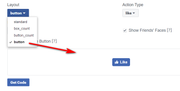
The Like button page on Facebook developers website only has a few options, the numbers can be removed and the “share” can also be removed, but since the button is added via an iframe it can not be styled with css. So the standard one has black text next to the button that shows the number of people that liked it, but the black text doesn’t show well on your site, then the next two show the number, and the last option just shows the “Like” so that is the one I choose this time.
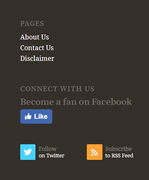
I was able to add “CONNECT WITH US” & “Become a fan on Facebook” but because the twitter and RSS feed is in the same widget that doesn’t allow text I couldn’t add that, but they already say that.
Hope this helps.Best regards,
MikeNovember 4, 2019 at 11:29 am in reply to: Burger menu not working for blog post pages on mobile? #1153663Hi,
Unfortunately, you will have to go to each page, but for the posts that use the functions.php code, I corrected that for you by removing the classav-submenu-hiddenfrom the shortcode.Best regards,
MikeHi,
Glad we were able to help, we will close this now. Thank you for using Enfold.For your information, you can take a look at Enfold documentation here
For any other questions or issues, feel free to start new threads in the Enfold forum and we will gladly try to help you :)Best regards,
MikeHi,
Glad we were able to help, we will close this now. Thank you for using Enfold.For your information, you can take a look at Enfold documentation here
For any other questions or issues, feel free to start new threads in the Enfold forum and we will gladly try to help you :)Best regards,
MikeHi,
Are you using mixed case words in your css? Did you add your css to the styles.css without updating the theme settings?
I guess since you have already rolled back to v4.5.7 we won’t be able to examine your issue, but I have not seen this on other sites.
Please check your webhost to see if you have the one click staging site option, this is a option in most cPanels to create a staging clone of your site so we can test on it and your site will stay up and running. You can always ask your webhost to help you with setting this up if you want.Here are some screenshots of what it would look like:
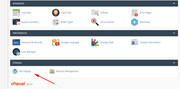
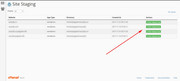
Then please update the staging site and see if you can recreate the error and allow us to examine.
Best regards,
MikeHey Tia,
Sorry, this has been confirmed that removing the related videos doesn’t work anymore, YouTube has made changes as part of their business model to not allow this. You could self-host or use a paid service such as Vimeo, although it seems the have a free plan.Best regards,
MikeHey udis,
Thanks for the login, since your PHP is v7.1 and your other setting look good you should be able to update fine, but you will have to update via FTP, The easiest and safest way to do this is to download the newest version from Theme Forest and rename your current theme folder to “enfold-old” via ftp then upload the new “enfold” folder and check that your site is working correctly.
Once you are happy you can delete the “enfold-old” folder via ftp, (not the WP theme page)
Should for some reason you wish to roll-back to the old version, it’s easy to do, simply rename the new “enfold” folder to “enfold-new” via ftp and then rename “enfold-old” to “enfold” then refresh your page.
Please don’t try to overwrite the theme folder, as this will leave old files behind and cause errors.Best regards,
MikeHey lepung,
I took a look at your page and found you had the errorlazySizes is not definedbut I didn’t see a plugin called lazySizes, but I did find Autoptimize that often lazy loads images, I turned off a couple of JS features and most of your page loads now, please try disabling your plugins one at a time and clear your cache each time, until your slider shows, then you will know the cause.Best regards,
MikeHey Kurt,
I took a look at your site and see that your PHP version is 5.6 which WordPress is warning you about, please ask your webhost to update to 7.+
I don’t see how your tables were showing, was this with ninja tables? Is there a chance that your old theme had some custom code in the functions.php to make this work? Sometimes people do that and then forget about it.
Does your webhost have a backup that they can restore? Often they will automatically make a backup every couple of days.Best regards,
MikeHey Moses,
Sorry for the late reply, I added this to your functions.php so the FaceBook script will load in your header,
I got the code from the Like button page on Facebook developers websitefunction fb_like() { ?> <div id="fb-root"> </div> <script async defer crossorigin="anonymous" src="https://connect.facebook.net/en_US/sdk.js#xfbml=1&version=v5.0"></script> <?php } add_action('wp_head', 'fb_like');then I added this code to your footer widget:
<iframe src="https://www.facebook.com/plugins/like.php?href=https%3A%2F%2Fgeeksmodo.com%2F&width=70&layout=box_count&action=like&size=small&show_faces=true&share=true&height=65&appId" width="70" height="65" style="border:none;overflow:hidden" scrolling="no" frameborder="0" allowTransparency="true" allow="encrypted-media"></iframe>and here is a screenshot of it above your twitter as requested:
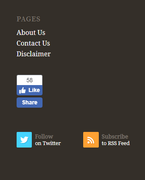
Thank you for your patience.Best regards,
MikeHi,
Glad we were able to help, we will close this now. Thank you for using Enfold.For your information, you can take a look at Enfold documentation here
For any other questions or issues, feel free to start new threads in the Enfold forum and we will gladly try to help you :)Best regards,
MikeHi,
Sorry for the late reply, this is for screen readers and to be A11y & ARIA available. Hidden text for screen readers doesn’t affect SEO Here is more about Accessibility and SEO This also supports the Google Lighthouse in which accessibility is part of your SEO score.
But if you really want to remove it, please go to \enfold\config-templatebuilder\avia-shortcodes\columns.php
line 1175 and find:$screen_reader_link .= '<a class="av-screen-reader-only" href=' . esc_attr( $link ) . " {$screen_reader}" . '>';then remove
av-screen-reader-onlyand add your own class.Best regards,
MikeNovember 3, 2019 at 8:20 pm in reply to: "So long and thanks for all the fish!" – our good bye from enfold #1153547Hey Peter,
Thank you for the kind words, and for allowing us to be of service.
Thanks for using Enfold, Hitchhiker :)Best regards,
MikeHey Pixie-Bob,
Sorry for the late reply, but we don’t have control over what youtube shows, and there is nothing in our code that makes the Icon Box different, for youtube. But there used to be an option within the youtube links that you could specify that suggested videos were from your channel, please see this post but I’m not sure if it still works, youtube has made a lot of changes.Best regards,
MikeHi,
Sorry I don’t think we have one, but we do have live demos of all of our demos as examples.Best regards,
Mike -
AuthorPosts
