

Forum Replies Created
-
AuthorPosts
-
Hi,
Glad we were able to help, if you have any further questions please create a new thread and we will gladly try to help you. Thank you for using Enfold.Best regards,
MikeHi,
Glad to hear this worked, as for adding the layerslider to the shop page I tried many ways but didn’t find a solution.
To add a image and text to your shop page go to Enfold Theme Options ▸ Shop Options ▸ Shop Banner Image and add your image and banner text:

Best regards,
MikeHi,
Glad we were able to help, if you have any further questions please create a new thread and we will gladly try to help you. Thank you for using Enfold.Best regards,
MikeHi,
Glad this helped, it’s because the arrows hang below the color sections over the text on mobile.
Unless there is anything else we can help with on this issue, shall we close this then?Best regards,
MikeHi,
As I understand on pages like the one you linked to with no transparency, before scroll you wouls like this logo:

and after scroll you would like this logo:

Then try this css:#top #header.header-scrolled:not(.av_header_transparency) .avia-standard-logo a { width: 221px!important; height: 100px!important; background-image: url(https://enfold.webers-webdesign.de/wp-content/uploads/logo-IIC_Website_03092022-transparent.png)!important; background-repeat: no-repeat; background-size: cover; } #top #header.header-scrolled:not(.av_header_transparency) .avia-standard-logo img { visibility: hidden; }After applying the css, please clear your browser cache and check.
Please note that I didn’t know the link to both of your logo images, so please adjust the urls, but it css will work as is.Best regards,
MikeHey nV15OoBtg21iTn5z,
We could probably offer some css to have the image “cover” the space, which would remove the white space above and below on mobile, but you will lose a little on the sides, unless you want to stretch the image and don’t mind a little distorting.
Another option would be to clone the element and use an image that is just right for mobile and set the display for the two elements so they only show on the screens you wish.
If you want some help with the css, please link to your page so we can examine.Best regards,
MikeHey diefleischerei,
Thank you for your question, I assume that the code you have from Mailchimp is javascript and includes the popup script, I also assume that you want this to work on every page, in this case you could add your code to this function replacing “-your code here-” and add it all to the end of your child theme functions.php file in Appearance ▸ Editor:function custom_mailchimp_popup_script() { ?> <script> -your code here- </script> <?php } add_action('wp_footer', 'custom_mailchimp_popup_script');if this doesn’t work then post your code so we can examine it to advise better.
Best regards,
MikeHey schweg33,
Thanks for the link to your page, you can use javascript to replace the image and link of the image element image.
Try adding this code to the end of your functions.php file in Appearance ▸ Editor:function custom_replace_image_in_image_element() { ?> <script> window.addEventListener('DOMContentLoaded', function() { var image = document.querySelector("#top.postid-142 .avia-image-container.avia-builder-el-8 img"); var link = document.querySelector("#top.postid-142 .avia-image-container.avia-builder-el-8 a"); var source = "https://-your-domain-/wp-content/uploads/fruher-und-heute/Restaurant-Fernsicht-1966.jpg"; image.src = source image.srcset = source link.href = source }); </script> <?php } add_action('wp_footer', 'custom_replace_image_in_image_element');Ensure that you fix the url to the image before testing, I was not sure if you wanted it posted.
You may want to resize your image to the size you wish, currently it is a different aspect so making it fit with css will stretch it.Best regards,
MikeOctober 8, 2022 at 9:29 pm in reply to: Blog soll nicht nach Ende der ersten Kategorie die zweite Kategorie weiter gehen #1368076Hi,
Glad Guenni007 could help, thank you Guenni007, if you have any further questions please create a new thread and we will gladly try to help you. Thank you for using Enfold.Best regards,
MikeHi,
Glad to hear that you have this sorted out, if you have any further questions please create a new thread and we will gladly try to help you. Thank you for using Enfold.Best regards,
MikeHi,
Thanks for the screenshot, to remove the black bottom & right border from the search button in your sidebar, add this css to your Quick CSS:#woocommerce_product_search-2 button { border-width: 0; }After applying the css, please clear your browser cache and check.
Best regards,
MikeHey navindesigns,
He is a user that developed these a few years ago, back then other users said they worked great but I don’t know if they still work with Enfold 5+ and our new changes, so you will need to ask him and perhaps test yourself.
Enfold doesn’t officially approve or verify third-party customizations, and we would not be able to support them in this forum.
I’m not knocking it I’m just saying we can’t fix it if an issue occurs.Best regards,
MikeHi,
Glad Guenni007 could help, thank you Guenni007, if you have any further questions please create a new thread and we will gladly try to help you. Thank you for using Enfold.Best regards,
MikeHi,
Thanks for the screenshots, while I only read English, I believe that your Google Console is not pointing to the robots.txt, it is referring to the robot meta tag in your page source code that I took a screenshot of above.
This is different than the robots.txt and your thread title is about the meta tag, you can easily see the meta tag on line 11 in your source code and don’t need a plugin.
Try re-submitting your page to the Google Console, as I recall it might take a day before google scans it again.Best regards,
MikeHi,
Thanks for the link to your site, but I don’t find noindex, I find index in the robots meta tag:

Please check again.Best regards,
MikeHi,
Thank you for the link to your site, I see an error for “rocket-loader” on your site but I don’t see a plugin for this, this sounds like a caching script but I’m not sure, do you recognize it? Does your server use a “object” cache such as Memcached, Redis, Varnish, Litespeed?

I’m not sure if it is related. I didn’t find any errors in your child theme style.css, but I did find that if you enable CSS File Merging And Compression your style.css works.
Or if you change the Enfold Theme Options ▸ General Layout ▸ Alternate Content Secondary Font Color to white the form text & placeholders become white, but I don’t think that you wanted the placeholders white.
I tested the child theme style.css on my demo site but couldn’t reproduce this issue, so by default the child theme style.css is working correctly.Best regards,
MikeOctober 7, 2022 at 11:46 am in reply to: Bottom of page jumps up each time, is it the scroll UP button? #1367937Hi,
Glad we were able to help, if you have any further questions please create a new thread and we will gladly try to help you. Thank you for using Enfold.Best regards,
MikeHey micmacGraphic,
Another user reported that Yoast SEO was adding the noindex, try disabling the plugin.
Also check that WordPress ▸ Settings ▸ Reading ▸ Search engine visibility is not checked:

If this doesn’t help please include admin login in the Private Content area so we can investigate.Best regards,
MikeOctober 7, 2022 at 3:30 am in reply to: Bottom of page jumps up each time, is it the scroll UP button? #1367890Hey Angèle,
Thank you for the link to your site, your testimonial slides are different sizes causing the page to move up and down as they are shown.
Most of your slides are 1361px high, but two are 730px, I would recommend making these two also 1361px
Another option would be to make all of the slide containers the same size, 1361px, but for the two small ones this would add a lot of white space.Best regards,
MikeHi,
Yes, go to Enfold Theme Options ▸ Layout Builder ▸ Integrated (Bundled) LayerSlider Plugin
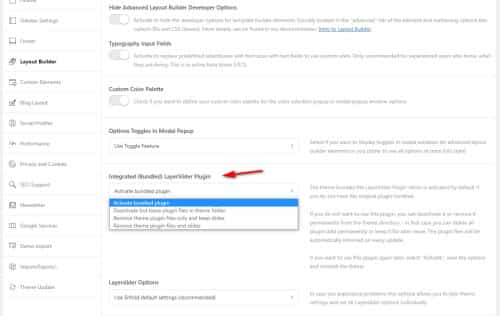
Best regards,
MikeOctober 7, 2022 at 3:04 am in reply to: Breadcrumb repeated info / no active page title on left #1367888Hi,
The title bar settings are in the admin sidebar layout options:

Best regards,
MikeHey Gary,
Unfortunately, footer menus can not display sub-menu items on click (dropdowns), this is shown in the menu page:

Best regards,
MikeOctober 7, 2022 at 2:54 am in reply to: Mailchimp widget display fields without any configuration possible #1367885Hi,
Glad to hear that you have this sorted out, if you have any further questions please create a new thread and we will gladly try to help you. Thank you for using Enfold.Best regards,
MikeOctober 6, 2022 at 7:37 pm in reply to: fullscreen slider by default for blog pages with transparent glassy header #1367860Hi,
Thanks for the link to your site, it looks like you were able to add the slider to all of your pages & posts with a function in your functions.php and the slider shortcode, but it looks like it added a second slider to your homepage and I believe that you only want this to add the slider to your posts, so I added if(is_single()) {…} to your function and it seems to be working, please check.for future readers the function is basically like this:
Best regards,
MikeHey brookjames,
Thank you for your explanation about the Shop Demo homepage grid under the slider, I cloned the element on my text site and uploaded 4 images that are 1500px X 1000px, this just was the test images I had, the size was not specific. Then when I added them to the image element inside the grid row cells I choose the portfolio size:

and they are all the same size to each other and to the default ones:

please give this a try.Best regards,
MikeOctober 6, 2022 at 4:50 pm in reply to: Problem with header when using phone in horizontal format. #1367836Hi,
Glad to hear that you have this sorted out, if you have any further questions please create a new thread and we will gladly try to help you. Thank you for using Enfold.Best regards,
MikeHi,
Glad Ismael could help, if you have any further questions please create a new thread and we will gladly try to help you. Thank you for using Enfold.Best regards,
Mike -
AuthorPosts
