

Forum Replies Created
-
AuthorPosts
-
Hi,
Try this[nolink] © Copyright – xyz.com
If you still have trouble please include an admin login so we can check.Best regards,
MikeHi,
Unless there is anything else we can assist with on this issue, shall we close this then?Best regards,
MikeHi,
Thanks for the screenshot and the link to your two pages, I tested by adding items to the cart and then checking those pages and to hide the cart please try this css:.page-id-22855 .cart_dropdown { display: none!important; } .page-id-97578 .cart_dropdown { display: none!important; }After applying the css, please clear your browser cache and check.
Best regards,
MikeHey lkhst,
Thank you for your question but I don’t know what Edwiser Bridge is, is it this plugin?
This looks like it is for Moodle, but I have not heard of this before nor seen it asked on our fourm before, so I don’t know how we are going to be able to assist with this without first learning how to use Moodle and the plugin first. We have limited ability to assist with third-party plugins and not all plugins work successfully with Enfold.
With the tens of thousands of plugins available this would be very hard to do.
I see your site is getting a javascript error:

but I don’t know where it is from, I recommend first disabling your other plugins and see if Edwiser Bridge then works, if not try making a screencast of the steps how to reproduce the error and another the same steps with the expected results, in a different theme, and an admin login so we can follow the steps and see if we notice what the error is.
Please note that the Twenty Nineteen theme doesn’t have a built-in page builder like Enfold does so it is not a good comparison.
Thank you for your patience.Best regards,
MikeHi,
Glad to hear that you have this sorted out, if you have any further questions please create a new thread and we will gladly try to help you. Thank you for using Enfold.Best regards,
MikeHi,
Thanks for your question, I believe that the WP Reset plugin works well as I use it on my test demo site for the past 5 years and have not had issues. I often need to use it to install different demos, sometimes daily, to help customers, and have never seen database issues.Best regards,
MikeHey Nic_007,
The easiest way to remove the backlink in the socket is to add[nolink]in Enfold Theme Options ▸ Footer ▸ Copyright please see our documentation here.Best regards,
MikeHi,
Thanks for your update, since you are starting a new topic we will close this one, thanks for using Enfold.Best regards,
MikeDecember 3, 2022 at 1:58 pm in reply to: Error message: cURL error 28: Connection timed out after 10001 milliseconds #1374903Hi,
Thanks for the login, I see that it looks like you have a site built with WPBakery Page Builder I would not recommend importing a demo site into your current site, Enfold includes it’s own custom page builder Advanced Layout Builder which can not be removed and other page builders conflict with.
If you want to migrate to Enfold and page builder I recommend creating a new WordPress install in a sub-directory or sub-domain and then import the demo there. The WPBakery shortcode is not compatible with our builder so you will need to create each page from scratch and not import them.
I don’t think this is the reason the demo import is not working, it’s probably a security option on your server. Please check your PHP settings to see if the secure options are activated.
If “allow_url_fopen, “allow_url_include” and “register_globals” are “off”
then try turning these “on”.
If this doesn’t help we can take another look on your new WordPress installation.Best regards,
MikeHey wgertler,
Thank you for your question, you can add screenshots by uploading your images to a screenshot host and pasting the HTML code or link in your post or the Private Content area.
I will try to answer your questions.
1: each link should be a new page
2: I checked our different gallery elements and I didn’t find one that includes tags or metadata with the image grid, only the title & excerpt. So I would recommend looking for the plugin that will meet your needs and using it’s shortcode to display it on the page.
3: randomize may be possible but due to question 2 you should ensure this is included with your plugin.
4-5: the theme has a lazy load option built-in, please don’t use Smush it has a conflict over the past year that Smush has not corrected yet, most likely your plugin will offer a “Infinite Scroll” option which is a type of lazy load where more images are shown the more a user scrolls, this probably be the best choice.Best regards,
MikeHi,
I’m sorry for not explaining it better, try adding the css in the Enfold Theme Options ▸ General Styling ▸ Quick CSS field or in the WordPress ▸ Customize ▸ Additional CSS field.Best regards,
MikeDecember 3, 2022 at 1:47 am in reply to: New versions of Enfold not available on Theme Update via Enfold Dashboard #1374848Hi,
You have two different issues, the first one is that you are trying to use the API that is no longer in service, so that theme you will need to manually update as I posted above.
The second issue is that your test site requires the host file to be edited to connect to, and Envato is not going to do this so the Token on that site will give you the 403 error.
I recommend now that your dev test site is updated check that everything is working correctly and don’t worry about if it can update or not.
If everything works correctly, backup your live site then manually update your live site as I posted above. Afterward your live site will connect properly to Envato and you can update automatically in the future.
But I would recommend always testing updates on your dev site first and as long as it is going the be hidden, requiring the host file to be edited you will need to update it manually.Best regards,
MikeDecember 2, 2022 at 10:18 pm in reply to: New versions of Enfold not available on Theme Update via Enfold Dashboard #1374837Hi,
Thank you for your patience, I tried to login to your dev site but I get a DNS error, so I assume that this site is down.
I see that your live site is using v4.7.5 I believe there was an error in this version so you will need to manually update and then future updates will work successfully.
To update your version of Enfold you will need to download the latest installable WP version from your Theme Forest account and upload it to your WordPress ▸ Appearance ▸ Themes ▸ Add Themes ▸ Add New

after you choose the zip file and click install, you will see a This theme is already installed message because you are updating, you can continue

then you will see the Theme updated successfully message.

Best regards,
MikeDecember 2, 2022 at 10:06 pm in reply to: title/description of gallery pictures are not shown #1374835Hi,
Glad we were able to help, if you have any further questions please create a new thread and we will gladly try to help you. Thank you for using Enfold.Best regards,
MikeHi,
Thanks for your patience, via FTP I see that you have a lot of files added to your child theme,
are all of these customized?
What version were these from?
The only way that I can see in finding the error is to create a staging copy of the site and then remove your customized files and add them back one at a time to find which one is causing the error.
Does the error occur if you use the regular footer instead of the footer page?Best regards,
MikeDecember 2, 2022 at 7:29 pm in reply to: Open on click a submenu and close the one previously opened #1374826Hi,
I see that in the first site that Guenni007’s code is working in your mobile menu has sub-menu items, for which the toggling occurs.
But on your second site I don’t see any sub-menus, all menu items are top level so there is nothing to toggle.
Try making the menu on the second site like the first site.Best regards,
MikeDecember 2, 2022 at 7:19 pm in reply to: title/description of gallery pictures are not shown #1374824Hey walhai,
Thank you for your patience and for the login to your site, I found this message in the console for your page:
title attributes removed by WP Accessibility
The gallery stores the caption as a title attribute so the plugin was removing it. I disabled this function in your WP Accessibility plugin and now the captions are showing.Best regards,
MikeDecember 2, 2022 at 2:06 pm in reply to: Update to Enfold 5.2.1 breaks footer and other child elements #1374776Hi,
Glad to hear that the css is not caused by the removal of the Header.php and Footer.php, we are not recommending adding these to child themes anymore for this very reason.
We have updated our documentation to recommend adding scripts to the child theme functions.php.
So please remove these two files from your staging site and check if removing any of your other customized child theme files will change the css, if not we will continue to investigate.
I see that you are using ACF to add a custom page class to your pages, but I don’t understand if it has another purpose, is this just for your custom css? Could this have changed and is causing your css to be wrong? Couldn’t you use the page IDs in the same way without ACF?Best regards,
MikeDecember 2, 2022 at 1:49 pm in reply to: Making top nav and secondary menu sticky on Mobile #1374771Hi,
Try this css instead:@media only screen and (max-width: 767px) { .responsive #top #wrap_all #header { position: fixed !important; } .html_header_transparency #wrap_all #main, .responsive #top #wrap_all #main { padding-top: 100px !important; } }After applying the css, please clear your browser cache and check.
Best regards,
MikeHi,
Maybe we can apply css for the sub-menu page to show the parent menu item open/expanded.
So it’s not based on clicking the menu, it’s about landing on the page.
Please copy the site to a public location so we can test.Best regards,
MikeDecember 2, 2022 at 1:30 pm in reply to: Menu Links in overlay/slide out are not reacting to settings Advanced Styling #1374768Hi,
Glad Yigit could help, if you have any further questions please create a new thread and we will gladly try to help you. Thank you for using Enfold.Best regards,
MikeDecember 2, 2022 at 1:29 pm in reply to: How can I add icons to Enfold Secondary Menu items? #1374767Hi,
Thanks for the feedback, try adding this css:#header_meta .sub_menu #avia2-menu li { display: flex; align-items: center; }After applying the css, please clear your browser cache and check.
My test results:

Best regards,
MikeHey jaimemerz,
Thanks for your patience and the link to your site, unfortunately, I don’t see another way around this.
I have tried some javascript to remove the padding on scroll but it doesn’t work reliably.
Sorry we were not able to help more.Best regards,
MikeDecember 1, 2022 at 3:06 pm in reply to: Thumbnails of embedded YouTube videos are displayed in an incorrrect format #1374644Hi,
I have seen issues with the Jetpack plugin in the past, mostly when the theme compresses the js and the Jetpack also does or Autoptimize is also used, the double compression causes errors sometimes, but not always.
Glad to hear that you have this sorted out, shall we close this then?Best regards,
MikeHi,
Thanks for the login, I see that if I inject jQuery.js and waypoint.js the script works, but both of these should be loaded automatically.
I see that all of your js is loaded by “rocket-loader” but I don’t see this plugin, I see that your LScache can not be controlled from WordPress and you have to do so from your server:

Please try to disable the “rocket-loader” and check again.Best regards,
MikeHi,
In Enfold title fields do not support HTML or HTML Entities this is why there is a warning, the Dev Team found years ago that it causes issues:

Best regards,
MikeHi,
I checked your example post and see that your new 1200×600 png image is the item that takes the longest for your page to load:
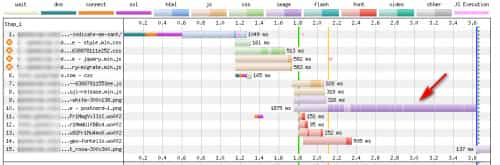
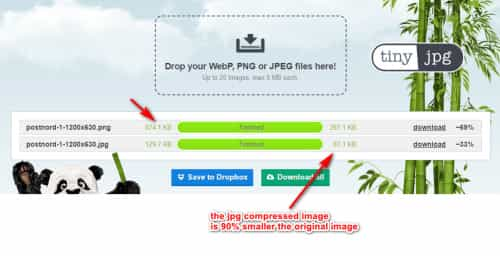
but it can be 69% smaller if you use an image compression like Tinyjpg.com for a total size of 267.1 KB:

but typically png images are the largest, if you use the jpg format it would be even smaller, only 87.1 KB for a 90% decrease
For the extra sizes you can delete the sizes you don’t want to use with the delete button, but be careful because different because each size is used by a different element.

Typically you should see around 18 different sizes, so if you see 30 sizes on this screen then some may have been added by other plugins.
If you only see around 18 on this screen but when you FTP you see 30 sizes then this is due to the Regenerate Thumbnails because it doesn’t delete unused image sizes, so in this case you don’t need to worry because these other sizes won’t be created in the future and they won’t slow down you site because they won’t be loaded. Images sitting on a server unused doesn’t slow down a site.
But if you want to remove them you can do so via FTP or you can follow this article that says there 3 plugins that will do it for you: Plugins For Image Cleanup I have not tried any of these.
But this might not be an issue if you delete all of your png images and then upload jpg image to make them smaller.Best regards,
MikeHi,
Glad we were able to help, if you have any further questions please create a new thread and we will gladly try to help you. Thank you for using Enfold.Best regards,
MikeDecember 1, 2022 at 1:42 am in reply to: Update to Enfold 5.2.1 breaks footer and other child elements #1374542Hi,
Thanks for the login, the margin of the diagonal border below the button was overlapping the button, I added this css in your Enfold Theme Options ▸ General Styling ▸ Quick CSS field to correct.#av_section_3 .av-section-color-overlay-wrap .container { z-index: 2; position: relative; }Please clear your browser cache and check.
Best regards,
Mike -
AuthorPosts
