
Viewing 30 results - 23,221 through 23,250 (of 244,499 total)
  • Author
    Search Results
  • #1364107

    Hi,

    Great, I’m glad that Yigit could help you out. I’ll close this thread for now then, please open a new thread if you should have any further questions or problems.

    Best regards,
    Rikard

    #1364090

    In reply to: Envato API

    Hey szimmerdesign76,

    Please refer to this: https://kriesi.at/documentation/enfold/theme-registration/#toggle-id-5

    Best regards,
    Rikard

    #1364084

    In reply to: Some font questions

    Hello Yigit,

    “Entypo-fontello are the default icon fonts used in Enfold”… haha, now I understand why this file is always loaded, and can’t be turned of :)

    Has for the fallback fonts; you say these are Helvetica or Arial. But why these 2 fonts are fallback? Is that something that Google fonts sets up, or is it an Enfold setting that results in these 2 fonts being used as fallback?

    In WP-Rocket I can preload wp-content/themes/enfold/config-templatebuilder/avia-template-builder/assets/fonts/entypo-fontello.woff2
    Do you think that is a good idea, or would it just slow down the first rendering of the site?

    Thanks,
    Alwin

    #1364080

    Hi,

    About the projects page: please try to enable debug mode, so that we can move the shortcodes to a new page: https://kriesi.at/documentation/enfold/intro-to-advanced-layout-builder/#debug-mode. We can do it for you, if you give us permission to do so.

    Space bar problem: please try to temporarily deactivate all plugins, to see if that changes anything.

    Best regards,
    Rikard

    #1364079

    Topic: Envato API

    in forum Enfold
    szimmerdesign76
    Participant

    Hello, I am having trouble getting my API key to validate. This is the same key I have used since first installing Enfold. Only difference is the hosting. The client switched the site to WPengine. I have deleted all keys and attempted to generate 2 with full permissions, still no luck. See error below:

    Last time we checked the token we were not able to connected to Envato:

    Purchases could not be accessed
    Username could not be accessed (needed for your information only)
    E-Mail could not be accessed (needed for your information only)
    Following errors occurred:

    Purchases: Errorcode 403 returned by Envato: Forbidden:
    – reason: invalid-token
    username Errorcode 403 returned by Envato: Forbidden:
    – reason: invalid-token
    email Errorcode 403 returned by Envato: Forbidden:
    – reason: invalid-token
    Purchases: A problem occurred accessing your purchases. Unable to check for updates.

    #1364077

    Hey,

    Thanks for contacting us!

    Please refer to this post – https://kriesi.at/documentation/enfold/contact-form/#add-on-click-event-to-the-contact-form-submit-button- :)

    Cheers!
    Yigit

    #1364076

    In reply to: Update Questions

    This reply has been marked as private.
    #1364075
    pnamroud
    Participant

    Hello, support,
    We use Enfold’s native contact form. We would like to track users’ information such as the user’s landing page on our website, which page the user came to our site from, which page the user filled out the form from, the user’s IP address, etc.
    What are the steps we need to take to accomplish this?
    Thanks for your help!

    #1364070

    In reply to: Update Questions

    Hey,

    Please add following code to Quick CSS field in Enfold theme options > General Styling tab

    
    .entry-content a {
    word-break: break-word;
    }
    

    Best regards,
    Yigit

    #1364066
    Guenni007
    Participant

    Selfhost Custom Fonts

    In most cases, these will be Google Fonts. The reason for this procedure is to achieve a GDPR ( DSGVO ) compliance by delivering the fonts on your own server.
    Google Fonts are under SIL Open Font License (OFL) .

    In principle, however, any other commercial font source can be treated according to this procedure.
    Only some online web font creators refuse to convert such fonts for CopyRight reasons. Of course, you must have the rights of use for these commercial fonts.

    First a recommendation: too many different fonts do not necessarily support the legibility of your page. – Apart from that, it’s also not good for the performance of your page.

    Also consider if it is not enough to offer modern font files. If you look at the support for those mime types usability of woff and woff2, you will find that all modern browsers up to mobile browsers support this format. ( only Opera Mini does not). Should we therefore offer more font mime types on our upload, or accept that these browsers then have to live with the fallback font ( Helvetica, Times etc. )? – I think this is acceptable – and supports the performance idea.

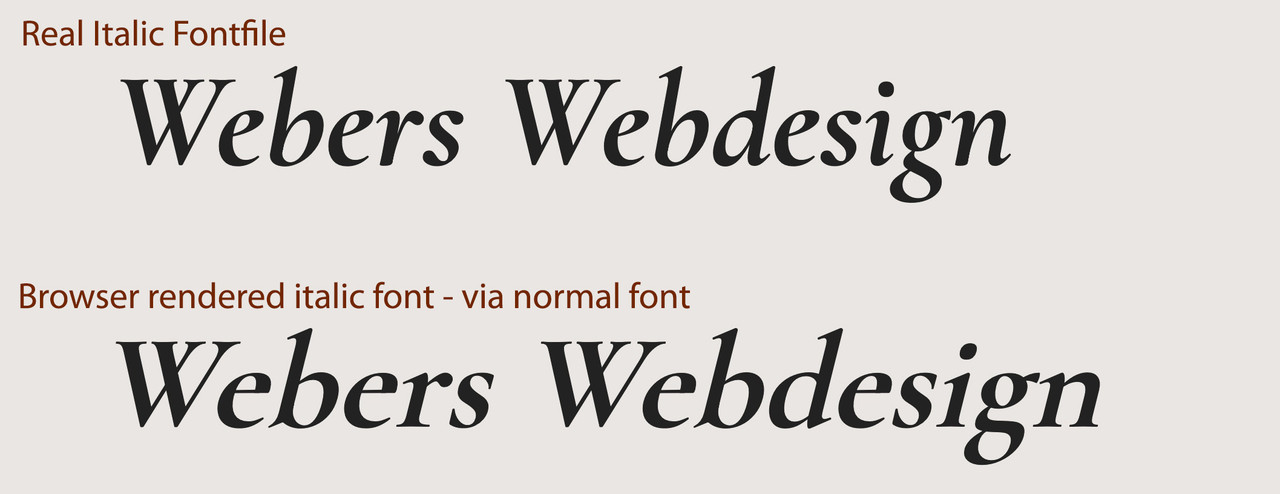
    Consider whether you really need to upload an extra italic font file. Browsers can render an italic font style well from the normal font files without quality loss. Yes – as someone who also comes from print layout, I know that italic styles can vary considerably – especially with serif fonts. But therefore burdening the performance by double upload?
    ____________

    To be GDPR compliant – you have to disable the Enfold embedding codes of Google Fonts. There are internal solutions as well as quite a few plugins.

    *Deprecated snippet removed*

    slightly newer snippet from 2018 using filter – mentioned by Günter

    function my_output_google_webfonts_script( $activate ){
      return false;
    }
    add_filter( 'avf_output_google_webfonts_script', 'my_output_google_webfonts_script', 10, 1 );

    Now:

    Preparing fonts for Enfold import/export “Custom Font Manager” needs a bit of explanation – because sometimes I see very long lists under the Custom Font Manager – because some users upload font-weights of font-families separately.

    As far as I have tested, the Font Kit Generator from FontSquirrel does not support the font family option ( The zip files uploaded afterwards usually only output the 400 font-weight. ) . This is probably sometimes the reason for the separate uploading of the different font styles.

    I prefer the Transfonter – only the option to create a demo page should be removed in the settings;
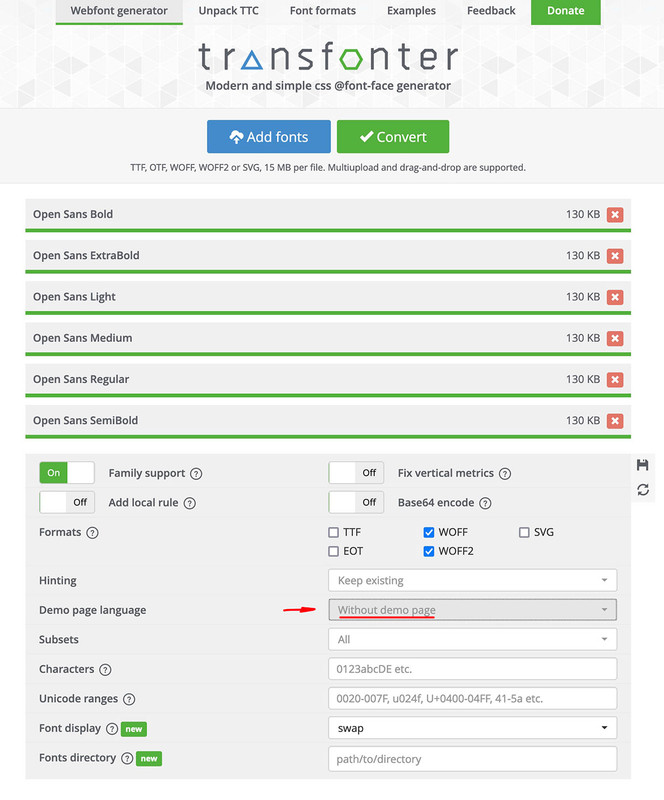
    otherwise this would also be in the downloadable zip file. In principle, this zip file is ready to be uploaded. You only have to rename it with the name of the corresponding font – (the font-family name is taken from the fonts themselves, but the listing within the Custom Font Manager is done via this zip name).

    If everything has worked so far, the font family will be displayed in the Custom Font Manager.

    The uploaded Fonts will be at : General Styling – Fonts – Heading Font (or Font for Body text ) at the end of the dropdown list “Uploaded Fonts”:
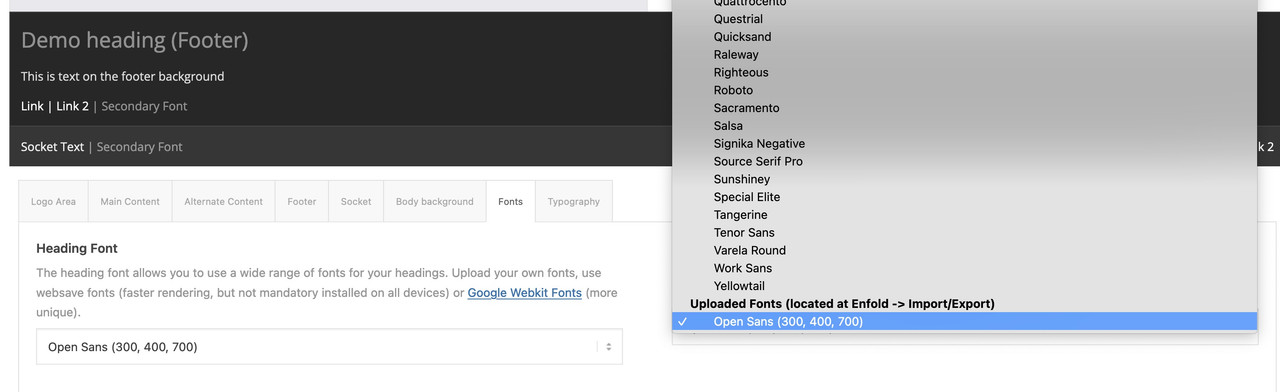
    If you select this font under Enfold Child – General Styling – Fonts for your Body Text – or Heading Font, then this font will only be loaded according to the existing font-weights. A bold (700) setting ensures that the fontname-bold is loaded.
    If you have uploaded the italic fonts and set this via css, the explicit fontname-italic or fontname-bolditalic will be loaded.

    • This topic was modified 3 years, 3 months ago by Yigit.
    #1364060

    Hi,

    Thanks for contacting us!

    Please add following code to Quick CSS field in Enfold theme options > General Styling tab

    
    @media only screen and (max-width: 767px) {
    .page-id-1164 .mfp-iframe-scaler {
      padding-top: 146.25%;
    }
    }
    

    Cheers!
    Yigit

    #1364047

    In reply to: Some font questions

    Hi Alwin,

    Thanks for contacting us!

    Entypo-fontello are the default icon fonts used in Enfold. Social icons, navigation and scroll to top arrows are using entypo-fontello fonts. In case Open Sans cannot be downloaded from Google’s CDN, fallback font families Helvetica or Arial would be used instead.

    I hope that helps :)

    Regards,
    Yigit

    #1364044

    In reply to: logo im hamburger menu

    Hi Franz,
    Please add following code to Quick CSS field in Enfold theme options > General Styling tab

    
    @media only screen and (max-width: 767px) {
    #top #wrap_all #header #av-burger-menu-ul > li.av-active-burger-items {
      top: 80px;
    }}
    

    Best regards,
    Yigit

    #1364041

    Hi Samuel,

    Thanks for contacting us!

    Please add following code to Functions.php file of your child theme in Appearance > Editor

    
    function year_shortcode() {
    	$year = date('Y');
    	return $year;
    }
    add_shortcode('year', 'year_shortcode');
    

    then add following shortcode in Enfold theme options > Footer > Copyright field

    
    [year]
    

    Regards,
    Yigit

    #1364040

    Hi Samuel,

    Thanks for contacting us!

    1- Please add following code to Quick CSS field in Enfold theme options > General Styling tab

    
    #top .seva-fields input[type="text"] {
      margin-bottom: 0;
    }
    

    2- There seems to be an empty field above your submit button. I attached a screenshot in private content field below. Could you please edit your form and delete it?

    Best regards,
    Yigit

    #1364039

    In reply to: Enfold Forms

    Hi Samuel,

    Thanks for contacting us!

    Please add following code to Quick CSS field in Enfold theme options > General Styling tab
    1-

    
    .avia_ajax_form label.input_checkbox_label {
      line-height: 1.3em;
    }
    

    2-

    
    #top .avia_ajax_form .text_input, #top .avia_ajax_form .select, #top .avia_ajax_form .text_area {
      font-size: 20px;
      font-family: georgia;
    }
    

    If these do not help, please post a screenshot showing the changes you would like to make. You can upload your screenshots on imgur.com and post the links here :)

    Regards,
    Yigit

    #1364038

    Hey @money4nothing,

    Please go to – https://kriesi.at/support/forum/enfold/#new-post to start a new thread and attach temporary WordPress and FTP logins in private content field and we will install the theme for you.

    If you post your credentials here, they would be visible to creator of this thread so for security reasons, please start a new thread :)

    Regards,
    Yigit

    #1364032

    Topic: Some font questions

    in forum Enfold
    Alwin
    Participant

    I am using the Google font Open Sans on all my Enfold websites (not hosted locally but from Google’s CDN).
    It’s the only font I use for the whole website.

    But I see that this font is also always loaded:
    wp-content/themes/enfold/config-templatebuilder/avia-template-builder/assets/fonts/entypo-fontello.woff2

    – If I am correct then Entypo-fontello is the deafult font from the Enfold theme?
    – Can I delete or prevent Entypo-fontello to be loaded?
    – Or can I change the Enfold deafult font in to another font?

    In case the Google font Open Sans can not be downloaded from Google’s CDN, does that mean Enfold is using Entypo-fontello has a failback font and uses this font instead of Open Sans when there is an issue with loading Open Sans?

    Thanks for your help!

    Best Wishes,
    Alwin

    #1364031

    I have the same problem. Purchased Enfold yesterday.

    I tried it with downloading both files – the INSTALLABLE WORD-PRESS-FILE ONLY with 16MB and the FULL THEME FILE with 64 MB.

    When unzipping the WORDPRESS ONLY File there even is no enfold.zip file, at least Not in my Downloads files.
    When unpacking the Bagger FULL-THEME-FILE with 64 MB there i get an enfold.zip but when trying to Upload this enfold.zip into WordPress i get the same message as Matts: Link has expired.

    Annoying! I just paid 90$ and it doesn‘t work.

    #1364028

    Topic: Enfold Forms

    in forum Enfold
    Samuel
    Participant

    (Please refer to the first form on the link.)
    How do I narrow the line height for the checkboxes?
    How do I change the font and size of the fields?
    Can I have the CSS code? Thanks.

    #1364026

    In reply to: paying for support

    Hi,
    Glad Ismael could help, if you have any further questions please create a new thread and we will gladly try to help you. Thank you for using Enfold.

    Best regards,
    Mike

    #1364016

    Hi,

    Due to our policy, we only provide support to our registered users.

    Please register to our support forum – https://kriesi.at/support/register/ using your purchase code, start a new thread under Enfold sub forum and attach temporary WordPress admin and FTP logins in private content field and we will update the theme for you. Make sure to have a backup to be on the safe side.

    Best regards,
    Yigit

    #1363998

    Hey solf,

    Thank you for the inquiry.

    Would you mind providing a screenshot of the issue? You can use imgur, savvyify or dropbox for the screenshot. Thanks.

    To align the list items to the right and implement a work-break rule, please add this css code.

    .entry-content-wrapper div li {
        text-indent: 0;
        text-align: left;
        word-break: break-all;
    }

    Please toggle or temporarily disable the Enfold > Performance > File Compression settings after adding the css.

    Best regards,
    Ismael

    #1363990

    Hi,

    Thank you for the inquiry.

    We are able to reproduce the issue on an iPad simulator and the problem seems to be occurring because of the background-attachment property, which is currently set to “fixed”. The background image displays back when we set the background-attachment property back to scroll.

    Please try to add the css code below to set the background-attachment to “scroll” only on mobile view.

    @media only screen and (max-width: 767px) {
    
      /* Add your Mobile Styles here */
      .avia-section.av-l7hbrsgi-22a28a38511cc44c00332707314bc68c {
        background-attachment: scroll;
        background-position: top center;
      }
    }

    You may need to toggle or temporarily disable the Enfold > Performance > File Compression settings after adding the css.

    Best regards,
    Ismael

    #1363989

    In reply to: paying for support

    Hey Samuel Ng,

    Thank you for the inquiry.

    You can extend your support license on Themeforest using the same account used to purchase the theme. Please check the documentation below for more info.

    // https://help.market.envato.com/hc/en-us/articles/207886473-Extending-and-Renewing-Item-Support

    You can extend the license directly from the Enfold theme page, just click the Renew Support button.

    // https://themeforest.net/item/enfold-responsive-multipurpose-theme/4519990/support

    Best regards,
    Ismael

    #1363988

    In reply to: Enfold theme

    Hey larademartino,

    Thank you for the inquiry.

    You can configure the theme settings including the logo and footer options in the Dashboard > Enfold > Theme Options panel, and widgets in the footer can be edited in the Appearance > Widgets panel. To help you get started with the theme, please check the documentation below.

    // https://kriesi.at/documentation/enfold/quick-setup/

    Reading a few articles in the blog page should also help.

    // https://kriesi.at/blog
    // https://kriesi.at/archives/wordpress-beginners-how-to-start-with-enfold-from-scratch
    // https://kriesi.at/archives/the-complete-guide-to-updating-enfold

    Best regards,
    Ismael

    #1363986

    Topic: Enfold theme

    in forum Enfold
    larademartino
    Participant

    Hi team,

    Can someone please help me with the Enfold theme, for a microsite I am building?

    I have installed the theme and can’t seem to edit the home page or any other.

    Trying to add a new page and then publishing has the enfold logo, header text and some enfold footer items on the page. I can’t seem to remove this.

    Please help :)

    Thanks,
    Lara

    #1363978

    In reply to: Logo in Menu vanishes

    Hi,

    Great, I’m glad that Yigit could help you out. I’ll close this thread for now then, please open a new thread if you should have any further questions or problems.

    Best regards,
    Rikard

    #1363976

    Hi,

    Great, I’m glad that we could help. I’ll close this thread for now then, please open a new thread if you should have any further questions or problems.

    Best regards,
    Rikard

    #1363966

    Hi,

    Thanks for contacting us!

    “avia” is the main menu in header, “avia2” is the secondary menu on header meta section and “avia3” is the menu in footer socket. After choosing the menu location, you should be able to choose which menu to display in page settings.

    If you would not like to use a plugin, we have a code snippet on our docs that you can use – https://kriesi.at/documentation/enfold/menu/#different-menu-for-different-pages :)

    Best regards,
    Yigit

Viewing 30 results - 23,221 through 23,250 (of 244,499 total)
