Hi Marc,
Great! Thanks for the update :)
For your information, you can take a look at Enfold documentation here – https://kriesi.at/documentation/enfold/
If you have any other questions or issues, feel free to start a new thread under Enfold sub forum and we will gladly try to help you :)
Enjoy the rest of your day!
Best regards,
Yigit
Hi,
Thanks for that. Please try the following in Quick CSS under Enfold->General Styling:
.avia-icongrid .av-icon-cell-item {
    text-align: left;
}
Best regards,
Rikard
Hi,
Thanks for the update. I’ll close this thread for now then, please open a new thread if you should have any further questions or problems.
Best regards,
Rikard
Hello everyone,
For those who are interested, you can download the latest version of the Italian language
Download here
Translation: Italian language
Version: Enfold 5.4
Released on: 24th January 2023
Strings: 6072
All translations are synchronised with the source files
Regards
Luigi
 Franz Sumnitsch
Guest
Dear Kriesi,
we have recently launched our new website, having used the Enfold theme from you. We have a question regarding the page with our projects.
For our projects presentation we have used the element “Masonry”. Even though the grid is set to sort out the project entries chronologically, it does not work 100%. In other words, every time we open this page, the sequence of the entries is slightly different, putting the entries in the random order. The entries move in the scale of ca. 1-2 rows of the grid, in relation to their correct position.
We would appreciate any help from your side to solve this issue.
Best regards!
Hi Rikard,
It appears that I could solve the 404 redirection of the start page. I realized that I need to define the start page in two different areas:
(Design => Customizer => Startseiten Einstellungen (starting page settings) and also under Enfold Theme Optionen => Startseiten Einstellungen (starting page settings). While I do not know when or how this changed, I could now fix it, and hope it will remain so. So, I would rather not update the theme for the time beeing on this site, but only use the 5.4 on another site, which I currently develop to avoid any risk of another problem. Still, would it be possible to go back to the older 4.8 version by again overwriting a 5.4 installation?
thank you for your feedback and help anyway.
kind regards
Rudi
Hey Filipp,
Replied to your thread here: https://kriesi.at/support/topic/enfold-207/. Let us continue there :)
Best regards,
Yigit
Hey Filipp,
Thanks for contacting us!
It seems like you are currently using Enfold 4.5.6 which is not compatible with PHP 8.x.
Please refer to this post: https://kriesi.at/documentation/enfold/theme-registration/#how-to-generate-a-envato-personal-token and generate a Personal Token.
Then install the Envato Market plugin: https://www.envato.com/lp/market-plugin/ and insert your Personal Token into plugin settings and check the Themes tab for the update.
I checked your profile and apparently support period expired on 2022-05-12.
Best regards,
Yigit
Hi,
Thanks for the login, I see that you added the PHP function to the plugin Simple Custom CSS and JS as a CSS code snippet:

That is why it didn’t work, the Simple Custom CSS and JS plugin doesn’t allow PHP snippets, so I moved the snippet to the WPcode plugin that I see you had installed.
I then added tiktok to your social profiles, but you will need to adjust the URL to yours.
Now the icon is showing, please clear your browser cache and check.

It is also available as a icon in your elements:
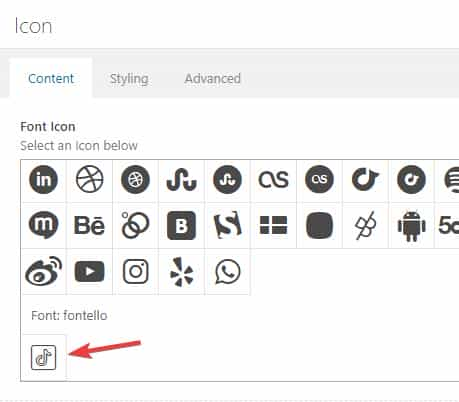
Best regards,
Mike
 Filipp Fuchs
Guest
Hi guys,
I have purchased enfold seven years ago and updated my Support and paid for it one year ago. But now I don’t have access to the support for theme anymore. I just have one problem I tried to switch to PHP8 but it is not working though my WordPress is updated to the newest release. Would be very kind of you to give me a hint how to solve the problem kind regards and greetings to Austria
Filipp FuchsGuest
Hi guys,
I have purchased enfold seven years ago and updated my Support and paid for it one year ago. But now I don’t have access to the support for theme anymore. I just have one problem I tried to switch to PHP8 but it is not working though my WordPress is updated to the newest release. Would be very kind of you to give me a hint how to solve the problem kind regards and greetings to Austria
Hi,
thanks for the link to your new blog site, I see the breadcrumb error on your post there:

When I switch to the parent theme this is resolved:

Give this a try, I was not able to isolate the function in your child theme functions.php causing this, perhaps you have other customizations that I’m not aware of?
Best regards,
Mike
Hi beachmarc,
I tested the code you have in your functions.php file on my test site and it worked as expected.
I noticed that you are currently using an older version of Enfold. Could you please update Enfold to the latest version 5.4 and check once again?
Best regards,
Yigit
Hey mandomaze,
Could you try updating the theme to the latest version (5.4) to see if that helps please? https://kriesi.at/documentation/enfold/how-to-install-enfold-theme/#theme-update.
Best regards,
Rikard
Reading through this it’s going to generate another load of problems!
Why would I want to change the uploads folder and change the URL to all files?
By web-config do they mean web.config?
Oh and this line: If that doesn’t work, create a new .htaccess file and replace old files with new ones. Huh?
As far as I can see the problem hasn’t be caused by ME ??? Why do other sites using Enfold and Shortcoder NOT have this problem??
Sorry not to be more enthusiastic.
Hi,
Please add the following code to the Quick CSS field in Enfold theme options > General Styling tab
/* Adjust submenu distance from main menu  */
@media only screen and (min-width: 990px) {
.av-main-nav ul {
  top: 80%;
}
}
Best regards,
Yigit
Hey,
Thanks for the information!
You can refer to this post: https://kriesi.at/documentation/enfold/social-share-buttons/#how-to-add-custom-social-icons-to-enfold-options and add a new icon to social share profiles and link it to your shop page :)
If you need assistance with this, please let us know!
Cheers!
Yigit
Hi,
Thanks for contacting us!
1- Have you modified footer.php or header.php files on your child theme? Please try updating those files with the fresh ones from the parent theme if you have.
- You can edit the file on your child theme and rename it from footer.php to old-footer.php
- Copy the footer.php file from the parent theme into your child theme
- Reapply the modifications you have on the old-footer.php file and check
2- It seems like your support period expired on 2016-03-02. If you have renewed your support period on ThemeForest, you can go to https://kriesi.at/support/forum/enfold#new-post and revalidate your purchase code. After that, you should be able to start new threads :)
Regards,
Yigit
 Peter Fertl
Guest
Hallo Enfold-Team,
Thema 1:
auf meiner Website werden PHP-Fehler im Footermodul angezeigt. https://dig-lippe.de
Ich habe per FTP die Ordner “enfold” und “enfold-child” ersetzt und den Server auf “PHP 8.1.” umgestellt und WordPress auf Version 6.1.1. aktualisiert.
Frage: Wie kann ich den Fehler beheben?
Thema 2:
ich wollte mich auf der Supportseite registrieren https://kriesi.at/support/register/
Leider wird mein item purchase code nicht akzeptiert. Können Sie das bitte prüfen, damit ich mich registrieren kann?
Danke im Voraus und Gruss
Peter Fertl
Alter Weg 23
32760 Detmold
-
This topic was modified 3 years, 2 months ago by
 Yigit. Reason: Moved the details into private content field
Hi,
is it possible to add an button next to the social Media Buttons in enfold? In detail, I want to add a Button which links to the site’s shop.
kind regards!
PS, I have kept the Twenty Twenty One theme active still. Then disabled all the plugins.
In a new tab I have opened the back end of one of the pages to see if the error occurs.
Going through them all the culprit looks to be SHORTCODER, with a total 2 php errors as above.
BUT as soon as I switch to Enfold I get a drastic decrease in back end speed – from 2 seconds to 7.8.
There also is a script error on the Theme Options page of enfold:
Missing Dependencies avia_template_save_js (xdomainnamex) wp-content/themes/enfold/config-templatebuilder/avia-template-builder/assets/js/avia-template-saving.js avia_element_js (missing) 5.4
Keeping Shortcoder inactive I went back to the same page I did the testing above I get the same PHP errors as before and it gets grindingly slow again at 12 seconds to display the page.
Warning is_file(): open_basedir restriction in effect. File(/en.js) is not within the allowed path(s): (/var/www/vhosts/xdomainnamex/:/tmp/) 2 +
wp-includes/class-wp-editor.php:516
WordPress core
Warning is_file(): open_basedir restriction in effect. File(/en_dlg.js) is not within the allowed path(s): (/var/www/vhosts/xdomainnamex/:/tmp/) 2 +
wp-includes/class-wp-editor.php:520
WordPress core
Reactivating Shortcoder increases the refresh time on the plugins page from 2 seconds to 12 ! But no errors.
Refreshing the test page the PHP errors totalled 4 when shortcoder was deactivated, but now go to 6 when activated and a refresh time of 11 seconds.
So although Shortcoder seems to be a problem, Enfold itself seems to be a problem too.
I hope this all helps!
C
Hello Enfold team,
unfortunately, I can’t upgrade my website to PHP 8 with Enfold. PHP 7.4 works without any problems.
When I upgrade to 8, I get a message: “There was a critical error on your site.”
Enfold version: 5.2.1
I deactivate all plugins, still doesn’t work. So I don’t think it’s the plugins. Nevertheless, the overview, maybe that makes it easier to solve the problem.
Plugins I use:
. Aksimet Anti-Spam
. Classic editor
. Contact form 7
. Cookie Notice & Compliance for GDPR / CCPA
. Disal Comments
. Duplicate Page
. duplicator
. Layer Slider WP
. OMGF
. OMGF Pro
. Opt-Out for Google Analytics (DSGVO / GDPR)
. Really simple SSL
. Revolution Slider
. Use Any Font
. Wordfence Security
Can you please help. I just can’t figure out what’s causing it.
Many Thanks.
Warm greetings
Daniel
Hi Rikard,
Just tried using Twenty Twenty One theme and the same problems are there, except only one of each total 2.
Using Enfold I get 3 warnings with two each total 6.
It’s the same error though : (
Hi Enfold team,
I would like to have a fullscreen picture in the blog post; just on Tablet portrait and Mobile.
What I would like achieve you can see here: https://ctrlv.cz/mBg2
My page: https://blog.mtsakademie.cz/cviceni/hledate-skvele-cviceni-v-praze-13/
I have tryied to use this css:
/* Main blog picture in mobile*/
@media only screen and (max-width: 479px){
.flex_column.mts-blog-uvodni-obrazek {width: 140% !important; margin-left: -38px !important; margin-bottom: 0px !important}
}
/* Main blog picture in tablet*/
@media only screen and (max-width: 767px) and (min-width: 480px) {
.flex_column.mts-blog-uvodni-obrazek {width: 140% !important; margin-left: -65px !important; margin-bottom: 0px !important}
}
This solution works, but I don´t see there the copyright info on the picture.
I am looking for a better solution where the copyright info will be visible.
Thanks a lot!
Zdenek
Hey djsmbd,
Thank you for the inquiry.
Does it work correctly after accepting the privacy cookies? If you want to enable the feature without requiring the user to accept the privacy cookies, set the Enfold > Privacy & Cookies > Cookie Handling > Default Cookie Behaviour to the first or second option.
Best regards,
Ismael
Hi,
So, what i’m looking to do is…
I need a landing page & some sub-pages that uses a completely different look/design than the rest of the site.
“BUT” i need to still be able to utilize ALL of the “Avia Layout Builder” options for each page.
What specific changes are you trying to implement to these pages? It sounds like what you are trying to accomplish here is a bit out of the scope of support, but if you need to still use the ALB, you have to create a copy of the template-builder.php file and add the template comment as instructed previously so that you can use it as template. You can then add the changes to the template.
where do i…
1) add a new logo, using the same layout, size, & placement as the main one, & letting Enfold do its thing for responsiveness etc?
2) tell the new template to use a different menu from the WP Menu? and let Enfold do its thing for responsiveness there too? i only need to change the colors for the menu.
3) where do i hardcode in a different background image for the pages?
4) and how can i have the footer use different/custom Widgets?
1.) To display a different logo on a specific page, you can use the avf_logo filter in the functions.php file.
add_filter('avf_logo','av_change_logo_img');
function av_change_logo_img($img)
{
    if( is_page('1005973') )
    {
        $img = "https://www.site.com/wp-content/uploads/2023/01/this-logo.svg";
    }
    if(is_singular('portfolio'))
    {
        $img = "https://www.site.com/wp-content/uploads/2023/01/that-logo.png";
    }
    return $img;
}
2.) You can use one of the following plugins to control the visibility of the menu items based on certain conditions.
// https://wordpress.org/plugins/conditional-menus/
// https://wordpress.org/plugins/if-menu/
3) Have you tried using the Color Section element?
4) Again, you can use the following plugins to control the visibility of the widgets.
// https://wordpress.org/plugins/widget-options/
// https://wordpress.org/plugins/widget-logic/
Best regards,
Ismael
Hey walhai,
Thank you for the inquiry.
You have to modify the enfold\config-templatebuilder\avia-shortcodes\postslider\postslider.php file, look for the following code around line 805.
$thumbnail = get_the_post_thumbnail( $the_id, $image_size );
Replace the $image_size with a different thumbnail (ex. full, large, square, medium etc ). Default size is “portfolio”.
$thumbnail = get_the_post_thumbnail( $the_id, "full" );
Best regards,
Ismael
Hi Eleina_Shinn,
We’re happy to hear that :)
Thanks for using Enfold and have a great day!
Best regards,
Nikko
Hi Norbert,
The version of Enfold you currently use is using the old API (username and API key) which Envato has already deprecated therefore you can’t update it with the usual method.
You can do the following process instead:
First make a backup:
– Site Backup: https://kriesi.at/documentation/enfold/backup-wordpress-site/
– Theme Settings Backup: https://kriesi.at/documentation/enfold/backup-theme-settings/
Option 1: Use Envato Market to update your site
– link: https://envato.com/market-plugin/
Option 2: Update manually
1. Login to ThemeForest and download the Enfold theme, right-click over the downloaded zip file and extract/unzip it.
2. It should generate a new folder, open it and look for the enfold folder
3. Right-click the enfold folder then zip it, here’s a tutorial on how to create a zip file in windows: https://www.howtogeek.com/668409/how-to-zip-and-unzip-files-on-windows-10/ (this should create enfold.zip
4. Log in to WordPress as and Admin.
5. Install and activate a maintenance plugin and put your site in Maintenance mode.
6. Go to Appearance > Themes, switch to a default WordPress theme like TwentyTwenty then delete Enfold.
7. Click on the ADD NEW button.
8. Click on the UPLOAD THEME button.
9. Click BROWSE and choose enfold.zip file
10. Click the INSTALL NOW button and switch to Enfold or your child theme.
11. Remove the maintenance mode then deactivate and remove the maintenance plugin.
Then register the theme by following the instructions in https://kriesi.at/documentation/enfold/theme-registration/
Once this is done, the next time you update, you’ll only need to go to Enfold > Theme Updates and click on the Update button.
Best regards,
Nikko
Hi enfold,
Thanks for giving us admin access, you can remove access now.
I see you are using Fade to another image hover effect which has following restrictions:
– Box shadow does not work when you select to zoom the image.
– Image fading does not work when image caption overlay or a link is used.
You will need to change it to another effect in order to use the link.
Best regards,
Nikko



