Viewing 30 results - 7,951 through 7,980 (of 244,446 total)
  • Author
    Search Results
  • #1445064

    Hey birte5,

    Thank you for the inquiry.

    Try to add this css code to adjust the background color of video container:

    div .mejs-container {
        background: #080808;
    }

    You may need to toggle or temporarily disable the Enfold > Performance > File Compression settings to make sure that the changes take effect.

    Best regards,
    Ismael

    #1445060

    In reply to: Customize table

    Hi,

    The html can be added in any of the table cells:

    
    <div class="av-table-coloured av-table-coloured-red">Hiit</div>
    

    The css should be added in the Enfold > General Styling > Quick CSS field:

    .av-table-coloured {
        position: relative;
        left: 0;
        top: 0;
        width: 100%;
        padding: 10px;
    }
    
    .av-table-coloured .av-table-coloured-red {
        background: red;
    }
    
    .av-table-coloured .av-table-coloured-orange {
        background: orange;
    }
    
    .av-table-coloured .av-table-coloured-blue {
        background: blue;
    }
    

    Please check this link: https://kriesi.at/documentation/enfold/add-custom-css/#quick-css

    Best regards,
    Ismael

    Hi,

    A serif font changes to script on hover.

    You might be able to do this in the Enfold > Advanced Styling panel. Edit the elements under the Main Menu section and toggle the Apply only to mouse hover state option.

    Best regards,
    Ismael

    #1445047
    VerhoevenGroup
    Participant

    Whenever I make any changes on pages, the content blocks disappear. The theme is up to date and the wordpress version also up to date.
    The error in the logs states: PHP Warning: Creating default object from empty value in /nas/content/live/nautiquenz1/wp-content/themes/enfold/config-templatebuilder/avia-shortcodes/slideshow_layerslider/slideshow_layerslider.php on line 28″

    Can you please help fix this so we can make changes on our site.

    #1445022

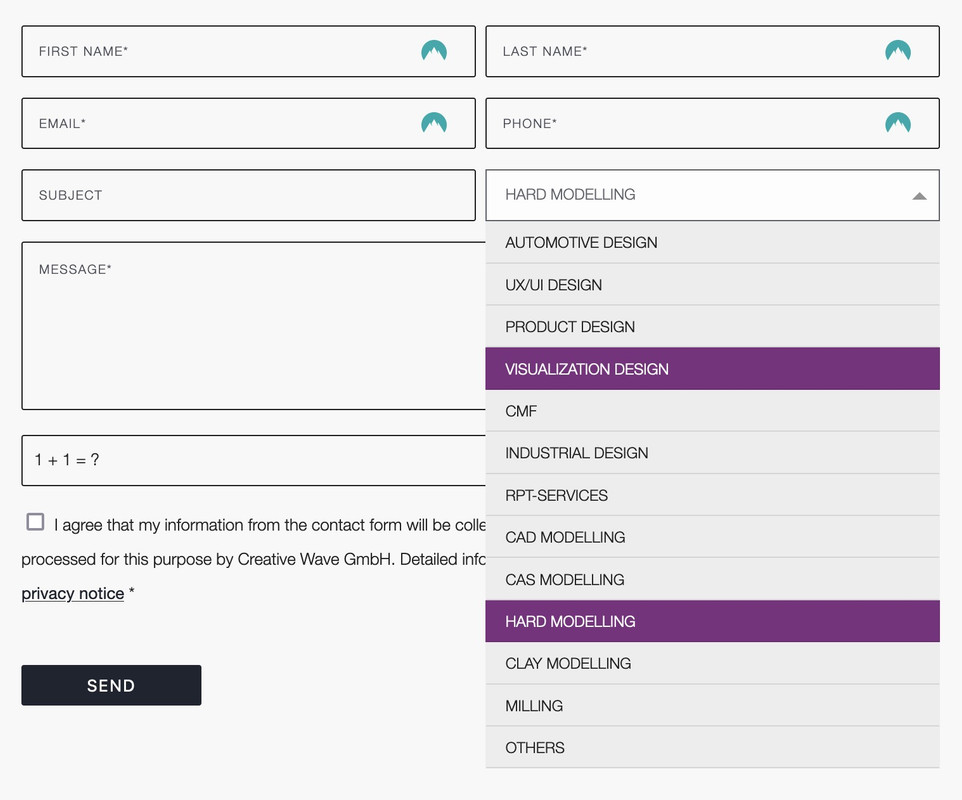
    you can only influence the select box ( as check boxes, radio buttons etc. ) by replacing the original html by a different html structure.

    put this to your child-theme functions.php:
    ( it is specific to your form – because the selector for that form element is given by the ID: #element_avia_6_1
    on other form elements it might be a different ID )

    function style_select_options(){
    ?>
    <script>
    window.addEventListener("DOMContentLoaded", function () { 
        (function($) {     
            $('.avia_ajax_form #element_avia_6_1').addClass('custom-select');
        })(jQuery);
    
        var x, i, j, l, ll, selElmnt, a, b, c;
        /* Look for any elements with the class "custom-select": */
        x = document.getElementsByClassName("custom-select");
        l = x.length;
        for (i = 0; i < l; i++) {
          selElmnt = x[i].getElementsByTagName("select")[0];
          ll = selElmnt.length;
          /* For each element, create a new DIV that will act as the selected item: */
          a = document.createElement("DIV");
          a.setAttribute("class", "select-selected");
          a.innerHTML = selElmnt.options[selElmnt.selectedIndex].innerHTML;
          x[i].appendChild(a);
          /* For each element, create a new DIV that will contain the option list: */
          b = document.createElement("DIV");
          b.setAttribute("class", "select-items select-hide");
          for (j = 1; j < ll; j++) {
            /* For each option in the original select element,
            create a new DIV that will act as an option item: */
            c = document.createElement("DIV");
            c.innerHTML = selElmnt.options[j].innerHTML;
            c.addEventListener("click", function(e) {
                /* When an item is clicked, update the original select box,
                and the selected item: */
                var y, i, k, s, h, sl, yl;
                s = this.parentNode.parentNode.getElementsByTagName("select")[0];
                sl = s.length;
                h = this.parentNode.previousSibling;
                for (i = 0; i < sl; i++) {
                  if (s.options[i].innerHTML == this.innerHTML) {
                    s.selectedIndex = i;
                    h.innerHTML = this.innerHTML;
                    y = this.parentNode.getElementsByClassName("same-as-selected");
                    yl = y.length;
                    for (k = 0; k < yl; k++) {
                      y[k].removeAttribute("class");
                    }
                    this.setAttribute("class", "same-as-selected");
                    break;
                  }
                }
                h.click();
            });
            b.appendChild(c);
          }
          x[i].appendChild(b);
          a.addEventListener("click", function(e) {
            /* When the select box is clicked, close any other select boxes,
            and open/close the current select box: */
            e.stopPropagation();
            closeAllSelect(this);
            this.nextSibling.classList.toggle("select-hide");
            this.classList.toggle("select-arrow-active");
          });
        }
    
        function closeAllSelect(elmnt) {
          /* A function that will close all select boxes in the document,
          except the current select box: */
          var x, y, i, xl, yl, arrNo = [];
          x = document.getElementsByClassName("select-items");
          y = document.getElementsByClassName("select-selected");
          xl = x.length;
          yl = y.length;
          for (i = 0; i < yl; i++) {
            if (elmnt == y[i]) {
              arrNo.push(i)
            } else {
              y[i].classList.remove("select-arrow-active");
            }
          }
          for (i = 0; i < xl; i++) {
            if (arrNo.indexOf(i)) {
              x[i].classList.add("select-hide");
            }
          }
        }
    
        /* If the user clicks anywhere outside the select box,
        then close all select boxes: */
        document.addEventListener("click", closeAllSelect); 
    
    });
    </script>
    <?php
    }
    add_action('wp_footer', 'style_select_options');
    

    after that for quick.css:

    /*the container must be positioned relative:*/
    .custom-select {
      font-family: inherit;
      text-transform: uppercase;
    }
    
    .custom-select select {
      display: none !important;
    }
    
    #top .select-selected {
      background-color: var(--enfold-main-color-bg);
      border-color: var(--enfold-main-color-primary);
      border-width: 1px;
      height: 41px;
      font-size: 12px;
      color: var(--enfold-main-color-primary);
      opacity: 0.7
    }
    
    /*style the arrow inside the select element:*/
    .select-selected:after {
      position: absolute;
      content: "";
      top: 18px;
      right: 10px;
      width: 0;
      height: 0;
      border: 6px solid transparent;
      border-color: #666 transparent transparent transparent;
    }
    
    /*point the arrow upwards when the select box is open (active):*/
    .select-selected.select-arrow-active:after {
      border-color: transparent transparent #666 transparent;
      top: 12px;
    }
    
    /*style the items (options), including the selected item:*/
    .select-items div,
    .select-selected {
      color: #FFF;
      padding: 2px 15px 2px;
      border: 1px solid transparent;
      border-color: transparent transparent rgba(0, 0, 0, 0.1) transparent;
      cursor: pointer;
      user-select: none;
    }
    
    /*style the items (options), including the selected item:*/
    .select-selected {
      padding: 5px 15px 2px;
    }
    
    /*style items (options):*/
    .select-items {
      position: absolute;
      background-color: #ddd;
      top: 100%;
      left: 0;
      right: 0;
      z-index: 99;
      font-size: 12px
    }
    
    /*hide the items when the select box is closed:*/
    .select-hide {
      display: none;
    }
    
    .select-items div:hover, .same-as-selected {
      background-color: #7d2a7e;
      color: #fff !important;
    }

    Looks then this way – but you can now style each option and pseudo states to your needs:

    • This reply was modified 1 year, 10 months ago by Guenni007.
    #1445009

    In reply to: Sidebar pushed down

    Hi,
    Glad Guenni007 could help, thank you Guenni007, if you have any further questions please create a new thread and we will gladly try to help you. Thank you for using Enfold.

    Best regards,
    Mike

    #1445008

    Hi,
    Glad we were able to help, if you have any further questions please create a new thread and we will gladly try to help you. Thank you for using Enfold.

    Best regards,
    Mike

    #1444995

    In reply to: website creating

    Hey PATRICIA,

    Thanks for reaching out to us. We develop a WordPress theme called Enfold, we don’t provide any of the services you are looking for unfortunately.

    Best regards,
    Rikard

    #1444991

    Hi,

    Thanks for the update. Please open a new thread if you should have any further questions or problems.

    Best regards,
    Rikard

    derfritz
    Participant

    Hello, after updating the events calendar and enfold we found some troubles regarding the display of recurring events. Before the update, only the first or the most current event was visible. After the update, every single event is shown. We use enfold layout elements without any customization.

    Thank you for your help!

    #1444969
    fefontol
    Participant

    Hi!
    I’ve created a valid Envato token following your instructions: Everything seems to be ok.
    But it’s not possilble to update the theme (from version 5.6.6 to 5.7.1

    This is the error message:

    Errori verificatisi controllando le 2024/05/21 15:33:
    Scarica il pacchetto URL: Codice errore 403 restituito da Envato: Forbidden:
    – response_code: 403
    – reason: scope-missing
    URL download del pacchetto: Si è verificato un problema nell’accedere al vostro link per il download. Impossibile eseguire l’aggiornamento.
    A seguito di errori del pacchetto Envato si sono verificati:
    Enfold – Richiesta di download URL fallita.

    Could you please help me with that?
    Thanks a lot
    Federico

    #1444952

    Hi,

    Thanks for letting us know. Please open a new thread if you should have any further questions or problems.

    Best regards,
    Rikard

    #1444947
    macjazz
    Participant

    Ich habe eschon vor einiger Zeit eine kleine Webseite (7Seiten) mit Enfold gemacht und erst jetzt bemerkt, dass das Menü am Handy nicht sichtbar ist – leere Seite.
    Woran könnte das liegen, alle Einstellungen durchgegangen, nichts gefunden.
    Danke für Tipps!

    #1444917

    In reply to: ALB

    Hi Lee,

    I’m sorry for the delayed response.

    You can definitely create your own elements for Enfold and offer them to Enfold users in a stand-alone plugin. A fellow Enfold user offered some elements ( https://www.spiderflystudios.com/resources/spiderfly-enfold-elements/ ).

    You can also create your own Enfold demos ( https://kriesi.at/documentation/enfold/import-demos/#creating-demos ).

    I hope this helps :) Let us know if you have any other questions.

    Regards,
    Yigit

    #1444916

    In reply to: Blocked IP

    Hi Hogne,

    I’m sorry for the delayed response.

    I contacted our hosting provider to check if your IP is blocked.

    As far as I know, our hosting provider’s security system automatically blocks IP addresses if it detects brute-force-like requests. This might have been the case. We’ll give you an update once we hear from them.

    In the meantime, does the manual demo import ( https://kriesi.at/documentation/enfold/import-demos/#how-to-manually-import-a-theme-demo ) work for you?

    Regards,
    Yigit

    Dear Kriesis, hello Nikko, hello Mike,
    unfortunately the issue with missing self hosted fonts is not resolved. It happens about three times a week and after changes in the Enfold Theme Options, e.g. after changing the copyright infos in the footer. If you want to have a closer look I ‘ll provide you the logon data.
    If the problem is unsolvable, I will switch to Google Fonts, which is not the preferred solution.

    Best regards
    Anne

    #1444913

    In reply to: Blogs slider

    hi

    Sure, this helps for this situation but still does not show the image or the text that was entered in that post.

    And more importantly: it still does not fix the problem I have and will try to explain again.
    We have a working situation with these post types on the live environment. When I upgrade to most recent version of Enfold, it stops working and you see what you see on the testing site (no text, no image).

    so someting changed within the avia shortcodes I assume betwean enfold 5.2 en enfold 5.7. But I am no sure where to look to try to fix this.

    #1444910

    Hi,

    Thanks for the update, we’ll close this thread for now then. Please open a new thread if you should have any further questions or problems.

    Best regards,
    Rikard

    Hi Maja,

    Please open a new thread and include WordPress admin login details in private, so that we can have a closer look at your site. We’ll close this thread for now.

    Best regards,
    Rikard

    Hey epochal11,
    You can change the header behavior when you edit the page and look in the Layout ▸ Header visibility and transparency option, change from Header is invisible and appears once the users scrolls down to one of the other options:
    Enfold Support 5878

    Best regards,
    Mike

    epochal11
    Participant

    Hi,
    we want to use this Theme: https://kriesi.at/themes/enfold-landing-page/
    The menu only appears after scrolling. We need the menu to appear always.
    I couldn’t find a setting, are there CSS/JS workarounds possible?
    Thanks, Alfons

    #1444900

    Hey reqonsult,
    Please see our demo of the Masonry Element. Here is another example of the same element used to show blog posts, it can also show products.

    Best regards,
    Mike

    #1444880

    In reply to: Blogs slider

    Thank you for taking the time.

    It is correct that clicking will get you to the homepage, it never was intended to actually show this post. Online in the slider (like it is working with an older version of enfold)

    Reagring where the posts are coming from, this is on this url
    /edit.php?post_type=reviews

    Hi Rikard

    I have added the code snippet, but unfortunately a new field is not showing in the element options. But I don’t see the field “toggle sorting tags” either, so I don’t know if something is wrong? I’m working in the Enfold version 5.2.1.

    Best regards,
    Maja

    #1444860

    Hi,

    Thank you for the info.

    We temporarily disabled the Enfold > Performance > File Compression settings. The changes made in General Styling are now displaying correctly. Please make sure to purge the cache before checking the page.

    Best regards,
    Ismael

    #1444852

    Hey amanda-mdllc,

    Thank you for the inquiry.

    We found an error in the console, which might be the reason why the slider is not displaying correctly.

    Error: Syntax error, unrecognized expression: #heading=h.ngufhp8xq157
        at HTMLAnchorElement.<anonymous> (avia-footer-scripts-0b8739d4fe487c49ae075d352a33296d---664b96d13b846.js:9:1021)
    

    Unfortunately, we can’t trace the error because compression is enabled. Please try temporarily disabling the Enfold > Performance > File Compression settings and let us know the result.

    Best regards,
    Ismael

    #1444850

    Hi,

    Thank you for the inquiry.

    Which blog layout did you select? If the default blog layout is active, you can edit the enfold/includes/loop-index.php and place the suggested code around line 293.

    echo apply_filters( 'avf_loop_index_blog_meta', $blog_meta_output );
    

    You can also use the avf_loop_index_blog_meta filter in the functions.php file to insert additional info in the meta info container:

    Example:

    add_filter("avf_loop_index_blog_meta", function ($output) {
        $photographer = get_field("photographer");
    
        if ($photographer) {
            $outlet_output = '<span class="photographer minor-meta">' . __('Photographer:', 'avia_framework') . ' ';
            $outlet_output .= wp_kses_post($photographer);
            $outlet_output .= '</span><span class="text-sep text-sep-cat">/</span>';
        }
        return $outlet_output . $output;
    }, 10, 1);

    Best regards,
    Ismael

    #1444800

    @Ismael

    The Layer Slider option is not useful, we don’t load it at all. Can’t you create a little hook in ~/enfold/config-templatebuilder/avia-shortcodes/slideshow/slideshow-video.js: to always force autoplay for all types of videos?

    #1444798
    amanda-mdllc
    Participant

    I have a website that I am using the the Fullwidth slider on and it is not showing up on desktop and mobile. I have it where it is an autorotation on and it is not working or even showing up. I have to arrow to the “next” image even though there are only 2 images and it shows. I deactivated all the plugins, cleared cache all around updated the theme and it still is not working.

    I created a login for you if you need to poke around.

    Thanks!
    ~Amanda

    #1444788

    In reply to: PHP upgrade fail

    Hey SugarPR,

    I see that you are running an old version of the theme, could you try to update to the latest version (5.7.1) to see if that helps please? The update to 5.7.1 has to be done manually from the version you are running, please refer to my replies in this thread: https://kriesi.at/support/topic/enfold-4-5-theme-update-update-failed-download-failed-a-valid-url-was-not-pro/#post-1021541
    You can either update manually via FTP: https://kriesi.at/documentation/enfold/how-to-install-enfold-theme/#theme-update, or upload the theme as if it was new under Appearance->Themes->Add New Theme.
    If that doesn’t work then please try to delete the whole theme folder, then replace it with the new version. Make sure that you have backups of the site before starting updating.
    Also please read this after you have updated: https://kriesi.at/documentation/enfold/theme-registration/

    Best regards,
    Rikard

Viewing 30 results - 7,951 through 7,980 (of 244,446 total)