

Forum Replies Created
-
AuthorPosts
-
December 22, 2018 at 2:54 am in reply to: Contact form: Email rejected due to AOL's DMARC policy #1048477
Hi,
For question 1: your email message from your form should already be formatted this way, for example this is the body of a contact form email I sent to myself, please note that the visitor email is listed as “E-Mail”Name: Mike <br/> E-Mail: (Email address hidden if logged out) <br/> <br/> Message: Please send me more info on the demo <br/> <br/>For question 2: To assign the “from” address to yours that does work, please use this function in your functions.php:
add_filter('avf_form_from', 'avf_form_from_mod', 10, 3);
function avf_form_from_mod($from, $new_post, $form_params) {
	global $enfold_custom_from_header;
	$enfold_custom_from_header = $from;
	$from = " (Email address hidden if logged out) ";
	return $from;
}
just change ” (Email address hidden if logged out) ” to your email, and the body of the message will still have the email that the visitor enters into the form. Like above.
Please test.Best regards,
MikeHi,
Can you please include a admin login in the private content area so we can take a closer look.
This could be related to a error in the updater that we fixed with v4.5.2, it was pinging Envato too often, and Envato has a limit on pings within a short time frame. If it won’t let you update, please try to do so manually.
Please read Private Content area.Best regards,
MikeHi,
If your css is in the style.css of your child theme, then you should note that if you add css to the file your merged css from your Enfold Theme Options > Performance > JS & CSS file merging and compression will not rebuild until you save your theme options.
You can force it to rebuild by adding a blank space to your Quick CSS field and then save your theme options (the big blue button)I recommend while you are building your site to disable all caching plugins & the css & js merging at: Enfold Theme Options > Performance > JS & CSS file merging and compression and to test your css in the Enfold Theme Options > General Styling > Quick CSS field.
Once your site is done then you can move your css to style.css and enable your caching.If this doesn’t help, please include a admin login in the private content area so I can assist better, I will continue to explain the steps I take.
Best regards,
MikeHi,
Glad we could help, unless there is anything else we can help with on this issue, shall we close this then?Best regards,
MikeHi,
Glad we were able to help, we will close this now. Thank you for using Enfold.For your information, you can take a look at Enfold documentation here
For any other questions or issues, feel free to start new threads under Enfold sub forum and we will gladly try to help you :)Best regards,
MikeHi,
Glad we could help, have a Merry Christmas !!
Unless there is anything else we can help with on this issue, shall we close this then?Best regards,
MikeDecember 21, 2018 at 2:28 pm in reply to: Contact form: Email rejected due to AOL's DMARC policy #1048186Hi,
Oh I see what you are doing now, I wonder if Strato is going to send you an error message for every web mail provider? Please try testing with @gmail.com, @yahoo.com, @hotmail.com, etc.
If they are going to do this with with all of them, then you will have to use the function with your own site email address and when you get a message you will have to copy the visitor email from the body of the message.
If Strato is only going to do this to AOL emails, then you could think about putting a message on your site “AOL addresses not supported” I have seen this many times for Yahoo addresses.If you use the function you may also need to set up a SMTP Server to Send WordPress Emails with, so that you can get emails with your business email in the “from” field.
Best regards,
MikeHi,
I found the error in your header.php that was printing the space at the top of your page, and removed it:" />Please clear your browser cache and check.
Best regards,
MikeHi,
So you want the text and the background image to have a opacity: 0.5?
I see you have already done that for the pink text, what about the testimony?As for the hotspot and chill background image not working, try copying all of your css and pasting in the WordPress > Customize > Additional CSS field to check for errors, perhaps you have a missing bracket causing a bunch of code not to work.
Where are you using your css, Enfold Theme Options > General Styling > Quick CSS field?
Best regards,
MikeHey ryanpmeighan,
Thank you for the login, I see that you are using Enfold v4.4.1 with WordPress v5.0, which have some slight issues together with the editors.
Typically we recommend updating your theme to the newest one, v4.5.2, but I went ahead and updated it for you, leaving your old one on your site as a backup.
Please check your site and ensure everything is working correctly, then let us know so we can delete your old theme from your site so it won’t confuse anyone helping you in the future.Best regards,
MikeHey rogierkoning,
How did you update the site, via FTP? These errors look like you tried to overwrite the current theme folder with the updated one?
Please note that if you update via FTP, you will need to remove the old theme folder “enfold” first (via FTP) then upload the new “enfold” folder at /wp-content/themes/enfold/
Please don’t try to overwrite the theme folder, as this will leave old files behind and cause errors.Best regards,
MikeHey ctpropertiessouthcoast,
I assume that when you say that you have made changes to your post or page, you are referring to the content and not css?
I also assusme that if you have a caching plugin, you would have checked it first, but if you have a caching plugin, the CDN setting might be easy to miss. Also you could check what kind of server caching your webhost is using, if any.As for your mobile header, Please try this code in the General Styling > Quick CSS field or in the WordPress > Customize > Additional CSS field:
@media only screen and (max-width: 989px) {
.html_mobile_menu_tablet #top #wrap_all .av_header_transparency {
    background-color: transparent !important;
    position: absolute!important;
}
}
Best regards,
MikeHi,
Please try this code in the General Styling > Quick CSS field or in the WordPress > Customize > Additional CSS field:@media only screen and (max-width: 989px) { .html_mobile_menu_tablet #top #wrap_all .av_header_transparency { background-color: transparent !important; } }Best regards,
MikeHi,
That’s great news, please note that Enfold v4.5.2 includes a setting to disable Gutenberg without a extra plugin.Best regards,
MikeHi,
Please see the screenshot in Private Content area, the top image is how it is now, and the bottom is after the css above. Is this how you would like it?
For your hotspots, please try this css:@media only screen and (max-width: 700px) { #bottleview div.av-image-hotspot.av-display-hotspot { display: none !important; } }Please note the correct name for your ID, and this explanation on the media query.
Best regards,
MikeDecember 21, 2018 at 5:14 am in reply to: Contact form: Email rejected due to AOL's DMARC policy #1048026Hi,
For your purpose you will not need to make any changes to your contact form,
First, your email address should in the “Your email address” field of the form so you will get the message:
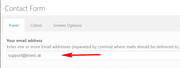
Then, when your visitor fills out the form with their email address, it will be in the “from” field, so you will see who sent it and when you reply it will go to them.The reason you were getting the error was because you were faking your own email to yourself, and it was AOL.
But the problem was going to be that when you replied to the message, it was going back to you, because your address was in the “from” field, not your visitor.
So please don’t use the function.I hope I explained this well.
Best regards,
MikeDecember 21, 2018 at 4:36 am in reply to: Anchor Links within Main Nav Menu Not Working Properly & Old Customized Scripts #1048006Hi,
Glad we were able to help, we will close this now. Thank you for using Enfold.For your information, you can take a look at Enfold documentation here
For any other questions or issues, feel free to start new threads under Enfold sub forum and we will gladly try to help you :)Best regards,
MikeHi,
That is great news, unless there is anything else we can help with on this issue, shall we close this then?Best regards,
MikeHi,
I took it out because we are now using a custom class to be more specific, where before we were combining many classes to be specific.
Please try this code in the General Styling > Quick CSS field or in the WordPress > Customize > Additional CSS field:#reviewinstagram .av-section-color-overlay { opacity: 0.5 !important; }Please clear your browser cache and adjust to suit.
Best regards,
MikeHi,
For your special headings your new custom classes are in the same div that the target is, so there should be no space between classes, and to target both we will add a comma, like this:.customerlove.av-special-heading,.instagramhome.av-special-heading { width: 60% !important; margin: auto !important; }Best regards,
MikeDecember 20, 2018 at 2:27 pm in reply to: Contact form: Email rejected due to AOL's DMARC policy #1047725Hi,
Perhaps it would be better to include a admin login in the Private Content area.
But just so you know, you can add screenshots by uploading your images to a service such as postimages.org and pasting the html code given in your post.Best regards,
MikeHi,
Please try this code in the General Styling > Quick CSS field or in the WordPress > Customize > Additional CSS field:@media only screen and (max-width: 989px) and (min-width: 768px) { .responsive .post-entry-330 .av_one_fourth.first + .av_one_fourth + .av_one_fourth.flex_column_div { clear: none !important; } }Best regards,
MikeDecember 20, 2018 at 7:02 am in reply to: Contact form: Email rejected due to AOL's DMARC policy #1047583Hey SpunkaneHill,
Sorry for the late reply, I believe the error you received was from curly quotes, once I corrected them the code saved easily.
Please try coping this code:add_filter('avf_form_from', 'avf_form_from_mod', 10, 3); function avf_form_from_mod($from, $new_post, $form_params) { $from = "(Email address hidden if logged out) "; return $from; }Best regards,
MikeHi,
Sorry for the late reply, I have taken a look at the plugin and it seems that you wrap the content you want to hide with a shortcode, but I don’t see the option to do this on hover.
To use this on your sidebar I believe you will need to wrap the content of the widget in the sidebar , as you can’t really wrap the sidebar itself. But looking at your site I didn’t find a sidebar, is it on a certain page? What is the content you want to hide/show?Best regards,
MikeHi,
Sorry for the late reply, the position of the mobile menu is set by the vertical-align being middle with 92px of top padding. We can change the vertical-align to top and then adjust the padding to suit.
Please try this code in the General Styling > Quick CSS field or in the WordPress > Customize > Additional CSS field:#top #av-burger-menu-ul { vertical-align: top !important; padding: 0px !important; }This will place the menu at the top, please change the 0px to suit, such as 20px.
Best regards,
MikeHi,
Sorry for the late reply,
Please include a url to the page with the issue, so we can examine.Best regards,
MikeHi,
It is probably best to use a plugin such as Sticky Side Buttons for something like this.Best regards,
MikeHi,
For the background, I think this is what you are looking for:#reviewinstagram .active-parallax { opacity: 0.5 !important; }Please adjust to suit.
For the special headings, that will adjust both at the same time:#reviewinstagram .flex_column_div .av-special-heading { width: 60% !important; margin: auto !important; }Please adjust to suit.
Please note that we advise that when you want target a certain element it is best to add a custom class to the element, by first going to Enfold Theme Options > Layout Builder > Show element options for developers and checking the box. Then in your elements you will have a extra field Custom Css Class
The reason is because classes like avia-builder-el-17 are automatically generated by the theme and will change as you add more elements to your page, so one day you will be wondering why your css doesn’t work anymore.
Best regards,
MikeDecember 20, 2018 at 4:44 am in reply to: Add image caption to images on single product page #1047567Hi,
Glad we were able to help, we will close this now. Thank you for using Enfold.For your information, you can take a look at Enfold documentation here
For any other questions or issues, feel free to start new threads under Enfold sub forum and we will gladly try to help you :)Best regards,
Mike -
AuthorPosts
