

Forum Replies Created
-
AuthorPosts
-
Hi,
Glad we were able to help, we will close this now. Thank you for using Enfold.For your information, you can take a look at Enfold documentation here
For any other questions or issues, feel free to start new threads in the Enfold forum and we will gladly try to help you :)Best regards,
MikeHi,
Glad we were able to help, we will close this now. Thank you for using Enfold.For your information, you can take a look at Enfold documentation here
For any other questions or issues, feel free to start new threads in the Enfold forum and we will gladly try to help you :)Best regards,
MikeHi,
Glad to hear, I have not seen this error before, perhaps it occurred on the switch over? Shall we see if you get another error message?Best regards,
MikeHi,
Sorry Theme Forest doesn’t allow individual discounts. The good news is that you will receive 6 months of support in our forum with your new license, plus for a few dollars more you can upgrade for a full year.Best regards,
MikeHi,
Thanks for the link, I added this function in your child theme functions.php:function custom_script(){ ?> <script> (function($){ $(document).ready(function(){ $('#archives-2 li a').each(function() { var text = $(this).text(); $(this).text(text.replace('2019', '2019.')); }); }); })(jQuery); </script> <?php } add_action('wp_footer', 'custom_script');Please check
Best regards,
MikeJuly 12, 2019 at 4:01 am in reply to: Mega Menu Using, but keep the wonderfull Burger Menu from Enfold? Possible? #1117907Hi,
Thank you for the screenshots, this helps a lot, I have not seen this before were two menus showed at the same time.
So right now the mobile menu is showing no items on mobile size, only the Mega mobile menu is, Please see the screenshot in Private Content area. I could not reproduce this on my localhost, but I notice that you have a plugin called “Max Mega Menu” if you deactivate this or any other plugin is it corrected?Best regards,
MikeHi,
I tried to follow along with your video but each of the elements worked correctly and displayed the previews, I was also able to edit the lorem ipsum on the location page.
I enabled “Always load all elements” in your Enfold Theme Options > Performance > Disable Template Builder Elements > Always load all elements
Please clear your browser cache and check.Best regards,
MikeJuly 11, 2019 at 5:40 am in reply to: Icon list animation not working in tab section when clicking on a link #1117674Hi,
Did you try disabling your plugins? What PHP version is your site using?
Now the icons only don’t animate when linked directly, like the link in the Private Content area?
Because that is true for me, but going to the page via the menu the icons animate.
I don’t see any errors from your site, we could remove the animation and force the icons to show, but you want the animation, correct?
I would recommend using the updated version because there are known bugs in your version that may show as other issues.Best regards,
MikeHi,
To add the dot in your date please add it in the date field at: WordPress > Settings > General > Date Format
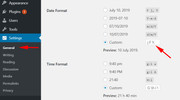
Best regards,
MikeHi,
I checked the site with Chrome, Firefox, Edge & IE11 and it seems that everything is working, which element is not working?
I also tested both of your sites and it looks like you can improve your load time by compressing your images, there are many plugins that will do this.Best regards,
MikeHi,
Please change your css to this:h3.av-masonry-entry-title.entry-title { font-size: 30px !important; color: red !important; }Best regards,
MikeHi,
Thanks for the login,
I checked your page “AAA HOME Last Version EN” but I didn’t see any gray borders, can you include a screenshot of the gray borders.Best regards,
MikeHey novaagencia,
I see that your LayerSlider is not installed correctly because your PHP ZipArchive extension is not enabled by your webhost, please ask your webhost to enable so we import the slider for you.
I also took a look at your settings and enabled Enfold Theme Options > Performance > Disable Template Builder Elements > Always load all elements.Best regards,
MikeHey sparkzilla,
Please try this code in the General Styling > Quick CSS field or in the WordPress > Customize > Additional CSS field:@media only screen and (max-width: 767px) { .responsive #top #wrap_all #header { position: fixed !important; } }Best regards,
MikeJuly 10, 2019 at 4:23 am in reply to: Enfold and Woocommerce; "Downloads remaining" and "Product expires" #1117258Hey kapteina,
Sorry for the late reply, Please link to the page in the screenshot so we can examine the page sectors and assist.Best regards,
MikeHey joostp37,
Sorry for the late reply, In the Private Content area is a beta version with the latest fixes which has solved many IE & Edge issues so perhaps this will help you also.
The easiest and safest way to test the beta version is to rename your current theme to “enfold-old” via ftp then upload the new “enfold” and check that your site is working correctly.
Once you are happy you can delete the “enfold-old” via ftp, (not the WP theme page)
Should for some reason you wish to roll-back to the old version, it’s easy to do, simply rename the new “enfold” to “enfold-new” via ftp and then rename “enfold-old” to “enfold” then refresh your page.
Please don’t try to overwrite the theme folder, as this will leave old files behind and cause errors.Best regards,
MikeHey norwestarch,
To add a script to your WP site you will need to upload it and adjust this function so the path is correct and add it to your functions.php:function my_custom_scripts() { wp_enqueue_script( 'custom-script', get_stylesheet_directory_uri() . '/js/my_custom.js', array( 'jquery' ) ); }I see that you are not using a child theme, I would point out that without using a child theme your customizations will be lost on the next update.
Please use our pre-built child theme
You will want to take a couple of steps, 1: please export your theme settings at: Enfold Theme Options > Import/Export > Export Theme Settings File to your computer, this is just for backup.
2: Once you install your child theme, please import your parent theme settings at:
Enfold Theme Options > Import/Export > Import Settings from your Parent Theme
Then you’ll need to re-set your menu options.
Finally, sometimes it is necessary to save your theme options one more time, to encourage the settings to be saved and activated in the merged /wp-content/uploads/dynamic_avia/ folder, a simple way to do this is to go to General Styling > Quick CSS field and place a space in the field so the theme options “Save all changes” button is clickable.Best regards,
MikeHey Balslev,
I see that you are using Enfold v4.5, to update this version you will need to manually update via ftp.
The easiest and safest way to do this is to download the newest version from Theme Forest and rename your current theme to “enfold-old” via ftp then upload the new “enfold” and check that your site is working correctly.
Once you are happy you can delete the “enfold-old” via ftp, (not the WP theme page)
Should for some reason you wish to roll-back to the old version, it’s easy to do, simply rename the new “enfold” to “enfold-new” via ftp and then rename “enfold-old” to “enfold” then refresh your page.
Please don’t try to overwrite the theme folder, as this will leave old files behind and cause errors.Best regards,
MikeHey CADCOM,
Sorry for the late reply, I tried to take a look at your popup yesterday and today, but I either get a spinning wheel or the page reloads.
But from seeing that the page is loading from javascript I don’t think we will be able to adjust the popup. Can you think of any other way we can see the popup?Best regards,
MikeHi,
Please try this code in the General Styling > Quick CSS field or in the WordPress > Customize > Additional CSS field:#advanced_menu_toggle, #advanced_menu_hide { visibility: hidden !important; }Best regards,
MikeHey radikio123,
Please try using the plugin Simple Image Sizes, you will be given the chance to edit the sizes WP creates after an upload, and which size will be used for each element.
In WordPress > Dashboard > Settings > Media > Media Settings you will be able to set the sizes, then please use the regenerate thumbnails option afterward.Best regards,
MikeHi,
Glad to hear you have it sorted out now.
We will close this now. Thank you for using Enfold.For your information, you can take a look at Enfold documentation here
For any other questions or issues, feel free to start new threads in the Enfold forum and we will gladly try to help you :)Best regards,
MikeHey Dexter,
Please try this code in the General Styling > Quick CSS field or in the WordPress > Customize > Additional CSS field:body { transform: scale(1.1); transform-origin: 0 0; }Please adjust the 1.1 to suit, such as 1.2
Best regards,
MikeHi,
Please try this code in the General Styling > Quick CSS field or in the WordPress > Customize > Additional CSS field:@media only screen and (max-width: 767px) { #top.home #layerslider_3 > div.ls-inner > div > div:nth-child(22),#top.home #layerslider_3 > div.ls-inner > div > div:nth-child(7),#top.home #layerslider_3 > div.ls-inner > div > div:nth-child(12),#top.home #layerslider_3 > div.ls-inner > div > div:nth-child(17){ top: 253.082px !important; } }Best regards,
MikeHi,
Glad we were able to help, we will close this now. Thank you for using Enfold.For your information, you can take a look at Enfold documentation here
For any other questions or issues, feel free to start new threads in the Enfold forum and we will gladly try to help you :)Best regards,
MikeHi,
Thanks for the feedback, I reviewed your site again with Chrome, Firefox, & Edge between 320px & 375px and didn’t find the white line
Which browser are you using?Best regards,
MikeHi,
Thank you for the FTP access, I renamed your current theme to “enfold-old” then I uploaded the new “enfold” and checked that your site is working correctly. Please also check for yourself and please check the IE issues.If you are happy you, (or I) can delete the “enfold-old” via ftp, (not the WP theme page)
Should for some reason you wish to roll-back to the old version, it’s easy to do, simply rename the new “enfold” to “enfold-new” via ftp and then rename “enfold-old” to “enfold” then refresh your page.Best regards,
MikeHi,
Yes, there are no settings, but you have to be sure to use some tags, because the related posts are picked by tags.
Perhaps this is why nothing appears on the frontend?Best regards,
MikeHi,
@Gitte I tested the plugin again on a clean install and it seems to be working correctly for me. You would just install the plugin as any other plugin and then the element will be usable in the Advanced Layout Builder.
As for your error, line 57 is for “$paths, $template_url.’/shortcodes/'”
So I assume that you are using a child theme and have already declared this path for custom shortcodes.
In your case, if you already have the “shortcodes” path created, you could remove the plugin and copy the enfold-related-posts-element/shortcodes/related_posts.php to your /shortcodes/ folder and see if that works.I would be happy to take a look at what’s going on but I will need an admin & ftp login.
After I created this plugin I found a “shortcode” that can be added to a code block element without the plugin, if you would like to try this, then deactivate the plugin and add this to your functions.php:function related_posts_shortcode( $attr ) { ob_start(); get_template_part( 'includes/related-posts' ); return ob_get_clean(); } add_shortcode( 'rpost', 'related_posts_shortcode' );then in your code block element use this shortcode:
[rpost]Best regards,
Mike -
AuthorPosts
