

Forum Replies Created
-
AuthorPosts
-
Hi,
Please try this code in the General Styling > Quick CSS field or in the WordPress > Customize > Additional CSS field:#footer .widget p,#footer .widget h3,#footer .widget a,#socket .copyright { font-weight: 400 !important; }Best regards,
MikeHi,
Thank you for the login, I found that this is actually from a javascript event listener, it seems to be “LeadTracking” or “FormIntegration” or both, perhaps from “RD Station” I don’t see any errors in the browser console.
So since it’s not interfering with your menu icons anymore, I assume you will want to keep using it now?
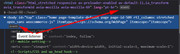
Best regards,
MikeAugust 16, 2019 at 8:48 pm in reply to: Jumping to anchors from other pages does't work well #1128360Hi,
Glad we were able to help, we will close this now. Thank you for using Enfold.For your information, you can take a look at Enfold documentation here
For any other questions or issues, feel free to start new threads in the Enfold forum and we will gladly try to help you :)Best regards,
MikeHey mattb1169,
Sorry for the late reply, if I understand correctly you would like a transparent mobile header. Please try this code in the General Styling > Quick CSS field or in the WordPress > Customize > Additional CSS field:@media only screen and (max-width: 766px) { .responsive #top #main {margin-top: -80px!important;} #top #wrap_all .av_header_transparency {background-color: transparent!important;} div#header_main > .container {display: block !important;} }Best regards,
MikeHey PIW,
Sorry for the late reply, I’m not sure about the character, but with a admin login in the Private Content area we could take a closer look.
To correct your menu icons please try this code in the General Styling > Quick CSS field or in the WordPress > Customize > Additional CSS field:#avia-menu .avia-menu-text .av_font_icon { display: inline !important; float: none !important; }Then clear your browser cache and check.
Best regards,
MikeHi,
Sorry for the late reply, in the thread you linked to the solution was:.page-id-2957.paged #layer_slider_1{ display: none; }It looks like after he tested and cleared his cache he found it worked. But this won’t work for you because the css has a page ID so it will only work on one page.
To adjust to your page please include a link to it so we can examine.
This would help because I can’t imagine what you are trying to achieve, perhaps it will make sense after we see your page.Typically, it’s a good idea to open your own threads for support because anything you add into the Private Content area will be seen by the thread’s opening poster, and you would not see anything we add to the Private Content area.
We are happy to help here, just wasn’t sure if you knew this.Best regards,
MikeHi,
Thank you for the screenshot, this helps. The 40px you put in the text block element is for paragraph text, the H2 already has a font size assigned in the base.css and has more specificity than the size you entered there.
If you used the special heading element with h2 picked as the heading you would have the 40px, or any size you wish on a per case basis, or if you added the “font-size” back into the css as before you would have all single post H2’s the same size.
Or you could add a “span” font-size in the code view of the text block and have that one H2 40px.
Please let us know if you would like to see an example of this.Best regards,
MikeAugust 16, 2019 at 4:51 am in reply to: Change featured image in shop when category is selected #1128132Hi Daniel,
Thank you for the kind words, but I’m still learning and am a student of my team’s great examples, and what I can find on Google.
Anyways, shall we close this then?Best regards,
MikeHi,
Sorry, I had saved a copy of your WordPress > Customize > Additional CSS
please see the link below for the css that was there if you want it, but I think that the end of your post says it’s fixed now?
https://www.dropbox.com/s/k6tm2x3p6b4rh5x/test.css?dl=0Best regards,
MikeHi,
Glad we were able to help, we will close this now. Thank you for using Enfold.For your information, you can take a look at Enfold documentation here
For any other questions or issues, feel free to start new threads in the Enfold forum and we will gladly try to help you :)Best regards,
MikeAugust 15, 2019 at 9:02 am in reply to: Change featured image in shop when category is selected #1127858Hi Daniel,
Your idea for using an in-code identifier for the category “dab compatible” this time clicked with me and I looked at the checkbox for “dab compatible”, so this function checks to see if the checkbox is checked, and the product is from the category “bonji-dab” and then applies the opacity.
Try adding this code to the end of your functions.php file in Appearance > Editor:function custom_dab_script(){ ?> <script> (function($){ $(document).ready(function(){ if ($('input[type=checkbox][name=bonji-dab]').prop('checked')) { $(".post-type-archive-product .product_cat-bonji-dab .avia-product-hover").css({ 'opacity': '1' }); } else { } }); })(jQuery); </script> <?php } add_action('wp_footer', 'custom_dab_script');Please ensure the other function above that starts with “function custom_dab_script()” is remove, otherwise you will get an error, or crash, because the names of functions must be unique in your functions.php.
Best regards,
MikeAugust 15, 2019 at 7:36 am in reply to: Contact form: how to change 'from' name and email address? #1127840Hi,
Please try using the plugin: WP Mail Logging to see if the email is being sent from your site. Then try removing your function and test again to see if the email is getting from your site to your mail server.Best regards,
MikeAugust 15, 2019 at 7:27 am in reply to: Blog posts displayed in Masonry element open up in new tab? #1127837Hi,
Glad we were able to help, we will close this now. Thank you for using Enfold.For your information, you can take a look at Enfold documentation here
For any other questions or issues, feel free to start new threads in the Enfold forum and we will gladly try to help you :)Best regards,
MikeHi,
I examined your new page while the error was showing and found this error in the console:

I believe that I found a way to reproduce the error on your site, if you make a change to the page and don’t save the page, but try to view the page so that you get the popup warning asking if you are sure you want to leave the page without saving, and then click cancel on the popup and then save the page, the error will appear.
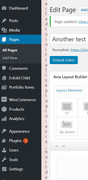
But I can not reproduce this on my localhost, I tried disabling your Classic Editor plugin and used the Classic Editor option in the theme settings, but his didn’t help, I also tried disabling plugins without success.
As I search for a solution I found many examples of the error but with many different plugins, try this Google search:TinyMCE "Failed to initialize"but I found no solutions.
I will ask the rest of the team to take a look, sorry, and thanks for your patience.Best regards,
MikeHi,
Glad to hear, and thanks for sharing your solution. We will leave this open until we hear back from you.Best regards,
MikeHi,
Glad to hear!
Ok, so setting the H2 “manually”… I think we are thinking of two different things with the word “manually”, when I think of manually I think of setting the font size with css, but from your screenshot I see that you removed the font size from the css.
So perhaps you mean that you want to set the font size in the advanced styling options page, or some other way that is not using the css? Is this correct?If not please explain.
Best regards,
MikeAugust 15, 2019 at 3:51 am in reply to: Masonry gallery – title below image and new image effect #1127783Hi,
Thank you for the feedback, when I check your site I see the caption font is already Gilroy-Bold when inactive, so this css changes the inactive font and adds the hover font:#top .av-masonry:hover figcaption h3.av-masonry-entry-title { font-family: Gilroy-Bold !important; font-size: 16pt !important; } #top .av-masonry figcaption h3.av-masonry-entry-title { font-family: Gilroy-Semibold !important; font-size: 16pt !important; }But this makes the inactive font thinner, if you just wanted the font to be heavier on hover then try this css instead:
#top .av-masonry:hover figcaption h3.av-masonry-entry-title {
    font-weight: bolder !important;
font-size: 16pt !important;
}
Best regards,
MikeAugust 14, 2019 at 9:18 am in reply to: Masonry gallery – title below image and new image effect #1127530Hi,
Glad to hear this helped. What would you like the hover effect to be?Best regards,
MikeHi,
Glad to hear this helped, shall we try to investigate the menu?Best regards,
MikeHi,
Glad we were able to help, we will close this now. Thank you for using Enfold.For your information, you can take a look at Enfold documentation here
For any other questions or issues, feel free to start new threads in the Enfold forum and we will gladly try to help you :)Best regards,
MikeHi,
Glad to hear, I found the top row has bottom margin on the heading, please include this css to remove:#top #termine.main_color .avia-table.avia-table-4 tr.avia-heading-row th h3 { margin: 0 !important; }Best regards,
MikeHi,
Sorry for the late reply and thanks for the login, I found that while my browser inspector was showing that your font on the page was “noticia text” the font was not correct when compared to the font on Google Fonts and it turns out that even though Google showed the font code as font-family: ‘noticia text’; it was really meant to be: font-family: ‘noticia-text’; with a dash.
I added the adjusted css to your WordPress > Customize > Additional CSS
Please clear your browser cache and check.Best regards,
MikeHi,
To add a custom class to the table please ensure that the option is enabled at: Enfold Theme Options > Layout Builder > Show element options for developers this will add the “custom css class” field to the table element:
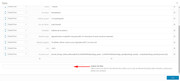
For this example we will add the class “table_one”, note that we don’t include the dot.
Then we will adjust the css like this:@media only screen and (max-width: 767px) { .table_one.avia-table td:before { display: none !important; } .table_one.avia-data-table tr:first-child th { display: block !important; } }Please give this a try.
Best regards,
MikeHi,
@Alhaji2017
I believe from your post that you are trying to update from within the theme automatically, but v4.5.5 had an error in it and must be updated via ftp.
The easiest and safest way to do this is to download the newest version from Theme Forest and rename your current theme to “enfold-old” via ftp then upload the new “enfold” and check that your site is working correctly.
Once you are happy you can delete the “enfold-old” via ftp, (not the WP theme page)
Should for some reason you wish to roll-back to the old version, it’s easy to do, simply rename the new “enfold” to “enfold-new” via ftp and then rename “enfold-old” to “enfold” then refresh your page.
Please don’t try to overwrite the theme folder, as this will leave old files behind and cause errors.Best regards,
MikeAugust 14, 2019 at 7:21 am in reply to: Contact form: how to change 'from' name and email address? #1127501Hi,
Glad to hear you will ask your web host if this will cause any issues with your server spam filters, I just thought I should point this out when I came across it in my research. As for the truncation in the ‘From’ field, I don’t know why this is, but you will see above that I pointed this out when I posted the code above, so I look forward to seeing the solution also to see where my error was.
It may take some time to hear back as we are all in different countries and different time zomes, Thank you for your patience.Best regards,
MikeAugust 14, 2019 at 6:44 am in reply to: Blog posts displayed in Masonry element open up in new tab? #1127493Hi,
Sorry, I tested again in incognito with a clear cache, but the masonry is opening in new tabs for me. Please see the video in Private Content area.Best regards,
MikeHi,
Thanks for the screencast and for creating the test page, I can now examine.
This error is from “TinyMCE Advanced” deactivating solves.
For your contact form, I found a few errors in your css in: WordPress > Customize > Additional CSS
I tried to correct, please clear your browser cache and check.Best regards,
MikeAugust 14, 2019 at 5:26 am in reply to: Enfold 4.5 Theme Update "Update Failed: Download failed. A valid URL was not pro #1127473Hi,
@siljerang
Thank you for the login, I took a look at your site and see that you are installing Enfold for the first time, so you would install the theme via WordPress > Appearance > Themes > Add New, and not the “Update Theme and Plugins from Zip File” plugin, it is only used to update a theme.
I assume that you also tried this and still get the error which I believe is due to your server PHP settings:
Max Upload Size: 2mb
PHP Time Limit: 30 secondsPlease ask your webhost to change the Max Upload Size to 20mb, and the Time Limit to “no limit”, if this doesn’t help please include your ftp access in the Private Content area so we can assist.
Best regards,
MikeHi,
@webvriend Please open a new thread so we can assist, as this is not your thread you will not see our comments in the Private Content area.Best regards,
MikeHi,
Glad to hear, I’m on a PC and it works with Chrome & Edge, for Firefox please try using this css instead:#top .main_color .btn a.avia-button.avia-color-custom { color: rgba(255,255,255,0.9) !important; border-radius: 50px !important; background: linear-gradient(-45deg, #FFA63D, #FF3D77, #338AFF, #3CF0C5) !important; border-color: transparent !important; background-size: 600% !important; animation: anime 16s linear infinite; -moz-animation: anime 16s linear infinite; } @keyframes anime { 0% { background-position: 0% 50%;} 50% { background-position: 100% 50%;} 100% { background-position: 0% 50%;} } @-moz-keyframes anime { 0% { background-position: 0% 50%;} 50% { background-position: 100% 50%;} 100% { background-position: 0% 50%;} }Best regards,
Mike -
AuthorPosts
