Forum Replies Created
-
AuthorPosts
-
Hey cnitsche360,
Entschuldigung für die verspätete Antwort. Ich konnte Ihre Seite nicht anzeigen, da ein Passwort erforderlich ist. Bitte geben Sie dies an.
Verknüpfen Ihre Mauerwerkselemente mit einer anderen Seite? Wenn dies der Fall ist, wird durch Tippen auf diese Seite anstelle der Titel eine Anzeige aufgerufen. Mobilgeräte haben keine Entsprechung für Hover- oder Mouseover-Geräte wie Desktop-Geräte.— Translated with Google —
Sorry for the late reply, I couldn’t view your page because it requires a password, please provide.
Do your masonry items link to another page? If they do then a tap will go to that page instead of showing the titles, mobile devices don’t have an equivalent to hover or mouse-over like desktop devices.Best regards,
MikeHey Jasmer,
Thank you for the login, I added this css to your site and the issues seem to be resolved, please clear your browser cache and check.#top.page-id-1691 .av-milestone-contentbox { min-height: 120px !important; } #top.page-id-1691 #avia-timeline-1 > ul > li:nth-child(6) > article > div ul li{ display: list-item !important; }Best regards,
MikeHi,
Glad we were able to help, we will close this now. Thank you for using Enfold.For your information, you can take a look at Enfold documentation here
For any other questions or issues, feel free to start new threads in the Enfold forum and we will gladly try to help you :)Best regards,
MikeSeptember 8, 2019 at 3:06 am in reply to: A blank is appearing between the photo and text after the update #1135531Hi,
Thank you for the login, you have hidden code added to your posts from what appears to be a Firefox add-on called Simple Translate are you using this?
I recommend removing this add-on and then removing the added code from each of your posts, you can see the code in the text elements when you use the “text” tab, not the visual tab.
Please see the screenshots in Private Content area.Best regards,
MikeHey gio_go,
Thank you for the login, typically the frontpage of the site is set in the Enfold Theme Options and I set this for you:
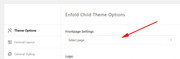
but you are getting 19 301 redirects, I checked with http://www.redirect-checker.org
but I can load your home page by adding /home/ to the end of your url, I also tried changing to the default WordPress theme and still got the same error. I also disabled your caching plugin to ensure that was not the issue.
So this could be something in your .htaccess file or a redirect from your hosting or nameservers, it’s hard to tell from here (outside of your host)
I recommend asking your host to take a look and let them know what we have found.
Was this domain parked before you got a hosting plan for it?Best regards,
MikeHey Wabke,
Thank you for the login, I took a look at your site and found a sample page, please see the link in the Private Content area, so I added and element and saved without error. Was your issue on just on one page? Please link to it so we can examine.Best regards,
MikeHey entspannt,
This is due to your testimonial slider, the container is smaller than some of the slides so it looks like the page is moving up and down. To correct we can make the container larger or you can shorten the testimonials so they are closer in size.
To see what a larger section looks like please try this code in the General Styling > Quick CSS field or in the WordPress > Customize > Additional CSS field:@media only screen and (min-width: 767px) { #top.home .avia-testimonial { min-height: 523px !important; } }Best regards,
MikeHey TheKango,
You can add a widget area to your header this will allow you to add text or image widgets just as in your sidebar. Please review our documentation and let us know if you need any help with it.Best regards,
MikeHi,
Sorry for the late reply, I have found that your “back to top” code has an error in it, a rouge ‘true’

removing this restores the icon, this doesn’t occur on a new clean install. I also note that the default title “Scroll to top” has been translated to “Scorrere verso l’alto” and contains a currly quote, perhaps this has something to do with the error, or it is the minifying or the cloudflare script.
I see above that you wrote that you have disabled the minifying / cache but it is still serving right now, perhaps your webhost is also caching?Best regards,
MikeHey Maxime,
Sorry for the late reply, I have replied a few hours ago to your first inquiry, if you have further questions please let us know by replying to that message.Best regards,
MikeHey rlhinirv57,
Sorry for the late reply, I have checked on my test site running v4.6.1 and Whatsapp icon is showing:
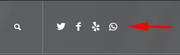
Can we see your site to investigate?Best regards,
MikeHey Gabster,
Sorry for the late reply, Please try this code in the General Styling > Quick CSS field or in the WordPress > Customize > Additional CSS field:div.mfp-iframe-scaler { height: 150vh !important; width: 100vw !important; } .mfp-iframe-scaler iframe { left: -15vw !important; width: 90% !important; height: 90% !important; }this will open the modal almost full screen, please feel free to adjust to suit.
Page IDs or classes can be added to target certain modals.Best regards,
MikeSeptember 7, 2019 at 10:54 pm in reply to: Masonry Gallery element leaves first and last image out #1135513Hi,
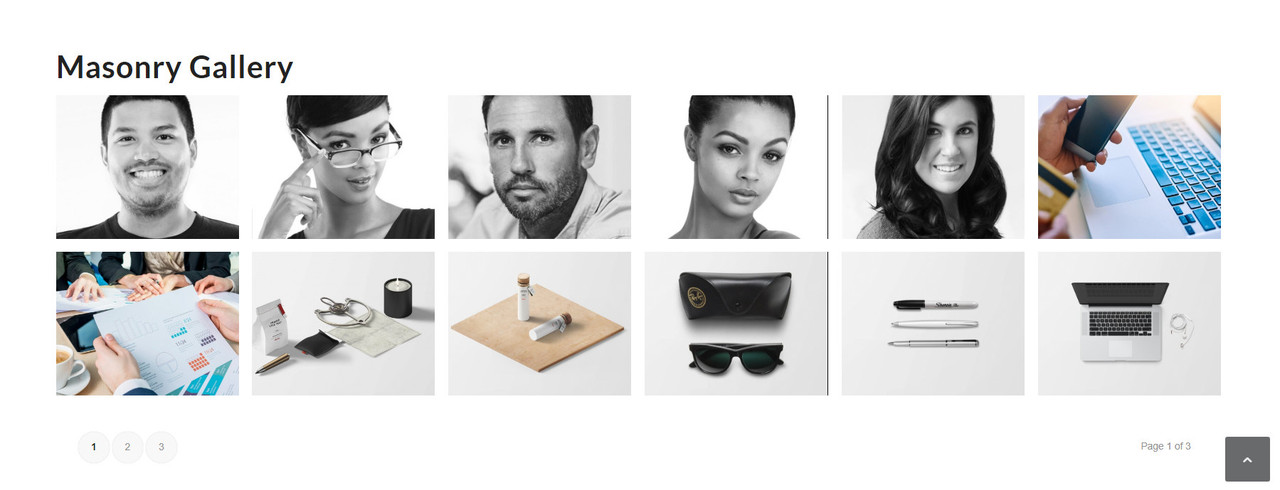
Sorry for the late reply, I have reviewed your page and gallery and all 30 images are showing, But your first element is a “av-masonry-item-no-image” which results in the space, I suspect you have some custom code or a custom element, but I couldn’t see the theme editor to check. I did copy your page shortcode to my localhost, where the error nor the “av-masonry-item-no-image” occurred.

I recommended disabling any custom codes or elements, or completely remove your theme via ftp and upload a clean version from Theme Forest via ftp.
If this doesn’t help please provide ftp access so we can investigate further.Best regards,
MikeHi,
Sorry for the late reply, I see that you have uploaded a version of the Open Sans font, but when the built-in version of Open Sans is used your italic issue is resolved.
Please clear your browser cache and check.Best regards,
MikeHey Max,
Sorry for the late reply, with Enfold you can write articles and publish as the portfolio type, and as long as you do this with the Advanced Layout Builder that is built-in to Enfold, you can add comments and social share buttons.
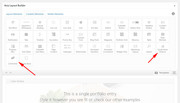
To display these as a blog you can use the “blog” element and choose portfolios to show.
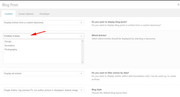
Your next two questions (3 & 4) refer to “blog posts” & “portfolio” posts, but if you simply substue the portfolio posts for the bolg posts, as above, then the answer is yes.
You can adjust the colors easily. We don’t have a built-in carousel, like in your example, but we do have an Accordion Slider that is similar and can be full height and auto-rotate.
I hope this helped, and we hope you choose Enfold
PS: Today we are having a birthday sale.Best regards,
MikeSeptember 7, 2019 at 8:26 pm in reply to: Create a Blog for the first time! Some questions… #1135482Hi,
Yes, that was tricky :) For your last issue:
To increase the font size, please try this css:.comment-entry.post-entry,.comment-entry.post-entry p,.comment-entry.post-entry a,.comment-entry.post-entry label,.comment-entry.post-entry span { font-size: 20px !important; }To adjust the button, try this css:
#respond #submit {
font-size: 20px !important;
border-radius: 20px;
}
To adjust the comment circle, try this css:
.comment-count {
    height: 120px !important;
    width: 120px !important;
    line-height: 120px !important;
}
Please adjust the sizes to suit.
Best regards,
MikeHi,
Glad to hear that this is working for you and glad we were able to help, we will close this now. Thank you for using Enfold.For your information, you can take a look at Enfold documentation here
For any other questions or issues, feel free to start new threads in the Enfold forum and we will gladly try to help you :)Best regards,
MikeSeptember 7, 2019 at 7:45 pm in reply to: product catalog with woocommerce without tax and shipping field #1135474Hi,
Please try the WooCommerce Cart Notices plugin.Best regards,
MikeHi,
I added the sub-text function, but I’m not sure if you want the tagline to actually show or just be readable to your screen reader?
Please check you site.add_filter('avf_logo_subtext', 'kriesi_logo_addition'); function kriesi_logo_addition($sub) { $sub .= '<h6>Geeksmodo: Product reviews, how-tos, deals and the latest tech news</h6>'; return $sub; }Best regards,
MikeHi,
Please try this code in the General Styling > Quick CSS field or in the WordPress > Customize > Additional CSS field:ul { margin-left: 2px !important; }Then clear your browser cache and check. Please see the screenshot in Private Content area.
This css will be universal on your site, please let us know if you only want this for some sections.Best regards,
MikeSeptember 7, 2019 at 5:39 am in reply to: Fatal error after updating Enfold to current version #1135213Hey 1lizcollins,
This sounds like you tried to overwrite the theme folder “enfold” via ftp, depending on how old your version was this could cause this because it will leave old files behind in the theme folder.The easiest and safest way to correct this is to download the newest version from Theme Forest and rename your current theme to “enfold-old” via ftp then upload the new “enfold” via ftp and check that your site is working correctly.
Once you are happy you can delete the “enfold-old” via ftp, (not the WP theme page)Best regards,
MikeHey djsmbd,
When you are in your menu page, please look at the top right corner for the “screen options” tab and click to see the options, there you will find the “Link Target” option so you can check the box to show it in the menu items:

Best regards,
MikeHey Luis Carinhas,
Thank you for contacting us, the WPML plugin is officially supported, and some other language plugins work well unofficially.
Please see this post from our documentation or this one from the WPML documentation.Best regards,
MikeHey kevinraposo7,
Please try this code in the General Styling > Quick CSS field or in the WordPress > Customize > Additional CSS field:#top.home #revolutionslider_1 { min-height: 100% !important; }This will only work on your home page, please let us know if you have other sliders so we can assist.
Best regards,
MikeHi,
Glad Victoria could help, we will close this now. Thank you for using Enfold.For your information, you can take a look at Enfold documentation here
For any other questions or issues, feel free to start new threads in the Enfold forum and we will gladly try to help you :)Best regards,
MikeHey bloggeravisen,
Please include an admin login & FTP access in the Private Content area so we can investigate.
Which demo are you trying to import?Best regards,
MikeHey Connor,
Are you experiencing an issue with uploading media files? Typically Enfold has no issue with the media library, It’s hard to say what the issue was on the thread you read, but I have experienced no issues on my test site.Best regards,
MikeHi,
I see that you are using Enfold v4.6, but we found an issue and released v4.6.1 on 09/05, please try updating to this version, and if this doesn’t help then I will ask the rest of the team to review. Please note that the download at Theme Forest may say v4.6, but this was a typo.Best regards,
MikeHi,
Sorry for the late reply, since we don’t have an option to apply the hover effect while always showing the caption, the css I wrote before requires that the Image > Caption > Caption Appearance is set to “Only display on hover”

I have set this for you, please check.
I have adjusted the image for you so there is more space around the guitar and set the upload size to 1485×1200 so it will show as 495×400, please check.
I assume that you will have more images to resize like this so I’m attaching the PhotoShop file and the sample image I used for this in the Private Content area. If you don’t have PhotoShop you can send it to someone on Fiverr with your other images and have them all done for $5Best regards,
MikeHi,
Sorry you can increase the font size of your elements in the advanced styling tab of the theme options, and you can adjust this css from -20px to -10px or remove:#top.blog h2.post-title.entry-title,#top.single h1.post-title.entry-title { padding-bottom: 0 !important; margin-bottom: -20px !important; }Please see Private Content area.
Best regards,
Mike -
AuthorPosts