Forum Replies Created
-
AuthorPosts
-
Hi,
Glad to hear you have sorted this out. Thanks for using Enfold.Best regards,
MikeHi,
Thanks for the login, currently your menu is the default menu items that use the full url to your anchors, this causes the browser to reload the page. To resolve this please create a new menu using the “custom links” option and only enter the hash links:
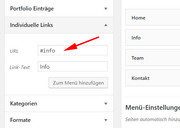
This will solve your one-page link issue.
I see that you have other pages so I assume that one day you may add links to other pages and will want a way for your visitors to return to the home page, for this you can use your current menu with the full url links.
But this means you will want to show two different menus on different pages… the Menu Swapper plugin works well with Enfold.Best regards,
MikeSeptember 8, 2019 at 7:47 pm in reply to: Google font not displayed after update to Enfold 4.6.1 #1135706Hey GreenDiamondEnt,
Thanks for the link to your site, when I look I find that your logo is black on a black header, and your mobile menu items are also black with a black background. Please try changing some of your colors to view these elements.Best regards,
MikeHey Diana,
Thank you for the login, perhaps a better solution would be to create a new copy of the slider for mobile, you would place the copy of the slider below your current one and use the screen option to choose when it should show. Naturally, you would also adjust your current slider not to show at the same time.
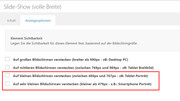
Right now your slider images are showing at 426×284 for mobile but loading at 1950×1300
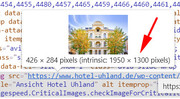
So if you adjust the image sizes in your new sider it will load easier for mobile devices.Best regards,
MikeSeptember 8, 2019 at 7:08 pm in reply to: GPDR-checkbox for contact forms missing since 4.6 update #1135697Hi,
Thanks for the login, your token looks like it is working but Envato limits the number of update checks from each site, and I wouldn’t doubt that they are getting a lot of traffic on this right now.
I would recommend waiting another 24 hours without checking for an update.
The first release of v4.6.1 was missed labeled internally as v4.6, please check for the text:
@since 4.6.1 on line 154 in:
\enfold\includes\helper-privacy.php
to see if you actually have the updated version.Best regards,
MikeHey Robyn,
Thanks for contacting us, the theme at the link seems up to date:
Theme: Enfold
Version: 4.6.1
perhaps you updated after sending the message?Best regards,
MikeHi,
Google has just released this lazyload plugin a day ago Google Releases Native Lazyload Plugin for WordPress I tested it and while it didn’t break Enfold, I didn’t notice an improvement either.
Just thought I’d share as it seemed on topic.Best regards,
MikeSeptember 8, 2019 at 6:08 pm in reply to: Enfold Woocommerce SKU über Produktname auf Single page #1135681Hey flaminghomer,
Können Sie vielleicht einen Link zu einer Demoseite erstellen, damit wir dies untersuchen können?— Translated with Google —
Perhaps, can you link to a demo page so we can investigate?
Best regards,
MikeHi,
Glad this helped, with the Quick CSS you were probably experiencing a cache issue, the WordPress > Customize > Additional CSS adds css above the internal cache.
Glad we were able to help, we will close this now. Thank you for using Enfold.For your information, you can take a look at Enfold documentation here
For any other questions or issues, feel free to start new threads in the Enfold forum and we will gladly try to help you :)Best regards,
MikeHi,
Glad we were able to help, we will close this now. Thank you for using Enfold.For your information, you can take a look at Enfold documentation here
For any other questions or issues, feel free to start new threads in the Enfold forum and we will gladly try to help you :)Best regards,
MikeHi,
Your changes are not showing to me, naturally with hard cache reloading on my end.
Your site is still serving cached & minified files, I’m sure this is the cause.
Unfortunately, I can not reproduce your error in an controled environment.
Please see the screenshot in Private Content area.Best regards,
MikeHi,
Thanks for the feedback, I reviewed all of the background colors of your elements in a “waterfall” from Body down to the sub-menu and only found #000000 & #191919 both blacks.
So I don’t see a cause for this.
Shall we close this thread then?Best regards,
MikeSeptember 8, 2019 at 5:30 pm in reply to: Create a Blog for the first time! Some questions… #1135668Hi,
I added this for you to remove this line:top .main_color article.post-entry .post_delimiter { border-color: transparent !important; }Please clear your browser cache and check.
As this thread is very long and covers multiple topics we should close this now. We find that it helps other users searching for solutions if the threads stick to one issue.
Naturally, we welcome you to open new threads for future issues. Agreed?Best regards,
MikeSeptember 8, 2019 at 5:08 pm in reply to: Masonry Gallery element leaves first and last image out #1135665Hi,
Thanks for the access to your css, Bingo:

.fotogalerie .av-masonry-entry {
    height: 175px;
    width: 175px;
}
I would have not expected that to be the issue, but the first av-masonry-entry in the container has the av-masonry-item-no-image which is the empty one :)
Please try replacing it with this:.fotogalerie .av-masonry-entry:not(.av-masonry-item-no-image) { height: 175px; width: 175px; }Then clear your browser cache and check.
Best regards,
MikeThanks for letting me know about the thumbnails, I’ll look for a new solution.
Hi,
Glad we were able to help, we will close this now. Thank you for using Enfold.For your information, you can take a look at Enfold documentation here
For any other questions or issues, feel free to start new threads in the Enfold forum and we will gladly try to help you :)Best regards,
MikeHi,
I believe you mean aria-hidden=’true’ this is correct and should be there, you can see in the screenshot above the extra “true” is after this. I see your icon is now working with aria-hidden=’true’ in place on v4.6.1
So what change did you make?Best regards,
MikeHi,
Thanks for your research and snippet, I adjusted your snippet to only work on mobile devices under 768px and tested it on my localhost which worked well, but please note that if you test it on a desktop browser and change the screen width below 768px to trigger it you may need to reload the page for it to work. This should be fine because on a real mobile device the page load will occur below the trigger.
Try adding this code to the end of your functions.php file via ftp:add_action( 'wp_head', function() { ?> <style> .myprefix-maybe-sticky { position: fixed !important; top: -100px; width: 100%; z-index: 999; opacity: 0; background: #fff; transition: 0.3s all; box-shadow: 0 2px 3px rgba(0,0,0,0.15); } .myprefix-show { top: 0; opacity: 1; } </style> <?php } ); add_action( 'wp_footer', function() { ?> <script> ( function( $ ) { 'use strict'; var $window = $( window ); var lastScrollTop = 0; var $header = $( '#header' ); var headerBottom = $header.position().top + $header.outerHeight( true ); var width = $(window).width(); if ((width <= 768)) { $window.scroll( function() { var windowTop = $window.scrollTop(); // Add custom sticky class if ( windowTop >= headerBottom ) { $header.addClass( 'myprefix-maybe-sticky' ); } else { $header.removeClass( 'myprefix-maybe-sticky' ); $header.removeClass( 'myprefix-show' ); } // Show/hide if ( $header.hasClass( 'myprefix-maybe-sticky' ) ) { if ( windowTop <= headerBottom || windowTop < lastScrollTop ) { $header.addClass( 'myprefix-show' ); } else { $header.removeClass( 'myprefix-show' ); } } lastScrollTop = windowTop; } ); } else {} } ( jQuery ) ); </script> <?php } );Best regards,
MikeHi,
I also see the logo at: http://www.ivva.at/ in Chrome, but the logo for: http://www.alohabowl.at/ is not showing due to this error:[Intervention] An <img> element was lazyloaded with loading=lazy, but had no dimensions specified. Specifying dimensions improves performance. See https://crbug.com/954323Please try disabling you lazy load, either in Autoptimize or wpfc-minified or both.
Best regards,
MikeHi,
Please try this code in the General Styling > Quick CSS field or in the WordPress > Customize > Additional CSS field:#top #avia-menu ul.sub-menu li a { background-color: #FAEEF0 !important; }Best regards,
MikeHey Rubben,
Please try this code in the General Styling > Quick CSS field or in the WordPress > Customize > Additional CSS field:.avia-menu.av_menu_icon_beside { border-color: transparent !important; }Best regards,
MikeHey drzatcodcan,
Thank you for the link, but I do not see an orange background in the menu items. Please see the screenshot in Private Content area.
I do see that the menu background is a darker shade of black. Please advise.Best regards,
MikeHey The Master,
The default demo xml is at:
\enfold\includes\admin\dummy.xml
please note that this demo doesn’t include all of the files and images that the online version does, I recommend using the “2017 Demo” as a base.Best regards,
MikeHey cnitsche360,
Entschuldigung für die verspätete Antwort. Ich konnte Ihre Seite nicht anzeigen, da ein Passwort erforderlich ist. Bitte geben Sie dies an.
Verknüpfen Ihre Mauerwerkselemente mit einer anderen Seite? Wenn dies der Fall ist, wird durch Tippen auf diese Seite anstelle der Titel eine Anzeige aufgerufen. Mobilgeräte haben keine Entsprechung für Hover- oder Mouseover-Geräte wie Desktop-Geräte.— Translated with Google —
Sorry for the late reply, I couldn’t view your page because it requires a password, please provide.
Do your masonry items link to another page? If they do then a tap will go to that page instead of showing the titles, mobile devices don’t have an equivalent to hover or mouse-over like desktop devices.Best regards,
Mike -
AuthorPosts