

Forum Replies Created
-
AuthorPosts
-
Hi,
Please try this code in the General Styling > Quick CSS field or in the WordPress > Customize > Additional CSS field:ul.disc, .entry-content-wrapper ul { list-style: none !important; margin-left: 0; padding-left: 0; } .entry-content-wrapper ul li { padding-left: 1em; text-indent: -1em; } .entry-content-wrapper ul li:before { content: "▪"; padding-right: 5px; color:#000 !important; }I had to include the character in the code because the hex code doesn’t work for this method. I also included the color so the theme doesn’t apply it’s own colors.
Please clear your browser cache and check.Best regards,
MikeHi,
Thanks for the link, I see that your table is in a column that is 2/5 so that is why it is narrow, form the screenshot I thought it was on a mobile device, but that is ok.
So in the css I wrote it for your single product pages so it won’t change other tables you might have, and assuming they are all the same this should work for all of them:
Please try this code in the General Styling > Quick CSS field or in the WordPress > Customize > Additional CSS field:@media only screen and (min-width: 768px) { #top.single-product .avia-data-table .avia-desc-col { text-align: center !important; width: 100px !important; padding: 9px !important; } #top.single-product .avia-data-table .avia-highlight-col { width: 350px !important; } }Then clear your browser cache and any cache plugin, and check.
I used px widths instead of percentages because it is a small area, if you want the columns in the table larger please use a column larger than 2/5 as the container.
Please let us know if this is what you had in mind.Best regards,
MikeHi,
Sorry for the late reply, the bundled layerslider is updated with the Enfold updates, I do recall one time a special security patch was released by layerslider to us and we pushed a special theme update to accommodate.
But the bundled layerslider can not be updated the same way as the stand-alone version, unfortunately this can not change. You can read more about the layerslider here.Best regards,
MikeHi,
Sorry for the late reply, the code for the “click to load” is written in the \enfold\config-templatebuilder\avia-shortcodes\google_maps\google_maps.php file
I don’t believe it’s something that you are going to be able to use elsewhere.
You may find this more helpful: jQuery Tutorial: AJAX Load Content With No Page Refresh
or this: Using AJAX With PHP on Your WordPress Site With Your Own Plugin
I also believe there is an ajax plugin that can help with this.Best regards,
MikeHi,
Sorry for the late reply, in the privacy settings you can add tool tip to some of the buttons in the tool tip field:
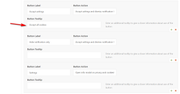
but not all privacy shortcodes allow this, for some of them you would wrap your text with the shortcode like this:
[av_privacy_custom_cookie cookie_name=""]Your text here[/av_privacy_custom_cookie]and it changes the text next to the button, many of which have a large text area for you to include plenty of text so a tool tip is not needed.Best regards,
MikeDecember 22, 2019 at 10:20 pm in reply to: Ninja Forms not working after latest WordPress update #1168628Hi,
Sorry for the late reply, I couldn’t reproduce your error with the cookie bar and Ninja Form plugin:
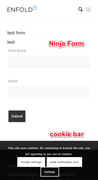
The Ninja Form is showing for me on my localhost, I assume that you cleared your browser, site, and server/CDN cache and any minifying plugins a couple of times, JS files can be difficult sometimes. Have you also tried deactivating other plugins and turn off your Enfold Theme Options > Performance > JS & CSS file merging and compression?
If this doesn’t help then please open a new thread with admin login details and how we can reproduce, ie: turn the cookie bar on.Since this is not your thread posting your login here will not be private and you will not see anything we write in the Private Content area.
Best regards,
MikeHi,
Sorry for the late reply, since you were using a custom stylesheet added to the Enfold theme then you will need to call this stylesheet with a function in your functions.php
I tried to add this function but your site gave an error that it must be added via FTPfunction enqueue_tommybooking_styles(){ wp_enqueue_style( 'tommybooking', get_template_directory_uri() . '/css/tommybooking.css' ); } add_action( 'wp_enqueue_scripts', 'enqueue_tommybooking_styles', 99 );If you include FTP access we can add this for you.
But I recommend using a child theme, so your custom code will not be lost with future theme updates Read about it & Get it here
It is easy to use a child theme but there are a few steps you must do, as outlined in the link, if you prefer I would be happy to assist in setting this up for you.Best regards,
MikeHi,
@algkent please try updating to see the new options, if you prefer to wait a couple of weeks our next version should be coming out.
Either way with your current version you will need to update via FTP, The easiest and safest way to do this is to download the newest version from Theme Forest and rename your current theme folder to “enfold-old” via ftp then upload the new “enfold” folder and check that your site is working correctly.
Once you are happy you can delete the “enfold-old” folder via ftp, (not the WP theme page)
Should for some reason you wish to roll-back to the old version, it’s easy to do, simply rename the new “enfold” folder to “enfold-new” via ftp and then rename “enfold-old” to “enfold” then refresh your page.
Please don’t try to overwrite the theme folder, as this will leave old files behind and cause errors.Best regards,
MikeHi,
@Guenni007 thank you. It’s odd I didn’t find a Thrive Leads popup on the page?
@algkent were you able to sort this out now?Best regards,
MikeHi,
Ok, if you don’t want to submit any translations that is fine. I only suggest it because that is how translations are added, and as I pointed out the DE “formal” doesn’t seem to be updated often.
Anyways, now you know how to change the translations for your site, you can then add your custom language files to your child theme so they will not be lost with each update, please see our documentation here.Best regards,
MikeHi,
Please export the layerslider to dropbox, or similar so we can import it on our localhost and test.Best regards,
MikeHi,
@Guenni007, great explanation, thank you.
@bobfurgo, were you able to implement this?Best regards,
MikeHi,
I believe the error is in this line:
$('.id_vet_mil_click').on(function(e){
you are using “on” instead of “click” like this:
$('.id_vet_mil_click').click(function(e){
PLease give this a try.Best regards,
MikeDecember 22, 2019 at 7:51 pm in reply to: 2 and 3 column not mobile responsive with fullwidth featured slider #1168612Hi,
Thanks for the login, I see that you are using the grid rows for your two and three column sections, the grid rows are designed to not break into a single column. Please try using the column elements for this function.Best regards,
MikeHi,
Glad to hear you have been able to sort this out.
Thank you for using Enfold.Best regards,
MikeHey ninasmith,
Sorry for the late reply, Please try this code in the General Styling > Quick CSS field or in the WordPress > Customize > Additional CSS field:@media only screen and (min-width: 425px) and (max-width: 988px) { #av_section_1 .scroll-down-link { top: 60% !important; } }Best regards,
MikeHi,
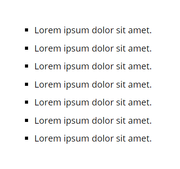
Sorry for the late reply, to use the list option in the text block element and always see the small square, please try this code in the General Styling > Quick CSS field or in the WordPress > Customize > Additional CSS field:ul.disc, .entry-content-wrapper ul { list-style: square outside !important; }this will be for your whole site, if you only want it for some pages then please let us know.
Best regards,
MikeDecember 22, 2019 at 6:56 pm in reply to: Buttons within column not displaying correctly on mobile devices #1168594Hi,
Sorry for the late reply, and thanks for the login, when I look at your grid row on mobile the buttons overlap each other and the images are too small to see well. Have you considered using columns instead?
Please see the screenshot in Private Content area.Best regards,
MikeHi,
Glad we were able to help, we will close this now. Thank you for using Enfold.For your information, you can take a look at Enfold documentation here
For any other questions or issues, feel free to start new threads in the Enfold forum and we will gladly try to help you :)Best regards,
MikeHi,
@Trent Dyrsmid this is a temp patch, the next update will include this, which will be released in a couple of weeks.
@djfoot glad to help.
@RezNation is this working for you?Best regards,
MikeHi,
Glad we were able to help, we will close this now. Thank you for using Enfold.For your information, you can take a look at Enfold documentation here
For any other questions or issues, feel free to start new threads in the Enfold forum and we will gladly try to help you :)Best regards,
MikeHi,
Glad we were able to help, we will close this now. Thank you for using Enfold.For your information, you can take a look at Enfold documentation here
For any other questions or issues, feel free to start new threads in the Enfold forum and we will gladly try to help you :)Best regards,
MikeDecember 22, 2019 at 6:13 pm in reply to: Change name of Avia layout builder on page builder #1168585Hi,
Glad we were able to help, we will close this now. Thank you for using Enfold.For your information, you can take a look at Enfold documentation here
For any other questions or issues, feel free to start new threads in the Enfold forum and we will gladly try to help you :)Best regards,
MikeHi,
Glad to help, are you going to be ok with deleting the “enfold-old” or shall I do it?
Then shall we close this?Best regards,
MikeHi,
Sorry about that, I didn’t realize it was one of the theme’s icons. So to solve this I added this css to your Quick CSS:#top #wrap_all .social_bookmarks_Newsletter a:before { content: ""; }it is now working for you, please clear your browser cache and check.
Best regards,
MikeHi,
Glad to hear you have been able to sort this out.
We will close this now. Thank you for using Enfold.For your information, you can take a look at Enfold documentation here
For any other questions or issues, feel free to start new threads in the Enfold forum and we will gladly try to help you :)Best regards,
MikeDecember 22, 2019 at 5:26 pm in reply to: Tabular Data Table (scrollable) inside of a tab section on mobile #1168578Hi,
Thank you for the login, since the table is set to scrolling it retains it’s width and is scrollable with a sideswipe, but in mobile, the tab section is also scrollable with a sideswipe, so the two elements nested are both being controlled by the same sidesipe.
So one solution is to add this css to show the complete table in mobile view and not rely on the sideswipe:@media only screen and (max-width: 767px) { #top.page-id-133 #tab_table .avia_scrollable_table .avia-table th,.avia_scrollable_table .avia-table td { padding: 9px 1px !important; } #top.page-id-133 #tab_table .avia_scrollable_table .avia-table li { margin-left: 0em !important; } #top.page-id-133 #tab_table .avia_scrollable_table .avia-table li { list-style: none !important; } #top.page-id-133 #tab_table .avia_scrollable_table .avia-table { width: 100% !important; } .responsive #top.page-id-133 #tab_table .avia_scrollable_table .avia-data-table > thead > tr > th, .responsive #top.page-id-133 #tab_table .avia_scrollable_table .avia-data-table > tbody > tr > th, .responsive #top.page-id-133 #tab_table .avia_scrollable_table .avia-data-table > tfoot > tr > th, .responsive #top.page-id-133 #tab_table .avia_scrollable_table .avia-data-table > thead > tr > td, .responsive #top.page-id-133 #tab_table .avia_scrollable_table .avia-data-table > tbody > tr > td, .responsive #top.page-id-133 #tab_table .avia_scrollable_table .avia-data-table > tfoot > tr > td { white-space: unset !important; } }If you test this css please clear your browser cache.
Please see the screenshot in Private Content area of the expected result. This is for a larger mobile screen (425px) for a small mobile screen like the iPhone 6 the text may overflow the cells.
So probably the best solution is to choose “adjust table to screen size” in the “Responsive Styling” option, unless you show your table below the tab section.Best regards,
MikeHi,
Good news, the dev team has adjusted the theme’s core files for parsing the shortcode in the schema and it is included in the next version. It is based on this shortcode.
So now it works in our schema:
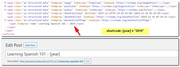
But the source code fragment you posted in the opening post is the schema created by the “rank math” plugin, and it seems to have it’s own logic and is not using the theme’s schema data and is not parsing the shortcode.
While we can not support 3rd party plugins, perhaps the “rank math” plugin has a filter to allow shortcode parsing now that the theme is?Best regards,
MikeDecember 21, 2019 at 3:47 pm in reply to: WooCommerce – Issue With Postal Code Field Display with Square Gateway #1168449Hey npmcgrew,
Sorry for the late reply and thanks for the login and screenshots. It looks like the issue is that the field uses the class “hidden” and we have css which hides the class, which we happen to also use.
Anyways, please try this code in the General Styling > Quick CSS field or in the WordPress > Customize > Additional CSS field:#wc-square-credit-card-credit-card-form .wc-square-credit-card-card-postal-code-parent.wc-square-credit-card-hosted-field-parent.hidden { position: relative !important; visibility: visible !important; }Then clear your browser cache and any cache plugin, and check.
Best regards,
Mike -
AuthorPosts
