

Forum Replies Created
-
AuthorPosts
-
December 13, 2020 at 10:00 pm in reply to: Header background change is also changing my sub-menu background color #1266952
Hi,
Glad we were able to help, we will close this now. Thank you for using Enfold.For your information, you can take a look at Enfold documentation here
For any other questions or issues, feel free to start new threads in the Enfold forum and we will gladly try to help you :)Best regards,
MikeHi,
Ok, if you include an admin login in the private content area, I could apply the above solutions for you to check.Best regards,
MikeDecember 13, 2020 at 9:53 pm in reply to: Ad publish date below preview image in Portfolio Grid #1266948Hey Carsten,
Sorry for the very late reply, Try adding this code to the end of your functions.php file in Appearance > Editor:add_filter( 'the_title', 'do_shortcode' );Then install this plugin: Date Published Shortcode
Then add this shotcode to your portfolio title:[post_published]
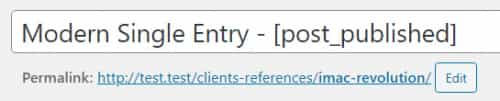
This was the result of my test:

Best regards,
MikeHi,
Sorry for the very late reply and thanks for the links. Please check the map image in the #venue section, it is not showing because the background image URL is not correct, also please disable any lazy loading, I believe the image heights are not applied until the images are viewed so when jumping to the anchor the image heights seem to be changing the section heights.Best regards,
MikeDecember 13, 2020 at 9:01 pm in reply to: Slider Beschriftung verschwindet bei Ausrichtungswechsel #1266939Hey Mulch2000,
Entschuldigung für die sehr späte Antwort und danke für den Link. Bitte versuchen Sie diesen Code im Feld Allgemeines Styling> Quick CSS oder im Feld WordPress> Anpassen> Zusätzliches CSS :@media only screen and (max-width: 1440px) { .avia_transform .av_fullscreen.avia-fade-slider .active-slide .avia-caption-content, .avia_transform .av_fullscreen.avia-fade-slider .active-slide .avia-caption-title,.avia_transform .av_fullscreen .avia-caption-title,.avia_transform .av_fullscreen .avia-caption-content { visibility: visible !important; } }Löschen Sie nach dem Anwenden des CSS den Browser-Cache und überprüfen Sie ihn.
— Translated with Google —
Sorry for the very late reply and thanks for the link. Please try this code in the General Styling > Quick CSS field or in the WordPress > Customize > Additional CSS field:
@media only screen and (max-width: 1440px) { .avia_transform .av_fullscreen.avia-fade-slider .active-slide .avia-caption-content, .avia_transform .av_fullscreen.avia-fade-slider .active-slide .avia-caption-title,.avia_transform .av_fullscreen .avia-caption-title,.avia_transform .av_fullscreen .avia-caption-content { visibility: visible !important; } }After applying the css, please clear your browser cache and check.
Best regards,
MikeHi,
Sorry for the very late reply and thanks for the login, please try Allowing shortcodes in product excerpts, I was going to test this for you but I couldn’t access the theme editor to apply the function.Best regards,
MikeHi,
Sorry for the very late reply. I was working on a similar function, please check this thread and see if it works for you.Best regards,
MikeDecember 13, 2020 at 8:29 pm in reply to: fullwith slider typographie nicht mittig auf iphones #1266933Hi,
Sorry for the very late reply and thanks for the links, In your screenshot of the mobile menu view, your page doesn’t use a transparent header, so the caption in the middle of the element doesn’t include the header height.
Currently, you are using a transparent header, so the caption is viewed over the element and appears as if the heading is in the center of the page.
If you want the header to show and move the caption up a little we can assist, please link to a test page with this setup.Best regards,
MikeHi,
Sorry for the very late reply, unfortunately when a static resource is cached by the users browser, it is necessary for the cache to be cleared to show an updated version of the same item.
For this situation, I would recommend changing the name of the font package at fontello and only include the new icons each time you change them.
By changing the name of the font package the font used will be different so the browser will consider it a new resource and download it, and ignore the cached version.
I believe that the thought behind no versioning for icon fonts is that it was not expected that the same icons would be changed often, do you plan on changing them often? Is it something like monthly scheme changes?Best regards,
MikeDecember 13, 2020 at 7:37 pm in reply to: fullwith dropdown unter hamburger menü mit social media icons #1266922Hi,
Sorry for the very late reply and thanks for the links.
Try adding this code to the end of your functions.php file in Appearance > Editor:function custom_burger_social_bookmarks_script() { ?> <script> (function($){ $('#avia-menu').one('click', function(){ jQuery('ul.social_bookmarks').clone().wrapInner('<div class="burger_social_bookmarks"/>').children(0).unwrap().appendTo('#av-burger-menu-ul'); }); })(jQuery); </script> <?php } add_action('wp_footer', 'custom_burger_social_bookmarks_script');Then add this css in the General Styling > Quick CSS field or in the WordPress > Customize > Additional CSS field:
#av-burger-menu-ul > .burger_social_bookmarks > li {
	width: 30px;
    height: 30px;
    line-height: 30px;
    text-align: center;
    display: inline-block;
    margin-right: 20px;
}
Then clear your browser cache and check.
Best regards,
MikeHi,
Thank you for your patience, once we hear back from the dev team we will reply here.Best regards,
MikeDecember 13, 2020 at 6:19 pm in reply to: Partial Success Importing the Construction Demo – but not images were imported. #1266913Hi,
Sorry for the very late reply and glad you were able to sort this out. We understand your frustration and are also sorry for this, we will certainly improve our responses.
As you have asked to disregard this request, we will close this thread. Thank you for using Enfold.For your information, you can take a look at Enfold documentation here
For any other questions or issues, feel free to start new threads in the Enfold forum and we will gladly try to help you.Best regards,
MikeDecember 13, 2020 at 6:11 pm in reply to: Add an image on enfold's default blog page (grid model) #1266909Hi,
Sorry for the very late reply and thanks for the login and links, I tested the solution above in your child theme because I didn’t see it activate on your site, I also added this css to center the image:@media only screen and (max-width: 767px) { .banner-img { display: block; margin: auto; padding-top: 30px; height: 200px; } }It seems to show on your Blog page & your category pages, please clear your browser cache and check.
Best regards,
MikeHi,
Sorry for the very late reply and thanks for the links, for #1, Tablet Header is no longer sticky on tablet I found your css has a max-width of 767px, please try changing this to 988px.media only screen and (max-width: 767px){ .responsive #top #wrap_all #header { position: fixed !important; } }For #2 & #3, please try adding this css:
@media only screen and (max-width: 989px) and (min-width: 768px) {
.responsive.html_mobile_menu_tablet #top #header_main > .container .main_menu .av-main-nav > li > a {
    height: 80px !important;
    line-height: 80px !important;
    top: -10px;
}
}
For #4, please try adding this css:
@media only screen and (max-width: 768px) {
#top.home #footer > div {
	padding: 0 !important;
}
}
For #5 your mobile menu social icons have the class
only-mobileand this css only allows it to show on tablets and above:@media only screen and (min-width: 768px) { .only-mobile { display: none; } }Did you add this css? Please try removing it.
Best regards,
MikeDecember 13, 2020 at 4:27 pm in reply to: Enfold tab: an image disappears with the Weglot translation? #1266903Hi,
Sorry for the very late reply and thanks for the links. I took a look at the section in both languages and all 7 images show correctly. Please see the screenshots in Private Content area.
Is this the same as you are seeing?Best regards,
MikeDecember 13, 2020 at 4:18 pm in reply to: Issues with Mansory and blogposts in combination with polylang in latest version #1266902Hi,
Sorry for the very late reply, I believe that you need to create a translation for each post

It looks like you only have 8 posts so this should be fairly easy.Best regards,
MikeHi,
Thank you for the feedback, I re-read your first post where you said that:When I set up the Child theme, is it impossible to have my general styling and quick css “running”
It seems like that the child overrides those settings.The child theme will override parent theme settings, child themes are designed to do this.
For example, I tested your child theme and found it to look very similar to the parent theme, the only difference I saw was the header was a light blue due to this css in your child theme stylesheet:#header_main { background: aliceblue !important; }but the page title bar was white and not the dark color of your screenshot.
So since this css is in your child theme it is correct for it to display, I see this is the only css in your child theme stylesheet, was this a test?
Please see the screenshot in Private Content area.
I compared your child theme quick css to the parent theme quick css and see they are a little different, typically when the parent theme settings are imported the quick css is also imported, did you try this?Best regards,
MikeHi,
Sorry for the late reply, dose the plugin have any options to not use a popup, perhaps inline? Perhaps the plugin author has seen this error before, have you asked them?
Can we login a take a look at the backend?Best regards,
MikeHi,
Sorry for the late reply, I would recommend using the theme lazy load and disable the other ones.
It seems that you have done this and the missing H6 closing tag is being added by the DOM automatically, at least in Chrome, but this might not happen in every browser, every time.
I added the closing H6 tag to each mega menu item and I then found the css adding the border and corrected it, please clear your browser cache and check./*Bordure des images*/ .avia_mega_div > .sub-menu li > span.mega_menu_title > a:nth-child(1) {border: solid 0px #cca752!important;}Best regards,
MikeDecember 12, 2020 at 1:50 pm in reply to: Picture homepage isn't adjusting in a good way to mobile #1266770Hi,
For your Dutch site, I found that the css for the box is in your WordPress > Customize > Additional CSS:.page-id-1623 #av_section_1 .avia_textblock.av_inherit_color:first-of-type, .page-id-67 #av_section_1 .avia_textblock.av_inherit_color:first-of-type { background: rgba(56,56,56,0.6); padding: 7px 0px; text-align: center; }I adjusted the background color to white:
background: rgba(255,255,255,0.6);
The reason the button didn’t show was because in your custom css there was atop: 145pxpushing the box down so the button didn’t show, I commented it out./*.page-id-1623 #av_section_1 > div.container > main > div > div > div,*/ .page-id-67 #av_section_1 > div.container > main > div > div > div { top:145px; } }I noticed the box was still over your face a little so I added this css to help:
@media only screen and (max-width: 767px){
html[lang="nl-NL"] #top.home #av_section_1 > div.container > main > div > div > div > section > div {
    padding: 0 !important;
}
html[lang="nl-NL"] #top.home #av_section_1 > div.container > main > div > div > div > section > div > h1 {
	margin: 0 !important;
}
}
This seems to help, but the text is longer in Dutch, perhaps reducing the font size a little more would help.
Please clear your browser cache and check.Best regards,
MikeHi,
Thanks for the feedback, but your screenshot is leading to a 404, please check the link.
Also, the login token seems to have expired.Best regards,
MikeDecember 11, 2020 at 3:24 pm in reply to: Problems with access to elements via css in tablet and smartphone versions #1266557Hi,
Thank you for changing this, the reason the last image drops down a row is that the combined width of all of the images is wider than the page, for example, on the desktop the image widths are 213px, if they were 209px they would if in a single row.
One thing we can do is remove the un-needed right margin on the last image to give the row more space, so in your Quick CSS I added#top.page-id-22 #wrap_all #main .post-entry-22 div#attachment_1374.wp-caption.alignleft { margin-right: 0 !important; }This seems to solve for above 1230px.
For below 430px I needed to target this specifically so I changed your media queries to include a min width, like this:
@media only screen and (min-width: 430px) and (max-width: 768px) and (orientation : landscape) { ... }
then I added this for below 430px:@media only screen and (max-width: 429px) { #top.page-id-22 #wrap_all #main .post-entry-22 .wp-caption.alignleft { width: 28% !important; } }Please clear your browser cache and check.
I also found this css in your child theme stylesheet, and it was causing issues for this so I commented it out.div#attachment_1765.wp-caption.alignleft { margin-left: 2px; } div#attachment_1768.wp-caption.alignleft { margin-left: 2px; } div#attachment_1771.wp-caption.alignleft { margin-left: 1px; }So now your page seems to look good on 425px & 375px mobile devices, with 3 images per row, but the smallest 320px will need to be 2 images per row to look good.
Best regards,
MikeHi,
That is good news, unless there is anything else we can help with on this issue, shall we close this then?Best regards,
MikeDecember 10, 2020 at 2:48 pm in reply to: Problems with access to elements via css in tablet and smartphone versions #1266299Hi,
Thank you for the feedback, I review the older post but I didn’t find an example of the code used, but the current missing H6 tag is an issue that should be corrected.
It looks like the AMP plugin is rebuilding the mobile menu, please try disabling this plugin and check. Of the plugins you have installed, the ones that have shown to cause issues on other sites are AMP, Autoptimize, JetPack, & Smush. For example, you have lazyload enabled in the theme settings, and in Smush, and Autoptimize, this could be a conflict.
Is the AMP new, I don’t recall seeing this on your site before?Best regards,
MikeDecember 10, 2020 at 1:32 pm in reply to: Problems with access to elements via css in tablet and smartphone versions #1266288Hi,
I tested the css by injecting it into the browser. I note that the last team image is still “alignright” where all of the other ones are “alignleft”, I was going to try changing it but in the backend of the page seems blank with the Advanced Layout Builder and the default editor. Did you use the Advanced Layout Builder for the page?Best regards,
MikeHi,
Thanks for the link to your other site, it looks like the plugin opens a popup at the point that the Enfold site gets stuck on, does the plugin have an inline option, so the popup is not used? Try disabling the Enfold Theme Options > Lightbox Modal Window theme option, perhaps there is a popup (lightbox) conflict?Best regards,
MikeDecember 10, 2020 at 12:09 pm in reply to: Problem with table: Height of "Label Column" does not grow with other columns #1266262Hi,
Glad to help, unless there is anything else we can help with on this issue, shall we close this then?Best regards,
MikeHey fcp,
Sorry for the very late reply and thanks for the login and video, I took a look at your mega menu and see that you have added the images in the menu by adding HTML to the menu items, this HTML doesn’t include the title tag and it is missing the closing H6 tag, for example this is your first item:
<img src="https://your-site.fr/medias/accueil/menu/nos-univers-bonne-nuit-les-petits.jpg"><h6><br>Bonne nuit les petits
I changed it to:
<img src="https://your-site.fr/medias/accueil/menu/nos-univers-bonne-nuit-les-petits.jpg" title="Bonne nuit les petits"><h6><br>Bonne nuit les petits</h6>
Now the title is showing on hover for that item, please check.
Please note that mobile devices do not have a “hover” event, so the mouseover image title will not show in the mobile menu on actual devices.Best regards,
MikeHi,
Sorry for the very late reply, I tried to test your skills shop and found that I can not complete the order, I am redirected to a page between the cart and the checkout, the URL includes?provider=tribe_wooticketso I assume that this is due to the plugin. Please see the screenshot in Private Content area.
I’m not sure that I took the correct steps, please describe the steps that should occur with this plugin stating with a product page.Best regards,
Mike -
AuthorPosts
