

Forum Replies Created
-
AuthorPosts
-
Hi,
Thanks for the feedback but the css I posted in not in your post#top #header.av_header_transparency .phone-info { color: #000; }You have the same incorrect css twice in your post at the top and bottom, try adding my css at the very top.
If you still have trouble please include an admin login in the Private Content area so we can help.Best regards,
MikeJanuary 15, 2023 at 8:48 pm in reply to: Enfold update from (4.6.3.1) to new Version (5.2.1) is not working #1378791Hi,
If that doesn’t help please open a new thread with the url to the page in question and an admin login so we can be of more assistance. Since this is not your thread posting your login here will not be private.Best regards,
MikeJanuary 15, 2023 at 8:45 pm in reply to: Google Fonts werden nach Import und Umstellung trotzdem gefunden #1378790Hi,
Thanks for your patience, I only found:/* Popup Google Fonts */ @import url('//fonts.googleapis.com/css?family=Acme|Montserrat');
but nothttps://fonts.googleapis.com/css?family=Arimo:400,700%7CArimo
Try disabling all of your plugins and clearing your server cache, I think your font checker site is caching the results and not giving fresh results each time because this site says no google fonts are found when the popup maker is disabled.
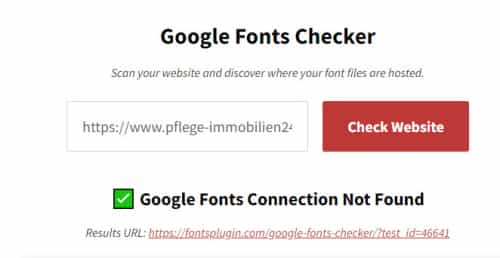
Best regards,
MikeHi,
Glad we were able to help, if you have any further questions please create a new thread and we will gladly try to help you. Thank you for using Enfold.Best regards,
MikeHey Axel,
Try this css:#top #header.av_header_transparency .phone-info { color: #000; }After applying the css, please clear your browser cache and check.
Best regards,
MikeHey Stefan Schmidt,
To update your version of Enfold you will need to download the latest installable WP version from your Theme Forest account and upload it to your WordPress ▸ Appearance ▸ Themes ▸ Add Themes ▸ Add New

after you choose the zip file and click install, you will see a This theme is already installed message because you are updating, you can continue

then you will see the Theme updated successfully message.

Best regards,
MikeHey myDEZIGN,
Thanks for the link to your page, I have checked it with my macOS Monterey with Safari 16.1 and the images show on the front page correctly, I’m updating to Ventura now but it will take half an hour.
In the meantime, I see most all of your images are youtube videos so there is a chance that your Safari is blocking these check the shield next to the address bar to see if the blocker is enabled. This article may helpBest regards,
MikeHi,
Very good, I have not seen this before typically Google obeys the rel=”nofollow” so I don’t know why in this case it is not.
Unless there is anything else we can help with on this issue, shall we close this then?Best regards,
MikeHi,
Typically when the theme tries to fix an error caused by a missing closing tag but adds it into the wrong place the error is hard to find and sometimes can’t be manually corrected.
I will take a look at the page and see if I can spot the error, please ensure the Avia Layout Builder Debugger is enabled and link to the page with the error and include an admin login in the Private Content area.Best regards,
MikeJanuary 15, 2023 at 7:15 pm in reply to: Memberpress Page Template has been replaced by default page template #1378771Hi,
Glad we were able to help, if you have any further questions please create a new thread and we will gladly try to help you. Thank you for using Enfold.Best regards,
MikeHi,
Your screenshot showed the search suffix

by default the WordPress search link has the rel=”nofollow” which it meant to tell crawler to not follow:

which seems that your crawler is not obeying, based on your screenshot of the report.
So you could just ignore the report or you could remove the search link from your menu.
To remove the search link go to Enfold Theme Options ▸ Main Menu ▸ General ▸ Append search icon to main menu and disable.Best regards,
MikeJanuary 15, 2023 at 6:59 pm in reply to: Memberpress Page Template has been replaced by default page template #1378766Hi,
Glad to hear the css helped, unless there is anything else we can help with on this issue, shall we close this then?Best regards,
MikeHi,
Glad we were able to help, if you have any further questions please create a new thread and we will gladly try to help you. Thank you for using Enfold.Best regards,
MikeJanuary 15, 2023 at 5:19 pm in reply to: Memberpress Page Template has been replaced by default page template #1378759Hi,
I believe Ismael has pointed to the correct solution, I don’t know why this occurred or a quicker way to correct it.Best regards,
MikeJanuary 15, 2023 at 5:15 pm in reply to: Enfold update from (4.6.3.1) to new Version (5.2.1) is not working #1378757Hi,
That is because the zip file you tried was not the installable WP version from your Theme Forest account, it was the full zip with the documentation.
Please check again carefully there are two download links, you want the installable WP version
If you did check carefully and you still get this error then your web server doesn’t have the PHP ZipArchive Extension activated, you will need to ask your web host to activate this so WordPress can extract the zip file.Best regards,
MikeHi,
Glad to hear this has helped, unless there is anything else we can help with on this issue, shall we close this then?Best regards,
MikeHi,
It looks like your desktop element is hidden on mobile and a different element is used with a different ID
try adding this css for mobile:#top .content .flex_column .widget_nav_menu #menu-tageskurse-1 li a { padding: 0.1em 3px; }After applying the css, please clear your browser cache and check.
Best regards,
MikeHi,
Thank you for your patience when I look at the links in your footer I see the social links are a “share box”.
I assume that you added this by using the “social buttons” element in your footer page, this element is a “share box” and not a social profile link.
You can copy the social profile code from your header and add in a code block element or you can use the icon elements to create your own social links.
Please see this thread
If you like the layout you currently have and just want to change the links for your footer page “share box”, Try adding this code to the end of your child theme functions.php file in Appearance ▸ Editor:function change_share_box_links_to_social_profile_links() { ?> <script> window.addEventListener('DOMContentLoaded', function() { (function($){ var facebook = "https://facebook.com"; var linkedin = "https://linkedin.com"; var instagram = "https://instagram.com"; var youtube = "https://youtube.com"; $("#footer-page .av-share-box-list").each(function(){ $(this).find(".av-share-link.av-social-link-facebook a").attr("href", facebook); $(this).find(".av-share-link.av-social-link-linkedin a").attr("href", linkedin); $(this).find(".av-share-link.av-social-link-instagram a").attr("href", instagram); $(this).find(".av-share-link.av-social-link-youtube a").attr("href", youtube); }); })(jQuery); }); </script> <?php } add_action('wp_footer', 'change_share_box_links_to_social_profile_links');and adjust the social links to suit.
Best regards,
MikeJanuary 15, 2023 at 3:51 pm in reply to: Enfold update from (4.6.3.1) to new Version (5.2.1) is not working #1378745Hi,
@Mariann_m Please note that you are using v4.7.4 which uses the API that Envato doesn’t support anymore, also as I recall there was another error in that version.
To update your version of Enfold you will need to download the latest installable WP version from your Theme Forest account and upload it to your WordPress ▸ Appearance ▸ Themes ▸ Add Themes ▸ Add New
after you choose the zip file and click install, you will see a This theme is already installed message because you are updating, you can continue
then you will see the Theme updated successfully message.
Best regards,
MikeJanuary 15, 2023 at 3:34 pm in reply to: Memberpress Page Template has been replaced by default page template #1378744Hi,
The “Event” breadcrumb at the end of your breadcrumbs has been added on by a plugin or script because the item before it has the class trail-end, for example, this is a proper breadcrumb:

and this is yours:

try disabling your plugins or switching to your parent theme to find where this is coming from.
If you can’t find it or it’s from something you can’t change you could use this css to hide siblings after the class trail-end:.breadcrumb-trail .trail-end ~ span { display: none; }Best regards,
MikeHi,
Thanks for the link to your site, the first button has it’s hover color set with this css:.page-id-8476 #av_section_1 .button { background-color: #00A8A8; color: #fff; }but the second button is in #av_section_3 so this first css won’t work, the correct css for this button is
.page-id-8476 #av_section_3 .button {
    background-color: #00A8A8;
    color: #fff;
}
I added this for you, please clear your browser cache and check.
Best regards,
MikeJanuary 15, 2023 at 2:59 pm in reply to: Center two 1/3 layout elements within a color section #1378740Hi,
@Shawn thank you for sharing, I’m sure someone will find this helpful.
Since this thread is from 2019 we will go ahead and close this, but if you have any further tips or questions please create a new thread and we will gladly try to help you. Thank you for using Enfold.Best regards,
MikeHey schweg33,
Thanks for your question, but Google Translate doesn’t know the word “veklein”, so I assume you mean increase.
Try this css:#top .content .flex_column .widget_nav_menu #menu-tageskurse li a { padding: 1.8em 3px; }adjust the 1.8em up or down to your liking, the default is 0.8em
Best regards,
MikeHi,
Thank you for the screenshot it helped explain the order, so I tested on the /lesson-tester/ page as you had applied the reverse order on mobile in the element options, this option wraps each row in an extra div making the reversal possible with flex.
I tested this css for tablet and it seems to work:@media only screen and (min-width: 768px) and (max-width: 989px){ .responsive #top #wrap_all .av-mobile-columns-flex { display: flex; flex-direction: row-reverse; flex-wrap: wrap; } .responsive #top #wrap_all .av-mobile-columns-flex .av_one_fourth:not(.column-top-margin) { margin-top: 50px; } }
lets try this on the /lesson-p1_33c/ page, set the reverse order on mobile in the element options, and test this css. If it works correctly then good, if not then remove the css but leave the reverse order on mobile in the element options enabled so I can test.
You will note in the above css I added a top margin for the first row because all of the other rows had a top margin, I’m not sure if this was because you had added a top margin in the backend to all rows but the first one, please check this on the /lesson-p1_33c/ page and make sure all rows have the same margin otherwise there will be no space between the top row 4 3 & 2 1Best regards,
MikeHi,
Thanks, it looks like the Avia Layout Builder Debugger but it looks like it is in the wrong place, was it like this before the page crashed or only after?
When adding shortcodes into elements it’s important to ensure that the closing tags are included, otherwise the theme will try to fix the error by adding the closing tags but sometimes it might add them into the wrong place causing the page to crash.
Typically you will need to use a backup to restore from this type of error.Best regards,
MikeHi,
Glad we were able to help, if you have any further questions please create a new thread and we will gladly try to help you. Thank you for using Enfold.Best regards,
MikeHi,
Can you include a screenshot of the red box, you can add screenshots by uploading your images to a screenshot host and pasting the HTML code or link in your post or the Private Content area.Best regards,
MikeHi,
Thank you for your patience as I understand you have adjusted your test page /lesson-tester/ so it is correct for mobile and desktop, and the issue now is tablet when it is two columns.
But you wrote above that on tablet it should be:
4 3
2 1this seems to be the way it is:

is this correct?for desktop it is
4321
mobile it is
1
2
3
4
and these are correct?so for your other pages like /lesson-p1_33c/ which I understand you have not done anything to,
desktop is correct with (top row only):
ZIQ YAQ KIN YAK
tablet with two rows is correct with (top row only):
ZIQ YAQ
KIN YAK
and mobile with one row should be
YAK
KIN
YAQ
ZIQ
so for this page mobile is the only one wrong right now, correct?Best regards,
MikeHi,
Glad we were able to help, if you have any further questions please create a new thread and we will gladly try to help you. Thank you for using Enfold.Best regards,
MikeHi,
Those results are for pages that end with /?s= which is used by WordPress for search results and WordPress makes those pages no-index
If you try going to one of those pages, as I have linked below, you will get a search not found error because the url is wrong.
I suspect that the crawler is following the search link in your menu for each page

Best regards,
Mike -
AuthorPosts
