

Forum Replies Created
-
AuthorPosts
-
Hey tixxpff,
Thank you for your question, when you manually create a product with the Advanced Layout Builder you will use other elements such as the special heading to add the product title, this is by design. The ALB meant to give you the ability to create custom layouts such as this one and here is another example
You can also use Shortcodes included with WooCommerce, but unfortunately WooCommerce doesn’t have a shortcode for displaying a product name, however, you can create your own by adding this code to the end of your child theme functions.php file in Appearance ▸ Editor:function displayProductName($item) { global $post; $product_title = get_the_title( $post->ID ); return $product_title; } add_shortcode('product_name', 'displayProductName');and use this shortcode
[product_name]

Best regards,
MikeHey Mariann_m,
Thanks for your question, but this looks to be an error with Polylang v3.3.1 they recommend downgrading to v3.3.0Best regards,
MikeHey Matt,
Thanks for the link to your page, for the first grid block I see “lesson 41” is at the top, I assume that you want “lesson 1” at the top.
Try this css:@media only screen and (min-width: 768px) { .avia-content-slider.avia-content-grid-active .avia-content-slider-inner { display: flex; flex-direction: column-reverse; } }After applying the css, please clear your browser cache and check.
Best regards,
MikeHey Matt,
Thanks for your patience and the link to your site, for your background image I assume that you are using this css:.main_color { background: #ffffff url(/wp-content/uploads/2023/01/background-border-1.jpg) top left repeat-y scroll }Try adding background-size: contain; like this:
.main_color {
    background: #ffffff url(/wp-content/uploads/2023/01/background-border-1.jpg) top left repeat-y scroll;
    background-size: contain;
}
After applying the css, please clear your browser cache and check.
Best regards,
MikeHi,
Try adding this css for the archive sidebar news images:@media only screen and (min-width: 1025px){ .news-wrap span.news-thumb, span.news-thumb img { width: 200px !important; height: auto !important; margin-right: 0px !important; } .news-wrap .news-headline { float: left; } }After applying the css, please clear your browser cache and check.
Best regards,
MikeHey Sebastian,
Thanks for your question, try adding this code to the end of your child theme functions.php file in Appearance ▸ Editor:function print_menu_shortcode($atts, $content = null) { extract(shortcode_atts(array( 'name' => null, 'class' => null ), $atts)); return wp_nav_menu( array( 'menu' => $name, 'menu_class' => 'menu-shortcode', 'echo' => false ) ); } add_shortcode('menu', 'print_menu_shortcode');This will let you show a menu in your page content as a shortcode, if your menu name is test then the shortcode to show it would be:
[menu name="test"]
Add the shortcode to a code block element:
Then add this css:.entry-content-wrapper ul.menu-shortcode, .entry-content-wrapper .menu-shortcode li { list-style: none outside; } .menu-shortcode .sub-menu { height:0; opacity: 0; visibility: hidden; transition: all 0.5s ease 0s; } .menu-shortcode .menu-item-has-children:hover > .sub-menu { height: 100%; opacity: 1; visibility: visible; transition: all 0.5s ease 0s; }I added transition to the css to ease in and out the sub-menus so it was not so fast.
Click the image to see the gif play

https://img.savvyify.com/images/2023/01/28/Enfold_Support_216.gifBest regards,
MikeJanuary 28, 2023 at 4:08 pm in reply to: Hide Nav bar, should appear when scrolling + slanted bottom edge of header img #1395722Hey Alex Freelance,
Thanks for your patience and the link to your site to hide your homepage menu until the page has been scrolled please try this css:@media only screen and (min-width: 767px) { #top.home .av_header_transparency #header_main_alternate { visibility: hidden; } }I see that you are using a background image for your header with a yellow arch, to make the white area under the yellow arch transparent please try this css:
.header_color .header_bg {
	-webkit-mask-image: unset !important;
	background-color: transparent !important;
}
After applying the css, please clear your browser cache and check.
Best regards,
MikeHi,
Thanks for your patience, this thread seems to cover a couple of topics and it seems now you are asking about the breadcrumbs on the page /category/aktuelles-aus-2023/ , you are asking about changing the style, yes you could use css to change it but I don’t know how you want to change it.
Perhaps you could open a new thread and explain how you want to style it perhaps with some screenshots.
This would help us keep the threads on topic and easier to follow, thanks for your understanding.Best regards,
MikeHey Zdeněk,
Thanks for your patience and the link to your page, please try this css instead:@media only screen and (max-width: 767px) { .mts-blog-uvodni-obrazek { width: 100vw !important; position: relative !important; left: calc(-50vw + 50%) !important; } .mts-blog-uvodni-obrazek .avia-image-container.avia-align-left { margin: 0; } }Best regards,
MikeHi,
Thank you for your patience to use this css for another page that is not the home page you would replace .home with the ID of the page.
So for the post over-mij you can find the ID by hovering over the “edit” link and look at the bottom of the page for the hover link, you will see the ID is 22, so for posts you would use .postid-22 instead of .home, if it was a page you would use .page-id-22
I think there are some plugins that will show the IDs in an easier way.
If you want it to work for all pages and posts then remove the .homeBest regards,
MikeHi,
Thanks for the link to your new page, but the code Ismael gave you is for the child theme functions.php, not for a text block on a page:

Like this:

I added this for you and now the slider shows on your shop page:

and your product page:

please clear your browser cache and check.Best regards,
MikeHey IBRAHIMBerro,
Thanks for the login, I see that you are getting this error:Failed to load resource: the server responded with a status of 404 (Not Found) /wp-admin/admin-ajax.phpI found that your Permalink structure includes /index.php/

I changed it to the basic Post name structure, please clear your server cache and check. If this doesn’t help please check your server error log and ask your webhost to check the file permissions for the /wp-admin/admin-ajax.php file because it should not give a 404 (Not Found) error.Best regards,
MikeHi,
Glad to hear that you have this sorted out, some of our demos have sidebar headers like this one and it works well, you will notice that below 767px the sidebar changes to a burger menu.
I don’t see any issues so we probably want to make the client happy :)
Perhaps you would want to choose one of these sidebar demos as a base to start with?
Naturally, if you run into any issues we will be happy to help.Best regards,
MikeHi,
Glad Nikko was able to help, if you have any further questions please create a new thread and we will gladly try to help you. Thank you for using Enfold.Best regards,
MikeHey pamk21,
You can change your site to a sidebar header at Enfold Theme Options ▸ General Layout ▸ Logo And Main Menu and choose leaft or right sidebar.
This will give you a vertical header and navigation.Best regards,
MikeHi,
Please see this tutorial on using the Team Member element to show a popup when the image is clicked to show more information.
It sounds exactly like what you are trying to do and explains step-by-step how to do it.
Try testing it on a test page on your site and if you get stumped include a link to the page and an admin login so we can assist.Best regards,
MikeHi,
Glad we were able to help, if you have any further questions please create a new thread and we will gladly try to help you. Thank you for using Enfold.Best regards,
MikeHi,
Glad we were able to help, if you have any further questions please create a new thread and we will gladly try to help you. Thank you for using Enfold.Best regards,
MikeHi,
Thanks for the link to your site, to display the page title to the page that you linked to, please go to the backend and in the admin sidebar find Layout ▸ Title Bar Settings and choose Display only Title

I did this for you, please clear your browser cache and check.Best regards,
MikeJanuary 27, 2023 at 1:05 pm in reply to: Continue shopping button – Redirect to the currently visited product category #1395564Hi,
Unfortunately, this is not an option, perhaps woocommerce offers this as an addon plugin.
Or try the solution in this thread, or perhaps this article, or this one.Best regards,
MikeHi,
Thanks for the feedback please try this css instead:.avia-icongrid .av-icon-cell-item .avia-icongrid-flipback { text-align: left; }After applying the css, please clear your browser cache and check.
Best regards,
MikeHi,
I added the custom class onethirdcircle to the three circles in all three languages and then adjusted the script to look for this class.
I then added this css in the Enfold Theme Options ▸ General Styling ▸ Quick CSS field for all three languages to center the text on mobile and cleared your cache for each language:@media only screen and (max-width: 767px) { .responsive #top .sc-av_one_third .flex_column_table_cell.onethirdcircle { display: flex; justify-content: center; flex-direction: column; } }Then to reduce the size of the circles and center them horizontally for mobile I added this css in the Enfold Theme Options ▸ General Styling ▸ Quick CSS field for all three languages to center the text on mobile and cleared your cache for each language:
@media only screen and (max-width: 767px) {
	.responsive #top .sc-av_one_third .flex_column_table_cell.onethirdcircle {
		max-width: 300px;
		margin: auto !important;
}
}
In my tests this is the smallest that you can use in all three languages and still have it look good based on the words, is some languages the words are too long without a break so it doesn’t fit in the circle well. Perhaps if you made the font smaller you could have a smaller circle but then would the text easily be readable?
You can test further if you like, please clear your mobile browser cache and check.
Please see the screenshot in the Private Content area of the mobile results.Best regards,
MikeHi,
Glad we were able to help, if you have any further questions please create a new thread and we will gladly try to help you. Thank you for using Enfold.Best regards,
MikeHi,
Glad to hear this helped, the image for “What’s the catch” is smaller than all of the others, please try correcting the image size by uploading a new correct image, it would be better than adding another script to adjust all of the images when only one is different.Best regards,
MikeHi,
To center the content in the 1/3 columns on mobile try this css:@media only screen and (max-width: 767px) { .responsive #top .sc-av_one_third .flex_column_table_cell.av_one_third{ display: flex; justify-content: center; flex-direction: column; } }After applying the css, please clear your browser cache and check.
Also please check the other pages on your site to ensure that this css and the custom script to make the columns have equal height and width is not causing any issues elsewhere, if so I recommend adding a custom class to these round elements on your homepage. Is this the only place you are going to use them or do you plan on using them also on other pages?
As for their size, on mobile columns are set to be full-width, if you want them smaller we can assist but how much smaller do you want them to be?Best regards,
MikeHi,
Glad we were able to help, if you have any further questions please create a new thread and we will gladly try to help you. Thank you for using Enfold.Best regards,
MikeHi,
I’m Glad to hear that you have this sorted out with the bog breadcrumbs, with this in mind I logged into your test site to check the empty breadcrumb issue with woocommerce products and I found that in the woocommerce settings woocommerce ▸ products ▸ Shop page no page has been set

I selected your e-shop page and now the breadcrumbs are correct.
I also checked my demo site for our shop demo, and it also has a shop page selected, so this seems to be the solution.
Please adjust to suit, then clear your browser cache and check.Best regards,
MikeHi,
Thanks for the login, I see that you added the PHP function to the plugin Simple Custom CSS and JS as a CSS code snippet:

That is why it didn’t work, the Simple Custom CSS and JS plugin doesn’t allow PHP snippets, so I moved the snippet to the WPcode plugin that I see you had installed.
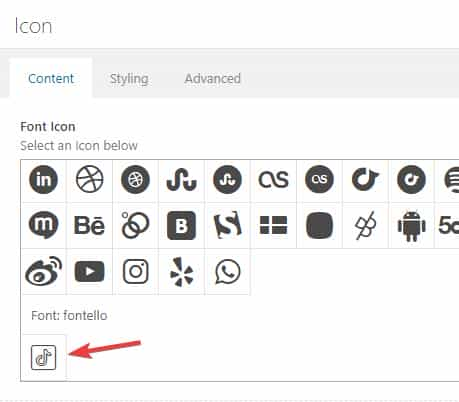
I then added tiktok to your social profiles, but you will need to adjust the URL to yours.
Now the icon is showing, please clear your browser cache and check.

It is also available as a icon in your elements:
Best regards,
MikeHi,
thanks for the link to your new blog site, I see the breadcrumb error on your post there:

When I switch to the parent theme this is resolved:

Give this a try, I was not able to isolate the function in your child theme functions.php causing this, perhaps you have other customizations that I’m not aware of?Best regards,
MikeHi,
Thanks for the screenshot, from it we found your domain and when we check we see that you are using v4.0.7
Please update to v5.4
To update your version of Enfold you will need to download the latest installable WP version from your Theme Forest account and upload it to your WordPress ▸ Appearance ▸ Themes ▸ Add Themes ▸ Add New

after you choose the zip file and click install, you will see a This theme is already installed message because you are updating, you can continue

then you will see the Theme updated successfully message.

Best regards,
Mike -
AuthorPosts

