

Forum Replies Created
-
AuthorPosts
-
February 4, 2021 at 2:58 pm in reply to: Add custom widget after main content, but before sidebar #1277723
This should work on both post with classic editor and posts with alb editor ( don’t know if it will work for Gutenberg):
add_filter('the_content', function($content) {
     if (is_singular('post')) {
      $content .= '[av_sidebar widget_area="my-sidebar-name"]';
     }
     return $content;
   }
);
And if you got more than one widget in that widget area – you can play with flex layout to have those widgets besides each other :
#main .avia-builder-widget-area {
  display: flex;
  flex-flow: row wrap;
  justify-content: space-between;
}

#main .avia-builder-widget-area::before,
#main .avia-builder-widget-area::after {
  display: none;
}

#main .avia-builder-widget-area .widget {
    padding: 0;
    margin-bottom: 30px;
}
February 4, 2021 at 2:19 pm in reply to: Add custom widget after main content, but before sidebar #1277710OK here is a code that should work:
add_filter('avf_template_builder_content', 'avf_template_builder_content_comment_mod' , 10 , 1);
function avf_template_builder_content_comment_mod($content = "")
{
  if(is_singular('post') || is_singular('portfolio')){
    $sidebar_content = do_shortcode("[av_sidebar widget_area='my-sidebar-name']");
    $content = $content . $sidebar_content ;
  }
  return $content;
}
remove the or portfolio clause if you do not want to include them!
But the existing shortcode is only for those post/portfolios when they are made by Advanced Layout BuilderFebruary 4, 2021 at 2:13 pm in reply to: Add custom widget after main content, but before sidebar #1277707thats the reason why i erased it. ( All code goes to child-theme functions.php )
i thought that we can use another filter of enfold:
but thisadd_filter('avf_template_builder_content', 'avf_template_builder_content_comment_mod' , 10 , 1); function avf_template_builder_content_comment_mod($content = "") { if(is_singular('post') || is_singular('portfolio')){ $sidebar_content = dynamic_sidebar( 'my-sidebar-name' ); $content = $content . $sidebar_content ; } return $content; }inserts the widget area before ( allthough it is
$content = $content . $sidebar_content) content. ?
Sorry – you had to wait for a modFebruary 4, 2021 at 1:26 pm in reply to: Add custom widget after main content, but before sidebar #1277691maybe a mod knows a better way – you can do it with wordpress standard functions this way:
( you don’t need to insert that dynamic side bar manually – it is done by that code allready)just a moment – the given code is not totaly correct – it works but it is not at the end of content in all cases – sorry
-
This reply was modified 5 years, 1 month ago by
Guenni007.
February 4, 2021 at 12:42 pm in reply to: Add custom widget after main content, but before sidebar #1277670The hook determines only the place where it is inserted.
Did you create that widget-area at Widgets : “my-sidebar-name” ?Are these single posts created with classic editor or with advanced Layout Builder ?
Try one post with classic editor!
February 4, 2021 at 12:26 pm in reply to: Add custom widget after main content, but before sidebar #1277667try a different if-clause !
add_action( 'ava_after_content', 'enfold_customization_category_widget_area' );
function enfold_customization_category_widget_area() {
	if (is_singular('post')) {
	  dynamic_sidebar( 'my-sidebar-name' );
	}
}
or use:
if(is_single()){if you like to have that on portfolio too use:
if(is_singular('post') || is_singular('portfolio')){On your testpage this is an animated svg logo.
You can do that with stroke-dasharray – read f.e. :
https://css-tricks.com/svg-line-animation-works/
https://www.cassie.codes/posts/creating-my-logo-animation/All animation is inside the svg itself ;)
https://webers-webdesign.de/Logo-animiert.svg
or see https://webers-testseite.de/pureinstall/signieren/
on my Signature the stroke-dasharray is used as a mask over the given letters.
But ! you have to read and study intensively how to obtain those svgs. F.e. you had to know the stroke-dashoffset etc. pp.my code is the same Ismael posted – only the icon is replaced
A description where something is changed is always a bit more complicated than posting the whole replacement code.I do not see your site – so it is difficult to give detailed advice
if you replace the second part by:
add_action('wp_footer', 'avf_add_search_script'); function avf_add_search_script(){ ?> <script type="text/javascript"> (function($) { $('.av-burger-menu-main').on('click', function() { var page = window.location.href; var mobile = $('.menu-item-search-mobile'); var search = '<form action="'+page+'" method="get" class=""><div><input type="submit" value="" id="searchsubmit" class="button avia-font-entypo-fontello"><input type="text" id="s" name="s" value="" placeholder="Search"></div></form>'; setTimeout(function() { if(mobile.find('form').length == 1) return; mobile.html(search); }, 500); }); })(jQuery); </script> <?php }!!! Only difference is the value “?” – then a magifier symbol is seen

( get a bigger magnifier: )
#av-burger-menu-ul #searchsubmit { font-size: 25px; }on my end it works perfectly – and even with ajax :
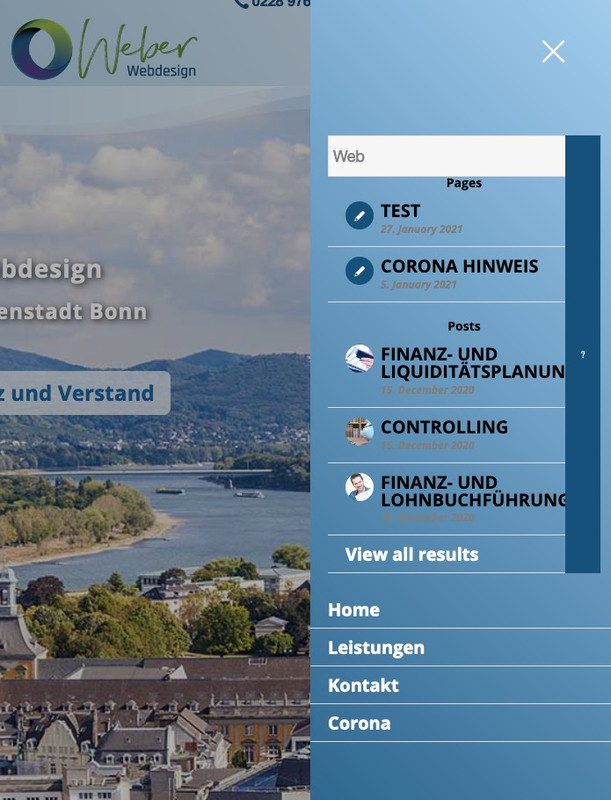
yes this little additional information that it is a multisite would have been good to know. ;)
if you are not using jQuery migrate you should edit a lot of your little snippets on which a click or load event is used
on reasons of f.e. load is in conflict with ajax load – the load is deprecated now on jQuery 3.5.1use instead the .on(‘load’, …
so on your example above://—————–popup—————— function add_custom_script(){ ?> <script type=”text/javascript”> jQuery(window).on('load', function () { jQuery(‘.open-popup-link’).magnificPopup({ type:’inline’, midClick: true }); }); </script> <?php } add_action(‘wp_footer’, ‘add_custom_script’);that one line i marked with: // —- here
is the line you had to edit – you can add more lines like this to replace other tags
the script takes over all attributes of the original tag and transfers them to the new tag.
But this is not necessary on your page.to your child-theme functions.php:
function replace_tags_with_tags(){
?>
<script>
  (function($) {
      function replaceElementTag(targetSelector, newTagString) {
        $(targetSelector).each(function(){
          var newElem = $(newTagString, {html: $(this).html()});
          $.each(this.attributes, function() {
            newElem.attr(this.name, this.value);
          });
          $(this).replaceWith(newElem);
        });
      }
      replaceElementTag('.tab_inner_content.invers-color h6', '<p></p>'); // ---- here
  }(jQuery));
</script>
<?php
}
add_action('wp_footer', 'replace_tags_with_tags');
but for SEO purpose as mike said allready – maybe it is better to change it manually in the albs.
January 27, 2021 at 12:11 pm in reply to: Image Link Settings – Automaticly file:///x:/xxx/.. to domain.tld/xxx/ #1275749put in functions.php ? child or parent?
If parent – where did you insert that snippet?
Next: if i test this input: file:///x:/xxx/ in the advanced tab of image alb – link settings: manually
it does not change to domain.tld/xxx ?so what is the link you would like to have? and that works if you put it in the url window of your browser?
i see that you are not working with a child-theme!
where did you enter the snippet?
add_filter('avf_logo_link','av_change_logo_link');
function av_change_logo_link($link){
    $link = get_site_url().'/zeroprojectconference2021/';
    return $link;
}
Next: you have activated the merging of css and js files.
Did you refresh those files ?because of:
$link = home_url(‘/subpage’);
you can use :add_filter('avf_logo_link','av_change_logo_link'); function av_change_logo_link($link){ $link = get_site_url().'/subpage'; return $link; }or with your home_url function:
add_filter('avf_logo_link','av_change_logo_link');
function av_change_logo_link($link){
    $link = get_home_url().'/subpage';
    return $link;
}
what is the difference – on most cases : no difference – but look to your dashboard – settings – general
there you got both defined.
If you install your wordpress in a subfolder – then they differs.but subpage is still not defined – so what do you want to achieve
-
This reply was modified 5 years, 1 month ago by
Edit : I must have been somewhat misguided by the headline. One should read just yet also the content ;)
I had thought that you wanted to set the Title attribute at the submenu list item.
_________________
forget about that here:
or you put this to your child-theme functions.php:function set_menu_text_as_title(){ ?> <script> (function($){ $('.av-subnav-menu a').each(function(){ var menuName = $(this).find('>.avia-menu-text').text(); $(this).attr('title', menuName); }); })(jQuery); </script> <?php } add_action('wp_footer', 'set_menu_text_as_title');but for me the alt attribute is much more important – so i have on that line instead:
$(this).attr('alt', menuName);btw. it would be nice to hear from you if it is solved ;)
and:
can you have a look what happens if you set the images in the banners to scroll or fixed position. The parallax seems to be a bit buggy:
point with your mouse over the banner on top and try to scroll then.First of all: if you want to post code – please use the code tags here. It’s much easier to inspect and check if a code will work or not.
Sorry didn’t saw that you want to achieve this only by custom fields. My way offers a real meta box. A meta box has different advantages.
you then can use the meta box for your f.e. loop-index.php
you see the post-meta-info starts from 373f.e. if you like to show the saved “Outlet” after categories
look for:if( ! empty( $cats ) ) { echo '<span class="blog-categories minor-meta">' . __( 'in','avia_framework' ) . ' '; echo $cats; echo '</span><span class="text-sep text-sep-cat">/</span>'; }and insert after that:
$outlet = get_post_meta($post->ID, 'outlet', true);
if(!empty($outlet))
{
	echo '<span class="outlets minor-meta">'. __( 'Outlet:','avia_framework' ) . ' ';
	echo $outlet;
	echo '</span><span class="text-sep text-sep-cat">/</span>';
}
it will show then as:

and “Outlet” it is just a text input ?
Just the Admin Area Part so far:
you will then have a meta box input field where author or excerpt is placed.
If you like you can have the meta box field at the side

and
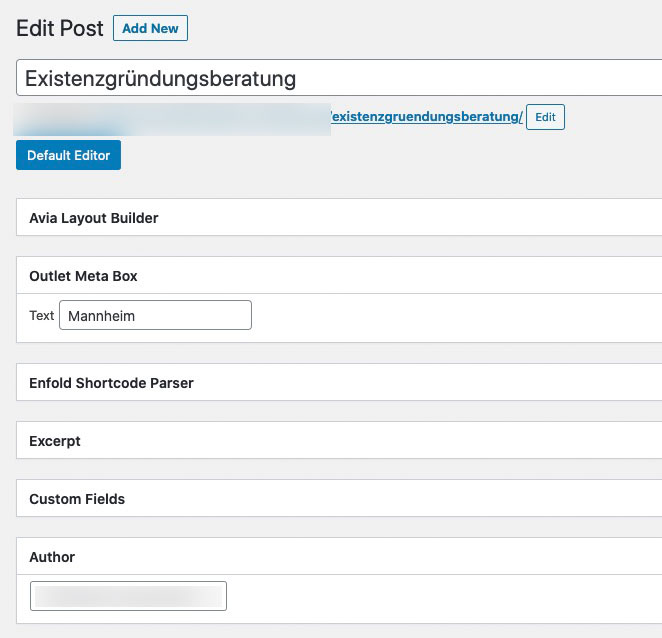
All comes to child-theme functions.php:
if you like to have the meta_box at the side – replace “normal” with “side”function add_custom_meta_box(){ add_meta_box("Outlet", "Outlet Meta Box", "outlet_meta_box_markup", "post", "normal", "default", null); } add_action("add_meta_boxes", "add_custom_meta_box"); //markup for metabox function outlet_meta_box_markup($object){ wp_nonce_field(basename(__FILE__), "meta-box-nonce"); ?> <div> <label for="outlet">Text</label> <input name="outlet" type="text" value="<?php echo get_post_meta($object->ID, "outlet", true); ?>"> </div> <?php } // storing the data function save_outlet_meta_box($post_id, $post, $update){ if (!isset($_POST["meta-box-nonce"]) || !wp_verify_nonce($_POST["meta-box-nonce"], basename(__FILE__))) return $post_id; if(!current_user_can("edit_post", $post_id)) return $post_id; if(defined("DOING_AUTOSAVE") && DOING_AUTOSAVE) return $post_id; $slug = "post"; if($slug != $post->post_type) return $post_id; $meta_box_text_value = ""; if(isset($_POST["outlet"])){ $meta_box_text_value = $_POST["outlet"]; } update_post_meta($post_id, "outlet", $meta_box_text_value); } add_action("save_post", "save_outlet_meta_box", 10, 3); function add_new_columns($columns) { $post_type = get_post_type(); if ( $post_type == 'post' ) { $new_columns = array( 'outlet' => esc_html__( 'Outlet', 'text_domain' ), ); return array_merge($columns, $new_columns); } } add_filter( 'manage_posts_columns', 'add_new_columns' ); function my_show_columns($name) { global $post; switch ($name) { case 'outlet': $outlet = get_post_meta($post->ID, 'outlet', true); echo $outlet; } } add_action('manage_posts_custom_column', 'my_show_columns'); // sort columns to your needs - do not list columns in the array if you do not want them (f.e. comments) function my_outlet_columns_definition( $columns ) { $customOrder = array('cb', 'title', 'outlet', 'date', 'author', 'categories', 'tags', 'comments'); foreach ($customOrder as $colname) $new[$colname] = $columns[$colname]; return $new; } add_filter( 'manage_posts_columns', 'my_outlet_columns_definition' ) ;next could be to have the option of sortable in list-view.
And to put this meta into quick edit field.For the frontend you could follow Ismael’s advice
-
This reply was modified 5 years, 1 month ago by
Thanks
January 24, 2021 at 11:34 pm in reply to: How to do the content page not bigger than 1310px but the slider in Fullwidth? #1275133well – you used for those layouts grid-row element : that is a full-width Element like color-section too.
If you use as surrounding container a color section and in it 1/4 columns to get your layout – then your content will be within the 1310px.same with the following and 1/2 columns in a color-section
maybe you need a beta tester ;)
Try without script – it jumps away
and scroll behavior is strange on that pages – remove it please and test my solution only from above.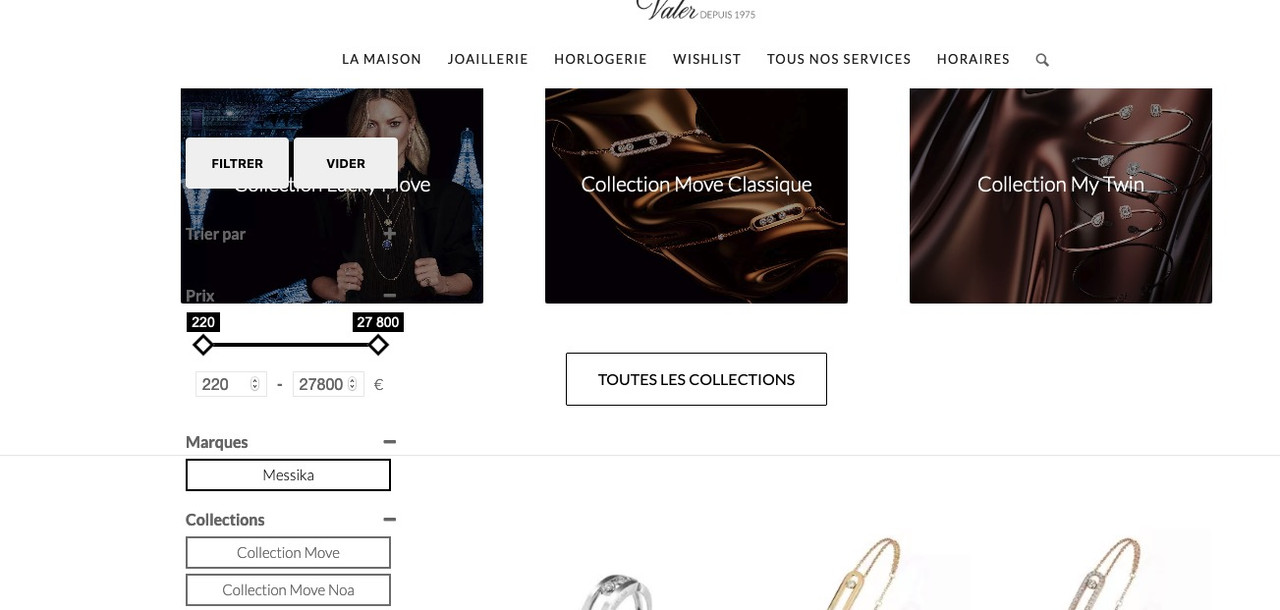
The behavior is not good like that either. The sidebar should be sticky as long as possible, and then scroll with the content at the bottom so that they both end at the bottom.
the other page – you have to find the specific selector for that page yourself !
i took now the woocommerce on general – maybe you better take a more specific class something like : term-dinh-van on #topbecause the woocommerce-products-header would be part of the flex container it had to be set to display none.
I do not know if you need it – but on your page there was no content in it so i put it to display none.
this woocommerce-products-header had to be on that place inside ?
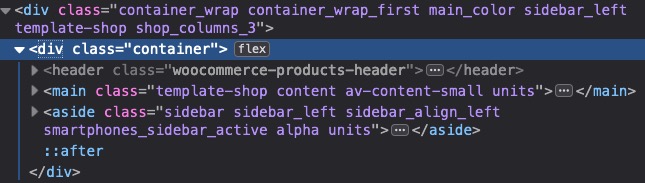
anyway try to see whats happening on that page – but remember my advice on top!
.responsive body#top.woocommerce { overflow-x: visible; } #top.woocommerce #wrap_all { overflow: visible; } #top.woocommerce .woocommerce-products-header { display: none; } @media only screen and (min-width: 767px){ #top.woocommerce .sidebar_left .container { display: flex !important; align-self: ; flex-flow: row nowrap; justify-content: flex-start; } #top.woocommerce .sidebar_left .content { order: 2 } #top.woocommerce #main .sidebar { position: -webkit-sticky !important; position: sticky !important; top: 100px; width: 30%; order: 1; height: 100%; } }on a lot of problems only a script will do the job – but if only css can do i would prefer this solution.
So try instead that edited work here – without the scripts!on that one page: https://valer.fr/messika/
the height of the sidebar is as big as the content container
That is why the sticky wouldn’t work:try :
.responsive body#top.page-id-12082 {
	overflow-x: visible;
}

#top.page-id-12082 #wrap_all {
	overflow: visible;
}

@media only screen and (min-width: 767px){
	#top.page-id-12082 .sidebar_left .container {
		display: flex !important;
		align-self: ;
		flex-flow: row nowrap;
		justify-content: flex-start;
	}

	#top.page-id-12082 .sidebar_left .content {
		order: 2
	}

	#top.page-id-12082 #main .sidebar {
		position: -webkit-sticky !important;
		position: sticky !important;
		top: 100px;
		width: 30%;
		order: 1;
		height: 100%;
	}
}
Comment: it will be more impressive and meaningful if content is much longer than the sidebar !
next page …
January 22, 2021 at 6:08 pm in reply to: How to adjust left sidebar menu to dropdown with arrows #1274826how did you implement that menu to enfold?
is it easy to do ?January 21, 2021 at 10:15 pm in reply to: How to adjust left sidebar menu to dropdown with arrows #1274532What number did you use for your layout?
https://iks-menu.ru/previews/on most of those previews : they work with flex model.
If you gave to the first flex-item an order number 2 they change position:.iksm-terms .iksm-term__link { order: 2; }to bring the parents in line with the items with children you can do that:
.iksm-term:not(.iksm-term--has-children) {
    margin-left: 40px;
}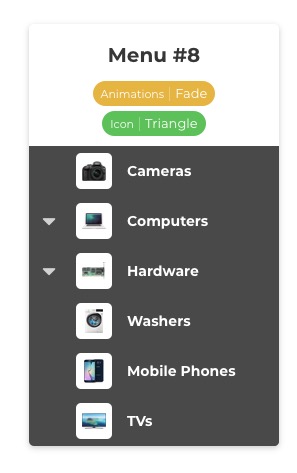
or style the menu 5 to your needs ( different arrows, and background)
January 21, 2021 at 6:54 pm in reply to: Background color and font weight correct in the source code but not applied #1274502Nein – ist leider nicht so trivial.
Am Mac ( ist ja ohnehin quasi “Linux-Basiert”) einige Terminal Tools die wunderbar diese ttf unter einhaltung der variable Fonts generieren.
Die Zukunft wird wohl dahin gehen – man sollte allerdings ein Fallback für die ewig gestrigen bereit stellen.heißt man lädt schon auch die Schriftschnitte die man möchte ( zB: 300, 400, 700) und diese variablen Font als woff2
man macht dann sozusagen im quick css eine weiche ähnlich den media-querries.
wobei ich dann die Sachen via einer Klasse die ich einem Eltern Element zuweise setze z.B:hiervor kommen die normalen Definitionen wie üblich dann jedoch :
lies zB: http://clagnut.com/blog/2390/@supports (font-variation-settings: normal) { .raleway-var .av-special-heading-tag { font-family: 'Raleway Variable',sans-serif; font-variation-settings: "wght" 600; line-height: 2em; letter-spacing: 0.05em !important; font-style: normal; font-size: 3em; } .raleway-italic-var .av-special-heading-tag { font-family: 'Raleway Italic Variable',sans-serif; font-variation-settings: "wght" 600; line-height: 2em; letter-spacing: 0.05em !important; font-style: normal; /*** da es ja am Schriftschnitt schon als italic gesetzt ist ***/ font-size: 3em; } }eingebunden werden die normalen Fonts und die variablen via z.B:
@font-face{
  font-family:'Raleway Variable';
  font-weight:100 900;
  src:url(../fonts/Raleway-VariableFont_wght.woff2) format('woff2')
}
@font-face{
  font-family:'Raleway Italic Variable';
  font-weight:100 900;
  src:url(../fonts/Raleway-Italic-VariableFont_wght.woff2) format('woff2')
}
die 100 900 sind die Spanne mit der gesetzt werden kann.
nach dem Converter musst du mal Googlen variable ttf nach varialbe woff2 z.B
-
This reply was modified 5 years, 2 months ago by
this plugin is nice to have if the steps between the Versions are not to big. It will create a “backup-zip” file of the WordPress installation. If it is as nice as a real backup i don’t know.
with the now increasingly faster internet connections, an update via ftp is actually no longer a time-consuming task.
I therefore recommend: https://kriesi.at/support/topic/some-hints-and-advice-to-update-enfold/#post-1056107 -
This reply was modified 5 years, 1 month ago by
-
AuthorPosts

