Forum Replies Created
-
AuthorPosts
-
on performance reasons : you should familiarize yourself with image optimization.
f.e.: this image here: image1 is 524kb big
this image2 450kb etc. pp.Since you are using the srcset option of enfold, you should ask yourself if increasing the compression level is not also an option for your images. Enfold offers a snippet for this; however, you would have to recalculate the thumbnails afterwards. Because the snippet only controls the compression during media upload.
for 55% compression instead of 0% ( Enfold let the quality level on 100 on uploading )add_filter("avf_jpeg_quality", "avf_set_quality_mod", 9999, 1); add_filter("avf_wp_editor_set_quality", "avf_set_quality_mod", 9999, 1); function avf_set_quality_mod($quality) { $quality = 55; return $quality;}but isn’t there an option to mark that on new posts or comments etc the cache will be refreshed automatically?
maybe you try that :
Note for SVG Support plugin users: If you are using SVG Support plugin and your SVG logo does not show up even after updating the file, please re-create your SVG file and re-upload it. If you need assistance with it, please share WP admin logins :)
from: https://kriesi.at/support/topic/hotfix-for-the-missing-logo-issue-on-enfold-4-8-6-4/
_____________
and by the way : why the code from above or here – should influence the logo ???
there is not even one selector in that code that concerns to logo container ?
here is my test page for your last topic: https://webers-testseite.de/blog-seite/
and my svg logo is still there !-
This reply was modified 4 years, 5 months ago by
Guenni007.
On that topic mentioned above – my solution to cut the excerpt by word count or something like this :
function custom_excerpt(){
?>
<script>
(function($){
	$(window).on('load' , function(){
	    $('.slide-entry').each(function() {
	     	$(".entry-content").text(function(index, currentText) {
	     		return currentText.substr(0, 20);
			});
			// if you like to cut the titles
	    	$(".entry-title").text(function(index, currentText) {
	     		return currentText.substr(0, 50);
			});
	    });
	});
})(jQuery);
</script>
<?php
}
add_action('wp_footer', 'custom_excerpt');
will work too – but better would be not to manipulate the DOM afterwards – but to directly build an excerpt with given settings.
so again : HOW to influence even these excerpts ?But maybe a Mod or Dev knows a method to influence it before it is build.
I see the filter : avf_masonry_loop_prepare – perhaps there is a possibility to set the length of that excerpt here too.Edit – : no – i now see that on normal blog the masonry helper has no influence on that. It is only by postslider.php
can you please replace that jQuery Code and replace it by this:
function custom_excerpt_setting(){
?>
<script>
(function($){
// trim excerpt by words
    function trimByWord(sentence,wordcount = 10) {
        var result = sentence;
        var resultArray = result.split(" ");
        if(resultArray.length > wordcount){
        resultArray = resultArray.slice(0, wordcount);
        result = resultArray.join(" ") + "...";
        }
        return result;
    }
    $(document).ready(function(){
        $('.avia-content-slider .read-more-link').each(function() {
            $(this).parent().parent().append($(this));
        });

        $('.avia-content-slider .slide-entry-excerpt').each(function() {
             $(this).text(function(index, currentText) {
                return trimByWord(currentText);
             });
        });
    });
})(jQuery);
</script>
<?php
}
add_action('wp_head', 'custom_excerpt_setting');
Edit : if you load jQuery in your footer ( see Enfold – Performance : “Load jQuery in your Footer” ) the whole had to be loaded in the footer too – and after jQuery is loaded. Last line should be replace by:
add_action('wp_footer', 'custom_excerpt_setting');yes – you are right – that is something i did not understand from the beginning- why the read-more button is part of slide-entry-excerpt.
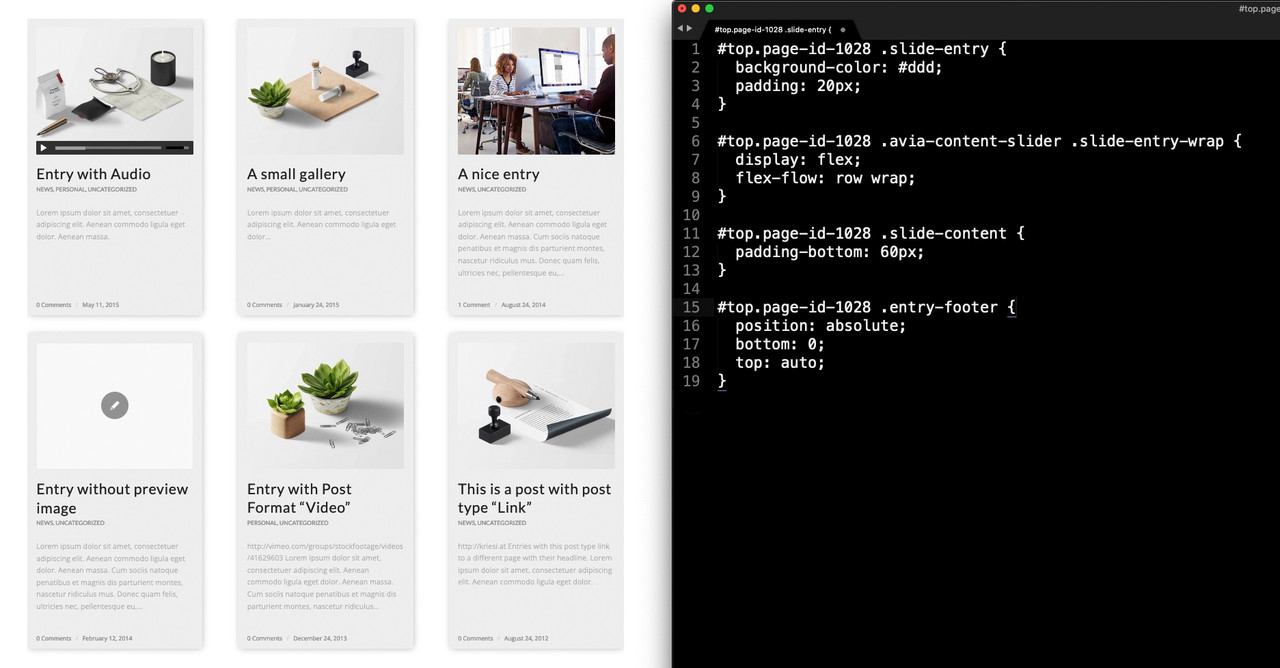
and with the css code from beginning – you see that now the slide-meta like the date is then in one line at the bottom:
#top.blog .avia-content-slider .slide-entry-wrap { display: flex; flex-flow: row wrap; } #top.blog .slide-content { padding-bottom: 60px; } #top.blog .entry-footer { display: ; position: absolute; bottom: 0; top: auto; }so – now i could find your page – your nick is informative enough on that ;)
function custom_excerpt_amount(){ ?> <script> (function($){ // trim excerpt by words function trimByWord(sentence,wordcount = 10) { var result = sentence; var resultArray = result.split(" "); if(resultArray.length > wordcount){ resultArray = resultArray.slice(0, wordcount); result = resultArray.join(" ") + "..."; } return result; } $(document).ready(function(){ // here is the place to choose the right selector $('.avia-content-slider .slide-entry-excerpt').each(function() { $(this).text(function(index, currentText) { return trimByWord(currentText); }); }); }); })(jQuery); </script> <?php } add_action('wp_head', 'custom_excerpt_amount');yes – and i comment in that code above ( jquery code ) that i do not see your page you are referring to. This line in the code :
$('.av-masonry-entry .av-masonry-entry-content').each(function() {had to be adjusted to the selectors that will work on your page – i can not give better advice if i do not see the concrete page it concerns
and since I am a participant like you I do not see the link if it is in the private content area.i do not see your page ( private content ) but that jQuery solution is an example only – and the selector ( as commented above ) had to be adjusted.
PS: And by the way – yes i can reproduce that – on my end here – if there is a custom set Excerpt – there is no influence on that filter.
but the filter you decided to use is ok. – maybe it is just a matter of the accepted args value – leave without that:
function avia_change_masonry_excerpt_length($length){ $length = 200; return $length; } add_filter('avf_masonry_excerpt_length','avia_change_masonry_excerpt_length', 10 );ah sorry – now i see that you have masonry in use.
I prefer on this to limit the excerpt on word basis.
f.e. this on child-theme functions.php:function custom_excerpt_amount(){ ?> <script> (function($){ // trim excerpt by words function trimByWord(sentence,wordcount = 10) { var result = sentence; var resultArray = result.split(" "); if(resultArray.length > wordcount){ resultArray = resultArray.slice(0, wordcount); result = resultArray.join(" ") + "..."; } return result; } $(document).ready(function(){ // here is the place to choose the right selector $('.av-masonry-entry .av-masonry-entry-content').each(function() { $(this).text(function(index, currentText) { return trimByWord(currentText); }); }); }); })(jQuery); </script> <?php } add_action('wp_head', 'custom_excerpt_amount');but this jquery solution does not work nice on “Load more” Masonries.
you mean on a page like this: https://kriesi.at/themes/enfold-2017/blog/blog-default/
Is it your intention to have same-height blocks? For that you do not need to have the samel excerpt length?
For you ? – yes, if you can carefully read the structure of the page, know how to use javascript and the elements used. Kriesi does not even bother to hide these things there.
The javascript is available in front of you as kriesi.js file in the source code. It is present there as a “principles picker”.
There is no ALB element for it if that’s what you mean. I always insert this element via CodeBlock element. Kriese did this via Text Block element.you can position those buttons absolute.
Best would be to give to the color-section a unique ID – or a custom class.The code below is with your default ID on this : #av_section_2 – but to avoid that every section_2 will do that on other pages – see above.
#av_section_2 .flex_column .avia-button-wrap {
  position: absolute;
  bottom: 0 !important;
  padding: 20px 0;
}
#av_section_2 .flex_column .av_textblock_section {
  padding-bottom: 40px;
}
The space now occupied by the button – must be added to the last element in front of it – here the text block – as padding-bottom.
Maybe you decide to give the headings a min-height for screens larger than the responsive case ( in your installation 768px )
f.e.:@media only screen and (min-width:768px){ #av_section_2 .flex_column .av_textblock_section h5 { min-height: 50px } }only if there are three lines of heading – this will not result in the alignement.
Yes you are right – but the original post is closed for new replies – so i couldn’t ask the Topic Originator.
October 14, 2021 at 7:13 pm in reply to: Undefined index: img_scrset in postslider.php on line 464 #1324983did you have the last Enfold installed?
because magazine has this too on 4.8.6.3.: https://kriesi.at/support/topic/error-25/#post-1322781
or update to 4.8.6.5go and look if on line 464 from postslider.php there is only:
if( 'disabled' == $atts['img_scrset'] )and try to replace it with:
if( isset( $atts['img_scrset'] ) && 'disabled' == $atts['img_scrset'] )or try an absolute Value please.
#top .logo svg {
    width: 450px;
}
the real dimension is managed through the surrounding container – but for scaling it needs (in some browsers an absolute width ( height ) ).
Can you show me a link – if not to the page – then to the svg itself?You want to apply flexbox model as here – and set parent element ( entry-content-wrapper ) to display flex? But in my opinion this requires to keep the flex columns exclusively in an enclosing ( color-section ) container. Then it would be enough to set the flex-flow to row wrap-reverse on responsive case. Otherwise, properties would still have to be assigned to the flex items.
With grid-row this is automatically the case – each flex-cell row is separate from other flex-cells. See: https://webers-testseite.de/reverse-order/
See the example page with one color-section ( white background ) and 6 1/3 flex-columns. On that it will be nice to have on the flex-column itself an input field with flex order number
Result you see belongs to:@media only screen and (max-width: 767px) { .page-id-38828 .avia-section.reverse-order .entry-content-wrapper .flex_column { flex: 1 1 100%; margin-bottom: 30px !important; } .page-id-38828 .avia-section.reverse-order .entry-content-wrapper .flex_column:nth-of-type(2), .page-id-38828 .avia-section.reverse-order .entry-content-wrapper .flex_column:nth-of-type(3) , .page-id-38828 .avia-section.reverse-order .entry-content-wrapper .flex_column:nth-of-type(6) { order: 1; } .page-id-38828 .avia-section.reverse-order .entry-content-wrapper .flex_column:nth-of-type(1), .page-id-38828 .avia-section.reverse-order .entry-content-wrapper .flex_column:nth-of-type(4), .page-id-38828 .avia-section.reverse-order .entry-content-wrapper .flex_column:nth-of-type(5) { order: 2; } }the trick will be that on responsive case this reverse order will be set in your media query ( when those columns should break to 100% width )
it only makes sense if the reverse order influences only one column row. ( yellow background )________
Read More : https://css-tricks.com/snippets/css/a-guide-to-flexbox/
the direct parent element should be the flexbox – the first children are the flex-items.Do you need on that page a shrinking header – or could it be a static one?
The header behavior is set to: “Let logo and menu position adapt to browser window”See here the example page: https://basis.webers-testseite.de/buttons/
the logo: Logo
the background for header-bg: backgroundmy ( page IDs included ) css:
.page-id-2602 .container.av-logo-container {
  margin: 0 50px 0 0;
}

.page-id-2602 .logo.avia-svg-logo {
  height: calc(100% + 35px);
  position: absolute;
  top: -35px;
}

.page-id-2602 #header:before {
  background-image: url(//basis.webers-testseite.de/wp-content/uploads/blue.svg);
  background-repeat: repeat-x;
  background-size: 35px;
  background-position: top left;
  z-index: 1;
  content:  "";
  width: 100%;
  height: 100%;
  position: absolute;
}
the responsive design isn’t set on this now – but it will work the same way.
the header_meta ( f.e. phone info had to change color on smaller screens etc. pp. )Have a look on Google Font Inter it is a variable webfont and looks very similar to Helvetica Neue. Big Advantage is on modern browsers – that you load only one file for all font-weights – and maybe ligatures etc.
Inter goes from 100 to 900 on weight ( flexible !!! ) and on slant ( italic variants -10 to 0 )btw. : this here is a nice online tool to get all font options from an uploaded font: https://wakamaifondue.com/
i’m not quite sure if fontsquirell converts every uploaded font to webfonts. Adobe fonts were not accepted in the past. In the meantime, there is a checkbox with which they secure copyright accordingly.
https://www.fontsquirrel.com/tools/webfont-generatorOn Expert Option you can check which webfonts you prefer. Modern Browsers do work with woff and woff2. If you like to have a bigger browser support you had to check all ( see above ) webfonts.
but also keep in mind that each font style brings performance burden with it.
do you have Webfont formats of Helevetica Neue ( woff, woff2, ttf, svg, eot ) ?
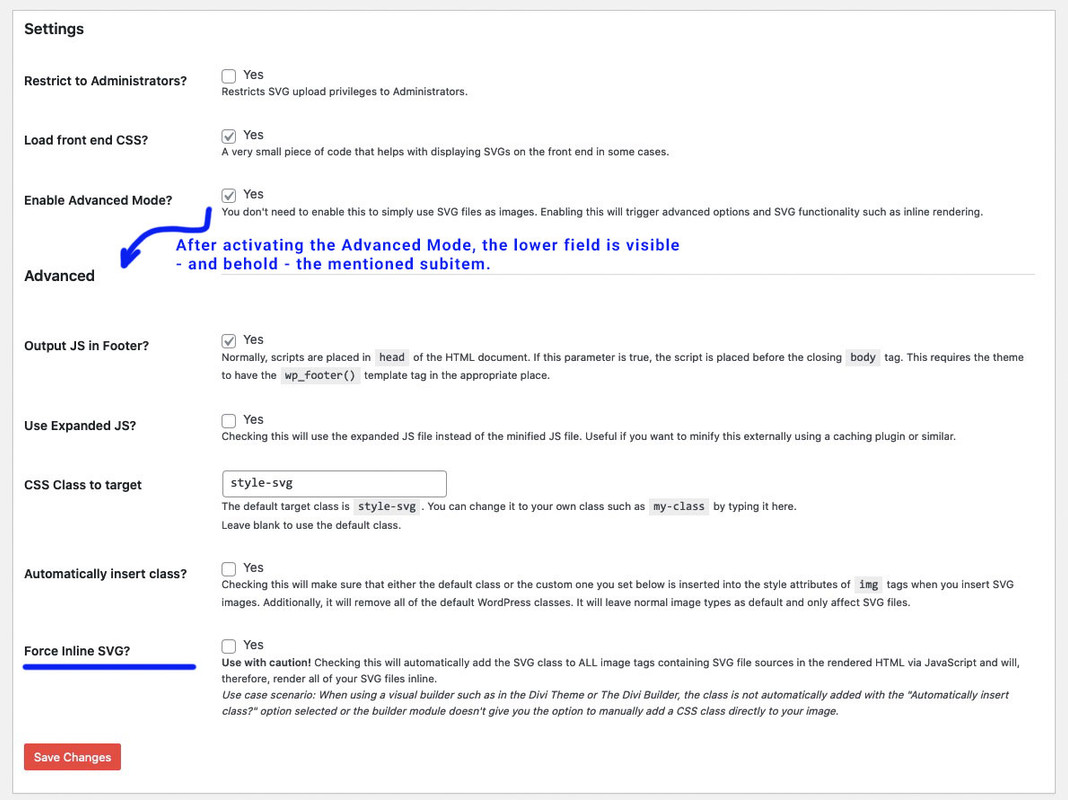
October 8, 2021 at 5:12 pm in reply to: Hotfix for the Missing Logo issue on Enfold 4.8.6.4 #1324150October 8, 2021 at 8:18 am in reply to: Hotfix for the Missing Logo issue on Enfold 4.8.6.4 #1324058@48DESIGN : if you mark the “Enable Advanced Mode?” Option on SVG Support and save the rest will be shown.
October 7, 2021 at 12:44 pm in reply to: Hotfix for the Missing Logo issue on Enfold 4.8.6.4 #1323904i use often the svg-support plugin too – but i do not mark the “Force Inline SVG” Option. maybe that was the reason for trouble.
October 6, 2021 at 12:48 pm in reply to: Full width column with background image SVG wrong scaling #1323761width and height : auto is not a working style in svgs.
https://css-tricks.com/scale-svg/then as mentioned befor in another topic – rename the classes – because Illustrator always use “st” – but if you have more than 1 svg on that page the last one in DOM decides the style of that classes ( st1 etc)
try to use :
… depends on how the svg should react on shrinking/expanding. – but we have no inline svg here – so there are two settings to make
for the background-image a quick css f.e.:
background-size: 100% 100% !important; see example page again.
on top this svg:by the way: this is an excellent svg optimizer: https://jakearchibald.github.io/svgomg/
try this svg instead:
<?xml version="1.0" encoding="utf-8"?>
<svg version="1.1" id="haseo_curve" xmlns="http://www.w3.org/2000/svg" xmlns:xlink="http://www.w3.org/1999/xlink" x="0px"
	 y="0px" viewBox="0 0 1500 400" style="enable-background:new 0 0 1500 400;" preserveAspectRatio="xMinYMid meet" xml:space="preserve">
<style type="text/css">
	.haseo0{fill:none;stroke:#F3D569;stroke-width:0.3704;stroke-miterlimit:1.4816;}
	.haseo1{fill:#F3D569;}
	.haseo2{fill:#FFFFFF;}
</style>
<g>
	<path class="haseo0" d="M0,400l83.4-89l50.7,44.5l60.9-57.4l65.3,9.1l52.5-45.3l9.2-32.5l78.3,14.7l41.4-26.6l13.8-22.7l54.3-10H567
		l39.6-15.6l28.6,24.7l31.3-5.4l44.2-28.4l58.3-31.2l44.9-48.5l76.4-15.7L905,89.5l4.6-15.6l63.7,15.6l34-35.7l81.1-20.6l42.4,20.6
		l39.6-20.6l44.2,15.5l56.7,5.1l15.7-6.2l43.3-16.4l90.3-2L1500,0"/>
	<path class="haseo1" d="M83.4,315.6c-2.5,0-4.5-2-4.5-4.5s2-4.5,4.5-4.5c2.5,0,4.5,2,4.5,4.5C88,313.5,85.9,315.6,83.4,315.6z"/>
	<path class="haseo2" d="M83.4,307.4c2,0,3.6,1.6,3.6,3.6s-1.7,3.6-3.6,3.6c-2,0-3.6-1.6-3.6-3.6S81.4,307.4,83.4,307.4 M83.4,305.6
		c-3,0-5.4,2.5-5.4,5.4c0,3,2.5,5.4,5.4,5.4c2.9,0,5.4-2.5,5.4-5.4C88.9,308,86.4,305.6,83.4,305.6z"/>
	<path class="haseo1" d="M134.1,360.4c-2.5,0-4.5-2-4.5-4.5c0-2.5,2-4.5,4.5-4.5c2.5,0,4.5,2,4.5,4.5
		C138.6,358.4,136.6,360.4,134.1,360.4z"/>
	<path class="haseo2" d="M134.1,352.3c2,0,3.6,1.6,3.6,3.6c0,1.9-1.7,3.6-3.6,3.6c-2,0-3.6-1.6-3.6-3.6
		C130.5,353.9,132.1,352.3,134.1,352.3 M134.1,350.4c-3,0-5.4,2.5-5.4,5.4c0,2.9,2.5,5.4,5.4,5.4s5.4-2.5,5.4-5.4
		C139.5,352.9,137.1,350.4,134.1,350.4z"/>
	<path class="haseo1" d="M194.2,302.7c-2.5,0-4.5-2-4.5-4.5s2-4.5,4.5-4.5c2.5,0,4.5,2,4.5,4.5S196.8,302.7,194.2,302.7z"/>
	<path class="haseo2" d="M194.2,294.5c2,0,3.6,1.6,3.6,3.6c0,2-1.7,3.6-3.6,3.6c-1.9,0-3.6-1.6-3.6-3.6S192.3,294.5,194.2,294.5
		 M194.2,292.7c-3,0-5.4,2.5-5.4,5.4c0,3,2.5,5.4,5.4,5.4c2.9,0,5.4-2.5,5.4-5.4C199.8,295.2,197.3,292.7,194.2,292.7z"/>
	<path class="haseo1" d="M260.3,311.8c-2.5,0-4.5-2-4.5-4.5s2-4.5,4.5-4.5s4.5,2,4.5,4.5S262.8,311.8,260.3,311.8z"/>
	<path class="haseo2" d="M260.3,303.7c2,0,3.6,1.6,3.6,3.6c0,2-1.7,3.6-3.6,3.6c-2,0-3.6-1.6-3.6-3.6
		C256.6,305.3,258.3,303.7,260.3,303.7 M260.3,301.9c-3,0-5.4,2.5-5.4,5.4c0,3,2.5,5.4,5.4,5.4c3,0,5.4-2.5,5.4-5.4
		S263.2,301.9,260.3,301.9z"/>
	<path class="haseo1" d="M313.7,266.2c-2.5,0-4.5-2-4.5-4.5s2-4.5,4.5-4.5c2.5,0,4.5,2,4.5,4.5S316.2,266.2,313.7,266.2z"/>
	<path class="haseo2" d="M313.7,258.1c2,0,3.6,1.6,3.6,3.6c0,1.9-1.7,3.6-3.6,3.6c-2,0-3.6-1.6-3.6-3.6
		C310.1,259.7,311.7,258.1,313.7,258.1 M313.7,256.2c-3,0-5.4,2.5-5.4,5.4c0,3,2.5,5.4,5.4,5.4c3,0,5.4-2.5,5.4-5.4
		C319.2,258.7,316.7,256.2,313.7,256.2z"/>
	<path class="haseo1" d="M322,234.6c-2.5,0-4.5-2-4.5-4.5c0-2.5,2-4.5,4.5-4.5s4.5,2,4.5,4.5C326.5,232.6,324.5,234.6,322,234.6z"/>
	<path class="haseo2" d="M322,226.4c2,0,3.6,1.6,3.6,3.6s-1.7,3.6-3.6,3.6c-2,0-3.6-1.6-3.6-3.6S320,226.4,322,226.4 M322,224.6
		c-3,0-5.4,2.5-5.4,5.4c0,2.9,2.5,5.4,5.4,5.4c3,0,5.4-2.5,5.4-5.4C327.4,227.1,324.9,224.6,322,224.6z"/>
	<path class="haseo1" d="M400.3,248.6c-2.5,0-4.5-2-4.5-4.5s2-4.5,4.5-4.5s4.5,2,4.5,4.5S402.8,248.6,400.3,248.6z"/>
	<path class="haseo2" d="M400.3,240.5c2,0,3.6,1.6,3.6,3.6s-1.7,3.6-3.6,3.6c-1.9,0-3.6-1.6-3.6-3.6S398.3,240.5,400.3,240.5
		 M400.3,238.6c-3,0-5.4,2.5-5.4,5.4s2.5,5.4,5.4,5.4s5.4-2.5,5.4-5.4S403.2,238.6,400.3,238.6z"/>
	<path class="haseo1" d="M441.7,222.6c-2.5,0-4.5-2-4.5-4.5s2-4.5,4.5-4.5s4.5,2,4.5,4.5S444.2,222.6,441.7,222.6z"/>
	<path class="haseo2" d="M441.7,214.4c2,0,3.6,1.6,3.6,3.6c0,2-1.7,3.6-3.6,3.6c-2,0-3.6-1.6-3.6-3.6
		C438,216.1,439.7,214.4,441.7,214.4 M441.7,212.6c-3,0-5.4,2.5-5.4,5.4c0,3,2.5,5.4,5.4,5.4c3,0,5.4-2.5,5.4-5.4
		S444.7,212.6,441.7,212.6z"/>
	<path class="haseo1" d="M455.5,199.6c-2.5,0-4.5-2-4.5-4.5c0-2.5,2-4.5,4.5-4.5s4.5,2,4.5,4.5C460.1,197.6,458,199.6,455.5,199.6z"/>
	<path class="haseo2" d="M455.5,191.4c2,0,3.6,1.6,3.6,3.6c0,1.9-1.7,3.6-3.6,3.6c-2,0-3.6-1.6-3.6-3.6
		C452,193.1,453.5,191.4,455.5,191.4 M455.5,189.6c-3,0-5.4,2.5-5.4,5.4c0,2.9,2.5,5.4,5.4,5.4c3,0,5.4-2.5,5.4-5.4
		C461,192.1,458.5,189.6,455.5,189.6z"/>
	<path class="haseo1" d="M509.9,189.3c-2.5,0-4.5-2-4.5-4.5c0-2.5,2-4.5,4.5-4.5c2.5,0,4.5,2,4.5,4.5
		C514.4,187.3,512.4,189.3,509.9,189.3z"/>
	<path class="haseo2" d="M509.9,181.2c2,0,3.6,1.6,3.6,3.6c0,2-1.7,3.6-3.6,3.6s-3.6-1.6-3.6-3.6C506.2,182.7,507.9,181.2,509.9,181.2
		 M509.9,179.3c-3,0-5.4,2.5-5.4,5.4c0,3,2.5,5.4,5.4,5.4c3,0,5.4-2.5,5.4-5.4C515.3,181.8,512.8,179.3,509.9,179.3z"/>
	<path class="haseo1" d="M567,189.3c-2.5,0-4.5-2-4.5-4.5c0-2.5,2-4.5,4.5-4.5s4.5,2,4.5,4.5C571.5,187.3,569.5,189.3,567,189.3z"/>
	<path class="haseo2" d="M567,181.2c2,0,3.6,1.6,3.6,3.6c0,2-1.7,3.6-3.6,3.6s-3.6-1.6-3.6-3.6C563.3,182.7,565,181.2,567,181.2
		 M567,179.3c-3,0-5.4,2.5-5.4,5.4c0,3,2.5,5.4,5.4,5.4s5.4-2.5,5.4-5.4C572.4,181.8,569.9,179.3,567,179.3z"/>
	<path class="haseo1" d="M605.6,173.9c-2.5,0-4.5-2-4.5-4.5c0-2.5,2-4.5,4.5-4.5s4.5,2,4.5,4.5C610.2,171.9,608.1,173.9,605.6,173.9z"
		/>
	<path class="haseo2" d="M605.6,165.8c2,0,3.6,1.6,3.6,3.6c0,2-1.7,3.6-3.6,3.6s-3.6-1.6-3.6-3.6S603.6,165.8,605.6,165.8 M605.6,163.9
		c-3,0-5.4,2.5-5.4,5.4c0,3,2.5,5.4,5.4,5.4s5.4-2.5,5.4-5.4C611.1,166.4,608.6,163.9,605.6,163.9z"/>
	<ellipse class="haseo1" cx="635.1" cy="193.9" rx="4.5" ry="4.5"/>
	<path class="haseo2" d="M635.1,190.3c2,0,3.6,1.6,3.6,3.6s-1.7,3.6-3.6,3.6s-3.6-1.6-3.6-3.6S633.1,190.3,635.1,190.3 M635.1,188.5
		c-3,0-5.4,2.5-5.4,5.4c0,3,2.5,5.4,5.4,5.4s5.4-2.5,5.4-5.4C640.6,190.9,638.1,188.5,635.1,188.5z"/>
	<ellipse class="haseo1" cx="665.4" cy="188.4" rx="4.5" ry="4.5"/>
	<path class="haseo2" d="M665.4,184.7c2,0,3.6,1.6,3.6,3.6s-1.7,3.6-3.6,3.6s-3.6-1.6-3.6-3.6S663.4,184.7,665.4,184.7 M665.4,182.9
		c-3,0-5.4,2.5-5.4,5.4c0,3,2.5,5.4,5.4,5.4s5.4-2.5,5.4-5.4C671,185.4,668.5,182.9,665.4,182.9z"/>
	<path class="haseo1" d="M769.9,133.4c-2.5,0-4.5-2-4.5-4.5c0-2.5,2-4.5,4.5-4.5s4.5,2,4.5,4.5C774.4,131.4,772.4,133.4,769.9,133.4z"
		/>
	<path class="haseo2" d="M769.9,125.3c2,0,3.6,1.6,3.6,3.6s-1.7,3.6-3.6,3.6s-3.6-1.6-3.6-3.6S767.9,125.3,769.9,125.3 M769.9,123.4
		c-3,0-5.4,2.5-5.4,5.4s2.5,5.4,5.4,5.4s5.4-2.5,5.4-5.4S772.9,123.4,769.9,123.4z"/>
	<g>
		<path class="haseo1" d="M813.8,85c-2.5,0-4.5-2-4.5-4.5c0-2.5,2-4.5,4.5-4.5s4.5,2,4.5,4.5C818.3,83,816.3,85,813.8,85z"/>
		<path class="haseo2" d="M813.8,76.9c2,0,3.6,1.6,3.6,3.6c0,2-1.7,3.6-3.6,3.6s-3.6-1.6-3.6-3.6C810.1,78.5,811.8,76.9,813.8,76.9
			 M813.8,75.1c-3,0-5.4,2.5-5.4,5.4c0,3,2.5,5.4,5.4,5.4s5.4-2.5,5.4-5.4C819.3,77.5,816.8,75.1,813.8,75.1z"/>
	</g>
	<g>
		<path class="haseo1" d="M890.3,69.1c-2.5,0-4.5-2-4.5-4.5c0-2.5,2-4.5,4.5-4.5s4.5,2,4.5,4.5C894.8,67.1,892.8,69.1,890.3,69.1z"/>
		<path class="haseo2" d="M890.3,60.9c2,0,3.6,1.6,3.6,3.6c0,1.9-1.7,3.6-3.6,3.6s-3.6-1.6-3.6-3.6C886.7,62.6,888.2,60.9,890.3,60.9
			 M890.3,59.1c-3,0-5.4,2.5-5.4,5.4c0,2.9,2.5,5.4,5.4,5.4s5.4-2.5,5.4-5.4C895.7,61.6,893.2,59.1,890.3,59.1z"/>
	</g>
	<g>
		<path class="haseo1" d="M905,92.3c-2.5,0-4.5-2-4.5-4.5c0-2.5,2-4.5,4.5-4.5s4.5,2,4.5,4.5C909.5,90.3,907.5,92.3,905,92.3z"/>
		<path class="haseo2" d="M905,84.1c2,0,3.6,1.6,3.6,3.6c0,1.9-1.7,3.6-3.6,3.6s-3.6-1.6-3.6-3.6C901.4,85.8,903,84.1,905,84.1
			 M905,82.3c-3,0-5.4,2.5-5.4,5.4c0,2.9,2.5,5.4,5.4,5.4s5.4-2.5,5.4-5.4C910.4,84.8,908,82.3,905,82.3z"/>
	</g>
	<g>
		<path class="haseo1" d="M909.6,77.8c-2.5,0-4.5-2-4.5-4.5c0-2.5,2-4.5,4.5-4.5s4.5,2,4.5,4.5C914.1,75.8,912.1,77.8,909.6,77.8z"/>
		<path class="haseo2" d="M909.6,69.6c2,0,3.6,1.6,3.6,3.6c0,1.9-1.7,3.6-3.6,3.6s-3.6-1.6-3.6-3.6C906,71.3,907.6,69.6,909.6,69.6
			 M909.6,67.8c-3,0-5.4,2.5-5.4,5.4s2.5,5.4,5.4,5.4s5.4-2.5,5.4-5.4S912.6,67.8,909.6,67.8z"/>
	</g>
	<g>
		<path class="haseo1" d="M973.4,92.3c-2.5,0-4.5-2-4.5-4.5c0-2.5,2-4.5,4.5-4.5c2.5,0,4.5,2,4.5,4.5C977.9,90.3,975.8,92.3,973.4,92.3
			z"/>
		<path class="haseo2" d="M973.4,84.1c2,0,3.6,1.6,3.6,3.6c0,1.9-1.7,3.6-3.6,3.6c-2,0-3.6-1.6-3.6-3.6
			C969.8,85.8,971.3,84.1,973.4,84.1 M973.4,82.3c-3,0-5.4,2.5-5.4,5.4c0,2.9,2.5,5.4,5.4,5.4s5.4-2.5,5.4-5.4
			C978.8,84.8,976.3,82.3,973.4,82.3z"/>
	</g>
	<g>
		<path class="haseo1" d="M1007.3,58.3c-2.5,0-4.5-2-4.5-4.5c0-2.5,2-4.5,4.5-4.5c2.5,0,4.5,2,4.5,4.5
			C1011.9,56.3,1009.9,58.3,1007.3,58.3z"/>
		<path class="haseo2" d="M1007.3,50.1c2,0,3.6,1.6,3.6,3.6s-1.7,3.6-3.6,3.6c-2,0-3.6-1.6-3.6-3.6S1005.4,50.1,1007.3,50.1
			 M1007.3,48.3c-3,0-5.4,2.5-5.4,5.4c0,2.9,2.5,5.4,5.4,5.4s5.4-2.5,5.4-5.4C1012.8,50.8,1010.4,48.3,1007.3,48.3z"/>
	</g>
	<g>
		<path class="haseo1" d="M1088.4,37.8c-2.5,0-4.5-2-4.5-4.5s2-4.5,4.5-4.5c2.5,0,4.5,2,4.5,4.5C1093,35.7,1091,37.8,1088.4,37.8z"/>
		<path class="haseo2" d="M1088.4,29.6c2,0,3.6,1.6,3.6,3.6s-1.7,3.6-3.6,3.6c-2,0-3.6-1.6-3.6-3.6S1086.5,29.6,1088.4,29.6
			 M1088.4,27.8c-3,0-5.4,2.5-5.4,5.4s2.5,5.4,5.4,5.4s5.4-2.5,5.4-5.4S1091.4,27.8,1088.4,27.8z"/>
	</g>
	<g>
		<path class="haseo1" d="M1130.8,58.3c-2.5,0-4.5-2-4.5-4.5c0-2.5,2-4.5,4.5-4.5c2.5,0,4.5,2,4.5,4.5
			C1135.4,56.3,1133.3,58.3,1130.8,58.3z"/>
		<path class="haseo2" d="M1130.8,50.1c2,0,3.6,1.6,3.6,3.6s-1.7,3.6-3.6,3.6c-2,0-3.6-1.6-3.6-3.6S1128.8,50.1,1130.8,50.1
			 M1130.8,48.3c-3,0-5.4,2.5-5.4,5.4c0,2.9,2.5,5.4,5.4,5.4s5.4-2.5,5.4-5.4C1136.2,50.8,1133.8,48.3,1130.8,48.3z"/>
	</g>
	<g>
		<path class="haseo1" d="M1170.4,37.8c-2.5,0-4.5-2-4.5-4.5s2-4.5,4.5-4.5c2.5,0,4.5,2,4.5,4.5C1175,35.7,1172.9,37.8,1170.4,37.8z"/>
		<path class="haseo2" d="M1170.4,29.6c2,0,3.6,1.6,3.6,3.6s-1.7,3.6-3.6,3.6c-2,0-3.6-1.6-3.6-3.6S1168.4,29.6,1170.4,29.6
			 M1170.4,27.8c-3,0-5.4,2.5-5.4,5.4s2.5,5.4,5.4,5.4s5.4-2.5,5.4-5.4S1173.4,27.8,1170.4,27.8z"/>
	</g>
	<g>
		<path class="haseo1" d="M1214.6,53.1c-2.5,0-4.5-2-4.5-4.5s2-4.5,4.5-4.5c2.5,0,4.5,2,4.5,4.5C1219.2,51,1217.1,53.1,1214.6,53.1z"/>
		<path class="haseo2" d="M1214.6,44.9c2,0,3.6,1.6,3.6,3.6s-1.7,3.6-3.6,3.6c-2,0-3.6-1.6-3.6-3.6S1212.6,44.9,1214.6,44.9
			 M1214.6,43.1c-3,0-5.4,2.5-5.4,5.4c0,2.9,2.5,5.4,5.4,5.4s5.4-2.5,5.4-5.4C1220,45.5,1217.6,43.1,1214.6,43.1z"/>
	</g>
	<g>
		<path class="haseo1" d="M1271.3,58.3c-2.5,0-4.5-2-4.5-4.5c0-2.5,2-4.5,4.5-4.5c2.5,0,4.5,2,4.5,4.5
			C1275.8,56.3,1273.8,58.3,1271.3,58.3z"/>
		<path class="haseo2" d="M1271.3,50.1c2,0,3.6,1.6,3.6,3.6s-1.7,3.6-3.6,3.6c-2,0-3.6-1.6-3.6-3.6S1269.3,50.1,1271.3,50.1
			 M1271.3,48.3c-3,0-5.4,2.5-5.4,5.4c0,2.9,2.5,5.4,5.4,5.4s5.4-2.5,5.4-5.4C1276.7,50.8,1274.3,48.3,1271.3,48.3z"/>
	</g>
	<g>
		<ellipse class="haseo1" cx="1329.2" cy="30.6" rx="4.5" ry="4.5"/>
		<path class="haseo2" d="M1329.2,26.9c2,0,3.6,1.6,3.6,3.6c0,1.9-1.7,3.6-3.6,3.6c-2,0-3.6-1.6-3.6-3.6S1327.3,26.9,1329.2,26.9
			 M1329.2,25.1c-3,0-5.4,2.5-5.4,5.4s2.5,5.4,5.4,5.4s5.4-2.5,5.4-5.4S1332.3,25.1,1329.2,25.1z"/>
	</g>
	<g>
		<ellipse class="haseo1" cx="1421.4" cy="29.6" rx="4.5" ry="4.5"/>
		<path class="haseo2" d="M1421.4,25.9c2,0,3.6,1.6,3.6,3.6s-1.7,3.6-3.6,3.6c-2,0-3.6-1.6-3.6-3.6S1419.4,25.9,1421.4,25.9
			 M1421.4,24.1c-3,0-5.4,2.5-5.4,5.4c0,2.9,2.5,5.4,5.4,5.4s5.4-2.5,5.4-5.4S1424.5,24.1,1421.4,24.1z"/>
	</g>
	<g>
		<path class="haseo1" d="M710.7,164.1c-2.5,0-4.5-2-4.5-4.5c0-2.5,2-4.5,4.5-4.5s4.5,2,4.5,4.5C715.2,162.1,713.2,164.1,710.7,164.1z"
			/>
		<path class="haseo2" d="M710.7,156c2,0,3.6,1.6,3.6,3.6c0,1.9-1.7,3.6-3.6,3.6s-3.6-1.6-3.6-3.6C707.1,157.6,708.6,156,710.7,156
			 M710.7,154.1c-3,0-5.4,2.5-5.4,5.4c0,2.9,2.5,5.4,5.4,5.4s5.4-2.5,5.4-5.4C716.1,156.6,713.6,154.1,710.7,154.1z"/>
	</g>
</g>
</svg>
and for that color-section :
.page-id-4215 #av_section_1,
.page-id-4215 #av_section_2 {
    background-size: 100% 100% !important;
}
on the bottom with preserveAspectRatio=“none“
October 6, 2021 at 12:13 pm in reply to: Full width column with background image SVG wrong scaling #1323755First, do you have the latest version of enfold installed?
Is there an example page where i can see the issue.
On a testpage i can not reproduce it: https://consulting.webers-testseite.de/hammerseo/Must not have been so important after all.
-
This reply was modified 4 years, 5 months ago by
-
AuthorPosts