Hey djsmbd,
Try adding the following to quick css:
span.logo a img{
margin-top:25px!important;
}
Best regards,
Jordan Shannon
Ahoy,
How do I make it so my entire icons show in the tab section area. Right now they are cut off on the tops and bottom…
Hello,
How do I add padding on top of my logo to align it with the menu items?
Cheers!
Hey massimobr,
Yes, you can do this with Quick CSS in General Styling. Please use something like this code:
.single-post .entry-content h2 {
   margin-top: 15px;
   margin-bottom: 15px;
   color: red;
   text-decoration: underline;
}
Please adjust the values as needed.
If you need further help, please provide us with the link to the page in question so we can give a more accurate code.
Best regards,
Sarah
Hey MulattoTech,
You can do this a text widget a little HTML. Go to Appearance > Widgets, and put a Text widget into your footer. In your text widget, put “Associations” as the title, and put the simple HTML into the content of the widget.Your code will be something like this:
<a href="your link"><img src="your image"></a>
This is actually a WordPress function, and not an Enfold one.
Here’s a thread that can help you: https://en.forums.wordpress.com/topic/how-to-add-image-with-link-in-footer
Best regards,
Sarah
Hi guys.
I was trying to update a site using enfold.
the old theme are using :
<link href="http://js.miraiglobal.com/revalidate/bookingentranceLine.css" rel="stylesheet" type="text/css" />
to get a booking system that looks like that:
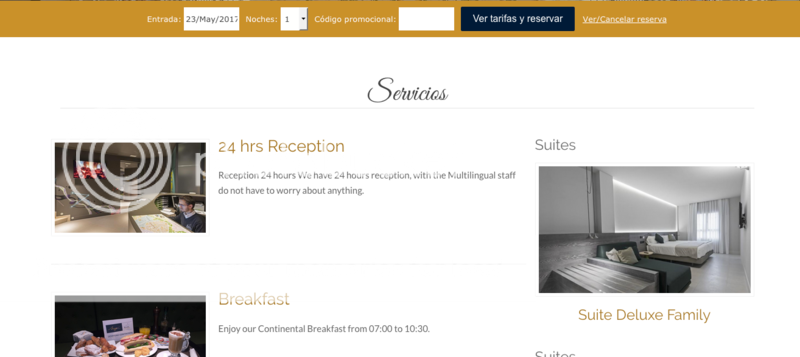
I was trying to get this working oon my new site with enfold theme
But cannot load this css from the link and then look very ugly.
how should i add in enfold this link?
In the old theme, i got the instructions to put the link in header.php and the booking system after </head>
p.d.The top orange bar its the correctly one in the image attached.
Thank you very much and apologize about my english
-
This topic was modified 8 years, 10 months ago by
 mrpacogp.
Hi all!
I have the fixed frame border set on my site. For some reason when using the trackpad on a laptop the frame adjusts or seems “loose” and slides to the left to reveal a grey border on the right hand side. Please view the link in the private area.
Also, when you scroll down on the page the hamburger icon appears to be on top of the top frame. I tried adjusting the z-indexes but wasn’t able to figure it out.
Thank you in advance! :)
Hi,
Try adding this css code in Quick CSS (located in Enfold > General Styling):
#top a,
#top .av_inherit_color a {
    text-decoration: none;
}
Hope this helps :)
Best regards,
Nikko
Hello Jordan,
No that list is broken. If you place the more tag in between two ol tags, it breaks the ol tags. It breaks the order. It stops functioning properly. It makes the numbers stop and then start over again from scratch. You can test this for yourself by placing a more tag in between some ol tags in enfold and then viewing the visual tab. It will interrupt the numbers and make them start again. If you look back in the text tab, you can then see all of the additional code that was added that you did not add. It was added automatically and it should be not be.
Thanks,
Brendon
Hi,
To see the other pages, you`ll need to import some demo following this answer: https://kriesi.at/support/topic/how-to-import-demo-file/#post-350765
Best regards,
John Torvik
I’m adding another to several recent Forum posts saying that the video function in Advanced Layout Builder is not working properly for links. When I insert a link from either Vimeo or YouTube, it shows only the link, not the video.
Note that this is happening only on new attempts. My site has several pages that were previously built to include video links, and those still look fine. For example:
homepage – https://www.missouriartscouncil.org (YouTube links)
professional development video page – https://www.missouriartscouncil.org/professional-development-videos (Vimeo links)
Here is a test page I created today. Self-hosted videos are displaying just fine, but the YouTube and Vimeo videos are not.
https://www.missouriartscouncil.org/video-media-element-test
I looked at this post:
https://kriesi.at/support/topic/video-not-showing-4
In which you recommended these fixes:
1) “I updated that link you posted using a code block in combination with the video embed script.”
– I can’t give you administrative access (it’s a State of Missouri website), but could you give me directions for how to do this?
2) “Attempt this solution: https://kriesi.at/support/topic/video-player-not-showing-only-showing-link/#post-423622”
– I’m afraid I don’t understand anything of what Rap says, starting with “going directly to the database.”
3) “Try switching to the default theme and try to see if it renders via the video shortcode.”
– What do you mean by switching to the default theme? I don’t want to lose any of my custom settings.
Note: I also did try removing the “s” and disabling the active plugins. This did not help.
Hi,
Please could someone tell me the CSS code I need to use to stop it automatically underlining clicked links. I don’t want the links to be underlined. It would be even better if the hover over function still worked after the link has been clicked as well!
Thanks for your help!
Kind Regards,
Tim
Hi Jordan,
Basically, if I add any additional menu items after “Ask a Pilot”, I want it to display on a row below the current menu, not increasing the width of the current menu. At the moment the browser has to be open to a wide dimension to stop the menu defaulting to mobile/tablet mode.
Kind Regards,
Tim
How can I disable the gallery animation on the page below?
I tried the fix here https://kriesi.at/support/topic/diable-image-animation-on-scroll/#post-133013 but that did not work, (and the code was not on 205)
can you help with this?
thanks
Nancy
Attempted the XML import – which failed . The error messages are below
Failed to import Media “”
Failed to import Media “”
Failed to import Media “”
Failed to import Media “”
Failed to import Media “”
Failed to import Media “”
Failed to import Media “”
Failed to import Media “”
Failed to import Media “”
Failed to import Media “”
Failed to import Media “”
Failed to import Media “”
Failed to import Media “”
Failed to import Media “”
Failed to import Media “”
Failed to import Media “dribbble”
Failed to import Media “enfold”
Failed to import Media “jquery”
Failed to import Media “microlancer”
Failed to import Media “wordpress”
Failed to import “General”: Invalid post type forum
Failed to import Media “”
Failed to import Media “wpml”
Failed to import “Hello World!”: Invalid post type topic
Failed to import “Re: Hello World!”: Invalid post type reply
I have a few questions and a comment
Comment 1) My only need is for the images which I can import manually. Is there anywhere I can just download all the images or link to them somewhere?
Question 1) When I do a XML import: Do I also need to Import Theme Settings for a Demo (this one is One Page Portfolio)
* I noticed a moderator on another post re the Enfold 2017 Demo provided the user with download link for both the Import Theme Settings – File (txt) and the current LayerSlider zip file – see https://kriesi.at/support/topic/cant-install-demo-content-of-enfold-2017/#post-796728
* When I did the xml import, then a theme setting import for the Enfold 2017 Demo, the the site loaded – again only with some images.
Comment 2) I modified all PHP server settings and WP-Config file settings per other posts and outlined in this post and the link below it
https://kriesi.at/support/topic/enfold-demo-importer-not-working/#post-794986
http://docs.presscustomizr.com/article/229-fixing-errors-when-uploading-images-in-wordpress
* I am checking with the hosting service to see if these settings are allowed on my shared server.
Update:
We’re now running Enfold 4.0.7. Yay!
I have figured out what went wrong with the image size. Sometime over the past eight days, the default attachment size in WordPress changed from Full Size to whatever size was at the top of the list. Irritating, but at least I know what to do.
Unfortunately, the video link is still a problem. I’m opening another thread.
Hi, I’ve been using Enfold for a while, and I just found out about the option to use a child theme. I do not know if it is convenient to use the child theme or not. I already have my design done just the way I like it, and I’m afraid to lose the finished ones. On the other hand, I do not know, exactly what benefits, do it in a child topic. Thank you.
Tabs Section stopped working after update to 4.0.6 :/
It broke my LIVE website so I had to rollback to 4.0.5
I am having somewhat of this issue… But I am not using images. I imported the Default Demo theme. I am just editing the slides and adding my stuff to make it a lot easier and quicker. First slide works like a charm. BUT, on the second slide, I hid all the images and am just working on the text sliding in. Well, the top text slides in okay, but the other four lines on text do not. They are not hidden and show in the preview and even work in the preview. but when saved and re-load homepage, same thing.
Login info in private comment..
Any ideas??
-
This reply was modified 8 years, 10 months ago by
 Basilis.
Ok, fair enough. I have then tried to use a more ‘Enfold’ solution as proposed in this ticket: https://kriesi.at/support/topic/contact-form-in-pop-up-prettyphoto-issue/#post-304173 and…it works perfectly!
Thanks for your time!
-
This reply was modified 8 years, 10 months ago by
 Sim0nb.
We are needing to add the Social Media Icon Houzz to (3) of our clients websites… is there a simple way to do this? We have looked at other topics but most are using “child themes” we are not!
Avery
Is this still active within Enfold?
https://kriesi.at/support/topic/change-image-on-shop-page-with-hover-effect/
I am not finding it. I would like to use it instead of a plugin.
To stop that from happening, I just moved my logo and menu to the side. Now I have another problem. I decide to change my About to my Home and want to make that my Front Page. My Home I changed to Categories. Now Categories is my Landing Page and I want it to be Home.
Can this be fixed?
I have seen several threads about this topic but I believe this is a new issue.
I used to be able to create sliders with a video link that points to a vimeo or YouTube video. When a user clicks on the video it would open in a lightbox. Our old sliders work fine for this functionality but when I create a new slider the slider doesn’t work.
I have added a link in the private content section that shows the page I am referring to.
I love the enfold theme and have bought this theme for many clients. That said, I have found the new layer slider update to be less intuitive than the original. Do you know if it is possible to revert back to the original version while still being able to update the enfold theme? I am using a child theme today.
Thanks for your help.
Rikard,
Every other major WordPress Premium Theme (Avada, X, etc.) switches from a desktop to a mobile menu schema when a site is being viewed on a mobile device. However, I can tell you that our site keeps the desktop menu scheme which creates per mobile tests “Tap targets are small” Also, menu items overrun each and basically the site looks terrible on a mobile device.
If Kriesi isn’t going to create mobile-friendly websites, then I’ll dump the theme and totally rebuild our site with another theme, especially when Google punishes sites that aren’t mobile-friendly.
please check the below link and need to show that i can’t find the description filed
https://kriesi.at/support/topic/how-is-this-menu-done-i-the-demo/#post-749472
Hi DickZirkzee,
Here is the code you can put in Enfold > General Styling > Quick Css, if it does not work, put into themes/enfold/css/custom.css for a bit different solution
<pre>

@media only screen and (max-width: 767px) {

   #full_slider_1 .av-single-slide.slide-1.active-slide img {

   left: 0px !important;

    min-height:300px;

    min-width: 890px;

 }

   #full_slider_1 .caption_fullwidth.av-slideshow-caption.caption_left.active-slide {

   min-height: 300px;

 }

 #full_slider_1 .avia-slideshow-inner {

  min-height: 300px;

 }

  #full_slider_1 .container.caption_container {

    padding-top:50px !important;

        width: 60% !important;

    float: left !important;

    margin-left: 10px !important;

  }

 #full_slider_1 .slideshow_align_caption {

  padding-top: 130px !important;

}

}
@media only screen and (max-width: 450px) {
#full_slider_1 .container.caption_container {
width: 40% !important;
float: left !important;
margin-left: 10px !important;
}
#full_slider_1 .av-single-slide.slide-1.active-slide img {
left: 0px !important;
min-height: 200px;
min-width: 630px;
}
#full_slider_1 .caption_fullwidth.av-slideshow-caption.caption_left.active-slide {
min-height: 200px !important;
}
#full_slider_1 .slideshow_align_caption {
padding-top: 0px !important;
min-height: 200px ;
}
#full_slider_1 .avia-slideshow-inner {
min-height: 200px;
}
}
Let mw know what you think.
If you need further assistance please let us know.
Best regards,
Victoria
UPDATE:
..ok, i fiddled with the css a little bit and i think i solved the buttons position problem
it’s not perfect but it’s o.k ( an updated screenshot is in the private content)
(..i’m still hoping someone could help me make it look better than it is?)
..but more important: ‘add to cart’ still reloads the page any chance the we can fix it?
i really hope so because the other code (in https://kriesi.at/support/topic/add-a-quantity-field-to-woocommerce-products/#post-690610) didn’t reload the page so there must be a way to do it, right?
-
This reply was modified 8 years, 10 months ago by
 Doron.
hi guys,
as you can see i insert two one-half columns and in the second one text is not in top line with image in first one-half column.
can you post css please?
i tried but it did not work
.av_one_half + br {
display: none;
}
link to problem is in private section
Hey cindybird52,
Here is the code you can put in Enfold > General Styling > Quick Css, if it does not work, put into themes/enfold/css/custom.css or your child theme
@media only screen and (max-width: 450px) {
.slideshow_align_caption {
      vertical-align: top;
}
#top .scroll-down-link {
      bottom: 200px;
}
}
If you need further assistance please let us know.
Best regards,
Victoria



