Viewing 30 results - 2,701 through 2,730 (of 16,898 total)
  • Author
    Search Results
  • #1324286
    Hidealoo
    Participant

    PHP: 7.4.24 – WP: 5.8.1 – Enfold (chikd): 4.8.6.3 – WooCommerce: 5.7.1 – WooCommerce Stripe Gateway: 5.6.2

    Hi,

    my shop is based in the UK, so all UK users should be paying VAT Tax @ 20%. When I view the basket and change the country dropdown to UK, no VAT is displayed or in the checkout. Any ideas please?

    <a href='https://automattic.pxf.io/y2XdbN/' target='_blank' rel='nofollow'/ rel=WooCommerce Tax Options" />

    Thank you.

    • This topic was modified 4 years, 6 months ago by Hidealoo. Reason: added login details
    #1324280

    Hi,
    When all plugins are off, I can’t switch to the new ENFOLD version at all.
    It is multilingual site, so I switch on WPML Multilingual CMS

    In this way I can switch to ENFOLD new version and edit content (pages, posts etc.),
    but website loads is extremely slow (sometimes it takes up to few minutes while the page is loading)

    The error is as following:

    [Sun Oct 10 15:29:33.513374 2021] [php7:notice] [pid 30085] [client 212.142.108.251:61668] WordPress datub\xc4\x81zes k\xc4\xbc\xc5\xabda Duplicate entry ‘2249-lv’ for key ‘trid_lang’ vaic\xc4\x81jumam UPDATE wp_icl_translations SET language_code = ‘lv’ WHERE translation_id = ‘2932’, ko izdar\xc4\xabjis require_once(‘wp-admin/admin.php’), require_once(‘wp-load.php’), require_once(‘wp-config.php’), require_once(‘wp-settings.php’), do_action(‘init’), WP_Hook->do_action, WP_Hook->apply_filters, SitePress->rebuild_language_information, TranslationManagement->add_missing_language_information, TranslationManagement->add_missing_language_to_posts, TranslationManagement->add_missing_language_to_post, referer: http://sibirica.lv/wp-admin/plugins.php
    [Sun Oct 10 15:29:33.571829 2021] [php7:notice] [pid 30085] [client 212.142.108.251:61668] WordPress datub\xc4\x81zes k\xc4\xbc\xc5\xabda Duplicate entry ‘2231-lv’ for key ‘trid_lang’ vaic\xc4\x81jumam UPDATE wp_icl_translations SET language_code = ‘lv’ WHERE translation_id = ‘2931’, ko izdar\xc4\xabjis require_once(‘wp-admin/admin.php’), require_once(‘wp-load.php’), require_once(‘wp-config.php’), require_once(‘wp-settings.php’), do_action(‘init’), WP_Hook->do_action, WP_Hook->apply_filters, SitePress->rebuild_language_information, TranslationManagement->add_missing_language_information, TranslationManagement->add_missing_language_to_posts, TranslationManagement->add_missing_language_to_post, referer: http://sibirica.lv/wp-admin/plugins.php
    [Sun Oct 10 15:29:33.588627 2021] [php7:notice] [pid 30085] [client 212.142.108.251:61668] WordPress datub\xc4\x81zes k\xc4\xbc\xc5\xabda Duplicate entry ‘2250-lv’ for key ‘trid_lang’ vaic\xc4\x81jumam UPDATE wp_icl_translations SET language_code = ‘lv’ WHERE translation_id = ‘2934’, ko izdar\xc4\xabjis require_once(‘wp-admin/admin.php’), require_once(‘wp-load.php’), require_once(‘wp-config.php’), require_once(‘wp-settings.php’), do_action(‘init’), WP_Hook->do_action, WP_Hook->apply_filters, SitePress->rebuild_language_information, TranslationManagement->add_missing_language_information, TranslationManagement->add_missing_language_to_posts, TranslationManagement->add_missing_language_to_post, referer: http://sibirica.lv/wp-admin/plugins.php
    [Sun Oct 10 15:29:33.913666 2021] [php7:notice] [pid 30085] [client 212.142.108.251:61668] WordPress datub\xc4\x81zes k\xc4\xbc\xc5\xabda Duplicate entry ‘2044-lv’ for key ‘trid_lang’ vaic\xc4\x81jumam UPDATE wp_icl_translations SET language_code = ‘lv’ WHERE translation_id = ‘2738’, ko izdar\xc4\xabjis require_once(‘wp-admin/admin.php’), require_once(‘wp-load.php’), require_once(‘wp-config.php’), require_once(‘wp-settings.php’), do_action(‘init’), WP_Hook->do_action, WP_Hook->apply_filters, SitePress->rebuild_language_information, TranslationManagement->add_missing_language_information, TranslationManagement->add_missing_language_to_posts, TranslationManagement->add_missing_language_to_post, referer: http://sibirica.lv/wp-admin/plugins.php
    [Sun Oct 10 15:29:33.963885 2021] [php7:notice] [pid 30085] [client 212.142.108.251:61668] WordPress datub\xc4\x81zes k\xc4\xbc\xc5\xabda Duplicate entry ‘2045-lv’ for key ‘trid_lang’ vaic\xc4\x81jumam UPDATE wp_icl_translations SET language_code = ‘lv’ WHERE translation_id = ‘2739’, ko izdar\xc4\xabjis require_once(‘wp-admin/admin.php’), require_once(‘wp-load.php’), require_once(‘wp-config.php’), require_once(‘wp-settings.php’), do_action(‘init’), WP_Hook->do_action, WP_Hook->apply_filters, SitePress->rebuild_language_information, TranslationManagement->add_missing_language_information, TranslationManagement->add_missing_language_to_posts, TranslationManagement->add_missing_language_to_post, referer: http://sibirica.lv/wp-admin/plugins.php
    [Sun Oct 10 15:29:34.014151 2021] [php7:notice] [pid 30085] [client 212.142.108.251:61668] WordPress datub\xc4\x81zes k\xc4\xbc\xc5\xabda Duplicate entry ‘2046-lv’ for key ‘trid_lang’ vaic\xc4\x81jumam UPDATE wp_icl_translations SET language_code = ‘lv’ WHERE translation_id = ‘2740’, ko izdar\xc4\xabjis require_once(‘wp-admin/admin.php’), require_once(‘wp-load.php’), require_once(‘wp-config.php’), require_once(‘wp-settings.php’), do_action(‘init’), WP_Hook->do_action, WP_Hook->apply_filters, SitePress->rebuild_language_information, TranslationManagement->add_missing_language_information, TranslationManagement->add_missing_language_to_posts, TranslationManagement->add_missing_language_to_post, referer: http://sibirica.lv/wp-admin/plugins.php
    [Sun Oct 10 15:29:34.064280 2021] [php7:notice] [pid 30085] [client 212.142.108.251:61668] WordPress datub\xc4\x81zes k\xc4\xbc\xc5\xabda Duplicate entry ‘2047-lv’ for key ‘trid_lang’ vaic\xc4\x81jumam UPDATE wp_icl_translations SET language_code = ‘lv’ WHERE translation_id = ‘2741’, ko izdar\xc4\xabjis require_once(‘wp-admin/admin.php’), require_once(‘wp-load.php’), require_once(‘wp-config.php’), require_once(‘wp-settings.php’), do_action(‘init’), WP_Hook->do_action, WP_Hook->apply_filters, SitePress->rebuild_language_information, TranslationManagement->add_missing_language_information, TranslationManagement->add_missing_language_to_posts, TranslationManagement->add_missing_language_to_post, referer: http://sibirica.lv/wp-admin/plugins.php
    [Sun Oct 10 15:29:34.114827 2021] [php7:notice] [pid 30085] [client 212.142.108.251:61668] WordPress datub\xc4\x81zes k\xc4\xbc\xc5\xabda Duplicate entry ‘2048-lv’ for key ‘trid_lang’ vaic\xc4\x81jumam UPDATE wp_icl_translations SET language_code = ‘lv’ WHERE translation_id = ‘2742’, ko izdar\xc4\xabjis require_once(‘wp-admin/admin.php’), require_once(‘wp-load.php’), require_once(‘wp-config.php’), require_once(‘wp-settings.php’), do_action(‘init’), WP_Hook->do_action, WP_Hook->apply_filters, SitePress->rebuild_language_information, TranslationManagement->add_missing_language_information, TranslationManagement->add_missing_language_to_posts, TranslationManagement->add_missing_language_to_post, referer: http://sibirica.lv/wp-admin/plugins.php
    [Sun Oct 10 15:29:34.164813 2021] [php7:notice] [pid 30085] [client 212.142.108.251:61668] WordPress datub\xc4\x81zes k\xc4\xbc\xc5\xabda Duplicate entry ‘2049-lv’ for key ‘trid_lang’ vaic\xc4\x81jumam UPDATE wp_icl_translations SET language_code = ‘lv’ WHERE translation_id = ‘2743’, ko izdar\xc4\xabjis require_once(‘wp-admin/admin.php’), require_once(‘wp-load.php’), require_once(‘wp-config.php’), require_once(‘wp-settings.php’), do_action(‘init’), WP_Hook->do_action, WP_Hook->apply_filters, SitePress->rebuild_language_information, TranslationManagement->add_missing_language_information, TranslationManagement->add_missing_language_to_posts, TranslationManagement->add_missing_language_to_post, referer: http://sibirica.lv/wp-admin/plugins.php
    [Sun Oct 10 15:29:34.214980 2021] [php7:notice] [pid 30085] [client 212.142.108.251:61668] WordPress datub\xc4\x81zes k\xc4\xbc\xc5\xabda Duplicate entry ‘2050-lv’ for key ‘trid_lang’ vaic\xc4\x81jumam UPDATE wp_icl_translations SET language_code = ‘lv’ WHERE translation_id = ‘2744’, ko izdar\xc4\xabjis require_once(‘wp-admin/admin.php’), require_once(‘wp-load.php’), require_once(‘wp-config.php’), require_once(‘wp-settings.php’), do_action(‘init’), WP_Hook->do_action, WP_Hook->apply_filters, SitePress->rebuild_language_information, TranslationManagement->add_missing_language_information, TranslationManagement->add_missing_language_to_posts, TranslationManagement->add_missing_language_to_post, referer: http://sibirica.lv/wp-admin/plugins.php
    [Sun Oct 10 15:29:34.264912 2021] [php7:notice] [pid 30085] [client 212.142.108.251:61668] WordPress datub\xc4\x81zes k\xc4\xbc\xc5\xabda Duplicate entry ‘2051-lv’ for key ‘trid_lang’ vaic\xc4\x81jumam UPDATE wp_icl_translations SET language_code = ‘lv’ WHERE translation_id = ‘2745’, ko izdar\xc4\xabjis require_once(‘wp-admin/admin.php’), require_once(‘wp-load.php’), require_once(‘wp-config.php’), require_once(‘wp-settings.php’), do_action(‘init’), WP_Hook->do_action, WP_Hook->apply_filters, SitePress->rebuild_language_information, TranslationManagement->add_missing_language_information, TranslationManagement->add_missing_language_to_posts, TranslationManagement->add_missing_language_to_post, referer: http://sibirica.lv/wp-admin/plugins.php
    [Sun Oct 10 15:29:34.298555 2021] [php7:notice] [pid 30085] [client 212.142.108.251:61668] WordPress datub\xc4\x81zes k\xc4\xbc\xc5\xabda Duplicate entry ‘2052-lv’ for key ‘trid_lang’ vaic\xc4\x81jumam UPDATE wp_icl_translations SET language_code = ‘lv’ WHERE translation_id = ‘2746’, ko izdar\xc4\xabjis require_once(‘wp-admin/admin.php’), require_once(‘wp-load.php’), require_once(‘wp-config.php’), require_once(‘wp-settings.php’), do_action(‘init’), WP_Hook->do_action, WP_Hook->apply_filters, SitePress->rebuild_language_information, TranslationManagement->add_missing_language_information, TranslationManagement->add_missing_language_to_posts, TranslationManagement->add_missing_language_to_post, referer: http://sibirica.lv/wp-admin/plugins.php
    [Sun Oct 10 15:29:34.332119 2021] [php7:notice] [pid 30085] [client 212.142.108.251:61668] WordPress datub\xc4\x81zes k\xc4\xbc\xc5\xabda Duplicate entry ‘2053-lv’ for key ‘trid_lang’ vaic\xc4\x81jumam UPDATE wp_icl_translations SET language_code = ‘lv’ WHERE translation_id = ‘2747’, ko izdar\xc4\xabjis require_once(‘wp-admin/admin.php’), require_once(‘wp-load.php’), require_once(‘wp-config.php’), require_once(‘wp-settings.php’), do_action(‘init’), WP_Hook->do_action, WP_Hook->apply_filters, SitePress->rebuild_language_information, TranslationManagement->add_missing_language_information, TranslationManagement->add_missing_language_to_posts, TranslationManagement->add_missing_language_to_post, referer: http://sibirica.lv/wp-admin/plugins.php
    [Sun Oct 10 15:29:34.365595 2021] [php7:notice] [pid 30085] [client 212.142.108.251:61668] WordPress datub\xc4\x81zes k\xc4\xbc\xc5\xabda Duplicate entry ‘2054-lv’ for key ‘trid_lang’ vaic\xc4\x81jumam UPDATE wp_icl_translations SET language_code = ‘lv’ WHERE translation_id = ‘2748’, ko izdar\xc4\xabjis require_once(‘wp-admin/admin.php’), require_once(‘wp-load.php’), require_once(‘wp-config.php’), require_once(‘wp-settings.php’), do_action(‘init’), WP_Hook->do_action, WP_Hook->apply_filters, SitePress->rebuild_language_information, TranslationManagement->add_missing_language_information, TranslationManagement->add_missing_language_to_posts, TranslationManagement->add_missing_language_to_post, referer: http://sibirica.lv/wp-admin/plugins.php
    [Sun Oct 10 15:29:34.399160 2021] [php7:notice] [pid 30085] [client 212.142.108.251:61668] WordPress datub\xc4\x81zes k\xc4\xbc\xc5\xabda Duplicate entry ‘2055-lv’ for key ‘trid_lang’ vaic\xc4\x81jumam UPDATE wp_icl_translations SET language_code = ‘lv’ WHERE translation_id = ‘2749’, ko izdar\xc4\xabjis require_once(‘wp-admin/admin.php’), require_once(‘wp-load.php’), require_once(‘wp-config.php’), require_once(‘wp-settings.php’), do_action(‘init’), WP_Hook->do_action, WP_Hook->apply_filters, SitePress->rebuild_language_information, TranslationManagement->add_missing_language_information, TranslationManagement->add_missing_language_to_posts, TranslationManagement->add_missing_language_to_post, referer: http://sibirica.lv/wp-admin/plugins.php
    [Sun Oct 10 15:29:34.432619 2021] [php7:notice] [pid 30085] [client 212.142.108.251:61668] WordPress datub\xc4\x81zes k\xc4\xbc\xc5\xabda Duplicate entry ‘2056-lv’ for key ‘trid_lang’ vaic\xc4\x81jumam UPDATE wp_icl_translations SET language_code = ‘lv’ WHERE translation_id = ‘2750’, ko izdar\xc4\xabjis require_once(‘wp-admin/admin.php’), require_once(‘wp-load.php’), require_once(‘wp-config.php’), require_once(‘wp-settings.php’), do_action(‘init’), WP_Hook->do_action, WP_Hook->apply_filters, SitePress->rebuild_language_information, TranslationManagement->add_missing_language_information, TranslationManagement->add_missing_language_to_posts, TranslationManagement->add_missing_language_to_post, referer: http://sibirica.lv/wp-admin/plugins.php
    [Sun Oct 10 15:29:34.466052 2021] [php7:notice] [pid 30085] [client 212.142.108.251:61668] WordPress datub\xc4\x81zes k\xc4\xbc\xc5\xabda Duplicate entry ‘2057-lv’ for key ‘trid_lang’ vaic\xc4\x81jumam UPDATE wp_icl_translations SET language_code = ‘lv’ WHERE translation_id = ‘2751’, ko izdar\xc4\xabjis require_once(‘wp-admin/admin.php’), require_once(‘wp-load.php’), require_once(‘wp-config.php’), require_once(‘wp-settings.php’), do_action(‘init’), WP_Hook->do_action, WP_Hook->apply_filters, SitePress->rebuild_language_information, TranslationManagement->add_missing_language_information, TranslationManagement->add_missing_language_to_posts, TranslationManagement->add_missing_language_to_post, referer: http://sibirica.lv/wp-admin/plugins.php
    [Sun Oct 10 15:29:34.499666 2021] [php7:notice] [pid 30085] [client 212.142.108.251:61668] WordPress datub\xc4\x81zes k\xc4\xbc\xc5\xabda Duplicate entry ‘2058-lv’ for key ‘trid_lang’ vaic\xc4\x81jumam UPDATE wp_icl_translations SET language_code = ‘lv’ WHERE translation_id = ‘2752’, ko izdar\xc4\xabjis require_once(‘wp-admin/admin.php’), require_once(‘wp-load.php’), require_once(‘wp-config.php’), require_once(‘wp-settings.php’), do_action(‘init’), WP_Hook->do_action, WP_Hook->apply_filters, SitePress->rebuild_language_information, TranslationManagement->add_missing_language_information, TranslationManagement->add_missing_language_to_posts, TranslationManagement->add_missing_language_to_post, referer: http://sibirica.lv/wp-admin/plugins.php
    [Sun Oct 10 15:29:34.533289 2021] [php7:notice] [pid 30085] [client 212.142.108.251:61668] WordPress datub\xc4\x81zes k\xc4\xbc\xc5\xabda Duplicate entry ‘2059-lv’ for key ‘trid_lang’ vaic\xc4\x81jumam UPDATE wp_icl_translations SET language_code = ‘lv’ WHERE translation_id = ‘2753’, ko izdar\xc4\xabjis require_once(‘wp-admin/admin.php’), require_once(‘wp-load.php’), require_once(‘wp-config.php’), require_once(‘wp-settings.php’), do_action(‘init’), WP_Hook->do_action, WP_Hook->apply_filters, SitePress->rebuild_language_information, TranslationManagement->add_missing_language_information, TranslationManagement->add_missing_language_to_posts, TranslationManagement->add_missing_language_to_post, referer: http://sibirica.lv/wp-admin/plugins.php
    [Sun Oct 10 15:29:34.591719 2021] [php7:notice] [pid 30085] [client 212.142.108.251:61668] WordPress datub\xc4\x81zes k\xc4\xbc\xc5\xabda Duplicate entry ‘2103-lv’ for key ‘trid_lang’ vaic\xc4\x81jumam UPDATE wp_icl_translations SET language_code = ‘lv’ WHERE translation_id = ‘2006’, ko izdar\xc4\xabjis require_once(‘wp-admin/admin.php’), require_once(‘wp-load.php’), require_once(‘wp-config.php’), require_once(‘wp-settings.php’), do_action(‘init’), WP_Hook->do_action, WP_Hook->apply_filters, SitePress->rebuild_language_information, TranslationManagement->add_missing_language_information, TranslationManagement->add_missing_language_to_posts, TranslationManagement->add_missing_language_to_post, referer: http://sibirica.lv/wp-admin/plugins.php

    #1324263

    Hi,

    Thanks for that. First off, could you try updating the theme to the latest version (4.8.6.5) to see if that helps please? https://kriesi.at/documentation/enfold/how-to-install-enfold-theme/#theme-update. Also please try upgrading your PHP version to 7.4 or higher. If that doesn’t help, then please enable debug mode: https://kriesi.at/documentation/enfold/intro-to-advanced-layout-builder/#debug-mode, so that we can move all content of the problem page to a test page. We can enable debug mode for you, if you give us permission to do so.

    Best regards,
    Rikard

    #1324246

    Hi,
    Thank you for your patience and for the login and ftp access, but I’m having trouble installing the theme on your server, the pages and menu install and even though all of the images are on your server they are failing to import into the WordPress database, I’m not sure why this is. Please try updating your PHP to v7.4+ and set your PHP Time Limit to “No limit” and I will try again.

    Best regards,
    Mike

    Hi Mike,
    Downgrading PHP to v7.4 solved both problems. Thanks for your help.
    Best regards.

    Hi,
    Thank you for your patience and for the login, I did see the error but it is very quick so I could not investigate what is sending it, but I have not seen one like this before, I note that WordPress is giving you this warning: Your .htaccess file does not contain all recommended security headers.
    2021-10-09_012.jpg
    so I would recommend looking at that and disabling your plugins, I also note that you are using PHP v8, try downgrading to the recommended v7.4

    Best regards,
    Mike

    #1324053

    Hi,
    Thanks for the theme update to fix the missing logo; that’s working fine now on all the sites.

    But I’m having a problem with updating the header.php file in my child theme on this site ( with customization in the child theme header.php):

    As manhattanctr mentioned in this feed, in your new header.php file there is no closing php ?> after this:

    <?php

    if( isset( $avia_config[‘temp_logo_container’] ) )
    {
    echo $avia_config[‘temp_logo_container’];
    }

    do_action( ‘ava_after_main_container’ );

    but when I appended my customization, I had to add one. Now I have 2 site headers! But if I remove the closing php ?> that I added on Line 257, the header.php file throws an error on Line 259 where my customization begins.

    I don’t know the reason for not closing the php ?> but I can’t get my customization to work without closing it. But closing it creates a double site header.

    Can you help?

    I just tried the latest version 4.8.6.5 that was released today and I get the following error:

    Fatal error: Uncaught Error: Call to undefined method aviaShortcodeTemplate::get_element_styles() in /opt/bitnami/apps/wordpress/htdocs/wp-content/themes/enfold/config-templatebuilder/avia-shortcodes/section/section.php:800 Stack trace: #0 /opt/bitnami/apps/wordpress/htdocs/wp-content/themes/enfold/config-templatebuilder/avia-shortcodes/section/section.php(1247): avia_sc_section->get_element_styles(Array) #1 /opt/bitnami/apps/wordpress/htdocs/wp-content/themes/enfold/config-templatebuilder/avia-template-builder/php/shortcode-template.class.php(1042): avia_sc_section->shortcode_handler(Array, ‘<br />\n[av_head…’, ‘av_section’, Array) #2 /opt/bitnami/apps/wordpress/htdocs/wp-includes/shortcodes.php(343): aviaShortcodeTemplate->shortcode_handler_prepare(Array, ‘<br />\n[av_head…’, ‘av_section’) #3 [internal function]: do_shortcode_tag(Array) #4 /opt/bitnami/apps/wordpress/htdocs/wp-includes/shortcodes.php(218): preg_replace_callback(‘/\\[(\\[?)(av_fea…’, ‘do_shortcode_ta…’, ‘[av_section min…’) #5 /opt/bitnami/apps/ in /opt/bitnami/apps/wordpress/htdocs/wp-content/themes/enfold/config-templatebuilder/avia-shortcodes/section/section.php on line 800

    #1323975
    manhattanctr
    Participant

    Please take a look at https://mommymakeovercenterofny.com/.

    On resolutions under 786px, the slider nav controls are now missing.

    As i yesterday, I edited our child header.php to match 4.8.6.3 which is running on the site. I do remember always having controls before and have “minimal” selected in the controls.

    #1323908

    Hey atravers70,
    Thank you for the login, could you upload the theme file you are trying to use to DropBox or something similar and link to it in the Private Content area so we can check.
    I see that you are using WordPress 5.8.1 with the Replete theme from 2012 on a server using PHP v5.6.40
    your server is also set to
    Upload max filesize 2M
    PHP post max size 8M

    The file size of the Enfold theme zip is around 16M, so this is why you can’t upload it.
    It looks like your site is a live shop with almost 400 products, considering that you are using PHP v5.6.40 I would not try to add Enfold to this site.
    I would recommend building a new staging site on a different server because you will need to use PHP v7.4 minimum for WordPress, here is a screenshot of your WordPress Site Health:
    2021-10-07_002.png
    but if you change your PHP version with the Replete theme there is a possibility of your site crashing.
    Also, note that Enfold is not a drop-in replacement for Replete, so you will need to make changes to your pages & posts to get the same look and feel of your site and this will take time and I’m concerned that you will have to have your site down for a time.
    So you would be better to not make changes to this site of server and build your new site on a new server so you and get it up and running the way you like.
    I also note that you have Thrive Architect installed and there is a builder conflict with it and Enfold that Thrive nor us have been able to solve, so you may not be able to use it.

    Best regards,
    Mike

    #1323848
    atravers70
    Participant

    Hi,

    Each time I try and upload new Theme zip file into WP I’ve getting

    “The link you followed has expired”

    I followed the advice given below by Customer Service at Envato, specifically increasing the PHP Limits (increased to maximum) and I still got the “The link you followed has expired” message.

    Beyond the PHP limit I wonder if on my WP Dashboard under Media the fact that I only have a Maximum upload file size of 2MB is an issue that needs to be changed?

    The other option Customer Service mentioned was;
    – Place the unzipped theme folder in your /wp-content/themes/ via FTP

    That 3rd option sounds complicated though.

    Will await direction from you.

    Thanks in advance
    Aaron

    Kino (Market)

    Oct 7, 2021, 15:20 GMT+11

    Hi Aaron,

    My name is Kino from Envato Customer Success Team. We’re happy to help you.

    If you are installing your theme from the WordPress theme installer, but get a message that says “The link you followed has expired”, most likely your web server is configured with PHP settings that are too low to allow the theme ZIP file to upload.

    Specifically, PHP is configured to a maximum file upload size limit of 8 megabytes or less. The theme ZIP is larger than the maximum limit. Thus, the webserver is rejecting the upload. WordPress is giving you a rather ambiguous message in response. This is not a theme fault or bug.

    Three options:

    – You can get your web host to increase your PHP limits.
    – You can do it yourself: http://www.wpbeginner.com/wp-tutorials/how-to-increase-the-maximum-file-upload-size-in-wordpress/
    – Place the unzipped theme folder in your /wp-content/themes/ via FTP

    Theme Support is provided by the author. If you need further assistance, please follow this link: https://themeforest.net/item/enfold-responsive-multipurpose-theme/4519990/support
    Kind regards,

    Kino
    (UTC+8)

    Envato

    This reply has been marked as private.
    #1323646

    In reply to: Mobile layout oddity

    The problem was not fixed with Gunther’s SVG file change. I updated again to 4.8.6.4 and swapped out his replacement php file. I am not sure why you said you could not inspect the site – I use Wordfence but there are no location blocks setup at all.

    If you go to https://ready.mobi/ and run my url https://logancoedsoftball.com/ you will see exactly what the site should look like in all modes. BTW, I removed the bg graphic from smaller renderings below 768px since it would not work period. So, if you look at what ready.mobi delivers and the actual content on a real cell phone, they are quite different. On a real phone the logo in mobile is MUCH larger than it should be and pushes the mobile menu to the right so much you don’t even see the Facebook icon any longer. This also has nothing to do with anything child theme related since I am not using a child theme here.

    I have numerous sites to manage and this was the first I tested on. There is definitely something wrong with the way logos are being downsized for mobile in the code.

    Also, there should be no difference in what I see when I load the site in a standard mobile browser window vs. a private or incognito window. This is NOT the case. Elements are all loading in an incognito window and the logo is oversized. In a standard window, I am missing the blue color section backgrounds.

    • This reply was modified 4 years, 6 months ago by manhattanctr.
    #1323630

    Hey Eduard,

    Thanks for contacting us!

    Please add following code to bottom of functions.php file of your child theme – https://kriesi.at/documentation/enfold/child-theme/

    //-------------------------------
    // Custom script in head section
    //-------------------------------
    
    function custom_script_name(){
    if( is_page( 6175 ) ) { 
    ?>
    <script>
    
    // Your script here
    
    </script>
    <?php
    }
    }
    add_action('wp_head', 'custom_script_name');

    Best regards,
    Yigit

    #1323606

    In reply to: Logo Missing Quick Fix

    Hi!

    Sorry for the problems.

    Can you please replace enfold\framework\php\class-svg-images.php

    with the content of

    https://github.com/KriesiMedia/enfold-library/blob/master/temp_fixes/Enfold_4_8_6_4/framework/class-svg-images.php

    Do not forget to make a copy of the original file for a fallback and clear server and browser cache.

    As @Guenni007 mentioned it was caused by the new svg support and forgetting to check for non svg file.

    Best regards,
    Günter

    #1323598

    Hi,

    Thanks so much for the modification to the avia-snippet-megamenu.js file, it works perfectly.

    On a related note, what is the proper way to replace the parent theme script with the modified child theme version?
    Doing it the wrong way works, and I can’t seem to find the right working way to replace it.

    When I do it the wrong way, like this:

    // add child theme adapted megamenu.js for keyboard accessibility of submenus
    wp_dequeue_script('avia-megamenu');
    wp_enqueue_script('avia-megamenu', get_stylesheet_directory_uri().'/js/avia-snippet-megamenu.js', array('avia-default'), '', true);

    it works fine, but then of course I get debug notices:

    Notice: wp_dequeue_script was called incorrectly. Scripts and styles should not be registered or enqueued until the wp_enqueue_scripts, admin_enqueue_scripts, or login_enqueue_scripts hooks. This notice was triggered by the avia-megamenu handle. Please see Debugging in WordPress for more information. (This message was added in version 3.3.0.) in /usr/local/www/mforams2/wp-includes/functions.php on line 5663
    Notice: wp_enqueue_script was called incorrectly. Scripts and styles should not be registered or enqueued until the wp_enqueue_scripts, admin_enqueue_scripts, or login_enqueue_scripts hooks. This notice was triggered by the avia-megamenu handle. Please see Debugging in WordPress for more information. (This message was added in version 3.3.0.) in /usr/local/www/mforams2/wp-includes/functions.php on line 5663

    When I (try) to do it the proper way, it does not seem to replace the parent theme one. I tried it like this:

    // add child theme adapted megamenu.js for keyboard accessibility of submenus
    function change_aviamegamenujs () {
        wp_dequeue_script( 'avia-megamenu' );
        wp_enqueue_script( 'avia-megamenu', get_stylesheet_directory_uri().'/js/avia-snippet-megamenu.js', array('avia-default'), '', true );
        }
    add_action( 'wp_print_scripts', 'change_aviamegamenujs', 100 );

    Remark: the replacement is in child theme functions.php line 687.

    Can you help me do it the proper way? Thanks in advance!

    Rob

    • This reply was modified 4 years, 6 months ago by rob2701. Reason: location of replacement in functions.php added
    #1323548

    In reply to: PHP Fatal Error

    Hey,

    Thanks for contacting us!

    They seem to be related to WordPress SEO Premium and Google Site Kit plugins. You are currently using PHP version 7.4.24. You can try upgrading it to 8.0. If you do not notice any issues with the plugins, you can simply disable WP debugging – https://codex.wordpress.org/WP_DEBUG as well.

    Best regards,
    Yigit

    #1323547

    Topic: Critical error

    in forum Enfold
    ESWEENEY113
    Participant

    I updated my theme to the newest version earlier and the logo was missing from the header area. I tried to replace it by uploading the file again but it didn’t work. So I went back to restore the site from a previous backup. Now I get the following message:

    Fatal error: Uncaught Error: Call to undefined method Avia_Popup_Templates::get_border_styles_options() in /var/www/wp-content/themes/enfold/config-templatebuilder/avia-shortcodes/columns/columns.php:561 Stack trace: #0 /var/www/wp-content/themes/enfold/config-templatebuilder/avia-template-builder/php/shortcode-template.class.php(1191): avia_sc_columns->register_dynamic_templates() #1 /var/www/wp-content/themes/enfold/config-templatebuilder/avia-template-builder/php/shortcode-template.class.php(116): aviaShortcodeTemplate->extra_config() #2 /var/www/wp-content/themes/enfold/config-templatebuilder/avia-shortcodes/columns/columns.php(89): aviaShortcodeTemplate->__construct(Object(AviaBuilder)) #3 /var/www/wp-content/themes/enfold/config-templatebuilder/avia-template-builder/php/template-builder.class.php(1765): avia_sc_columns->__construct(Object(AviaBuilder)) #4 /var/www/wp-content/themes/enfold/config-templatebuilder/avia-template-builder/php/template-builder.class.php(539): AviaBuilder->createShortcode() #5 /var/www/wp-i in /var/www/wp-content/themes/enfold/config-templatebuilder/avia-shortcodes/columns/columns.php on line 561

    My hosting company tells me it’s the theme, however I updated the same theme on another client’s website earlier today with no problems. Any idea what it could be?
    Thanks!
    Erin
    There has been a critical error on this website.

    #1323541

    Topic: PHP Fatal Error

    in forum Enfold
    tonytrabon
    Participant

    I am receiving these two errors. Can you help me understand how they are impacting the theme?

    “NOTICE: PHP message: PHP Fatal error: Uncaught Error: Class ‘WPSEO_Shortlinker’ not found in /www/wp-content/plugins/wordpress-seo-premium/src/wordpress/wrapper.php:71”

    “NOTICE: PHP message: PHP Fatal error: require(): Failed opening required ‘/www/wp-content/plugins/google-site-kit/third-party/vendor/autoload_files.php’ (include_path=’.:/usr/share/php’) in /www/wp-content/plugins/google-site-kit/includes/loader.php on line 51”

    caribou-digital
    Participant

    @Nikko I am having the same issue as a lot of Envato users seem to be having. However, all of your support responses are private and/or your team is performing fixes directly on people’s websites, so there isn’t anything I can see to resolve the problem ourselves.

    We use Enfold with a child theme, which works fine with Enfold 4.8.6.3 as the parent. However, when we update to Envato 4.7.6.4 we get the following PHP error and the site doesn’t load:

    Fatal error: Uncaught Error: Call to undefined method Avia_Popup_Templates::get_border_styles_options() in /opt/bitnami/apps/wordpress/htdocs/wp-content/themes/enfold/config-templatebuilder/avia-shortcodes/columns/columns.php:561 Stack trace: #0 /opt/bitnami/apps/wordpress/htdocs/wp-content/themes/enfold/config-templatebuilder/avia-template-builder/php/shortcode-template.class.php(1097): avia_sc_columns->register_dynamic_templates() #1 /opt/bitnami/apps/wordpress/htdocs/wp-content/themes/enfold/config-templatebuilder/avia-template-builder/php/shortcode-template.class.php(99): aviaShortcodeTemplate->extra_config() #2 /opt/bitnami/apps/wordpress/htdocs/wp-content/themes/enfold/config-templatebuilder/avia-shortcodes/columns/columns.php(89): aviaShortcodeTemplate->__construct(Object(AviaBuilder)) #3 /opt/bitnami/apps/wordpress/htdocs/wp-content/themes/enfold/config-templatebuilder/avia-template-builder/php/template-builder.class.php(1732): avia_sc_columns->__construct(Object(AviaBuilder)) #4 /opt/bitnami/apps/wordpress/htdocs in /opt/bitnami/apps/wordpress/htdocs/wp-content/themes/enfold/config-templatebuilder/avia-shortcodes/columns/columns.php on line 561

    Please advise us on how we can fix this so we can use the up-to-date version of Envato

    #1323395
    rafagim
    Participant

    hello I have an error with the classic editor, I cannot put content in pages or in posts, only the html code comes out. I attach the error that wordpress throws me, it seems from your template.

    WordPress versión 5.8.1
    Tema actual: Enfold Child (versión 1.0)
    Plugin actual: (versión )
    PHP versión 7.4.23

    Detalles del error
    ==================
    Se ha producido un error del tipo E_ERROR en la línea 489 del archivo /home2/cedersom/public_html/cedersomontano.org/wp-content/themes/enfold/config-templatebuilder/avia-template-builder/php/shortcode-template.class.php. Mensaje de error: Uncaught Error: Cannot use string offset as an array in /home2/cedersom/public_html/cedersomontano.org/wp-content/themes/enfold/config-templatebuilder/avia-template-builder/php/shortcode-template.class.php:489
    Stack trace:
    #0 /home2/cedersom/public_html/cedersomontano.org/wp-content/themes/enfold/config-templatebuilder/avia-template-builder/php/shortcode-template.class.php(443): aviaShortcodeTemplate->create_sortable_editor_element(Array)
    #1 /home2/cedersom/public_html/cedersomontano.org/wp-content/themes/enfold/config-templatebuilder/avia-template-builder/php/template-builder.class.php(397): aviaShortcodeTemplate->prepare_editor_element()
    #2 /home2/cedersom/public_html/cedersomontano.org/wp-includes/class-wp-hook.php(303): AviaBuilder->js_template_editor_elements(”)
    #3 /home2/cedersom/public_html/cedersomontano.org/wp-includes/class-wp-hook.php(327): WP_Hook->apply_filters(”, Array)
    #4 /home2/cedersom/public_html/cedersomontano.org/wp-includes/plugin.php(470): WP_Hook->do_action(Array)

    #1323389
    This reply has been marked as private.
    #1323385

    Hi Ismael,

    Thanks for looking into this. I replaced the code in the file like you said, but unfortunately it does not make the submenus keyboard accessible. Also, once the Enfold file compression is enabled again, it blanks the top image on home page and the images on the Tours, Impressions and Info pages, so something is not quite right yet.

    I have left the replaced code in place on the dev site so you can see (also there as avia-snippet-megamenu_2021-10-04.js).
    On the live website the avia-snippet-megamenu_2020-10-06.js code (also there on dev site) works well on submenus (see Blog and Info menu): https://mforamsterdam.com

    Can you take another look?
    Also, if you could check how I did the js replacement in child theme functions.php line 687-690, I would appreciate your advice for improvement (now gives a notice in debug log).

    Thanks and have a good day,
    Rob

    #1323359

    Hi,
    I see that you are using PHP v8.0.10 on your server, please try downgrading to v7.x
    and then clear your caches. You may also want to deactivate your other WooCommerce plugins before re-activating the main WooCommerce plugin.

    Best regards,
    Mike

    #1323352
    This reply has been marked as private.
    #1323335
    rob2701
    Participant

    Hi,

    I would appreciate some help with the MegaMenu submenu items keyboard accessibility.

    I used to have an adapted avia-snippet-megamenu.js in my child theme to take care of this (as described in https://kriesi.at/support/topic/accessibility-issues-with-main-nav-leaves-us-sites-in-danger-of-lawsuits/#post-1226327)

    Now I had a look at the avia-snippet-megamenu.js from 4.8.6.3, and it looks like this functionality is already included there, am I right?

    However, if I place the new 4.8.6.3 file avia-snippet-megamenu.js in the child theme /js folder, the submenu items are not keyboard accessible.

    In the child theme /js folder I have put the old file as avia-snippet-megamenu_2020-10-06.js and the new file as avia-snippet-megamenu.js and as avia-snippet-megamenu_4.8.6.3ORG.js

    Can you let me know what I’m doing wrong here? I would appreciate it if you could have a look. Details in the private area (development site copy, so feel free to try).

    BTW, the replacement is set in child theme functions.php line 687-690, but probably not done right (gives notice in debug log).

    Thanks in advance for your help and advice,
    Rob

    #1323256

    Hi Nikko,

    I appreciate your prompt assistance. I’ve got two errors still occurring on multiple pages even with all plugins disabled:

    Top of several pages:
    Notice: LayerSlider skin “v6” not found. Defaulting to “noskin”. in /www/wp-content/themes/enfold/config-layerslider/LayerSlider/assets/classes/class.ls.sources.php on line 100

    Bottom of all pages:
    Notice: Undefined variable: the_id in /www/wp-content/themes/enfold/footer.php on line 48 Notice: Undefined variable: the_id in /www/wp-content/themes/enfold/footer.php on line 73 Notice: Undefined variable: the_id in /www/wp-content/themes/enfold/footer.php on line 85

    #1323255

    Since Enfold 4.8.6.3 several lines of code have been added to the new header.php ( lines 40 to 107 and 146-147 etc. ). The reason for this is the new option for the footer: Curtain Effect.

    So if your installation contains a header.php and/or footer.php in the child theme, you have to update them too. So check via ftp if they are present in the child theme folder.
    So if you already have alternate files there, you should remember why this is the case, because just putting a copy there doesn’t make sense.

    Now create copies of the new (4.8.6.3) files and reapply the former adjustments there. Before you upload them via ftp to the child-theme, save the older files as rollback on your harddisk.

    With such major changes to the parent theme, you must always remember to also renew the theme’s alternate files in your child theme. Of course, then with the changes that justify their presence in the child theme.

    _______


    @bkatzdesign

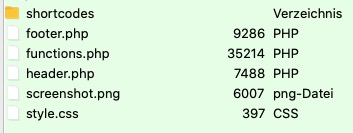
    To solve now the problem : maybe tell us what files are besides your child-theme style.css ( root directory of the child-theme )
    on default premade Enfold Child – there should be only three files : ( style.css, functions.php and screenshot.png ).
    i do often have a shortcodes folder there. you see on the image that this would be the place for footer.php and header.php files in your child-theme

    #1323223

    Hi,

    I can see the script added to the markup on your site, what are you seeing in Google Analytics? You can try to add the code using a function instead, to see if that helps:

    function tobias777g_google_analytics(){
    ?>
    YOUR SCRIPT GOES HERE
    <?php
    }
    add_action('wp_head', 'tobias777g_google_analytics');

    Best regards,
    Rikard

Viewing 30 results - 2,701 through 2,730 (of 16,898 total)