
-
AuthorSearch Results
-
May 11, 2022 at 9:58 am #1351323
Hi,
Thanks for the update!
If you have any other questions or issues, please register to our support forum – https://kriesi.at/support/register/ using your purchase code and start new threads under Enfold sub forum :)
Best regards,
YigitMay 11, 2022 at 9:29 am #1351313In reply to: Updating from V 3.5.4 to 4.8
Hi,
We are glad that Rikard could help! :)
For your information, you can take a look at Enfold documentation here – https://kriesi.at/documentation/enfold/
If you have any other questions or issues, feel free to start a new thread under Enfold sub forum and we will gladly try to help you :)
Enjoy the rest of your day!
Best regards,
YigitMay 11, 2022 at 9:28 am #1351311Hi Peter,
We are glad that Rikard could help! :)
For your information, you can take a look at Enfold documentation here – https://kriesi.at/documentation/enfold/
If you have any other questions or issues, feel free to start a new thread under Enfold sub forum and we will gladly try to help you :)
Enjoy the rest of your day!
Best regards,
YigitMay 11, 2022 at 9:24 am #1351308In reply to: Lost user and password for Endfold theme
Hi María,
We are happy that Rikard could help you.
If you have any other questions or issues, please register to our support forum – https://kriesi.at/support/register/ using your purchase code and start new threads under Enfold sub forum :)
Best regards,
YigitMay 10, 2022 at 11:02 pm #1351290In reply to: Same form on several pages
Well you say it i name it: use the ALB Element : Widget Area
You can create on widgets a new widget area – f.e.: form1
place inside that new widget area your form and place it with that above mentioned ALB : Widget Area to all of your 20 pages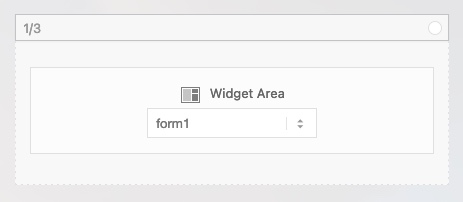
Next: how to put a form in a widget area?
How would you do it on a normal situation – do you have a shortcode for it?Is it an enfold generated form? – then you can copy that enfold – shortcodes and place a html widget in that new widget-area – copy&paste that enfold shortcodes of that form to it.

you know how to get the enfold shortcodes?
May 10, 2022 at 10:32 pm #1351288In reply to: Page Editor Spinning Wheel
OK I think I may have fixed this. After I updated the theme to the latest version, I deactivated the “classic editor” plugin and select “use block editor” in the enfold settings. It seems to be working fine, not my favourite editor but hey it is working! Thanks for your help in this matter.
May 10, 2022 at 9:11 pm #1351281In reply to: Form not working
Hey Ingo,
Thanks for contacting us!
Please refer to this post – https://kriesi.at/documentation/enfold/contact-form/#troubleshoot :)
Best regards,
YigitMay 10, 2022 at 9:09 pm #1351279In reply to: Submenue wrong top-margin in Safari
Hi Ingo,
Thanks for contacting us!
Please add following code to Quick CSS field in Enfold theme options > General Styling tab
.avia-safari #top .flex_column_table.av-equal-height-column-flextable.av-7kmmtz-63e735761ed44bed2ca27c142ce5dff9 {
margin-top: -40px;
}
Also you have following code in style.css file
.submenue-ib {
  padding: -100px 0 10px 0;
  margin: 0 0 0 0;
  text-align: right;
  vertical-align: top;
}
Please change “-100px” to “0” as negative values are invalid for padding
Best regards,
YigitMay 10, 2022 at 9:00 pm #1351277In reply to: magazine categories as dropdown
Hi Vera,
It does not really matter but developers at Codeable are familiar with Enfold :)
Best regards,
YigitMay 10, 2022 at 8:57 pm #1351276In reply to: Z-Index issue
Hi Dan,
Thanks for contacting us!
Could you please try moving your Code Block element into a separate Color Section element with a custom ID (you can edit your Color Section element and go to Advanced > Developer Settings > Custom ID. “custom-bar” in example below) at the very beginning of your page and then add following code to bottom of Quick CSS field in Enfold theme options > General Styling tab
#custom-bar {
  z-index: 2;
  position: fixed;
}
Best regards,
YigitMay 10, 2022 at 8:37 pm #1351273In reply to: Change name 'winkel'
Hey Eric,
Thanks for contacting us!
Please add following code to bottom of functions.php file of your child theme
add_filter('avf_title_args', 'av_custom_single_title', 10, 2);
function av_custom_single_title($args,$id)
{
if ('is_singular')
	{
		$args['title'] = get_the_title($id);
		$args['link'] = get_permalink($id);
	}
return $args;
}
Best regards,
YigitMay 10, 2022 at 7:41 pm #1351266In reply to: Lazy Loading
Hey Evi,
Let me elaborate:
1- Image elements i.e. slider elements, gallery elements. Supported elements have lazy load option in Advanced > Performance tab.
2- You can use it on all supported elements.
3- If there is a conflict with 3rd party plugins, lazy loaded images may not be loaded or animations may be broken. You can simply check your images on front end.
4- It would be safe when checked once. You could also check after an update if we make performance changes which would be mentioned in change log – https://kriesi.at/documentation/enfold/changelog/Cheers!
YigitMay 10, 2022 at 7:26 pm #1351265Topic: "Other articles from the same….."
in forum EnfoldInSilentio
ParticipantHi,
Like in my other threads already told i added a CPT: “Classes”
I created a page called “Classes” with a masonry.
This is the place where customers can get an overview about the classes we offer.
So far, so good.When a user cklicks on one of the classes he sees the usual (images, text, booking form)
What he should also see is:
A preview/announcement of the other courses – a little bit like “What else do we offer”.
Now i checked the options of Enfold and i find dozens of ways to do this if i had posts – but i dont see even one way to do it with pages.
Remember: I use CPT that has the same capabilities like your portfolio-CPT.So how can i either….
– create a sidebar that shows something like “latest posts” – just with my CPT
– create some content-Element that does something similar?Expected amount:
All in all we are talking about 20 classes, divided in about 5 or 6 categories.What could be a possible way to get that done with Enfold?
kind regards
EviMay 10, 2022 at 7:22 pm #1351262In reply to: Breadcrumbs do not read in full on mobile version
Hi,
You are welcome! :)
For your information, you can take a look at Enfold documentation here – https://kriesi.at/documentation/enfold/
If you have any other questions or issues, feel free to start a new thread under Enfold sub forum and we will gladly try to help you :)
Enjoy the rest of your day!
Best regards,
YigitMay 10, 2022 at 6:58 pm #1351255In reply to: Lazy Loading
Sorry Yigit,
but this did not answer any of my questions.
I know where and how to disable/enable LL but this was not what i wanted to know, neither about 3rd Party Plugins.1: Which elements are influenced by Lazy Load?
2: On which elements it should be used or not (on which it is more recommended than others)?
3: What can happen in a bad case?
How to check?
4: Will it stay safe when checked once or do have to check every Enfold update?
…and so onEvi
May 10, 2022 at 6:33 pm #1351245In reply to: Lock settings for editors in Layout Builder
Hey Thorsten,
Thanks for contacting us!
Have you checked Custom Element Templates – https://kriesi.at/documentation/enfold/custom-element-templates/? You could lock selected settings in the elements and only leave content field unlocked :)
Best regards,
YigitMay 10, 2022 at 6:30 pm #1351240In reply to: Extend support
Hi Ingo,
Thanks for contacting us!
Please login to your account on ThemeForest and go to Enfold’s page – https://themeforest.net/item/enfold-responsive-multipurpose-theme/4519990 and click “Renew support” button on the right hand side.
After that, you can go to https://kriesi.at/support/forum/enfold#new-post and re-validate your purchase code :)
Best regards,
YigitMay 10, 2022 at 6:28 pm #1351239In reply to: Demo Template won't import
Hi Olivier,
Please open a new thread and include WordPress admin login details in private, so that we can have a closer look at your site.
Best regards,
RikardMay 10, 2022 at 6:28 pm #1351237In reply to: Lazy Loading
Hi Elvira,
Thanks for contacting us!
Currently only images are lazy loaded using HTML. You can enable/disable it globally in Enfold theme options > Performance or enable/disable in supported elements under Advanced > Performance > Lazy Loading Of Images.
In a bad case, if you are using a 3rd party plugin to lazy load images, they may not show up or break the animations. Since it is implemented using HTML, it is safe.Regards,
YigitMay 10, 2022 at 6:10 pm #1351225In reply to: image occupancy to background image
Hi,
Please add following code to Quick CSS field in Enfold theme options > General Styling tab
.flex_column.av-6j251f4-707e937d083a53255153ab2399200342 {
  background-color: rgba(255,255,255,0.9);
}
255,255,255 is the RGB value of the color and 0.9 is opacity level.
Best regards,
YigitMay 10, 2022 at 6:01 pm #1351219In reply to: Media player for youtube videos not working
Hey Chrilles,
Thanks for the login token. The problem seems to be a conflict with the SG Optimiser plugin. Could you try turning off file compression under Enfold->Performance, to see if that helps?
Best regards,
RikardMay 10, 2022 at 5:59 pm #1351218In reply to: Breadcrumbs do not read in full on mobile version
Hey,
Thanks for contacting us!
Please add following code to Quick CSS field in Enfold theme options > General Styling tab
@media only screen and (max-width: 480px) {
.title_container .breadcrumb {
  display: none;
}}
Best regards,
YigitMay 10, 2022 at 5:58 pm #1351216In reply to: Page Editor Spinning Wheel
Hey greigmckean83,
Thanks for the login details. Could you try updating the theme to the latest version (4.9.2.3) to see if that helps please? https://kriesi.at/documentation/enfold/how-to-install-enfold-theme/#theme-update.
Best regards,
RikardMay 10, 2022 at 5:57 pm #1351215In reply to: Text instead of logo / Logo plus text
Hi,
Thanks for the feedback, you can have the text to the right, please see our documentation here, with your code above but you will need specific css to move the “text” & “claim” there for each screen size and it is depending on your header size before and after scroll and the header height for mobile. It would be much easier if we could help on a live site.
I would recommend using “span” instead of a “div” because you will want them to display “inline” instead of “block” for the text to be to the right of the image.
I will try a Header widget solution on my test site and see if that might work out.Best regards,
MikeMay 10, 2022 at 5:57 pm #1351214In reply to: Menu Link Color on Click After Update to 4.9.2.3
Hey,
Thanks for contacting us!
Active state works on my end but focus state does not. Please add following code to Quick CSS field in Enfold theme options > General Styling tab
.header_color .main_menu ul:first-child > li a:focus {
  color: #b3ae40;
}
@guenni007 thanks for your help :)Best regards,
YigitMay 10, 2022 at 5:53 pm #1351211In reply to: "Coming Soon" for Subpage?
It seems as if we dont understand each other.
I was asking for something like a Template “out of the box” (i know that i can create my own “Coming soon” page”
“has Enfold an option to have a nice “Under Construction” or “Coming Soon” message for a SUBPAGEEvi
May 10, 2022 at 5:52 pm #1351209In reply to: Formatting
Hey,
Thanks for contacting us!
Please add following code to Quick CSS field in Enfold theme options > General Styling tab
.template-page .entry-content-wrapper h1, .template-page .entry-content-wrapper h2 {
  text-transform: none;
}
Best regards,
YigitMay 10, 2022 at 5:01 pm #1351201Topic: Critical Error after manually checking for Enfold theme update
in forum Enfoldceakins1908
ParticipantHi,
I clicked the button to manually check for a theme update and it gave me a “critical error” message and I can no longer access my admin area and my site is not showing (https://alisonreedcounseling.com/). I’ve deactivated all plugins and it is still giving this error. How can this be fixed?May 10, 2022 at 4:43 pm #1351200Hi Rikard,
We do see that both the template + PHP versions need to be updated.
However, when accessing enfold-child > Theme Update > there is this message: No Updates available. You are running the latest version! (4.7.4). It is clear that the child theme is not updating as expected to the 4.9.2.3. We had re-purchased the template as the previous developer did not insert the valid Envato private token.Would you be able to advise why the child theme is not updating as expected?
In the meantime, I will have the hosting company update the PHP version to 7.4.
Best,
TamaraMay 10, 2022 at 4:20 pm #1351191Hi Ferdinand,
Are you sure that you are logging into Themeforest with the same account which was used to purchase the license? If it is the correct account, then you would have to reach out to Themeforest support for further help with that, as we don’t manage any purchase details ourselves.
Once you have access to the theme files, then the update to 4.9.x has to be done manually from the version you are running, please refer to my replies in this thread: https://kriesi.at/support/topic/enfold-4-5-theme-update-update-failed-download-failed-a-valid-url-was-not-pro/#post-1021541
You can either update manually via FTP: https://kriesi.at/documentation/enfold/how-to-install-enfold-theme/#theme-update, or use a plugin to upload the theme zip file: https://wordpress.org/plugins/update-theme-and-plugins-from-zip-file/
If that doesn’t work then please try to delete the whole theme folder, then replace it with the new version. Make sure that you have backups of the site before starting updating.
Also please read this after you have updated: https://kriesi.at/documentation/enfold/theme-registration/Best regards,
Rikard -
AuthorSearch Results
-
Search Results
-
Hi,
Like in my other threads already told i added a CPT: “Classes”
I created a page called “Classes” with a masonry.
This is the place where customers can get an overview about the classes we offer.
So far, so good.When a user cklicks on one of the classes he sees the usual (images, text, booking form)
What he should also see is:
A preview/announcement of the other courses – a little bit like “What else do we offer”.
Now i checked the options of Enfold and i find dozens of ways to do this if i had posts – but i dont see even one way to do it with pages.
Remember: I use CPT that has the same capabilities like your portfolio-CPT.So how can i either….
– create a sidebar that shows something like “latest posts” – just with my CPT
– create some content-Element that does something similar?Expected amount:
All in all we are talking about 20 classes, divided in about 5 or 6 categories.What could be a possible way to get that done with Enfold?
kind regards
EviHi,
I clicked the button to manually check for a theme update and it gave me a “critical error” message and I can no longer access my admin area and my site is not showing (https://alisonreedcounseling.com/). I’ve deactivated all plugins and it is still giving this error. How can this be fixed?


