
Viewing 30 results - 25,411 through 25,440 (of 244,559 total)
  • Author
    Search Results
  • #1354546

    why don’t you do that yourself.
    Install a fresh wordpress with enfold – and install your demo then.
    Install duplicator – that nice free backup tool will generate two files – one installer file and one data file ( on default a zip file – on bigger installations it will be an own format (daf)).
    Thats all – upload both files to your new server – start installer and only enter the new database values.
    _____
    I do have that too for my installations – but not with a demo – but with Enfold and Child-Theme and all necessary plugins and some standard settings and functions.php snippets.

    #1354541
    John
    Participant

    I just updated to Enfold 5.0 and I thought updating would fix this, but it didn’t. The post slider on our homepage isn’t loading correctly as if it’s missing some CSS. The comments and the dates aren’t showing correctly, specifically.

    #1354540

    In reply to: enfold

    Hi Paolo,

    Thanks for contacting us!

    Dark Photography demo uses Masonry element on the Work page to display the images added as portfolio items. You can go to Settings > Permalinks to change “Portfolio Items Base” but removing it not easily possible I am afraid.

    Here is what you could do in case you have your portfolio as pages, you can add Masonry Gallery element to your page from Media Elements tab of Advanced Layout Builder, choose images you would like to display in your Masonry Gallery and add custom links (https://imgur.com/a/8qkSn0q) to them, then go to Advanced > Link Settings and choose to use custom link – https://imgur.com/a/oPjjxfc.

    I hope that helps!

    If you have any other questions or issues, please register to our support forum – https://kriesi.at/support/register/ using your purchase code and start new threads under Enfold sub forum :)

    Regards,
    Yigit

    #1354538

    Hey Rikard!

    I really have no idea what is blocking it but both things are working on the Live site that has the previous version of WordPress and Enfold 4.9 (also older) All I see is that Block Editor CSS is being applied before Enfold’s, so Enfold is the last one and gets applied. But you will know more than me.

    Sending you Super Admin access to the Staging site on the Private Content.

    Thank you in advance for your help!

    Havi

    #1354533
    danikra74
    Participant

    Habe gerade auf Enfold v5.0 aktualisiert. Alles sieht gut aus, nur die Galerie zeigt alle Bilder doppelt. Habe auf einer anderen Entwurfsseite eine neue Galerie eingefügt und auch hier werden alle Bilder doppelt angezeigt. 🙈 (Bug in der neuen Version?) Und jetzt mal schnell zurück auf v.4.9 geht leider nicht. (microsoft edge und chrome Browser wird es korrekt angezeigt)
    Bitte um Rückmeldung. Vielen Dank.

    #1354532
    welswebmaster
    Participant

    Hi Enfold team,
    First, thanks for providing us with such goodness!
    I’m finding that the color section is not clearing the background image (dark-floral.png) after removing it.
    SEE Private for URL
    Steps taken:
    Cleared server cache
    Cleared browser cache
    Opened page in an incognito window
    Opened page in different browser
    Verified with host provider (WP Engine) that cache clearing on install was working.

    5.0 isn’t appearing to be available yet for me even though the token is valid. However, I didn’t see this as a FIX in the changelog though either.
    No Updates available. You are running the latest version! (4.9.2.1)

    Please help, and thanks!

    #1354528

    Hello, everyone,
    For those who are interested, you can download the latest version of the Italian language

    Download here
    Translation: Italian language
    Version: Enfold 5.0
    Strings: 5714
    All translations are synchronised with the source files

    Regards
    Luigi

    Hi,

    Thanks for letting us know, I’ll close this thread for now then. Please open a new thread if you should have any further questions or problems.

    Best regards,
    Rikard

    Steve
    Participant

    I have buttons displayed over images & videos within Fullscreen Slider and a Fullwidth Easy Slider.
    Since updating to Enfold 5, the buttons appear as they always have and ‘dip’ when clicked but have no effect.

    #1354501

    In reply to: Collaboration

    Serg Dianov
    Guest

    Hi Yigit!

    Yes, a copy of Enfold 5 would be great.

    You can send it to (Email address hidden if logged out)

    Regards,
    Serg

    Rikard
    Keymaster

    We’re happy to announce that Enfold 5.0 is finally available. Since this is a major update, we would recommend that users update on a staging or development sites first.

    Please see the change log below:

    New demo: https://kriesi.at/themes/enfold-parallax/

    feature: added position options (responsive) to:
    - Image
    - Button
    - Columns
    
    feature: added "Curtain Reveal Animations" (found in Animations Dropdown) to:
    - Image
    - Columns
    - Masonry
    - Masonry Gallery
    
    feature: added Animations Dropdown to:
    - Button
    
    feature: added parallax option (responsive) to:
    - Image
    - Columns
    
    feature: added transform options (perspective, rotate3d, scale3d, skew, translate3d) (responsive) to:
    - Image
    
    feature: added options to scale (zoom) and opacity for images when slide becomes active:
    - Easy Slider
    - Fullwitdh Easy Slider
    
    feature: minimum column height in % of surrounding layout container
    
    feature: theme option to disallow background image parallax and delayed animations on mobile (Performance Tab) - changed to be allowed by default
    feature: added swipe to all devices supporting touch screens (not only to mobile devices)
    feature: Extended Animations Dropdown with "Advanced Fade Animations", "Special Advanced Animations"
    
    feature: ALB Horizontal Gallery added rotation and styling options
    feature: ALB PostSlider added Navigation Dots
    feature: ALB Testimonial Slider added navigation styling and animation options
    feature: Adjusted options (and new options) for most sliders - under progress:
    - Slider Control Styling
    - Show Navigation Arrows and Dots (or none)
    - Custom colors for Navigation Arrows and Dots
    - Transitions and speed
    - Autorotate, end with last slide
    - Disable/Enable manual rotate (hide corresponding Navigation Arrows)
    
    feature: WPML global layout theme options - keep in sync options for all languages
    feature: added support for RankMath SEO plugin (active beta)
    
    tweak: CSS Burger Menu - remove space above mobile menu in landscape orientation and mobile devices
    tweak: support image links for slideshows with first slides caption as permanent caption
    tweak: option to add "alb templates" to top of page (not only to bottom)
    tweak: add option "Use custom link (fallback is image link)" to ALB Masonry Gallery
    tweak: ALB Tab Section new option "Deeplink String" (Advanced Tab -> Developer Settings) to set a custom link hash
    
    fixed: Block editor and ALB Tab Section have strange behaviour in backend
    fixed: Accordion Slider division by zero if no entries or images
    fixed: Anchor column link not working when set to open in the same window
    fixed: Block editor typography letter spacing not working
    fixed: Google Search only allows 1 tag FAQPage
    
    tweak: jQuery 3.0 remove deprecated $.proxy in all theme files:
    - enfold\config-gutenberg\js\avia_gutenberg.js
    - enfold\config-templatebuilder\avia-shortcodes\slideshow\slideshow.js
    - enfold\config-templatebuilder/avia-shortcodes/slideshow_accordion/slideshow_accordion.js
    - enfold\config-templatebuilder\avia-shortcodes\slideshow_fullscreen\slideshow_fullscreen.js
    - enfold\config-templatebuilder\avia-shortcodes\menu\menu.js
    - enfold\config-templatebuilder\avia-template-builder\assets\js\avia-tab-section.js
    - enfold\config-templatebuilder\avia-template-builder\assets\js\avia-tooltip.js
    - enfold\js\avia.js
    - enfold\js\shortcodes.js
    - enfold\framework\js\avia_sidebar.js
    - enfold\framework\js\conditional_load\avia_google_maps_api.js
    - enfold\framework\js\conditional_load\avia_google_maps_front.js
    - enfold\framework\js\conditional_load\avia_google_recaptcha_api.js
    
    tweak: jQuery 3.0 remove deprecated $.fn.focus() in js\aviapopup\jquery.magnific-popup.js
    
    updated: sync all language files version 5.0 (close to final release)
    updated: Dutch language files nl_NL (version 5.0 provided by EZWebdesign - Roger Hoen )
    
    DEVELOPER:
    
    tweak: support json string for slideshow options in HTML (data-slideshow-json="...")
    
    added conditional body classes: 
    - 'pointer-device-undefined', 'pointer-device-fine', 'pointer-device-coarse', 'pointer-device-coarse-only', 'pointer-device-none', 
    - 'touch-device', 'no-touch-device'
    
    added: class aviaPopupTemplatesPlugins
    
    added: filter 'avf_css_rules_position' - allows to alter position rules top bottom left right
    added: filter 'avf_css_rules_animation_duration' - allows to alter animation-duration rules
    added: filter 'avf_css_rules_animation_delay' - allows to alter animation-delay rules
    added: filter 'avf_css_rules_transition_duration' - allows to alter transition-duration rules
    added: filter 'avf_el_styling_responsive_styles_skip' - skip creating rules on element basis
    added: filter 'avf_get_global_option_keys' - modify global options key attributes before adding to internal logic
    added: filter 'avf_is_global_option' - remove a global option attribute
    
    deprecated: AviaHelper::css_4value_helper() no longer needed
    removed: $.AviaParallaxElement - replaced by AviaObjectParallaxElement in enfold\js\avia-snippet-parallax.js
    
    renamed: function sonar_keyframes -> keyframes
    renamed: filter 'avf_css_rules_sonar_keyframes' -> 'avf_css_rules_keyframes'

    The whole thing wouldn’t be so bad if the first value in the ALB element didn’t override the default values of the Enfold options under Advanced Options: Customize Typography Settings.
    So if values are changed in the ALB, only the values for the corresponding screen width should be changed – and no new default value should be set.

    Thanks @Guenni007

    The issue is simple when you set the sizes you expect it to only affect those screen sizes and the “Default” for all other screen sizes should be the theme default OR the styles specified in the new Enfold > General Styling > Typography tab. The logic isn’t right at the moment.

    This is a new change in the most recent versions of Enfold. The problem only started to occur when I moved to the latest version.

    It used to work as expected but now as Guenni007 has pointed out the Default size is now the desktop size which is really silly.


    @Rikard

    Do you have enough to understand the issue here?

    I just want to add – I have over 50 Enfold licenses / sites with another 15 in progress and in about half of the cases I did not specify font sizes for the smaller screens. This means I will have to go through every heading on every page and explicitly state font sizes – Its going to take an extremely long time and is caused by a recent change in the logic.

    • This reply was modified 3 years, 10 months ago by thinkjarvis.
    • This reply was modified 3 years, 10 months ago by thinkjarvis.
    #1354488

    In reply to: Child Upgrade Question

    Hey Andy,

    You shouldn’t have to update anything in your child theme, unless you run into problems. The update to 4.9.x has to be done manually from the version you are running, please refer to my replies in this thread: https://kriesi.at/support/topic/enfold-4-5-theme-update-update-failed-download-failed-a-valid-url-was-not-pro/#post-1021541
    You can either update manually via FTP: https://kriesi.at/documentation/enfold/how-to-install-enfold-theme/#theme-update, or use a plugin to upload the theme zip file: https://wordpress.org/plugins/update-theme-and-plugins-from-zip-file/
    If that doesn’t work then please try to delete the whole theme folder, then replace it with the new version. Make sure that you have backups of the site before starting updating.
    Also please read this after you have updated: https://kriesi.at/documentation/enfold/theme-registration/

    Best regards,
    Rikard

    • This reply was modified 3 years, 10 months ago by Rikard.
    #1354486

    Topic: enfold

    Paolo
    Guest

    Good morning,

    I recently purchased the Enfold theme and installed the “Dark Photography Demo”.
    I have modified the portfolio to adapt it to my needs but I noticed that in the url appears this part of the address “/portfolio-item/”.

    As I am restructuring an old site I have to keep the same links in order not to lose seo, is it possible to remove the “/portfolio-item/” part of the url?

    Thank you very much
    Paolo Agostiniani

    #1354484

    Hey havi,

    You have a strong tag inside of the h3, so that is the styling which is picked up. There’s no styling being applied from the block editor for that tag as far as I can see, so Enfold is not overriding anything.

    About the block; I see that the padding is not applying, but I can’t see any styling from the theme overriding it. Which line in which file are you saying is overriding the block setting?

    Best regards,
    Rikard

    #1354481

    first – please try my approach from above. When inserting the image, choose the right source right away, namely the Full Image.

    ________________
    Now to your legitimate question (even if you always come out with the details only part by part).
    On my test page, the full image is still displayed with your setting – even when i insert the smaller source image. But there I’m already testing a newer beta version of Enfold. I will now run the same test on a current Enfold version to see if it is the same there.
    Edit same here with Enfold 4.9.2.3 the image isn’t cropped when choosing on styling tab : No scaling (…)
    So there must be something with your installation – on both testing pages the non-cropped image is shown in backend.
    allthough i’m seeing this in backend preview:

    But please try the other method first if that helps to have the non-cropped version

    PS: you link to the page was forced redirected – i could not see that page.

    #1354476

    Topic: Child Upgrade Question

    in forum Enfold
    44doors
    Participant

    Hello. I’d like to update my theme in hopes that it corrects a php8 error that I am seeing. I have Enfold Child theme active. My child theme says v1 and my Enfold theme (not active) says version 4.2.5. The Child concept confuses me a bit so I’m unsure if my Child theme is inheriting any files from the Enfold theme or if they are truly separate themes.

    What is the best way to update my child theme to the latest version? There is not an auto-update option available.

    #1354475

    Hi scitation,

    Quick CSS is only allows CSS codes but not PHP codes, so it’s not an option.
    You’ll need to use a child theme to make the modification that Guenni007 is suggesting, if you aren’t using one then you can download and read the instructions here: https://kriesi.at/documentation/enfold/child-theme/


    @Guenni007
    thanks for helping out :)

    Best regards,
    Nikko

    #1354464

    In reply to: Colum Hover Effect

    Hi tiffanytnttobol,

    We’re glad that we could help :)
    Thanks for using Enfold and have a great day!

    Best regards,
    Nikko

    Hi,

    Thank you for the update.

    The script is not working because of this error.

    (index):270 Uncaught ReferenceError: jQuery is not defined
        at (index):270:8
    

    Did you set jQuery to load in the footer? Please try to temporarily disable the option from the Enfold > Performance panel. We also adjusted the priority of the hook by changing this line.

    add_action('wp_footer', 'ava_custom_scripts', 999);
    

    We set the priority to 999 to make sure that it loads after the jQuery library.

    Best regards,
    Ismael

    #1354460

    Hey mlustig,

    Thank you for the inquiry.

    Which specific error are you getting? You may have to update the theme from version 4.8.9 to 4.9.2.3, then upgrade it again once the latest version (5.0) of the theme is available, which is going to be available very soon. Please make sure to toggle or to temporarily disable the Enfold > Performance > File Compression settings after doing the upgrade.

    Best regards,
    Ismael

    Hi!

    and Chrome shows a spin wheel until all the elements are loaded

    Have you tried disabling the site Page Preloading option? You can find it in the Enfold > Theme Options panel. This should disable the spinning wheel and immediately show the available content on page load.

    Best regards,
    Ismael

    #1354448
    digi_informatique
    Participant

    Hello

    I’ve tried to install “Construction” demo on my multiste wordpress. I recieved a cURL error 28, so I tried manual import as mentioned : https://kriesi.at/documentation/enfold/import-demos/#how-to-manually-import-a-theme-demo but it still doesn’t work.

    I use a personnalised child theme (to avoid breaking another enfold child theme with landing page demo installed on it, used for a sub site of my activity)

    I already had the same problem with de landing page demo, but resolved it by using https. It does’nt work here anymore with construction demo
    server info :
    PHP 8.0.12 cgi-fcgi
    cURL 7.64.0 OpenSSL/1.1.1d (too old version ?)
    Max input time -1
    max_execution_time 165
    Thank you for your help
    Regards
    Fabien

    • This topic was modified 3 years, 10 months ago by digi_informatique.
    • This topic was modified 3 years, 10 months ago by digi_informatique. Reason: specify issue in title
    #1354445

    Hi,

    You are welcome! :)

    For your information, you can take a look at Enfold documentation here – https://kriesi.at/documentation/enfold/

    If you have any other questions or issues, feel free to start a new thread under Enfold sub forum and we will gladly try to help you :)

    Enjoy the rest of your day!

    Best regards,
    Yigit

    #1354443
    mlustig
    Participant

    I am getting a fatal error from your Theme and its framework plug-in:

    When seeking help with this issue, you may be asked for some of the following information:
    WordPress version 6.0
    Active theme: Enfold (version 4.8.9)
    Current plugin: Edge Core (version 1.1.1)
    PHP version 8.0.17

    Please advise

    #1354442
    havi
    Participant

    Hi guys,

    I need help. Enfold is overriding the CSS from the Block Editor. Sending you the Staging and Live site URLs on Private content.

    This is Staging – Latest version of WP + Enfold
    where(.wp-block-columns.has-background) is overriden by Enfold CSS
    So, Padding: 1.25em 2.375em is gone.
    Same happens to the H3 “You can make a difference” it’s white on the Block Editor but gets overriden by Enfold CSS for H3 (not shown on this image – but you can see that on the Staging Site)
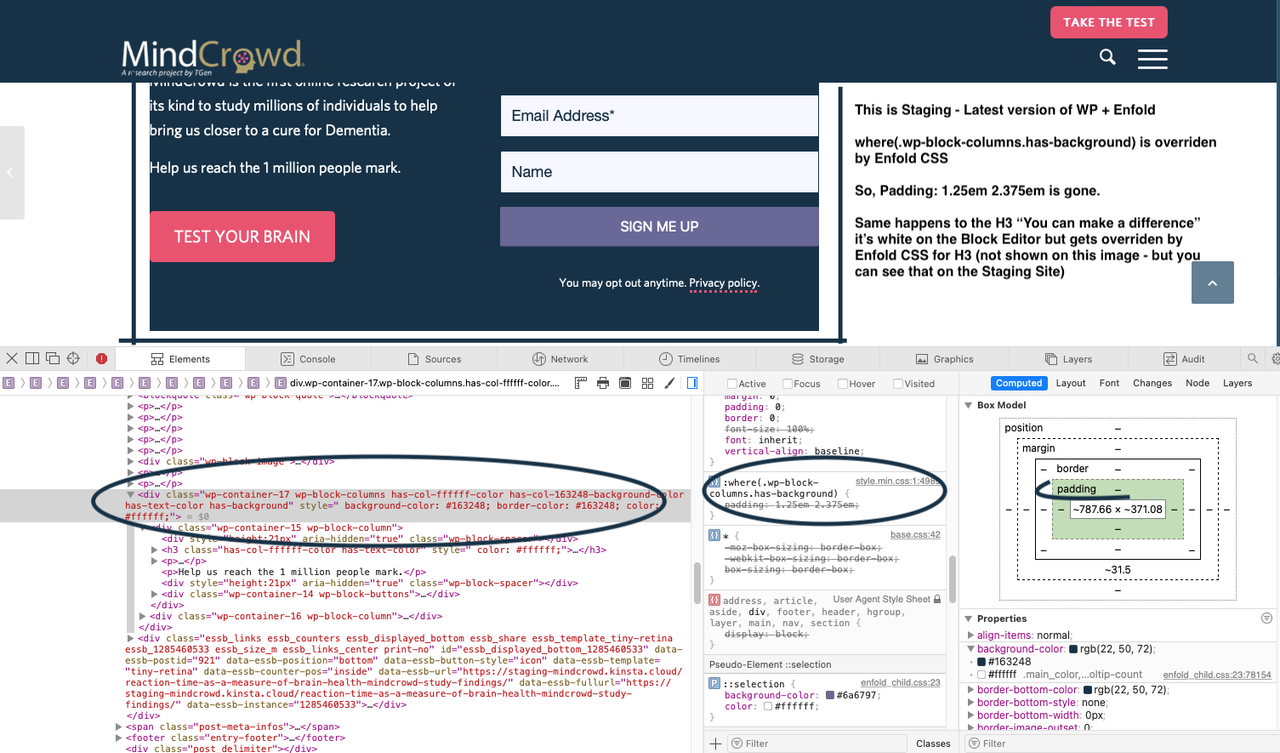
    Staging Site Updated to Latest versions of WordPress and Enfold

    And This is the Live Site – Previous version of WP + Enfold
    where(.wp-block-columns.has-background) is not overriden by Enfold CSS
    So, Padding: 1.25em 2.375em is rendered. (on the left the Highlighted area.)

    The text “YOU CAN MAKE A DIFFERENCE.” is #ffffff on the Block Editor and cannot be seen on Staging because the block editor CSS is overriden by Enfold CSS for H3.
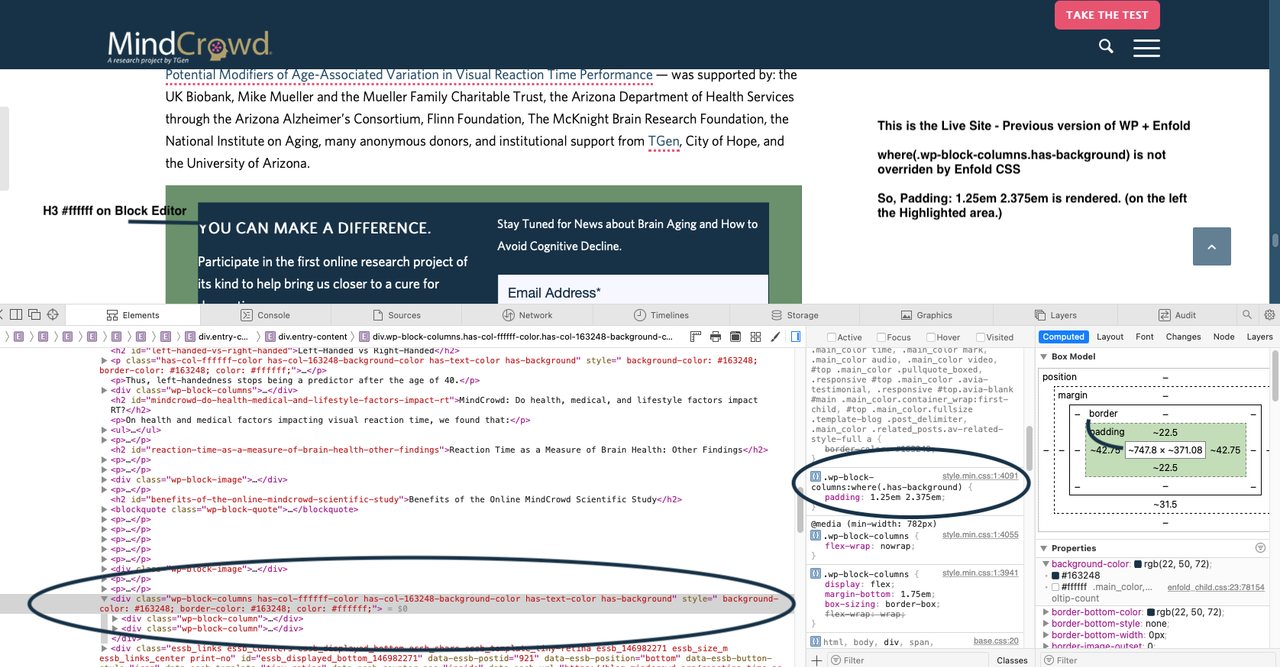
    Live site previous version of WP and Enfold 4.9

    Help!!

    Thank you!

    Havi

    #1354430

    Hi,

    Thanks for letting us know, I’ll close this thread for now then. Please open a new thread if you should have any further questions or problems.

    Best regards,
    Rikard

    Hi,

    You are welcome! :)

    For your information, you can take a look at Enfold documentation here – https://kriesi.at/documentation/enfold/

    If you have any other questions or issues, feel free to start a new thread under Enfold sub forum and we will gladly try to help you :)

    Enjoy the rest of your day!

    Best regards,
    Yigit

    #1354423
    easy-marketing
    Participant

    Hallo Enfold Team,
    1) Ist es möglich jeder Seite eine eigene Navigation zur Verfügung zu stellen?
    2) Ist es möglich unter “Demodaten importieren” nur gewünschte Unterseiten hinzuzufügen. Ich hätte gerne die Kontaktseite von Demo xy und die Portfolio Seite von Demo xy? Möchte nicht immer die ganze Demoseite importieren.
    3) Kann ich auch verschiedene Logos auf verschiedenen Seite anzeigen lassen?

    Sind bei dem Enfold Theme nur globale Einstellungen möglich, das wäre sehr schade. Und wann kommen denn mal neue Demodaten?

    LG Alex

Viewing 30 results - 25,411 through 25,440 (of 244,559 total)
