Hi,
Glad Rikard could help, if you have any further questions please create a new thread and we will gladly try to help you. Thank you for using Enfold.
Best regards,
Mike
Hi,
Glad we were able to help, if you have any further questions please create a new thread and we will gladly try to help you. Thank you for using Enfold.
Best regards,
Mike
Hi,
Glad Nikko was able to help, if you have any further questions please create a new thread and we will gladly try to help you. Thank you for using Enfold.
Best regards,
Mike
Hi,
Glad Yigit could help, if you have any further questions please create a new thread and we will gladly try to help you. Thank you for using Enfold.
Best regards,
Mike
Hi,
Glad Nikko was able to help, if you have any further questions please create a new thread and we will gladly try to help you. Thank you for using Enfold.
Best regards,
Mike
Hi,
Your site seems down right now, please check:

Are you using OVH Hosting?
You can not FTP demo files they will not install, the demo files need to be imported with the WordPress import feature for .xml files
Please see our documentation: How to manually import a theme demo
But if you are using OVH Hosting see this post, note that he says:
I tried several times, some tries were partially successful. In the end, it worked
I recommend importing your demo on a localhost install and using the Duplicator plugin to migrate/clone it to your OVH host.
Best regards,
Mike
Hi,
Thanks for letting us know, I’ll close this thread for now then. Please open a new thread if you should have any further questions or problems.
Best regards,
Rikard
Hi,
Glad to hear that you have this sorted out, and thanks for sharing your solution.
Sorry for our delayed response, but if you have any further questions please create a new thread and we will gladly try to help you. Thank you for using Enfold.
Best regards,
Mike
Hi,
You can use the Enfold Theme Options ▸ Import/Export ▸ Custom Font Manager to include custom fonts and then use css to apply those fonts to your specific headings and body text. Please see our documentation.
Best regards,
Mike
Hi,
I don’t think contacting WordPress support is all that difficult: https://wordpress.org/support/welcome/. The people on that forum should be in a much better position to help you out, since they support the default features in WordPress. We are obviously focused on our own product, and we don’t always know how things should work in regards to default WordPress features.
The padding setting is not available when Enfold is the active theme, so that might be a theme problems, but I would have to clarify that with our developers. It’s available if you activate Twentytwentyone for example: https://snipboard.io/f9rcA7.jpg
Best regards,
Rikard
Hi,
Thank you, if you have any further questions please create a new thread and we will gladly try to help you. Thank you for using Enfold.
Best regards,
Mike
Hi,
Great, I’m glad that you managed to solve your problem. I’ll close this thread for now then, please open a new thread if you should have any further questions or problems.
Best regards,
Rikard
This is a fresh WordPress installation. There are no plug ins or images yet. I can use any other theme, and I don’t have the problem. But as soon as I activate Enfold, it slows down to where I can hardly work on it.
I just purchased Enfold, and downloaded the files. When I try to install it I get the following error message:
“The Link you followed has expired”
I can install other themes without issue.
I increased the memory and solved this problem.
-
This topic was modified 3 years, 10 months ago by
 alturn.
Hi Marcos,
Thanks for contacting us!
Could you please go to https://kriesi.at/support/forum/enfold#new-post and try to re-validate your purchase code and check if that helps? :)
Cheers!
Yigit
Hello,
Webpages properly resolve with column and button colors (white and blue respectively) when viewing as a logged in Admin. However, when viewed and not logged in (typical website visitor or Admin logged out) several elements do not resolve. Impacted webpages include but are not limited to:
The StructInt.com website has no functions/plugins that require visitors to be logged in other than standard WordPress functions. Any help to resolve this issue is greatly appreciated. Administrator login credentials are provided in the Private Content area.
Thank you!
Hello, I have a simple website created using Enfold as the theme. I am using PHP 7.2, but I need to upgrade that to PHP 8.1. However, if I try upgrading to PHP 7.4 or 8.1, the site throws a critical error. This happens still even after I disable all plug-ins. If I switch to a different theme, then PHP 7.4 and 8.1 work.
It is a simple site – basically a 1 page site with a few blog posts — nothing complex at all. Why would Enfold prevent me from being able to upgrade to PHP 8.1? It’s very important that I do. Please help.
Hi Rikard,
Actually, you have the same issue. See how the padding CSS gets overridden
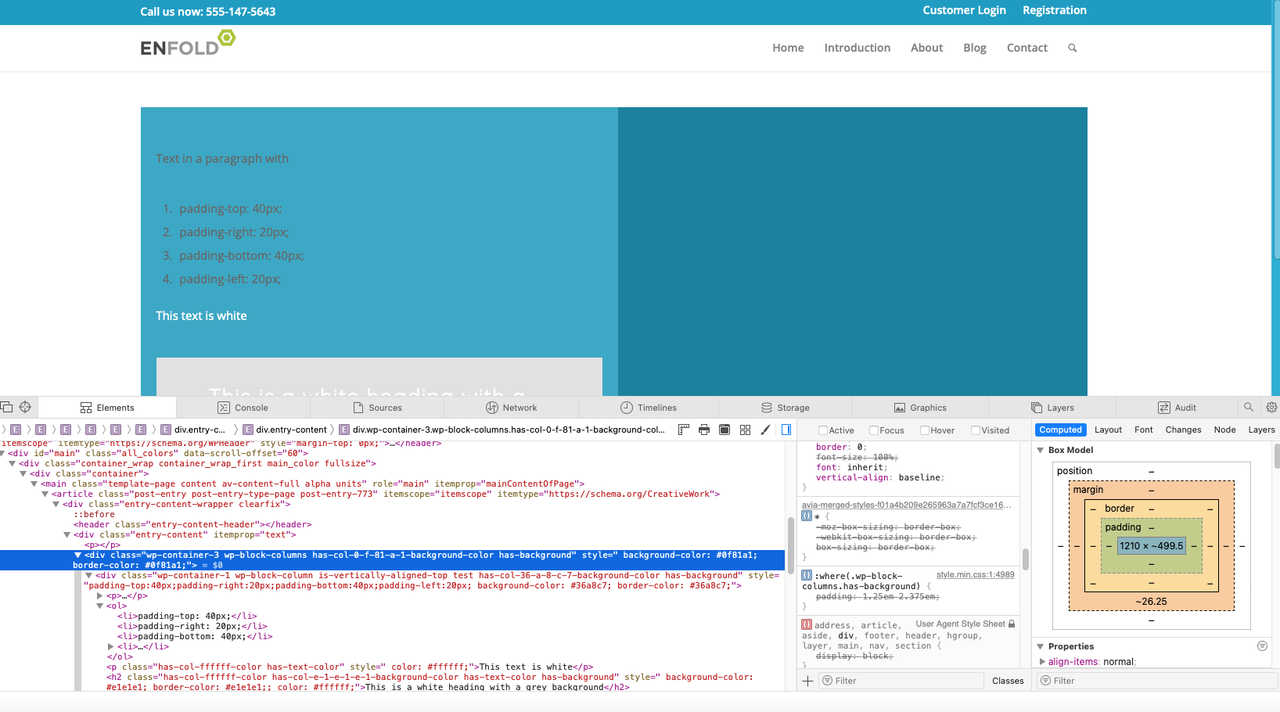
The only difference is that you added an additional background and padding to each column on the cell, Remove that. Add the background to the container, not the individual columns.
This is the code that worked before WordPress 6.0:
<div class=”wp-container-8 wp-block-columns has-col-ffffff-color has-col-163248-background-color has-text-color has-background” style=” background-color: #163248; border-color: #163248;; color: #ffffff;”>
<div class=”wp-container-6 wp-block-column”>
<p>text text text</p>
<div style=”height:21px” aria-hidden=”true” class=”wp-block-spacer”></div>
</div>
This is your code and you added padding:
`<div class=”wp-container-3 wp-block-columns has-col-0-f-81-a-1-background-color has-background” style=” background-color: #0f81a1; border-color: #0f81a1;”>
<div class=”wp-container-1 wp-block-column is-vertically-aligned-top test has-col-36-a-8-c-7-background-color has-background” style=”padding-top:40px;padding-right:20px;padding-bottom:40px;padding-left:20px; background-color: #36a8c7; border-color: #36a8c7;”>
<p>Text in a paragraph with<br><br></p>
It’s a bug. I shouldn’t have to recreate every single Gutenberg container after updating to WordPress 6.0
And, I disabled every single plugin: https://staging-mindcrowd.kinsta.cloud/es/6-consejos-para-cuidar-la-salud-cerebral-y-prevenir-el-alzheimer/
Still there.
There is only WordPress 6.0 and Enfold 5.0 (it really doesn’t matter what version of Enfold as this was a change on WordPress 6.0 that created this compatibility bug with Enfold)
Please, let me know when it’s fixed or if you have a patch for me to install. Thank you!
Havi
- padding-top: 40px;
- padding-right: 20px;
- padding-bottom: 40px;
- padding-left: 20px;<br>
<p class=”has-col-ffffff-color has-text-color” style=” color: #ffffff;”>This text is white</p>
<h2 class=”has-col-ffffff-color has-col-e-1-e-1-e-1-background-color has-text-color has-background” style=” background-color: #e1e1e1; border-color: #e1e1e1;; color: #ffffff;”>This is a white heading with a grey background</h2>
<p></p>
</div>
<div class=”wp-container-2 wp-block-column”></div>
</div>
Hi Matt,
First off, could you clear all caches and minification from the site? Also please make sure to activate the option to delete the old CSS and JS files is active under Enfold->Performance. If you should need further help, then please post admin WordPress login details in private.
Best regards,
Rikard
Good afternoon Rikard
In the meantime I updated my Enfold to Vers.5, but unfortunately it doesn’t work to adjust the colums in my mobile view. I put the login for you below, maybe you can have a look in the backend.
Have a nice weekend
Bea
Hi,
Thanks for letting us know, I’ll close this thread for now then. Please open a new thread if you should have any further questions or problems.
Best regards,
Rikard
 Indunil
Guest
Hi,
I am a freelance developer and subcontracted to update WordPress and Enfold theme for a client. There is a client complaint saying block editor in admin is unusable occasionally. I could also recreate the issue please see https://ibb.co/HpL4j92 .
The site content is in Deustshe which I dont understand and the translation of displayed message is “It looks like you are adding HTML tags or other special characters. Once all HTML tags are closed, the preview will be available again. If this message persists please check the use of special characters and try to remove them.” . This issue is not a full time issue, time to time same page’s content loads fine.
I did search about this error is your forums and couldnt find sufficient information. I do have theme key, but still have not got permission from client use it for signing up to your forum.
While I get that permission from them, or having them to contact you correctly, if you have steps for resolving this documented please provide necessary links to me.
Thanking you
Indunil
Thank you for your reply. Please forgive my lack of knowledge but how do i do this? Can you maybe send me the Enfold gym files so i can add via ftp? If this is possible which folder do i put the files in.
I have asked my host to turn up php levels but they are taking a very long time and have had no response. I need that demo data on as a amteer of urgency. I would really appreicate further assistance if possible.
best Regards alec
Hi Rudolf,
You can go to https://kriesi.at/support/forum/enfold#new-post to start new threads :)
Best regards,
Yigit
Hi,
This has already been merged into our core files, so it will be in the next version, but I don’t know when that will be released.
Please see this sticky thread: Enfold 5.0 is now available – please read this before updating we recommend that users update on a staging or development sites first.
Please try testing each of your sites on a staging site before updating all of them at once, we have tried to test the v5 update as a team before releasing, but as you see this error slipped past us. Please note that this is a major update.
Best regards,
Mike
Hi,
Thank you for your patience, the Dev Team has replied with this file update:
/enfold/config-templatebuilder/avia-shortcodes/slideshow/slideshow.js
DropBox link to file
Once you replace your slideshow.js file Please clear any cache plugin and your browser cache and check.
Please note that clearing javascript files can sometimes require a couple of tries and Safari can be hard to clear the cache, often you need to also clear the history to fully purge the cache, following these steps for Safari and note Step 4 where you will Clear the History.
This has been added to the next update.
Best regards,
Mike
Aha – now i know why.
If you open the jquery.magnific-popup.js ( in enfold/js/aviapopup folder ) – you see at the end the retina support:
and read on line 1894 :
ratio: 1 // Function or number. Set to 1 to disable.
so it is disabled !
i set a 1.5 on that ( but you had to edit the minified file ) – and now even on the simulation the @2x file opens – if the Responsive Images For Lightbox is disabled.
On real devices i could not test it if it works with that option too.
the retina support from magnific popup script is for that known nomenklatura with @2x prefix just before the file name ( …@2x.jpg etc )
one problem with big images is – that wordpress got a limitation to 2560px – but you can switch that of by child-theme functions.php snippet:
add_filter( 'big_image_size_threshold', '__return_false' );
because if you are using in a slider the 1500px x 630px image there will be no adequate image with the exact file name at 2times resolution.
for lack of retina device you could test whether it works here? Because it does not work via the simulation: Link
on image src – i can see as image source the @2x file – but the link on lightbox-added not
Hi conny,
If you are running Enfold 4.0, then the update to 5.0 has to be done manually, please refer to my replies in this thread: https://kriesi.at/support/topic/enfold-4-5-theme-update-update-failed-download-failed-a-valid-url-was-not-pro/#post-1021541
You can either update manually via FTP: https://kriesi.at/documentation/enfold/how-to-install-enfold-theme/#theme-update, or use a plugin to upload the theme zip file: https://wordpress.org/plugins/update-theme-and-plugins-from-zip-file/
If that doesn’t work then please try to delete the whole theme folder, then replace it with the new version. Make sure that you have backups of the site before starting updating.
Also please read this after you have updated: https://kriesi.at/documentation/enfold/theme-registration/
We can’t really say if you will run into problems or not, but could try to update on a staging or development version of the site first. Or you could upload the new version to a separate folder via FTP, that would give you an option to activate the old version in case there should be any problems.
Best regards,
Rikard
Hi,
Thanks for letting us know, I’ll go ahead and close this thread for now then. Please open a new thread if you should have any further questions or problems.
Best regards,
Rikard



