Did you test the plugin “hide-my-wp” with Enfold ? I can not make it work…
Not a Theme problem, but if anybody has tested, any feedback is welcome.
Thx
Hi, is it possible to get a german translation for the enfoldthem? someone got it?
many thanks
carsten
Hi tasoskouk
Your images should all be larger than 450×450 pixels for them to be cropped at the same height. For example, this image: http://tasoskoukouvitis.com/enfold/wp-content/uploads/2012/12/KitchenAid-Espresso-Machine-1.jpg is 391x530px. So when it gets cropped down to 450×450 it only crops the one edge because the other is already smaller than that size.
Then in the column view the images get scaled down to fit the column number but the width is smaller than the others so it actually uses more height to get the image to fill that whole width.
What I usually recommend is that you put all of your product images on a white background in an image editor and position them in the center. Then save all of your images at the same large size so that you are always working with the same size canvas and wordpress can manipulate the thumbnails as needed but it will all always be the same.
If not that way then just for the images that are non-standard like the mixer.
Regards,
Devin
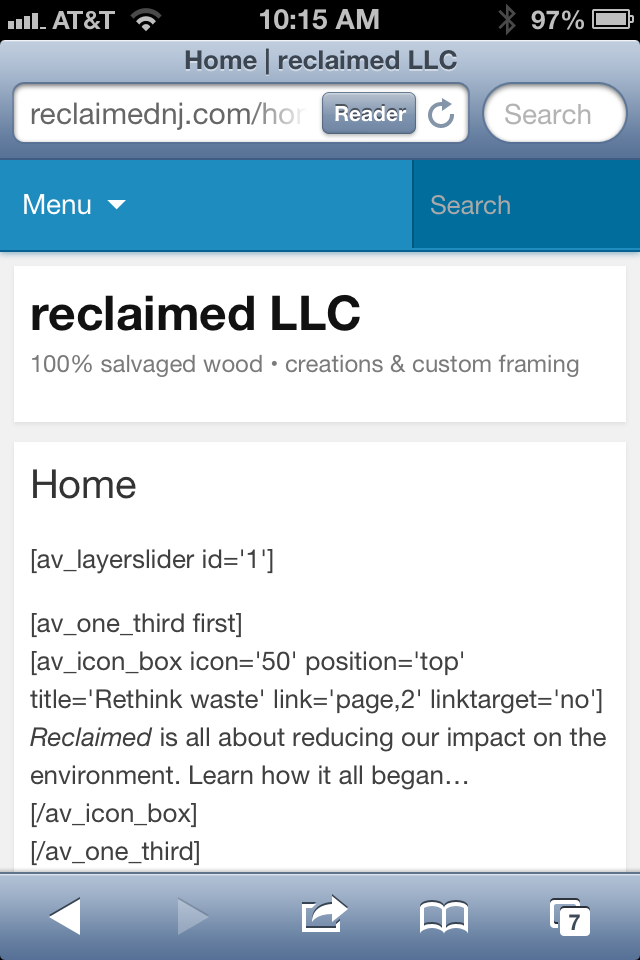
Hey there, I’m new to this theme and have built out most of my WP site using the Enfold theme. On a Mac/PC my site looks amazing using this theme, but on a mobile I keep having issues with it showing up properly. Here is what I’m seeing on my iPhone: http://reclaimednj.com/wp-content/uploads/2013/07/image-1.png
It’s really weird too. The other day it was working, then again today it is not…
Thanks in advance for the help!!
-Ben
Hi,
We’ve also installed WishList member with the Enfold theme, however when editing Pages in WordPress the “Advanced Layout Editor” no longer works.
There are no errors reported in the browser console, the editor error just fails to show.
Any ideas?
Matt
Sorry for additional post…but I just tried viewing in Google Chrome in reduced screen and noticed the same problem.
If you reduce the browser width to the point just before the menu switches to mobile/smartphone mode, then hopefully you’ll see what I’m talking about.
thanks
Well, after going to the panel / Enfold – I enabled the page of the beginning of the page (homepage), this setting only after the shortcord [layerslider id = “1”] worked – in visual mode.
And also being necessary to fix the builder settings, entering @
editing the wp-content/themes/enfold/config-layerslider/LayerSlider/builder.php
BEFORE ==
/ / Get file transition
if (file_exists ($ custom_trs)) {
$ data = file_get_contents ($ custom_trs);
Else {}
$ data = file_get_contents ($ sample_trs);
}
AFTER ==
/ / Get file transition
if (file_exists ($ custom_trs)) {
$ data = @file_get_contents ($ custom_trs);
Else {}
$ data = @file_get_contents ($ sample_trs);
}
#isthehint
Regards and sorry my english,
Luis Girardi
see http://www.nitrosul.com/NIA
Hi Nick
Think you overlooked the first sentence that reads
“Among the many common myths perpetuated about the game of blackjack are the following: “,
Anyway the menu problem occurs when viewed on iPad in portrait. Instead of the entire mega menu drop down appearing, only a small portion of the drop down appears…like a single column dropdown with the remaining columns that should appear to the right, cut off.
cheers
Hi,
I was reading your page http://livedealer.org/dev/live-casino-games/live-blackjack/house-edge-comparisons/ , and you have some information on there which is not correct. Counting cards is not illegal.
Let me explain. Blackjack is legally defined as a game of chance just as are slot machines. If a law made counting cards illegal that would mean that skill is involved that can influence the outcome, which is in fact true, but that would then make blackjack closer to tournament poker, where a number of judges in various regulated and unregulated markets around the world already ruled that blackjack is a game with a significant skill component. Though I don’t know laws in your country, it is not illegal to count cards in any casino in the United States.
However since a casino is private property, if they suspect you of counting, they will ask you to leave and ban you as is their right since it is their private property for any reason not covered by civil rights legislation (age, gender, etc..)
In fact in Atlantic City , the NJ Supreme Court ruled that casinos are not allowed to ban players for counting cards since by state law, blackjack is a game of chance with zero skill component. They still ban the players who count though officially they give some other reason for the ban.
In either scenario, counting cards is perfectly legal.
I looked at your menu in Google Chrome in various screen sizes and I don’t see any problems. Please elaborate and illustrate what they are.
Thanks,
Nick
I have deleted that line but nothing changed… You are talking about wp-content/themes/enfold/index.php line 23 right?
1) Maybe you forgot to remove the http:// prefix? Make sure that the protocol is set to “mailto:”

2) Yes – insert following code into the quick css field and adjust the font size value
#top .social_bookmarks li a {

font-size: 30px;

}
3) You can use a plugin like http://wordpress.org/plugins/wp-google-fonts/ to install more fonts. However note that this can increase the page loading time and I’d recommend to stick with the default fonts (one font for headlines and one font for the body text).
4) Yes – Kriesi just hides it with css. Insert following code into the quick css field
@media only screen and (max-width: 767px){

.responsive #top #main .sidebar {

display: block  !important;

border: none !important;

}

}
5) At the moment the layout builder is only bundled with the Enfold theme but we’ll release more themes in the future. Older themes (like Replete, Propulsion, Angular, Choices, Eunoia, etc.) come with a “Template Builder” which is similar to the layout builder.
Hey!
You can use the “nextpage” quicktag
<!--nextpage-->
to split your page/post content. However note that it DOES NOT work with the “advanced layout builder” and you MUST use the “Default editor”.
Regards,
Peter
Hi,
The rotating company logos are made using the Layer Slider. It is a very wide single image with the logo laid out, moving from right to left on an infinite loop.
Regards,
Ismael
Hi,
You can add Media Queries and choose to hide them on desktop screen widths. Inspect the menu that you want to hide look for the unique menu li id. Add this on your custom.css or Quick CSS.
@media only screen and (min-width: 1024px) {

/* Add your Desktop Styles here */

#menu-item-755 {

display: none;

}

}
This will hide the menu on screens with minimum of 1024px resolution.
Regards,
Ismael
Hi,
You can watch tutorial videos about Enfold here: https://vimeo.com/channels/aviathemes
Regards,
Ismael
Hi,
Go to includes > admin > register-admin-options.php, find this code:
'Yellowtail'=>'Yellowtail',
Add this code below, to register the Maven Pro font.
'Maven Pro'=>'Maven Pro',
You’ll be able to select it on Enfold > Styling > Heading Font.
Regards,
Ismael
Hi!
Open up enfold/js/avia.js and delete
// decreases header size when user scrolls down

avia_header_size();
Regards,
Peter
1) You can use a plugin like: http://wordpress.org/plugins/post-types-order/ if you want to change the sort order manually or use the code from this thread: https://kriesi.at/support/topic/blog-posts-and-grid-layout
2) Open up wp-contentthemesenfoldframeworkphpclass-framework-widgets.php and replace
for ($i = 1; $i <= 20; $i++ )
with
for ($i = 1; $i <= 50; $i++ )
Hi,
I was trying to give new typo to our http://www.musikzentrale.net, but for some reason font will not change. Originally, i was running on Open Sans, both, head and body styled vie Enfold -> Styling -> General. When i switch to any other combination, nothing happens, except when i use Web Safe Fonts for body.
I have been through custom.css and quick css, but there is no font set. Any idea? I would love to add some spice with Coda & MAven Pro.
Thanks, Sebastian.
Hello,
I am trying to set up a shop on my website using Enfold & Woocommerce but it doesn’t display so good. I am trying to do something similar to the demo shop on Theme Forest but I can’t make the sidebar disappear on my pages:
– On the shop page, I want to right sidebar gone : http://openhomeautomation.net/shop/
– On the product page, I want this left sidebar gone : http://openhomeautomation.net/product/home-automation-arduino/
Does anybody know how to fix this ? Thanks !
Hello,
Once again, Enfold is a great theme!
Cross-browser testing went really well. Only one thing I’d like to bring up…
In IE8, the buttons are only showing the outline, not the fill color. And since the text is colored white, it just looks like a blank rectangle. I’m guessing it has something to do with IE8 not wanting to render the gradient.
http://stage.stankimballdds.com
It’s very possible that I inadvertently changed something in the CSS that’s causing this. But I don’t recall changing any of the button settings.
When you get a moment, please let me know if there’s an easy fix.
Thank you!
I know this is a question that is outside the scope of typical support, so I don’t expect a resolution, . . . but I’m just curious if it’s possible to customize elements similar to the example (link) I’ve attached (torn-paper look) applying CSS or another method. I’m an expert at photoshop, so creating the images would be easy if it came to that. I just wouldn’t know how to implement it into the theme elements. Hope I’m making sense.
http://www.fascinationstreet.se/
Regardless, I’m very excited to be trying out the Enfold theme. Wow! So many beautiful features!
-Patrick
jwferne:
Just put up our site on Thursday. http://www.tfgsearch.com
I really enjoyed putting this together and the support team here rocks! Thanks guys!!!
– John
Could you expand on how you did the rotating company logos please. Was it an “Easy Slider”? Was it a Layer Slider? If so what were the settings? Multiple slides or just one?
<<Please don't ask support type question in this topic. You can contact site authors if the site has contact information or create a new topic but this kind of thread should be left to showing off alone :) >>
Does anyone know what kind of code a form in Enfold would need to ban certain email domains from being able to submit?
I’ve got a montage of images that overlap each other and each have different image maps. I created the image maps in Dreamweaver and now I’m trying to copy that html into Enfold, but Enfold just wants to make the entire image a single link ( http://withthisring.org/fundraising-test/ ). I’ve also tried downloading the “Insert HTML Snippet” Plug-in to see if that might help, but it did not. Would appreciate any suggestions to get this to work. Thanks!
Hello
I’m trying to make the buttons on my homepage move to a different sections on my homepage simialr to your homepage 7 example:
http://kriesi.at/themes/enfold/homepage/home-v7-one-page-portfolio/
I tried to follow the instructions on this thread:
https://kriesi.at/support/topic/button-on-click-move-to-part-of-the-page, but you don’t example how to add an element id.
Please could you give me some instructions.
Thank you