Hi,
I added the code Team VDLP shared on this post – https://kriesi.at/support/topic/styling-custom-post-types-broken-since-enfold-5-0/#post-1360792 to the bottom of functions.php file of your child theme and that helped.
Please review your website :)
Best regards,
Yigit
 Alexander Baum
Hello, all plugins are disabled. The error remains unchanged. see below
Wenn du Hilfe bei diesem Problem suchst, wirst du möglicherweise nach einigen der folgenden Informationen gefragt:
WordPress-Version 6.0.1
Aktives Theme: Enfold (Version 5.1.1)
Aktuelles Plugin: (Version )
PHP-Version 8.0.20
Fehler-Details
==============
Ein Fehler vom Typ E_ERROR wurde in der Zeile 62 der Datei /var/www/vhosts/26164.s1.creoline.cloud/httpdocs/wp-content/themes/enfold/config-layerslider/LayerSlider/assets/classes/class.km.autoupdate.v3.php verursacht. Fehlermeldung: Uncaught Error: Call to undefined function extract() in /var/www/vhosts/26164.s1.creoline.cloud/httpdocs/wp-content/themes/enfold/config-layerslider/LayerSlider/assets/classes/class.km.autoupdate.v3.php:62
Stack trace:
#0 /var/www/vhosts/26164.s1.creoline.cloud/httpdocs/wp-content/themes/enfold/config-layerslider/LayerSlider/assets/classes/class.km.autoupdate.plugins.v3.php(22): KM_UpdatesV3->__construct()
#1 /var/www/vhosts/26164.s1.creoline.cloud/httpdocs/wp-content/themes/enfold/config-layerslider/LayerSlider/assets/init.php(94): KM_PluginUpdatesV3->__construct()
#2 /var/www/vhosts/26164.s1.creoline.cloud/httpdocs/wp-content/themes/enfold/config-layerslider/LayerSlider/layerslider.php(65): require(‘…’)
#3 /var/www/vhosts/26164.s1.creoline.cloud/httpdocs/wp-content/themes/enfold/config-layerslider/config.php(418): include_once(‘…’)
#4 /var/www/vhosts/26164.s1.creoline.cloud/httpdocs/wp-includes/class-wp-hook.php(307): Avia_Config_LayerSlider->handler_include_layerslider()
#5 /var/www/vhosts/26164.s1.creoline.cloud/httpdocs/wp-includes/class-wp-hook.php(331): WP_Hook->apply_filters()
#6 /var/www/vhosts/26164.s1.creoline.cloud/httpdocs/wp-includes/plugin.php(476): WP_Hook->do_action()
#7 /var/www/vhosts/26164.s1.creoline.cloud/httpdocs/wp-settings.php(598): do_action()
#8 /var/www/vhosts/26164.s1.creoline.cloud/httpdocs/wp-config.php(76): require_once(‘…’)
#9 /var/www/vhosts/26164.s1.creoline.cloud/httpdocs/wp-load.php(50): require_once(‘…’)
#10 /var/www/vhosts/26164.s1.creoline.cloud/httpdocs/wp-admin/admin.php(34): require_once(‘…’)
#11 /var/www/vhosts/26164.s1.creoline.cloud/httpdocs/wp-admin/themes.php(10): require_once(‘…’)
#12 {main}
thrown
Hi,
Thanks for that. First off, could you try updating the theme to the latest version (5.1.1) to see if that helps please? https://kriesi.at/documentation/enfold/how-to-install-enfold-theme/#theme-update.
Best regards,
Rikard
Hey Highlander-2013,
Could you try updating the theme to the latest version (5.1.1) to see if that helps please? https://kriesi.at/documentation/enfold/how-to-install-enfold-theme/#theme-update.
Best regards,
Rikard
Hey condonp,
I can’t reproduce this problem, the Easy Slider 1500*430 setting is working as it should using Enfold 5.1.1: https://wpexpert.se/enfold/easy-slider/. If you should need any further help with this, please post a link to where we can see the actual problem.
Best regards,
Rikard
Hello,
I updated enfold to 5.1.1 via FTP and now got an fatal error. Even if I change the complete folder to the older Version, the fatal error is still there. Have you got any tipps to fix this problem?
Hi,
Thanks for that. I tried activating Enfold, but the site returns a critical error message. Do you have a backup which you could restore? Also, do you have server error logs which you could share with us?
Best regards,
Rikard
Hey Frans,
Thank you for the inquiry.
Are you trying to create a carousel type of slideshow where it skips one item at a time instead of the whole set of slides? Currently, this will work if the slide only contains a single column, at least with the current implementation of the slider script. It is not going to work for slides with multiple columns such as the content slider.
You may need to hire a freelance developer to help you modify the enfold/config-templatebuilder/avia-shortcodes/slideshow/slideshow.js file and the config-templatebuilder/avia-shortcodes/contentslider/contentslider.php template. You can also contact our partner Codeable for this kind of customization.
// https://kriesi.at/contact/customization
Best regards,
Ismael
Hey Gabriela,
Thanks for contacting us!
I am afraid the only way to access updated theme files for you is to have an access to ThemeForest account that was used when purchasing the theme.
Envato has replaced their API keys with Personal Tokens and we have implemented those changes in Enfold 4.5. Any older version than that requires a manual update first (you can download the theme files by logging into your ThemeForest account and going to Downloads page) and then you can insert your Personal Token for auto updates – https://kriesi.at/documentation/enfold/theme-registration/#how-to-generate-a-envato-personal-token.
Please try contacting Envato support. They might be able to help you recover your ThemeForest account but they would probably ask for a proof of purchase :)
Best regards,
Yigit
Hey Jan,
Thank you for the inquiry.
There might be an issue with the merged scripts. Please try to toggle or disable the Enfold > Performance > File Compression settings and temporarily disable the cache plugin, then refresh the dashboard. Let us know if that works. If not, please provide the login details in the private field so that we can check the issue further.
Best regards,
Ismael
 Gabriela Andrade
Guest
Hello,
I was recently hired as a web developer at my company. Our CEO had purchased a key for the Enfold theme for our WordPress site many years ago. I was troubleshooting an issue today and realized that we are still running Enfold 4.4.1. Our dashboard seems to think it is the latest available version. I wanted to check the validity of our API key and/or manually update the version using FTP, but our CEO does not remember his password to login to ThemeForest, and he is not sure which email address the password reset is being sent to, if the email is even one of his active accounts. We would like to avoid re-purchasing the theme. What would be your recommended course of action?
 Raghava
This reply has been marked as private.
Hey tonyb47,
The update to 5.1 has to be done manually from the version you are running, please refer to my replies in this thread: https://kriesi.at/support/topic/enfold-4-5-theme-update-update-failed-download-failed-a-valid-url-was-not-pro/#post-1021541
You can either update manually via FTP: https://kriesi.at/documentation/enfold/how-to-install-enfold-theme/#theme-update, or use a plugin to upload the theme zip file: https://wordpress.org/plugins/update-theme-and-plugins-from-zip-file/
If that doesn’t work then please try to delete the whole theme folder, then replace it with the new version. Make sure that you have backups of the site before starting updating.
Also please read this after you have updated: https://kriesi.at/documentation/enfold/theme-registration/
Best regards,
Rikard
yes – it is because if there is a caption – it tries to put each image in a p-tag.
if you switch to text-mode – you can see it:
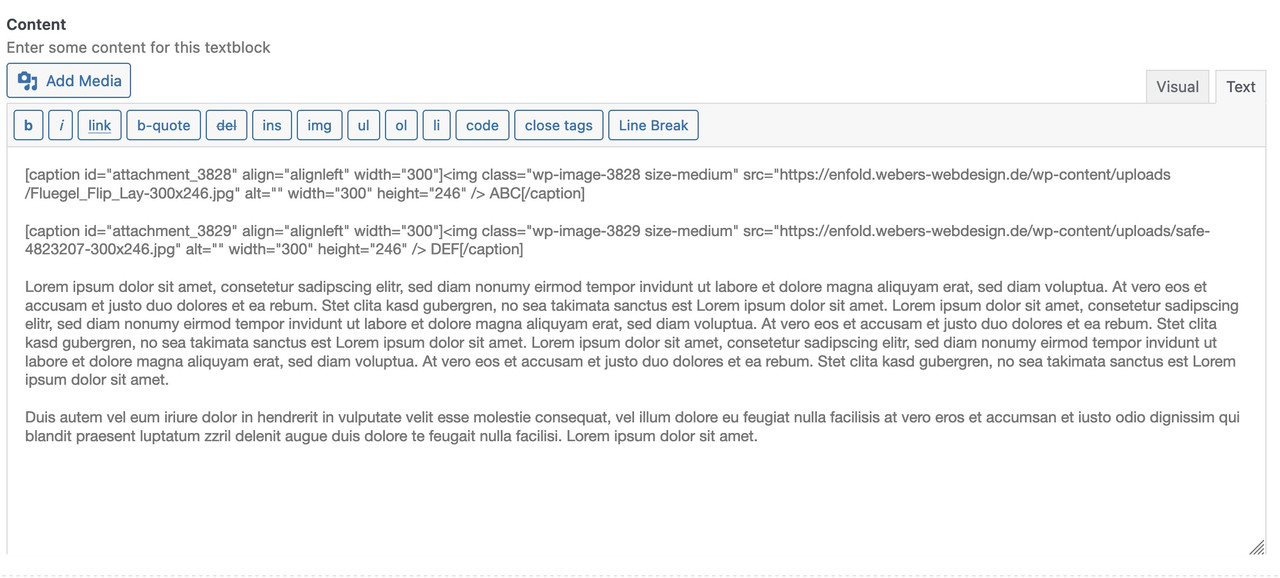
if you change it to:
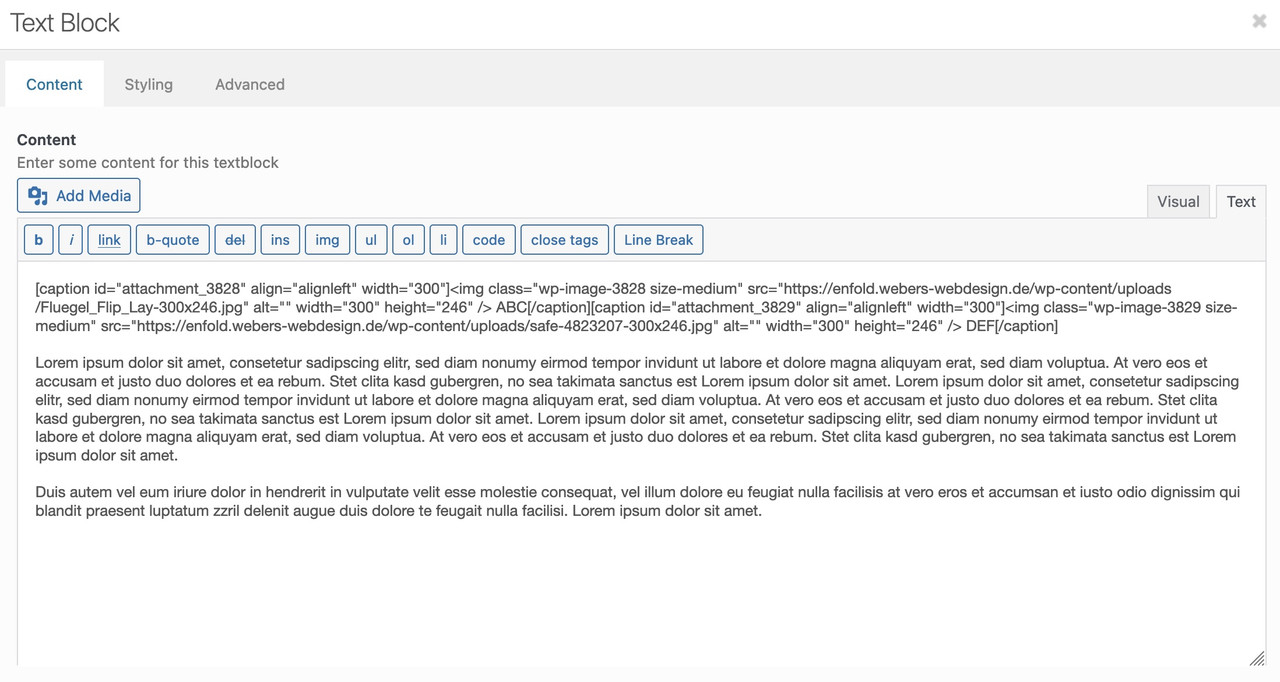
these images are besides each other. BUT editing that text-block again – it will again place that return.
see example page from above: https://enfold.webers-webdesign.de/magoo/
see comment inside the css rule – a change to a different display is not possible – allthough the selector is more specific and rule is set to important.
______
now to your accordion. Can you show us a page it concerns? but at least one of the Enfold sample pages?
Hi Peter,
Please try the following in Quick CSS under Enfold->General Styling:
@media only screen and (min-width: 1200px) {
.page-id-330 #av-layout-grid-2 .iconbox_top .iconbox_content {
    height: 370px;
    min-height: 370px;
}
}
Best regards,
Rikard
-
This reply was modified 3 years, 8 months ago by
 Rikard.
Hi,
Great, I’m glad that Ismael could help you out. I’ll close this thread for now then, please open a new thread if you should have any further questions or problems.
Best regards,
Rikard
First – these are snippets for child-theme functions.php!
to reduce the compression level of calculated images :
/**** abstellen der von Enfold auf 100 gesetzten jpeg Qualität  *****/
add_filter("avf_jpeg_quality", "avf_set_quality_mod", 9999, 1);
add_filter("avf_wp_editor_set_quality", "avf_set_quality_mod", 9999, 1);
function avf_set_quality_mod($quality) { $quality = 55; return $quality;}
A) for WordPress image size formats
// Remove unneeded WP image sizes
// Remove default image sizes here.
function prefix_remove_default_images( $sizes ) {
// do NOT remove small and medium sizes, they are used in backend Media Library!
// unset( $sizes['small']); // 150px
// unset( $sizes['medium']); // 300px
 unset( $sizes['large']); // 1024px
 unset( $sizes['medium_large']); // 768px
 return $sizes;
}
add_filter( 'intermediate_image_sizes_advanced', 'prefix_remove_default_images' );
B) for Enfold image size formats
function remove_enfold_image_sizes() {
// do NOT remove widget size, is used in backend portfolio items!
// remove_image_size('widget');
  remove_image_size('square');
  remove_image_size('featured');
  remove_image_size('featured_large');
  remove_image_size('portfolio');
  remove_image_size('portfolio_small');
  remove_image_size('gallery');
  remove_image_size('magazine');
  remove_image_size('masonry');
  remove_image_size('entry_without_sidebar');
  remove_image_size('entry_with_sidebar');
  remove_image_size('shop_thumbnail');
  remove_image_size('shop_catalog');
  remove_image_size('shop_single');
  remove_image_size('shop_gallery_thumbnail');
}
add_action('init', 'remove_enfold_image_sizes');
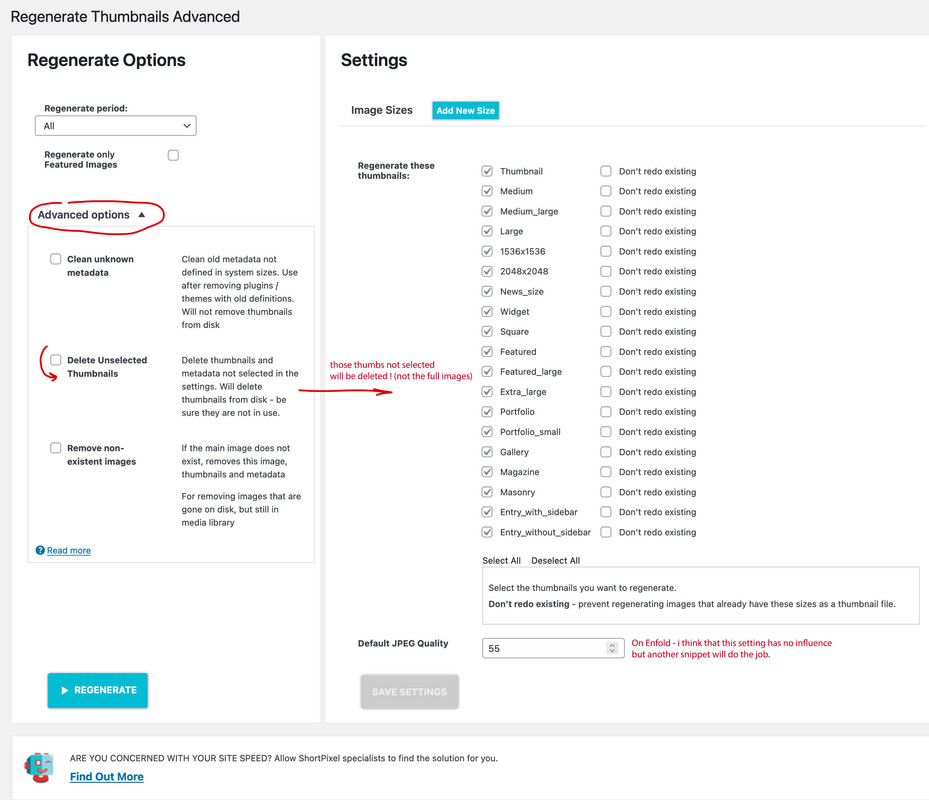
After inserting these snippets you had to recalculate thumbnails – use a plugin for that
i prefer: regenerate-thumbnails-advanced
Hello;
We have a WordPress site that uses Enfold v3.8. This site was done by a developer that we have lost contact with and there is no username or Key information in the WP Enfold Admin.
We have purchased Enfold v5 and would like to update our site to this latest version.
How can we do this without losing the current site content and design?
Thank you for your help.
if your search results does not show too many results – you can easily increase the number of results to a high enough value – so there will be no pagination:
function enfold_search_results_per_page( $wp_query ) {
	if ( is_search() ) {
		$wp_query->query_vars["posts_per_page"] = 999;
	}
}
add_filter( 'pre_get_posts', 'enfold_search_results_per_page' );
Hi, I used reCaptche V2/V3 a lot of times in Enfold, without any problems. Now I’ve integrated the keys of reCaptcha in the common way, but the check failed. Is there an issue with the latest update? Everything is in the latest version. PHP 8.0.
I’ve made a 100 second video of the process. What is the problem?
Thank you in advance
Jan
Hello
the featured images (which are shown on top of every blogpost) are actually linked so that the image opens in a lightbox.
I dont want that.
The image should not have a link….just the image.
How do i tell Enfold not to link the featured image?
And this also:
I use nextgengallery
When i click an image from the gallery it opens twice – one time by the NGG-lightbox and behind it there is another lightbox – probably from Enfold.
What i need:
NGG gallery images open by NGG-lightbox
All other images (except the featured image) handeld by the Enfold lightbox if i decided to put a link on it
Eva Simone
are your svg’s monochrome black?
then go to fontello.com – and drag&drop the svg’s to the input field on top of that page.
give a name to your set and download the zip from there. this zip upload to enfold.
if fontello got some error warnings – f.e. on compound path – this little detour can help: https://kriesi.at/support/topic/custom-icons-showing-blank/#post-1357932
if not ( multicolor svg’s) we had to find a different solution.
Hello
the featured images (which are shown on top of every blogpost) are actually linked so that the image opens in a lightbox.
I dont want that.
The image should not have a link….just the image.
How do i tell Enfold not to link the featured image?
Eva Simone
Hi there,
Since Enfold 5.0 (and latest version) something happend with HTML structure in combination with custom post types.
With CPT UI we create custom post types and enable Avia Builder to create pages. Since Enfold 5.0 Avia builder sections are not included anymore in:
<div id=”main” class=”all_colors”>
It looks like this main div closes too early. Please check out the screenshot in the link below:
https://snipboard.io/G8JXKP.jpg
Hope you can assist with this issue.
Kind regards,
Team VDLP
Hi,
Please add following to bottom of Functions.php file of your child theme to enable post type option :)
add_theme_support( "add_avia_builder_post_type_option" );
Regards,
Yigit
-
This reply was modified 3 years, 8 months ago by
 Yigit.
I just installed the theme and in my WordPress dashboard it is showing Enfold with the theme options; however, when I go in to customize my site, I have extremely limited options and the format is basically just the articles listed one after another. No slider or options to configure slider or anything else.
I think i registered it with a token correctly also.
Any thoughts on things to change?
Hey,
You are welcome!
If you have any other questions or issues, please register to our support forum – https://kriesi.at/support/register/ using your purchase code and start new threads under Enfold sub forum :)
Best regards,
Yigit
Alexander BaumGuest
Hallo,
wir wollten gerade Euer Theme installieren. Leider kommt es zu einem Fehler.
Könnt Ihre das bitte prüfen.
Danke Alexander Baum
Wenn du Hilfe bei diesem Problem suchst, wirst du möglicherweise nach einigen der folgenden Informationen gefragt:
WordPress-Version 6.0.1
Aktives Theme: Enfold (Version 5.1.1)
Aktuelles Plugin: (Version )
PHP-Version 8.0.20
Fehler-Details
==============
Ein Fehler vom Typ E_ERROR wurde in der Zeile 62 der Datei /var/www/vhosts/26164.s1.creoline.cloud/httpdocs/wp-content/themes/enfold/config-layerslider/LayerSlider/assets/classes/class.km.autoupdate.v3.php verursacht. Fehlermeldung: Uncaught Error: Call to undefined function extract() in /var/www/vhosts/26164.s1.creoline.cloud/httpdocs/wp-content/themes/enfold/config-layerslider/LayerSlider/assets/classes/class.km.autoupdate.v3.php:62
Stack trace:
#0 /var/www/vhosts/26164.s1.creoline.cloud/httpdocs/wp-content/themes/enfold/config-layerslider/LayerSlider/assets/classes/class.km.autoupdate.plugins.v3.php(22): KM_UpdatesV3->__construct()
#1 /var/www/vhosts/26164.s1.creoline.cloud/httpdocs/wp-content/themes/enfold/config-layerslider/LayerSlider/assets/init.php(94): KM_PluginUpdatesV3->__construct()
#2 /var/www/vhosts/26164.s1.creoline.cloud/httpdocs/wp-content/themes/enfold/config-layerslider/LayerSlider/layerslider.php(65): require(‘…’)
#3 /var/www/vhosts/26164.s1.creoline.cloud/httpdocs/wp-content/themes/enfold/config-layerslider/config.php(418): include_once(‘…’)
#4 /var/www/vhosts/26164.s1.creoline.cloud/httpdocs/wp-includes/class-wp-hook.php(307): Avia_Config_LayerSlider->handler_include_layerslider()
#5 /var/www/vhosts/26164.s1.creoline.cloud/httpdocs/wp-includes/class-wp-hook.php(331): WP_Hook->apply_filters()
#6 /var/www/vhosts/26164.s1.creoline.cloud/httpdocs/wp-includes/plugin.php(476): WP_Hook->do_action()
#7 /var/www/vhosts/26164.s1.creoline.cloud/httpdocs/wp-settings.php(598): do_action()
#8 /var/www/vhosts/26164.s1.creoline.cloud/httpdocs/wp-config.php(78): require_once(‘…’)
#9 /var/www/vhosts/26164.s1.creoline.cloud/httpdocs/wp-load.php(50): require_once(‘…’)
#10 /var/www/vhosts/26164.s1.creoline.cloud/httpdocs/wp-admin/admin.php(34): require_once(‘…’)
#11 /var/www/vhosts/26164.s1.creoline.cloud/httpdocs/wp-admin/themes.php(10): require_once(‘…’)
#12 {main}
thrown
Hi Antonio,
Could you please try adding following code to bottom of Quick CSS field in Enfold theme options > General Styling tab?
html {
  background-color: white;
}
Best regards,
Yigit
Hey guys,
my website is not showing in the Google Search since 6 month.
Is there a technical problem from enfold? I register the site in the Google Search Console, but it doesn´t work.
I deactivated the plugin yoast, but it doesn´t work.
I´m not happy, please help me!
Thank you very much.



