Hi Gianluca,
You can change it by adding this CSS code in Enfold > General Styling > Quick CSS (just change the font size value):
.home .av-magazine .av-magazine-content-wrap .av-magazine-title {
    font-size: 18px;
}
Hope it helps.
Best regards,
Nikko
Ein sehr gutes Plugin – schon auch in der Freien Version ist WP Armour
Dort im Link oben kannst Du auch schon nachlesen, wo das Plugin sich automatisch einbindet. Enfold ist in der Liste nicht aufgeführt, aber auch Enfold Kontaktformulare werden unterstützt.
Ich bin mir nicht sicher, ob das nur bei meiner Pro Version so ist, aber die “Enable 2 Level Spam Check” sollte man nicht aktivieren. Hier hatte ich zuviele false positiv Resultate.
Such mal nach Erfahrungen mit dem Plugin – danach wirst du dein f12 Captcha ausmisten.
Hallo Supportteam,
da ja einige Abmahnungen wegen Google Fonts public wurden, haben wir alle Google Dienste im Enfold deaktiviert, also auch reCapture.V2/V3..
Auf einer anderen Webseite haben wir das F12 Captcha/Honeypot (CF7) für Contact Form eingebaut… funktioniert recht gut..
Gibt es eine Doku in der beschrieben ist, wie man ein anderes Kontaktformular wie ContactForm etc. einbindet oder zumindest das Plugin von F12 Captcha/Honeypot (CF7) ?
Denn seit der Deaktivierung kommen doch etliche Spams über das Kontakformular…
Danke vorab..
Alexander
Hi Silvio,
The child theme won’t get updated unless you make a change to it, only the parent theme (Enfold) gets updated.
We’ll wait for the staging site then.
Best regards,
Nikko
Hi troupdim,
Here’s how you can register the theme: https://kriesi.at/documentation/enfold/theme-registration/#register-my-theme
Hope it helps.
Best regards,
Nikko
Hey sky19er,
The Sticky Header option has always been ignored on mobile devices:

Perhaps you had used some javascript or css for a sticky mobile header, such as:
@media only screen and (max-width: 767px) {
  .responsive #top #wrap_all #header {
    position: fixed;
  }
  .html_header_top.html_header_sticky #top #wrap_all #main {
  	padding-top: 98px !important;
  }
}
Best regards,
Mike
Hey Martin,
Thanks for your question, theme updates are for life from your Envato Theme Forest account, and support is for 6 months unless you upgrade to the 12-month option.
Best regards,
Mike
Hi,
Thanks for the clarification. Did you try adjusting the font size for the H1 element for small screen sizes under Enfold->Typography?
Best regards,
Rikard
Hey Flipper5183,
Could you try updating the theme to the latest version (5.4.1) to see if that helps please? https://kriesi.at/documentation/enfold/how-to-install-enfold-theme/#theme-update. Also make sure to fix your missing SSL certificate.
Best regards,
Rikard
Hi satucker,
You can put back the original code on the other files.
Just make sure every time you update the theme, you’ll need to update this file as well since updates remove all changes you made in the Enfold theme.
Best regards,
Nikko
Hi,
The previous webmaster installed Enfold 3.6 but didn’t enable auto-updates. I’ve now taken over and updated to 5.4, however the fonts are displaying incorrectly even though no settings or CSS have been changed.
If I change back to 3.6 everything instantly returns to normal. 3.6 is currently active, but once you activate 5.4 and reload the homepage you’ll see the font change (most noticeable in H1 tags but affects others too)
Please have a look and advise.
Thanks
I am currently in the process of setting up an Enfold installation on a subdomain of my primary website. The goal is to showcase the website to the customer in a nearly finished state. In the future, is it possible to obtain a new license for a different domain and transfer it to Enfold without having to reinstall and set up everything again? I am not very familiar with how Enfold’s licensing works, so any assistance would be greatly appreciated.
Best regards from Salzburg,
Konsti
Hi,
Glad we were able to help, if you have any further questions please create a new thread and we will gladly try to help you. Thank you for using Enfold.
Best regards,
Mike
Hi,
Thanks for your patience and the link to your site, in the theme settings Enfold Theme Options ▸ Advanced Styling you have picked the option Menu Links in overlay/slide out twice, once with a white background color and once with a blue background:

Try removing the option with the blue background color by using the red X and then save the theme options and Then clear your browser cache and any cache plugin, and check.
Best regards,
Mike
Hi,
Glad Yigit could help, if you have any further questions please create a new thread and we will gladly try to help you. Thank you for using Enfold.
Best regards,
Mike
Hi,
Glad to hear that you have this sorted out, if you have any further questions please create a new thread and we will gladly try to help you. Thank you for using Enfold.
Best regards,
Mike
Hi,
Glad we were able to help, if you have any further questions please create a new thread and we will gladly try to help you. Thank you for using Enfold.
Best regards,
Mike
Hi,
Thanks for the feedback, on your shop page I see many underlined blue links, excerpt for what seems to be product titles with an H4 heading, they have a strange class that I don’t recognize uagb-rm__title, I assume this is from a plugin but I can’t tell since your wpo-minify plugin is active, nonetheless try this css to override it:
#top h4.uagb-rm__title a {
    color: blue;
}
After applying the css, please clear your browser and minify plugin cache and check.
The expected results:

Best regards,
Mike
Hey Enfold
I have tested the contact form and the e-mails are not be received by the e-mail set as recipient in the backend.
Will you please help me find a solution.
I have put a link so you can log in to the site and take a closer look
Thanks
Alan ;)
Hi “Support”,
first of all: great theme, we’re making more and more customers buy Enfold ;-)
Is there a way, to change the layout and design of category pages without changing PHP files?
Is it possible to use the Avia page builder to create good looking category pages?
I’ll explain in the private section more detailled, what we want to achieve.
Thanks a lot
Hey,
How to I open this grey element to delete it???
That’s the default widget. You can replace the default widgets with your own in WordPress dashboard > Appearance > Widgets
I tried the support forum for a question and never got a reply.
It doesn’t look like you started any threads: https://kriesi.at/support/profile/alona123/topics/
You can start new threads under Enfold subforum https://kriesi.at/support/forum/enfold#new-post
Cheers!
Yigit
Hi Yigut,
Thanks for your help…
I went ahead and bought the Enfold theme.
I am more of a video editor and am used to finding work-arounds to problems.
I used the Enfold Modern demo and I am finishing the home page. I got to the bottom and it looks like a dark grey footer.
I cant edit it or delete it.
The text says—
Interesting Links
Lorem ipsum dolor sit amet, consectetuer adipiscing elit. Aenean commodo ligula eget dolor.
Where to find us
1818 N Vermont Ave
Los Angeles, CA, United States
(555) 774 433
(Email address hidden if logged out)
————————————————————–
How to I open this grey element to delete it???
Thanks Yigit— Ed Young
PS, I tried the support forum for a question and never got a reply.
Hey Enfold
I have issues with changing the menu background, font and burger menu.
I have adjusted – Advanced Styling->Menu Links in overlay/slide out
– Font colour: #444444
– Font Hover colour: #444444
– Menu background: #faf7f2
– Menu Hover BG: #faf7f2
But no change.
I added below css into quick css, which Mike has provide me with in a previous case
@media only screen and (max-width: 989px) {
.html_mobile_menu_tablet .header_color div .av-hamburger-inner,
.html_mobile_menu_tablet .header_color div .av-hamburger-inner::before,
.html_mobile_menu_tablet .header_color div .av-hamburger-inner::after {
background-color: #faf7f2 !important;
}
#top #wrap_all .av-burger-overlay .av-burger-overlay-scroll #av-burger-menu-ul li a {
color: #faf7f2 !important;
}
}
See print here
View post on imgur.com
Please could you tell, what has to be adjusted?
Thx
Best regards
Lene
maybe this is a possible way to reach the same only with enfold alb usage:
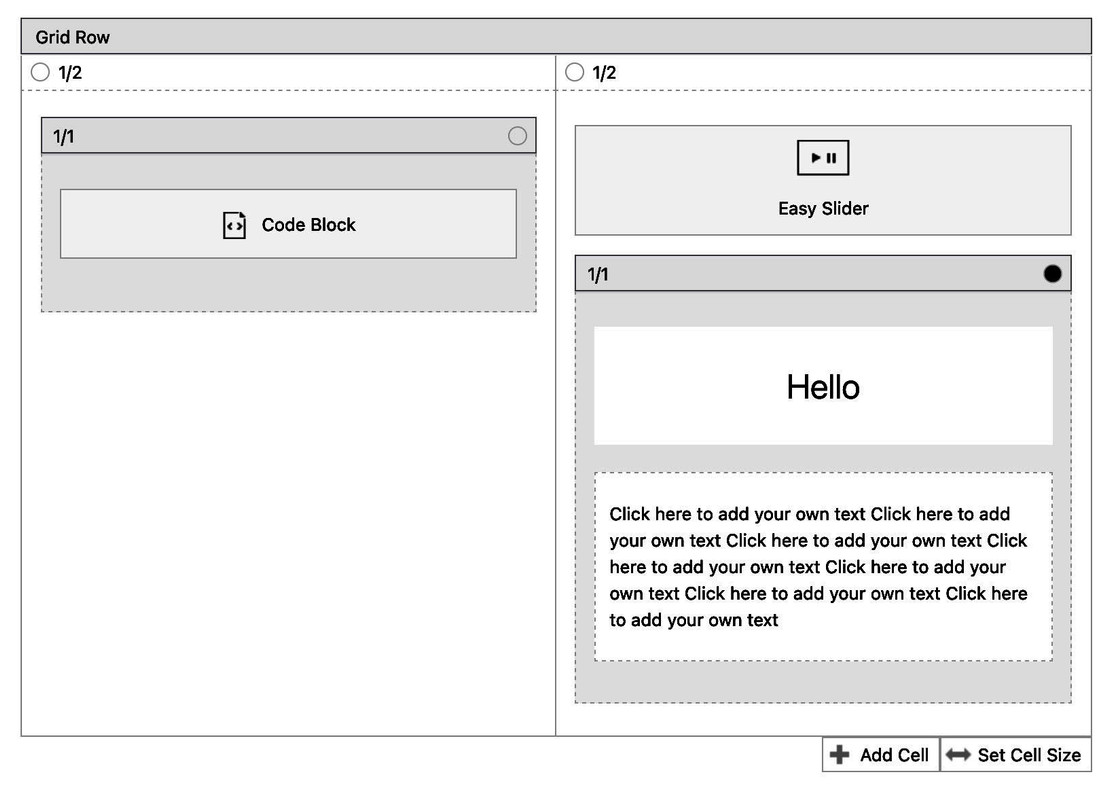
On newer Enfold we got the options to position that 1/1 container absolutely – and if we place it absolute: 0 ( set to a higher z-index )
We have then no background-images but a real slider with real cross-fade options because we got images.
The only problem is responsive behavior : In the end, the image of the slider determines the height of the cell. If this content gets higher then the images – it will “overflow” this “background-slider”. This absolute positioning you can set only for wider screens – and on mobile you can have the normal behavior etc. pp.
see example: https://webers-testseite.de/test-temp/
Hey Joep,
Please add the following code to the Quick CSS field in Enfold theme options > General Styling tab and adjust as needed
.av-masonry-entry .av-inner-masonry-content {
  background-color: orange;
  color: white;
}
#top .av-masonry-entry .av-masonry-entry-title {
  color: red;
}
Best regards,
Yigit
Hi Denis,
You are welcome! :)
For your information, you can take a look at Enfold documentation here – https://kriesi.at/documentation/enfold/
If you have any other questions or issues, feel free to start a new thread under Enfold sub forum and we will gladly try to help you :)
Enjoy the rest of your day!
Best regards,
Yigit
Hey Denis,
Please add the following code to the Quick CSS field in Enfold theme options > General Styling tab
#top .avia-slideshow-inner {
  height: auto !important;
}
Best regards,
Yigit
Hey,
Slider elements including the Post Slider element in Enfold do support swipe functionality on mobile.
Could you please show us some examples?
Best regards,
Yigit
Hi,
Glad Ismael could help, if you have any further questions please create a new thread and we will gladly try to help you. Thank you for using Enfold.
Best regards,
Mike



