Hey morijksen,
The update to 7.1.4 has to be done manually from the version you are running, please refer to my replies in this thread: https://kriesi.at/support/topic/enfold-4-5-theme-update-update-failed-download-failed-a-valid-url-was-not-pro/#post-1021541
You can either update manually via FTP: https://kriesi.at/documentation/enfold/how-to-install-enfold-theme/#theme-update, or upload the theme as if it was new under Appearance->Themes->Add New Theme.
If that doesn’t work then please try to delete the whole theme folder, then replace it with the new version. Make sure that you have backups of the site before starting updating.
Also please read this after you have updated: https://kriesi.at/documentation/enfold/theme-registration/
Best regards,
Rikard
Ismael
I still have issue:
Plugin updates errors.impossible to update
Google captcha errors (tested new keys same errors)
Due to I think : mpossible to save under enfold settings pages.
Thk for help!
You have credentials to check
installed the hook in the functions.php: https://kriesi.at/support/topic/not-registered-dependencies-for-enfold-css-and-js/#post-1495556
I replaced the whole enfold/config-templatebuilder/avia-template-builder/php/class-save-buildertemplate.php
And still have this notification in wordpress Pages-Media and Blogs: on top of the page
Notice: Functie WP_Scripts::add werd verkeerd aangeroepen. Het script met de handle “avia_analytics_js” is in de wachtrij gezet met afhankelijkheden die niet zijn geregistreerd: avia_builder_js. Lees Foutopsporing in WordPress voor meer informatie. (Dit bericht is toegevoegd in versie 6.9.1.) in /var/www/vhosts/denbreejenhoveniers.nl/httpdocs/wp-includes/functions.php on line 6131
Translation:
Notice: Function WP_Scripts::add was called incorrectly. The script with the handle “avia_analytics_js” was queued with dependencies that are not registered: avia_builder_js. See Debugging in WordPress for more information. (This post was added in version 6.9.1.) in /var/www/vhosts/denbreejenhoveniers.nl/httpdocs/wp-includes/functions.php on line 6131
Hi all,
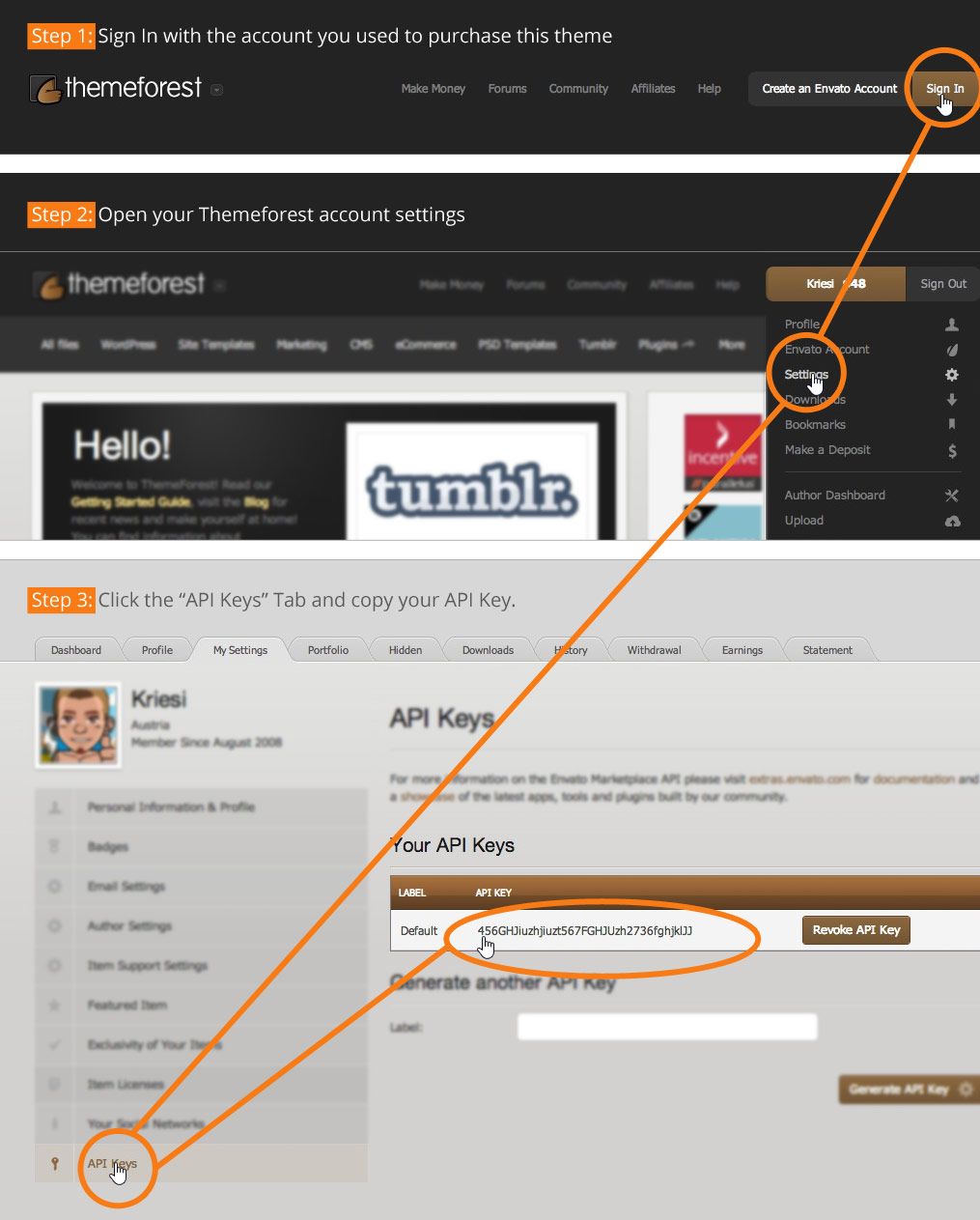
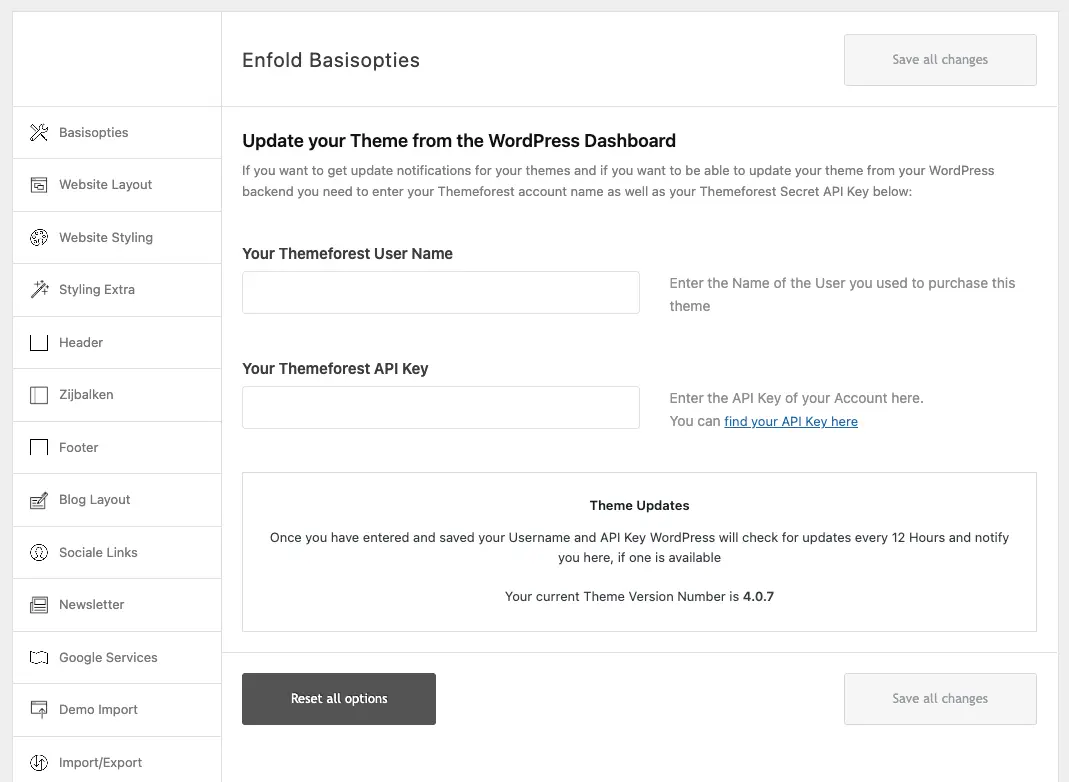
I’ve bought the Enfold template through themeforest. However, the instructions from the plugin (https://moniquerijksen.nl/wp-content/themes/enfold/framework/images/layout/FIND_API.jpg) are not up to date anymore. I cannot upload my license to the plugin settings, because the fields don’t match.
Does anyone know how I can add my license to update the plugin? I cannot update my php version now because the site keeps crashing. I’ve mailed Kriesi support a bunch of times but got no answer whatsoever. Any answer is highly appreciated.
This is the current set up: https://moniquerijksen.nl/wp-content/uploads/2026/04/screenshot-2026-04-02-at-11-14-45.webp
Thank you very much.
Thk but this page hook isn’t so clear even for me.
Isn’t it possible to put my google code in the Enfold/Google services setings?
Good morning, I’m building the homepage of my website http://www.casapumua.com
starting from an Enfold demo.
The problem is that I can’t remove the excessive space below the three text boxes (two white ones on the sides and a beige one in the center).
There’s a large empty space left underneath. Please give me instructions on how to remove it. It’s linked to the three boxes—there isn’t any additional element creating that space.
I’ll share the website access details with you so you can fix the issue.
Thanks
Ismael in case you want to support and help, instead of presuming I don’t know how to update Enfold.
All plugins have been disabled. On datepicker works on every pages but not the one in Private Content.
Thank you for having a look.
Xavier
Hi,
The fix was included in the latest version of the theme, 7.1.4. Please make sure to upgrade the theme if you haven’t done so. Let us know if the issue persists.
— https://kriesi.at/documentation/enfold/changelog/
Best regards,
Ismael
Hi,
Thank you for the feedback.
Have you tried replacing the whole enfold/config-templatebuilder/avia-template-builder/php/class-save-buildertemplate.php file as described in the following thread?
— https://kriesi.at/support/topic/not-registered-dependencies-for-enfold-css-and-js/#post-1495805
Make sure to use this hook:
— https://kriesi.at/support/topic/not-registered-dependencies-for-enfold-css-and-js/#post-1495556
Let us know the result.
Best regards,
Ismael
Hi,
Thanks for the update. Please open a new thread if you should have any further questions or problems.
Best regards,
Rikard
 Jessica
Guest
Good afternoon,
i am helping a friend with her website, which was created years ago by someone who Im not able to reach anymore. Her wordpress website is running on WordPress with the theme ” Enfold”. Since i cant get in touch with the original developer, I was wondering how i can update the theme to the latest version, so it will stay compatible with the plugins she needs, the latest PHP version and WordPress. Do i have to buy the theme or will that overwrite the existing theme? Or can i buy something which enables the envato token zo i can keep the website updated?
Thank you in advance,
With kind regards,
Jessica
Hi
Can you tell me if there is a fully working ticket system in one of the demo’s in Enfold.
I would like to show a client of mine how this works..
Tnx!
Hi
after creating a google ads account i need to put this code in the website. This google tag will follow on the form page the SEND FORM button click.
But how to upload it on enfold setings? And how to say on the script my contact form url is ?
Google says have to put this cscript in the <head></head> of the form page
Hi Ismael,
Thank you for the prompt answer.
We always update on time, but did again today with the last version of enfold.
Calendar doesn’t work unless logged in as admin.
Hi!
Thank you for the update.
The code should fix the deps issue with avia-layout and avia-shortcodes — make sure to add this hook in the functions.php file. Regarding the Real Media plugin, try to set the Enfold > Enfold > Disable Features > Self Hosted Videos And Audio Features (WP-Mediaelement Scripts) to Always load media features (default behavior).
Let us know the result.
Best regards,
Ismael
Hey khickman,
Thank you for the inquiry.
The search element in Enfold should display results directly below the search field without redirecting to a separate page. When you press enter or click the search icon, it should redirect to the search results page and show the results without any 403 errors.
The 403 error probably indicates a server permissions issue or a conflict with your server configuration. We recommend reaching out to your hosting provider and ask them to check for any server-side restrictions or security rules that might be blocking the search requests. Mention that you’re getting a 403 Forbidden error when submitting search queries.
Also check if you’ve made any recent modifications to your search field or added any custom code related to the search functionality. If so, try to temporarily remove those changes to see if the issue resolves. If you’re using any security plugins like Wordfence or iThemes Security, try temporarily disabling them to see if they’re blocking the search requests.
Let us know the result.
Best regards,
Ismael
Edit: something new to me – yes Mike is right – it is the “different” mobile menue – and you choose the same menue as the desktop menue.
______________
For me a mobile Menue is always the hamburger one on enfold –
But even then – there is no conflict because what is id in text-menu ist a class on hamburger menue.
My suggestion is that you use a footer-menue in this way:
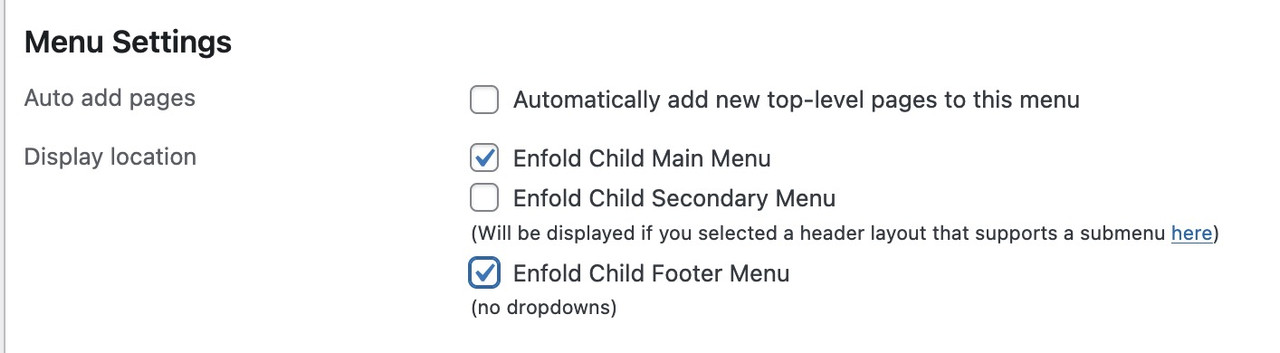
this will end in duplicate ID’s
Hi,
Thank you for the update.
You can use the following css to hide the badge message and force all the form elements including the submit button into the same row:
.avia_recaptcha_v3 .av-recaptcha-area,
.avia_recaptcha_v3 .av-google-badge-message {
    display: none;
}

.avia_recaptcha_v3 .form_element {
    display: inline-block;
    width: auto;
    vertical-align: top;
}
Add this to Enfold > General Styling > Quick CSS. Please make sure to purge the cache before testing.
Let us know the result.
Best regards,
Ismael
Hey Philipp Nepraunig,
Thank you for the inquiry.
We are aware of the issue, and a fix will be included in the next patch. In the meantime, you can add the code provided in the following thread to the functions.php file:
— https://kriesi.at/support/topic/not-registered-dependencies-for-enfold-css-and-js/#post-1495467
Let us know the result.
Best regards,
Ismael
Hey koomo,
Thank you for the info.
We took a look at the private link you shared. It looks like your site is running a very outdated version of the Enfold theme (5.6), and the current version is 7.1.4. This is likely causing the calendar issue, as a lot has changed between those versions.
We recommend updating the theme first before troubleshooting further. Please follow the steps in the docs below:
— https://kriesi.at/documentation/enfold/theme-update/
Also, please make sure to back up your site before updating, just to be safe. Once the update is done, clear your cache and check if the calendar is working again.
Let us know the result.
Best regards,
Ismael
1. Is there a way to force Enfold to use my Custom 404 page when a query returns no results?
2. Is there a way to force Enfold to use my Custom 404 page when a query does returns results?
My website is basically a portfolio website, and therefore there is no need for any user to query anything
Lastly, please take a look at my private content…
3. Are there any other URL patterns or query types I may have missed?
Hi,
Glad that Rikard could help, if you have further questions please open a new thread and we will try to help. Thanks for using Enfold.
Best regards,
Mike
Hi,
Glad that Rikard could help, if you have further questions please open a new thread and we will try to help. Thanks for using Enfold.
Best regards,
Mike
The site we have had working for a year or so has suddenly stopped working after a WordPress update. It now appears broken with the header images not appearing along with other css issues. No matter what i have tried to do to correct this it hasn’t fix it. Yet if i preview the home page for example this displays correctly, but the live site is displaying incorrectly? Could i ask one of the support team to take a look over the site and come back to me as soon as possible please with a fix?
Look forward to your reply.
 Philipp Nepraunig
Guest
Hello Kriesi Team,
I am writing here, because I couldnt find a “Report Theme Issues/Bugs” Form.
With Enfold 7.1.4, a large number of PHP notices are generated as soon as WordPress debug mode is enabled.
The notices are mainly:
• Function WP_Scripts::add was called incorrectly
• Function WP_Styles::add was called incorrectly
Did you already notice this issue, and are you currently working on a fix?
Below is what I found during debugging.
Kind regards,
Yeah I realize that sounds kind of silly…let me instead rephrase the question:
In Enfold’s Theme Options I have specified my own Custom 404 Page.
Yet, visits to mydomain.com/?author trigger a different kind of 404 Page.
This 404 Page seems to be generated by Enfold (which provides a list of all my pages).
1. Why is my Custom 404 that I specified in Enfold not kicking in? See Private Content for URL
2. Where is this 404 Page coming from?
3. And how can I edit it?
Enfold seems to bypass my custom 404 page when author names are queried.
And it’s your 404 page (not the one I created) that reveals a list of all published pages.
Note, this doesn’t happen when using a default theme, e.g. Twenty Twenty-Five.
As soon as I switch back to Enfold the problem persists.
-
This reply was modified 3 days, 14 hours ago by
 themeacco.
Hey Munford,
Thank you for the inquiry.
The code you found is too general and will likely affect other elements on the page, not just the portfolio grid.
A cleaner approach is to add a custom css class to your portfolio element and target that instead. You can do this by opening the portfolio element in the layout builder, go to the “Advanced” tab and add a custom class name there (e.g., av-music-portfolio). Then add your spacing rule to Enfold > General Styling > Quick CSS:
#top .av-music-portfolio .isotope-item {
    margin-bottom: 20px;
}
This way the rule only applies to that specific portfolio and nothing else on the site.
For more details on adding custom css classes in Enfold, please refer to the documentation:
— https://kriesi.at/documentation/enfold/add-custom-css/
Let us know if the issue persists.
Best regards,
Ismael
Hi,
Glad to hear that you sorted it out, if you have further questions please open a new thread and we will try to help. Thanks for using Enfold.
Best regards,
Mike