

-
AuthorPosts
-
March 30, 2026 at 4:27 am #1496426
Hi all,
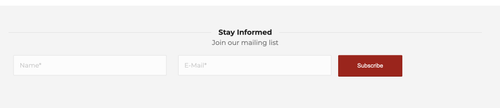
I would like to have NAME, EMAIL, and the SEND button on a single row in a contact form. I had this working with no problems, but after turning on reCAPTCHA, the button now appears on the next line – and changing the field lengths doesn’t make a difference. Is there a way to keep the elements in the same row?
Thanks for any help!
March 30, 2026 at 4:47 am #1496427Hey mjrielly,
Thank you for the inquiry.
Did you set all fields’ Form Element Width to 1/3? Enabling security captcha will always push the submit button beneath it, but we might be able to modify it with css. Please provide the site URL in the private field so we can check the issue properly.
Best regards,
IsmaelMarch 30, 2026 at 12:56 pm #1496435Yes, I did. And it worked fine until I turned on the reCAPTCHA
Contact is at the bottom of the main page and a few others.Thanks for any help!
March 31, 2026 at 6:19 am #1496456Hi,
Thank you for the update.
You can use the following css to hide the badge message and force all the form elements including the submit button into the same row:
.avia_recaptcha_v3 .av-recaptcha-area,
.avia_recaptcha_v3 .av-google-badge-message {
    display: none;
}

.avia_recaptcha_v3 .form_element {
    display: inline-block;
    width: auto;
    vertical-align: top;
}
Add this to Enfold > General Styling > Quick CSS. Please make sure to purge the cache before testing.
Let us know the result.
Best regards,
IsmaelMarch 31, 2026 at 12:25 pm #1496464Thank you. This resulted in removing the reCapture line at the bottom (This site is protected by reCAPTCHA…)
But the submit button is still on the second line. I cleared the cache as well. No luck.April 1, 2026 at 6:37 am #1496487Hi,
Thank you for the feedback.
Try to replace the modification with the following code:
.avia_recaptcha_v3 fieldset {
    display: flex;
    flex-wrap: nowrap;
    align-items: flex-start;
    flex-direction: row;
}

.avia_recaptcha_v3 .form_element {
    flex: 0 0 calc(33.333% - 10px);
    margin-right: 15px;
}

.avia_recaptcha_v3 .av-recaptcha-area {
    position: absolute;
    bottom: -80px;
    left: 0;
    width: 100%;
}

.avia_recaptcha_v3 .av-google-badge-message {
    display: none;
}
Make sure to purge the cache before testing.
Best regards,
IsmaelApril 1, 2026 at 12:26 pm #1496500Thank you for the help. That fixed the issue with keeping the elements on one line, but now my other forms are all on one line.
-
This reply was modified 2 weeks, 6 days ago by
mjrielly.
April 1, 2026 at 1:46 pm #1496503Hi again. You can close this. I decided to use a short code for the “subscribe” forms instead. Thanks for the help!
April 1, 2026 at 7:16 pm #1496510Hi,
Thanks for the update. Please open a new thread if you should have any further questions or problems.
Best regards,
Rikard -
This reply was modified 2 weeks, 6 days ago by
-
AuthorPosts


- The topic ‘Looking for some styling help on contact form with reCAPTCHA’ is closed to new replies.