Viewing 30 results - 1,621 through 1,650 (of 7,495 total)
  • Author
    Search Results
  • #1190117
    Daniel
    Participant

    Hi,

    Many times I would like to change a file in Enfold am I’m searching the forum on how to do so. In the end it never works because I don’t understand what to do, or what I do doens’t work. I am hoping you can help me out.

    In this specific case I want to edit the file /enfold/config-templatebuilder/avia-shortcodes/timeline/timeline.php. There is something wrapped in <strong> that I want to remove on line 1313. What I want is to copy the file to my child theme, make sure that this file is loaded instead of the Enfold file (this is where I get stuck) and make changes to this file.

    Can you please help me with this specific solution but more important, with a better understanding of when and which files I can edit and what is the correct way to do so? My aim is also to lower the amount of questions on the forum.

    Thanks so much,
    Daniel

    • This topic was modified 6 years ago by Daniel.
    #1190037
    disolt-master
    Participant

    Hello,

    i am developing an e-shop with Enfold shop theme.
    So far all good.
    I realized in the process that the variable products don’t change image when i am setting it in the variation.
    The only way i can change the variation is if i haven’t set on the product a featured image.
    Searching for an answer i checked google developer console and i found that i had warnings:
    [DOM] Found 6 elements with non-unique id #_ajax_nonce: (More info: https://goo.gl/9p2vKq)
    [DOM] Found 3 elements with non-unique id #avia-save-nonce: (More info: https://goo.gl/9p2vKq)
    [DOM] Found 2 elements with non-unique id #current-page-selector-1: (More info: https://goo.gl/9p2vKq)
    [DOM] Found 2 elements with non-unique id #woocommerce_meta_nonce: (More info: https://goo.gl/9p2vKq)
    [DOM] Found 2 elements with non-unique id #product_length: (More info: https://goo.gl/9p2vKq)

    Can you help me fix with these issues?
    If you need access please say so and i will send you an account to make the changes.

    Thank you.
    Disolt’s Team

    #1189885

    In reply to: Product Visibility

    Hi Cloudypro,

    I have reported this issue to our dev and a hook will be added in the upcoming version of Enfold.
    Please go to wp-content > themes > enfold > functions-enfold.php line 246-400 (erase this) and replace with: https://pastebin.com/cbPHMHJi
    Then go to wp-content > themes > enfold > config-woocommerce > config.php, erase all content inside it and replace with: https://pastebin.com/5wAYbCUK
    And on your child theme’s functions.php add this code: https://github.com/KriesiMedia/enfold-library/blob/master/actions%20and%20filters/Search/avf_ajax_search_woocommerce_params.php
    Hope this helps.

    Best regards,
    Nikko

    #1189851
    Travelwiththewind
    Participant

    Hello Enfold Team,
    I need to modify the related-posts.php on my enfold-child to see on my post page the related posts based on the last category. I have three category but I want to search the related posts only from the third category. How can I do?
    Thanks in advance.

    #1189442

    I have tried search and replace. It is not in the database. I have searched the entire database manually and created a new one aswell.

    The problem is happening on several sites now.
    It is loading resources, like fontello, etc. from double domain names. It is loading from “https://old-domain-name.com/wp/new-domain.name.com/wp-content/etc

    If I remove ” old-domain-name/ ” from the URL, then I get the resource.

    The database is not containing the old-domain-name. I have searched it though Visual Code etc. This must be somewhere from the parent theme..?

    Am I doing something wrong or missing something? I move site from FTP, I move the database, I update the site/home URL in the options-table, I update the wp-config file with the new database. Everything works except some resources that seems to be related to the theme/Enfold.

    #1189214

    In reply to: Weird bullets appeared

    Hi,
    Sorry for the late reply, and thanks for the login, I took a look at your site and see that you are using Enfold v4.2 with WordPress v5.3.2, so you will need to manually update via FTP because of the API/Token changes with Envato.
    The easiest and safest way to update is to download the newest version from Theme Forest and rename your current theme folder to “enfold-old” via ftp then upload the new “enfold” folder and check that your site is working correctly.
    Should for some reason you wish to roll-back to the old version, it’s easy to do, simply rename the new “enfold” folder to “enfold-new” via ftp and then rename “enfold-old” to “enfold” then refresh your page.
    Once you are happy you can delete the “enfold-old” folder via ftp, (not the WP theme page)
    Please don’t try to overwrite the theme folder, as this will leave old files behind and cause errors.

    I didn’t find your error: Warning: Cannot modify header information – headers already sent by (output started at /home/intera65/public_html/wp-content/plugins/search-filter-pro/includes/class-search-filter-post-cache.php:1513) in /home/intera65/public_html/wp-admin/post.php on line 223

    but this is caused by the plugin search-filter-pro so I recommend disabling until after you update your theme and all plugins, perhaps then the conflict will be resolved.

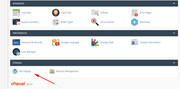
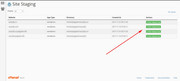
    I also recommend checking with your webhost to see if you have the one click staging site option, this is a option in most cPanels to create a staging clone of your site so you can test updates on it and your live site will stay up and running untouched. This is a good practice should updating cause any issues that take time to resolve. You can always ask your webhost to help you with setting this up if you want.

    Here are some screenshots of what it would look like:
    staging-1
    staging-2

    Best regards,
    Mike

    Hey Bpieterse,

    Please try the following in Quick CSS under Enfold->General Styling:

    #top .main_color input[type='text'] {
      color: #000 !important;
    }
    
    .search-results .post-meta-infos {
      display: none;
    }

    Best regards,
    Rikard

    PressWizards.com
    Participant

    Background Summary: I’ve used Enfold for many clients for many years, always use latest version of WP and Theme. Congrats on building something that works well, has been very reliable, and is always updated.

    Issue Research: Making changes to a page in the Advanced Layout Builder (ALB) and clicking the Update button saves the changes to the database posts table successfully (and shows in Revisions), but NOT to the postmeta ‘_aviaLayoutBuilderCleanData’ field, and then the theme seems to be pulling from that field to display the page, which displays an old version of the page, not from the posts post_content field like normal. I’ve verified using Chrome Dev Tools that the POST submission has all the posts and postmeta fields with correct values containing the updates made, and gets a 200 success response, but the postmeta CleanData field is not updated for some reason.

    Multiple Updates are made, and if using the Block Editor, clicking Update says it works, but displays the old version, and reloading the Editor page causes all those changes to be LOST. We’ve lost hours of work due to this issue. Changing the page status from Draft to Published seems to help for some reason. Cloning the page does not help.

    I have tried multiple servers, migrating a site from one to another, same issue. Disabled all plugins, disabled all caching, same issue. It does not happen on all pages, but even removing sections of the page don’t seem to help, once it’s not working, it stops updating.

    Interestingly, if I delete the ‘_aviaLayoutBuilderCleanData’ field value in the database, then the page updates ok, and the page displays ok. It doesn’t seem to recreate it right away either… a few updates work ok, then once it recreates it, it doesn’t display any updates made again, and the issue is back.

    I searched and found many posts with similar issues, but most seem to be either certain text or sections or characters cause it to break, such as the special character replacement noted in the docs, and that’s a shame, the text should be escaped or something. If it’s parser related, it’s only affecting the CleanData field value, which is the problem. Upon failing to update, it should delete that field then, so it falls back to displaying from the posts post_content field like a normal site would

    I have created a workaround that seems to solve the issue completely, and this code can be placed in the functions.php of a child theme, or as I prefer, use the Code Snippets plugin and have it fire only in the Admin:

    function fix_for_enfold_page_builder( $post_ID, $post ) {
      $page_builder_active = get_post_meta( $post_ID, '_aviaLayoutBuilder_active', true );
      $page_builder_shortcode_tree = get_post_meta( $post_ID, '_avia_builder_shortcode_tree', true );
     
      if ( $page_builder_active && $page_builder_shortcode_tree ) {
        update_post_meta( $post_ID, '_aviaLayoutBuilderCleanData', $post->post_content );
      }
    }
    add_action( 'wp_insert_post', 'fix_for_enfold_page_builder', 10, 2 );

    I would suggest Enfold stop using ‘_aviaLayoutBuilderCleanData’ completely, as it’s very concerning when updates show in Revisions and in the Editor, but are not actually used for the display of the content, that’s a major bug and no matter the cause, storing two versions of a page is bound to have issues and cause problems, not to mention take up twice as much space in the database.

    #1188692
    Tobias
    Participant

    Hello Enfold Team,

    we noticed something special today. On our pages the widget “next events” is not displayed on the Search Result Sites. How can we fix this error?

    Thanks for your support.

    Tobias

    #1188217

    In reply to: The Event Calendar

    Hey Luigi,

    Please have a look at the following threads:
    https://kriesi.at/support/topic/events-calendar-search-function-underneath-enfold-header/
    https://kriesi.at/support/topic/events-calendar-style-issue/

    If you need further assistance please let us know.

    Best regards,
    Victoria

    #1188211

    Topic: Iframe Wont Load

    in forum Enfold
    roamingk
    Participant

    I Frame not displaying.

    I am using the latest version of Enfold and have WPML translat installed.

    When I go to the different langauges, the embedded search box in an iFrame will not load, even though in the code, it is present.

    Here is the page working

    Here is the page not working in French

    https://www.parrotshotel.com/booking/?lang=fr

    I have disabled all the other plugins with no effect.

    Any ideas on what might be causing the iframe not to load?

    #1188122
    queenofthenorth
    Participant

    I’ve followed the instructions here: https://kriesi.at/documentation/enfold/header/?fbclid=IwAR0PwQPMPz0Pf5m1Z29-jkGQktb9bU1HBYxk80L5sxRvetIbZYV8IVKNX14#toggle-id-5

    It created a widget area in the header but the widget is under the logo on the left. How do I get the widget (search bar) in between the logo and the menu?

    #1187751

    Hey Soporte MKP,

    Please have a look at the following thread:
    https://kriesi.at/support/topic/limit-ajax-search-results-with-relevanssi/

    If you cannot see it, you need to register at our forum.

    For technical support please register here kriesi.at/support/register with your item purchase code .

    Go to https://kriesi.at/support/ select the theme you purchased bookmark the URL.

    Example: https://kriesi.at/support/enfold

    Scroll to the bottom of the page to open a new ticket.

    If you need further assistance please let us know.

    Best regards,
    Victoria

    #1187056

    Topic: Product Visibility

    in forum Enfold
    Cloudypro
    Participant

    Hello
    I am facing some problems and i gave up researching ! Hope you can help

    The search function on Enfold keeps showing the results of “out of stock” products although i have disabled the option to show “out of stock” products from within WooCommerce Product Inventory settings.
    Is there any way i can solve this case ?
    Also Product Visibility when set to “shop only” (excluding search), does not work, as i can still see the product in the search result (i did clear my browsing history, cache, cookies etc .)

    Thank you !

    • This topic was modified 6 years ago by Cloudypro.
    #1186829

    Topic: Support Link Hidden

    in forum Enfold
    milano24ore
    Participant

    What a frustrating experience to find the link to create a new forum topic. We paid, we are logged in and still, the button to ask for support or create a new topic in the forum is nowhere to be found. Why don’t you make it more obvious? Put it in the menu as “Ask a support question” or “report a malfunction” or “propose a new feature”. Then you can write there that a login is required, or that you want money or whatever. But don’t make us search and browse through unstructured forum entries for hours. We come to this website because we are your clients and we build websites with the wonderful Enfold theme. And every once in a while we have something to communicate with you guys.
    Please, be a bit more corporate …

    #1186783
    Soporte MKP
    Guest

    Hi there!

    We are trying to limit ajax search form results to 5, as it is configured on Enfold block. But results shows unlimited results. We have installed Relevanssi plugin.

    We have tried many code customizations without success.

    What can we do?

    Regards

    #1186754
    mmr1234
    Participant

    I wanted to jump in and say I have been having the same issue as others in recent threads, but I dont seem to see much of a response from the Enfold team.

    Since an Enfold update that i applied on 1/17/20 my traffic tanked to near 0. It magically came back with another Enfold update on 1/28/20, but is again not work as of last week on 2/11/20:

    2020-02-18_16-54-08.jpeg

    I have not actually lost the traffic, its there, but it’s not tracking. Here is my Search console:

    2020-02-20_13-48-30.jpeg

    So the issue appears to be the new GDPR and privacy settings in Enfold. I have them ALL turned off under the privacy policy tab, and I have disabled cookie consent messages. So not sure why this is impacting me at all.

    Any suggestions?

    #1186572

    I wanted to jump in and say I have been having the same issue. Since an Enfold update that i applied on 1/17/20 my traffic tanked to near 0. It magically came back with another Enfold update on 1/28/20, but is again not work as of last week on 2/11/20:

    2020-02-18_16-54-08.jpeg

    I have not actually lost the traffic, its there, but it’s not tracking. Here is my Search console:

    2020-02-20_13-48-30.jpeg

    So the issue appears to be the new GDPR and privacy settings in Enfold. I have them ALL turned off under the privacy policy tab, and I have disabled cookie consent messages.

    I’m kind of surprised to see the responses from the Enfold team here that are not acknowledging that there is a problem with the theme.

    Do we have any updates?

    #1186469

    In reply to: Mobile menu

    Hey bramblejam,

    Here is the code you can put in Enfold > General Styling > Quick Css,  if it does not work, put into themes/enfold/css/custom.css

    
    /* Header in sidebar to turn to burger on iPad 768px */
    @media only screen and (max-width: 990px) {
      
            .responsive #top .av_header_transparency.av_alternate_logo_active .logo a > img{opacity:1}
            .responsive #top .av_header_transparency .logo img.alternate{display:none;}
            
            .responsive #top #wrap_all #header {position: relative; width:100%; float:none; height:auto; margin:0 !important; opacity: 1; min-height:0;}
            .responsive #top #main {padding-top:0 !important; margin:0;} 
            .responsive #top #main .container_wrap:first-child{ border-top:none; }
            .responsive.html_header_top.html_logo_center .logo { left: 0%; -webkit-transform: translate(0%, 0); -ms-transform: translate(0%, 0); transform: translate(0%, 0); margin:0; }
            .responsive .phone-info{float:none; width:100%; clear:both; text-align: center;}
            .responsive .phone-info span{margin:0;padding:0; border:none;}
            .responsive.html_header_top #header_main .social_bookmarks ,
            .responsive.html_top_nav_header #top .social_bookmarks { width:auto; margin-top:-16px; } 
            
            .responsive #top .logo{position: static; display:table; height:80px !important; float:none; padding:0; border:none; width:80%; }
            .responsive .logo a{display:table-cell; vertical-align: middle;} 
            .responsive .logo img{height:auto !important; width:auto; max-width: 100%; display: block;  max-height: 80px;}
            .responsive #header_main .container{height:auto !important; }
            .responsive #top .header_bg { opacity: 1; filter: alpha(opacity=1); }
            .responsive.social_header .phone-info {text-align: center; float:none; clear:both; margin:0; padding:0;}
            .responsive.social_header .phone-info span{border:none; width:100%; text-align: center; float:none; clear:both; margin:0; padding:0;}
            .responsive #header_meta .social_bookmarks li{ border-style:solid; border-width:1px; margin-bottom:-1px; margin-left:-1px;}
            .responsive #top #header_meta .social_bookmarks li:last-child{border-right-style: solid; border-right-width:  1px;}
            .responsive #header .sub_menu, .responsive #header_meta .sub_menu>ul{float:none; width:100%; text-align: center; margin:0 auto; position: static;}
            .responsive #header .social_bookmarks{padding-bottom:2px; width:100%; text-align: center; height:auto; line-height: 0.8em; margin:0;}
            .responsive #header_meta .sub_menu>ul>li{float:none; display: inline-block; padding: 0 10px;}
            .responsive #header .social_bookmarks li{float:none; display: inline-block;}  
            .responsive.bottom_nav_header #header_main .social_bookmarks{ position: relative; top: 0; right: 0; margin: 10px auto; clear:both;}
            .responsive.bottom_nav_header.social_header .main_menu>div{height:auto;}
            .responsive .logo img{margin:0;}
            .responsive.html_header_sidebar #top #header .social_bookmarks{display:none;}
            .responsive body.boxed#top, .responsive.html_boxed.html_header_sticky #top #header{max-width: 100%;}  
            
            .responsive.html_header_transparency #top .avia-builder-el-0 .container, .responsive.html_header_transparency #top .avia-builder-el-0 .slideshow_inner_caption{padding-top:0;}
            .responsive #top .av_phone_active_right .phone-info.with_nav span{border:none;}
            
            .responsive #top #wrap_all .av_header_transparency .main_menu ul:first-child > li > a, 
            .responsive #top #wrap_all .av_header_transparency .sub_menu > ul > li > a, 
            .responsive #top .av_header_transparency #header_main_alternate, 
            .responsive .av_header_transparency #header_main .social_bookmarks li a,
            .responsive #top #wrap_all .av_header_transparency .phone-info.with_nav span,
            .responsive #top .av_header_transparency #header_meta, 
            .responsive #top .av_header_transparency #header_meta li,
            .responsive #top #header_meta .social_bookmarks li a{ color:inherit; border-color: inherit; background: inherit;}
            .responsive.html_top_nav_header .av-logo-container{height:auto;} 
            .responsive.html_top_nav_header .av-section-bottom-logo{border-bottom-style: solid; border-bottom-width: 1px;}
            
            
          /*new mobile*/
            .responsive .av-burger-menu-main{display: block;}
            .responsive #top #wrap_all .main_menu{top:0; height:80px; left:auto; right:0; display: block; position: absolute;}
            .responsive .main_menu ul:first-child > li a { height: 80px; line-height: 80px;}
            .responsive #top .av-main-nav .menu-item{display:none;}
            .responsive #top .av-main-nav .menu-item-avia-special{display:block;}
            .responsive #top #wrap_all .menu-item-search-dropdown > a { font-size: 24px; }
            .responsive #header_main_alternate{display:none;}
            .responsive #top #header .social_bookmarks{display:none;}
            .responsive #top #header .main_menu .social_bookmarks{display:block; position: relative; margin-top: -15px;}
            .responsive #top .av-logo-container .avia-menu{height:100%;}
            .responsive #top .av-logo-container .avia-menu > li > a{line-height: 80px;}
            .responsive #top #main .av-logo-container .main_menu{display:block;}
            .responsive #top #main .av-logo-container .social_bookmarks{display:none;}
            .responsive #top #main .av-logo-container .main_menu .social_bookmarks{display:block; position: relative;}
            .responsive #top #main .av-logo-container .main_menu{display:block;}
            .responsive #top #header_main > .container .main_menu  .av-main-nav > li > a,
            .responsive #top #wrap_all .av-logo-container {height:80px; line-height:80px; }
            .responsive #top #wrap_all .av-logo-container {padding:0;}
            .responsive #top #header_main > .container .main_menu  .av-main-nav > li > a{
                min-width: 0; padding:0 0 0 20px; margin:0; border-style: none; border-width: 0;
            }
            .responsive #top .av_seperator_big_border .avia-menu.av_menu_icon_beside{border-right-style: solid; border-right-width: 1px; padding-right: 25px;}
            .responsive #top #header .av-main-nav > li > a, .responsive #top #header .av-main-nav > li > a:hover{
            background:transparent;
            color: inherit;
            }
            
            .responsive.html_top_nav_header .av-logo-container .inner-container{overflow: visible;}
            .html_header_sidebar #header .container {
              width: 90%;
            }
    
    }


    If you need further assistance please let us know.

    Best regards,
    Victoria

    zimbo
    Participant

    This topic has numerous posts over the years. The recommendation from mods to stop the Google Search Console error is to disallow the directory in robots.txt.

    However as pointed out by user pentasys further on in this thread, this is not enough to stop the error.

    The user suggested to add an index.html file to the directory with a noindex command is fine: except that after every Enfold update, every user would have to remember to re-add the index.html file into /framework because the update would (I assume) overwrite/delete the user-added index.html.

    A further user suggestion was then made for the theme to permanently add such a file into /framework, with the correct code to stop indexing, so that these Console errors are stopped permanently, and then (I assume) we can also remove the Disallow from robots.txt.

    This suggestion has been ignored. I’m fed up with these “errors” being reported to me every month or so by Google, for what is a problem of the theme’s making.

    This is a simple fix. PLEASE can a request be added so the next theme update adds index.html to /framework to solve this problem once and for all? After all, some folks might not search back through old posts and you mods will just keep answering this same old question for the rest of eternity: unless you fix it… :-)

    #1185836

    Thank you, Victoria, for the hint. I searched through the CSS for the margin keyword and then found the problem.

    Btw, do you know of an Enfold specialist for hire for some extra CSS (maybe also PHP) “magic”?

    Best regards,
    Ralph

    #1185828

    read here somthing in additon: https://kriesi.at/documentation/enfold/search/

    for example to use instead relevansi search

    #1185598

    Hi Victoria,

    In the Enfold theme settings I have activated that TAGS are to show on posts. But it doesn’t show. I, and other helpers, have tried to problem-search but everything looks to be activated correctly. And yet, still no tags showing.
    So please, if you could log in, and check the settings, it would be appreciated. And needed.

    In regards to the TOKEN key, I suspected that maybe some errors was corrected in an update. When we integrated the theme we tried to insert the token key, but after several hours of work and still no succes, we gave up. Had to sign in to different sites, and when we tried to contact support (which we had to google our way to), again we had to do a sign in to an account in order to write a ticket. That didn’t work very easy or smooth neither, so we kind of gave up on this theme and support. Have not experienced this level of difficulty in support in any other theme I have ever worked with.
    So what we are asking right now, is NOT just a tutorial or a document showing how to. We need specific personal help getting the token key integrated properly, so that we can receive the proper updates on the theme.

    So, please help.
    Log in information in earlier mail.

    #1185395

    Hey topnetat,

    Here is the code you can put in Enfold > General Styling > Quick Css,  if it does not work, put into themes/enfold/css/custom.css

    
    .main_color input[type='text'], 
    #top .main_color input[type='input'],
     #top .main_color input[type='password'],
      #top .main_color input[type='email'],
       #top .main_color input[type='number'],
        #top .main_color input[type='url'],
         #top .main_color input[type='tel'],
          #top .main_color input[type='search'], 
          #top .main_color textarea, #top .main_color select {
        border: 1px solid #6d6b76;
        border-radius: 3px;
    }


    It looks it is the Gravity form already.

    If you need further assistance please let us know.

    Best regards,
    Victoria

    #1185311

    Hi bimsenfold,

    Thank you.

    Here is the code you can put in Enfold > General Styling > Quick Css,  if it does not work, put into themes/enfold/css/custom.css

    
    .html_elegant-blog #top .template-search .post-entry .post-meta-infos {
        margin-top: -5px;
    }
    

    If you need further assistance please let us know.

    Best regards,
    Victoria

    #1185289
    DirkB
    Participant

    “Wenn Sie alle Cookies ablehnen, funktioniert diese Website möglicherweise nicht wie erwartet. Bitte überprüfen Sie unsere Einstellungsseite und deaktivieren Sie Cookies oder Funktionen, die Sie nicht verwenden möchten, und akzeptieren Sie Cookies. Diese Meldung wird jedes Mal angezeigt, wenn Sie ein neues Fenster oder eine neue Registerkarte öffnen.

    Sind Sie sicher, dass Sie fortfahren wollen?”

    I would like to change that text since it has some errors included. The text message comes “pre-programmed” when Google Maps is in a setup where the website user has to actively allow/enable Google Maps. So instead of showing the Google Maps location, the page is of course just showing the text. All ok but I want to adjust the text but can’t find the code-line and have unfortunately not the time at the moment to search each single piece.

    Aufgrund deiner Datenschutz-Einstellungen können wir Ihnen die Karte nicht anzeigen. Klicken Sie hier, um die Karte in einem neuen Fenster zu öffnen.

    Hope to get an solution where to change since it could be a problem most german website-admins may want to change due to the translation error.

    Correct translation would be (for next Enfold update):

    Business style:
    “Aufgrund Ihrer Datenschutz-Einstellungen können wir Ihnen die Karte nicht anzeigen. Klicken Sie hier, um die Karte in einem neuen Fenster zu öffnen.”

    Casual writing style:
    “Aufgrund Deiner Datenschutz-Einstellungen können wir Dir die Karte nicht anzeigen. Klicke hier, um die Karte in einem neuen Fenster zu öffnen.”

    Thanks for help with this request!

    #1184652
    pabloeduardo
    Participant

    hi my trouble my main trouble is that i want to use custom types and fields and i am using the toolset plugin but i am posting here their response to some compability issues… i allready paid for that plugin but i can cancel i f you point me in the right direction…. which plugin is the best for using custom types and fields in enfold….. which one has the best compatibility?

    this is the answer they gave me in the toolset types and posts….
    ————————–
    Hi, there are several compatibility issues with the Enfold theme and at this time we have been unable to establish an ongoing working relationship with the theme authors. Content Templates simply won’t work in the Enfold theme, and there isn’t a good workaround right now. Unfortunately the theme is not currently compatible with Views and Content Templates because it uses many different functions to display the content, rather than relying on one single function like the_content. If you’d like to use Enfold successfully with Toolset, we recommend you reach out to their authors and let them know we are trying to work out a permanent solution. Until then, unfortunately I do not have a good solution for you.
    Unfortunately I do not have a comprehensive list of features that do or do not work with Enfold and Toolset together. We typically respond to User reports of problems. So if no one has reported a problem, our team would not be aware of it. Instead, I can show you how to search for some of the other issues Enfold users have experienced and reported here in the forums. Copy + paste this text into Google search:
    site:toolset.com/forums/topic enfold
    This search will scan all the forum topics that include the word “Enfold.” You can see problems with AJAX search and filtering, problems with Enfold’s advanced editor, problems with content templates, and problems with Layouts have all been reported. Since editing Forms require the use of Content Templates or Template Layouts, I suspect you could run into issues with editing Forms as well.
    My best advice is to not use the Enfold theme with Toolset, because we have not been able to communicate regularly with their developers. If a conflict between our systems is discovered during development of your project, it is likely that problem will not be fixed in a reasonable amount of time because we cannot collaborate with their developers.

    #1184108

    I have the same problem with Emmasfm.
    Here are GTM script:
    GTM script
    – 1st Script: I copy a header.php from the Enfold into the child theme. And then, I paste the 1st script into between the <head>…..</head>
    – 2nd script: I paste after the <body> tag

    But when I check the status of Google Assistant Extension, the yellow color before the Google Tag Manager.
    The yellow color means that at least one Google Tag has a minor issue and the issue should be addressed, otherwise you might face some tracking discrepancies.
    How can I fix it? (You can see more detail in the private content)

    Enfold should have an article guide everyone about Google Tag Manager, I search any available can’t solve the problem.

    #1184010
    sand44
    Participant

    Hi,

    I’m using the grid layout and I wanted for each post to have a background color based on its category.
    I searched in the documentation and found : https://kriesi.at/documentation/enfold/blog-post/ > Different post style for each category, which says :

    “All posts added to a specific category can be styled to look different from other posts using custom CSS code. A unique CSS class name in the format “category-xyz” is added to all of the post articles.”

    But it seem there is no category class name added … here are the classes I got in the <article> for an article in the “news” category.

    class=”slide-entry flex_column post-entry post-entry-51 slide-entry-overview slide-loop-2 slide-parity-even av_one_third real-thumbnail”

    Can you help me with this ?

    I tried to had {$cats} on this line of the config-templatebuilder/avia-shortcodes/postslider/postslider.php file but without success.
    $output .= “<article class=’slide-entry flex_column {$style} {$post_class} {$grid} {$extraClass} {$thumb_class}’ $markup>”;

    Thanks a lot

    #1183982
    This reply has been marked as private.
Viewing 30 results - 1,621 through 1,650 (of 7,495 total)