Hey guys,
I would need to customize the anchor link target from Enfold’s “back to top” on one specific page of a website only. The page’s id is 2077 and the link should go to #locations instead of #top.
I tried following code which did not do the trick:
add_filter( 'av_back_to_top_href', 'custom_back_to_top_link', 10, 1 );

function custom_back_to_top_link( $href ) {
    // Only modify the link on page with post ID 2077
    if ( is_page( 2077 ) ) {
        // Change the URL to the ID of your custom anchor
        $href = '#locations';
    }
    return $href;
}
Any improvement or different solution to that?
Thx in advance & Best Regards,
Michael
Hi,
Thanks for your patience please try this css in your Enfold Theme Options ▸ General Styling ▸ Quick CSS field
#top.single-product .av-woo-purchase-button .posted_in {
	display: none;
}
After applying the css, please clear your browser cache and check.
Best regards,
Mike
Hello, i have this error in the website:
Fatal error: Access level to avia_sc_chart::shortcode_insert_button() must be public (as in class aviaShortcodeTemplate) in /home/customer/www/grupodavila.es/public_html/wp-content/themes/enfold/config-templatebuilder/avia-shortcodes/chart/chart.php on line 49
if i try enter in https://www.grupodavila.es/wp-admin/:
Fatal error: Access level to avia_sc_chart::shortcode_insert_button() must be public (as in class aviaShortcodeTemplate) in /home/customer/www/grupodavila.es/public_html/wp-content/themes/enfold/config-templatebuilder/avia-shortcodes/chart/chart.php on line 49
How can i resolve? i change PHP versions, but i cannot fiz nothing…how can i fix this error?
thanks!
-
This topic was modified 3 years, 1 month ago by
 magister10.
Hi,
Glad we were able to help, if you have any further questions please create a new thread with this link and we will gladly try to help you. Thank you for using Enfold.
Also if you go to the Enfold Support Forum you can click the big blue button at the top of the page.

Best regards,
Mike
Hi,
Please choose left align in the button option here:

I did the first one for you.
Please note since this thread is quite long now and has covered multiple topics, we ask that different threads are used for multiple questions, this helps future users find solutions easier and helps keep the thread length manageable.
Please let us know if this helps you with the button so we can close this thread and feel free to open a new thread for future topics. Thanks for understanding.
Best regards,
Mike
Hi pegaso6262,
You can reduce the risk by doing the following:
First make a backup
– Site Backup: https://kriesi.at/documentation/enfold/backup-wordpress-site/
– Theme Settings Backup: https://kriesi.at/documentation/enfold/backup-theme-settings/
Second setup a staging site, some hosting provider offer an option to create a staging site via cpanel, if your webhost does not have it on your cpanel then you can use plugins, please check this article: https://wpengine.com/resources/what-is-a-staging-site-why-have-one/#How_to_Create_a_Staging_Site_for_WordPress
Once you have setup a staging site, please proceed to update the stage site in order to test if it will mess up your site or not:
Option 1: Use Envato Market to update your site
– link: https://envato.com/market-plugin/
Option 2: Update manually
1. Login to ThemeForest and download the Enfold theme, right-click over the downloaded zip file and extract/unzip it.
2. It should generate a new folder, open it and look for the enfold folder
3. Right-click the enfold folder then zip it, here’s a tutorial on how to create a zip file in windows: https://www.howtogeek.com/668409/how-to-zip-and-unzip-files-on-windows-10/ (this should create enfold.zip
4. Log in to WordPress as and Admin.
5. Install and activate a maintenance plugin and put your site in Maintenance mode.
6. Go to Appearance > Themes, switch to a default WordPress theme like TwentyTwenty then delete Enfold.
7. Click on the ADD NEW button.
8. Click on the UPLOAD THEME button.
9. Click BROWSE and choose enfold.zip file
10. Click the INSTALL NOW button and switch to Enfold or your child theme.
11. Remove the maintenance mode then deactivate and remove the maintenance plugin.
If update is successful on the staging site then please proceed to update the live site.
If update is not successful then, please give us temporary admin access to your staging site and we’ll try to check further.
Best regards,
Nikko
Hi navindesigns,
Please try to add this CSS code in Enfold > General Styling > Quick CSS:
@media only screen and (max-width:767px) {
  #top .avia-layerslider .ls-bottom-slidebuttons {
    top: 0 !important;
  }
}
Hope it helps.
Best regards,
Nikko
Hi this topic is related to #1401082. It is about the same website ceramicasa.nl
#2:
On a number of pages (maybe a lot) something strange happens with the texts in blocks. The texts are cut off by an image or another block. This while the block must of course continue until the text stops, just like on the desktop version.
If you look at https://ceramicasa.nl/tegels/ and you scroll to about half you will see:
” TEGELS VOOR BINNEN.
De keramische tegels voor binnen hebben een afmeting van 6 of 9mm dik, hoe groter de tegel hoe dunner.
De tegels kunnen zowel op de vloer als op de wanden toegepast worden, hierdoor kan je tegels makkelijk combineren met elkaar. Kies je voor de klassieke marmerlook tegel of ga je liever voor een betonlook?”
Only on the mobile view does the image go over the text and not everything is visible.
On the same page a little lower it says: “TEGELS VOOR BUITEN.” and there the text spills out of the gray block.
#3
On that same page, if you scroll a little further, there is a header: KERAMISCHE KEUKENBLADEN.
This is stuck to the button that is located somewhere else on the desktop version.
Just click through the site, there are more of these weird alignment problems that I would actually expect that they should not occur due to Enfold’s responsive construction.
Hi,
Thanks please try this css in your Enfold Theme Options ▸ General Styling ▸ Quick CSS field:
#top.home .avia-fullscreen-slider .avia-slideshow-button.avia-button.avia-color-light {
    color: #fff;
    border: 2px solid #fff;
    background: 0 0;
}
After applying the css, please clear your browser cache and check.
Best regards,
Mike
Hi,
Thanks for the screenshot and the link to your site, please try this css in your Enfold Theme Options ▸ General Styling ▸ Quick CSS field
#top.home .template-shop.avia-content-slider .inner_product .inner_product_header,
#top.home .template-shop.avia-content-slider .inner_product .avia_cart_buttons {
	display: none;
}
After applying the css, please clear your browser cache and check.
Best regards,
Mike
Hi,
Could you try updating the theme to the latest version (5.4.1) to see if that helps please? https://kriesi.at/documentation/enfold/how-to-install-enfold-theme/#theme-update.
You can open a new thread by following this link, or if you click this button: https://imgur.com/a/AnoSPNb
Best regards,
Rikard
Hallo,
Ich habe gerade die neueste Version des Enfold Themes hochgeladen.
Die Webseite läuft, allerdings kann ich keine der Seiten in WordPress bearbeiten. Es kommt folgender Fehler:
Failed to initialize plugin: avia_builder_button
Ich habe alle Plugins deaktiviert. wordpress ist auf dem neuesten Stand.
Könnten Sie mir weiterhelfen?
Herzlichen Dank
Michael
If english language would be prefered I can post in english too………
-
This topic was modified 3 years, 1 month ago by
 siltalai.
Hi,
Please also disable the script, we will not use it, and then try going to WordPress ▸ Customizing ▸ WooCommerce ▸ Product Images and choosing Uncropped
and then go to WooCommerce > Status > Tools > Regenerate shop thumbnails, and click the Regenerate button next to it.
If this doesn’t help try adding this code to the end of your child theme functions.php file in Appearance ▸ Editor:
add_filter( 'avf_wc_before_shop_loop_item_title_img_size', 'avf_wc_before_shop_loop_item_title_img_size_mod', 10, 1 );
function avf_wc_before_shop_loop_item_title_img_size_mod( $thumbnail_size ) {
    return 'woocommerce_thumbnail';
}
If you use the Woocommerce Gallery instead of the Enfold Gallery do you have the same issue?
Best regards,
Mike
Hi,
Thanks for the feedback, if you are going to use the short pixel plugin, then please don’t use the script, it looks like the plugin is trying to change the images.
I would recommend disabling this plugin and any other “optimizer” plugins until the core issue is solved.
Then try going to WordPress ▸ Customizing ▸ WooCommerce ▸ Product Images and choosing Uncropped
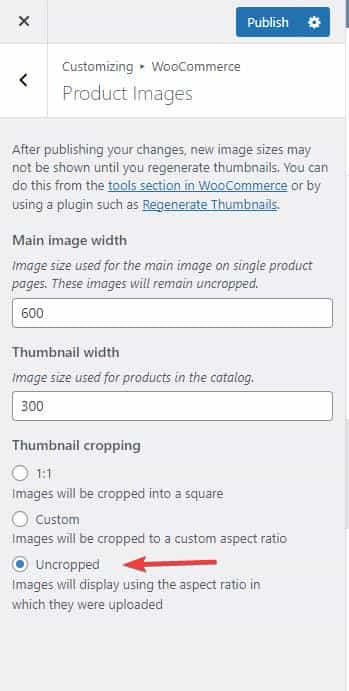
and then go to WooCommerce > Status > Tools > Regenerate shop thumbnails, and click the Regenerate button next to it.
If this doesn’t help try adding this code to the end of your child theme functions.php file in Appearance ▸ Editor:
add_filter( 'avf_wc_before_shop_loop_item_title_img_size', 'avf_wc_before_shop_loop_item_title_img_size_mod', 10, 1 );
function avf_wc_before_shop_loop_item_title_img_size_mod( $thumbnail_size ) {
    return 'woocommerce_thumbnail';
}
Then clear any cache plugins and any server cache and your browser cache.
Best regards,
Mike
on that page: https://nlsla.org/ you had set the padding-top of #main to zero.
if the header is sticky you had to change that to 80px as in my code above.
see above comments on these rules if you like to have background from the beginning.
  #top .av_header_glassy.av_header_transparency .header_bg {
    background-color: #376b9e;
    opacity: 1;
    filter: alpha(opacity=100);
  }

  .responsive #top .header_bg {
    opacity: 1;
    filter: alpha(opacity=100);
    background-color: #fff !important;
  }
some settings on top might not be usefull for your pages. – but try it first – then we can correct the settings
PS:
on that page (nlsla.org) – you have overwritten standard enfold setting ( middle ) :
@media only screen and (max-width: 767px) {
  .avia-section.av-minimum-height .container .content {
    vertical-align: top;
  }
}
but this is not good – because your buttons will be at top in responsive case.
Hi,
Thanks for the link to your page, currently I see you have a plugin wpo-minify active so it is minifying your css so I can’t see exactly where this rule is coming from that is preventing your link from showing the text-decoration underline, but from the classes I believe it’s from the WordPress Block Editor:
#top a:where(:not(.wp-element-button)) {
    text-decoration: none;
}
To override this css please try this css in your Enfold Theme Options ▸ General Styling ▸ Quick CSS field:
#top #main .content a:where(:not(.wp-element-button)) {
    text-decoration: underline;
}
After applying the css, please clear your browser and minify plugin cache and check.
The expected results:

Best regards,
Mike
Hi Silvio,
I apologize if the changes I made caused any issues, can you setup another staging site? I thought the link you gave was a staging site because of its subdomain name.
The screencast I posted shows it works properly when I have disabled the caching plugin and have switched to the parent theme, which suggests that the problem is most likely on the child theme.
I have also tested this on my enfold install however I could not reproduce the same issue, maybe your child theme has some js scripts/code that maybe interferring with the load more button function.
Best regards,
Nikko
Hi Barnett,
You can download it here: https://bit.ly/38d4IFj
Or you can go to our documentation page and click on the yellow button: https://kriesi.at/documentation/enfold/child-theme/
Hope this helps.
Best regards,
Nikko
Hi woogie07,
1. Yes, it’s possible, please try to add the following on Enfold > General Styling > Quick CSS:
#top #wrap_all .avia-fullwidth-slider .avia-slideshow-button {
    font-size: 18px;
    padding: 20px;
}
Just adjust the values as you see fit.
2. I could see a vertical line on the left of the subhead on the fullwidth easyslider, is this already done? I’m not really sure I understood the question.
Best regards,
Nikko
Hi Illingco,
Please try to add this CSS code in Enfold > General Styling > Quick CSS: (just change the values as you see fit)
#top #wrap_all .socket_color .av-subnav-menu .av-menu-button-colored>a .avia-menu-text {
    color: white;
    font-size: 13px;
    background-color: blue;
    border: 2px solid black;
}
Best regards,
Nikko
Hi So Evolve,
I have checked for the rumble icon on fontello’s website unfortunately, I did not find any icon.
You will need to find it somewhere or you can try downloading it here: https://companieslogo.com/rumble/logo/ (I just found one here)
Then do the following Steps:
1. Please add this code in functions.php of your child theme or you can add it via a plugin called WPCode:
// Register new icon as a theme icon
function avia_add_custom_icon($icons) {
    $icons['rumble'] = array( 'font' =>'entypo-fontello', 'icon' => 'ue897');
    return $icons;
}
add_filter('avf_default_icons','avia_add_custom_icon', 10, 1);

// Add new icon as an option for social icons
function avia_add_custom_social_icon($icons) {
    $icons['Rumble'] = 'rumble';
    return $icons;
}

add_filter('avf_social_icons_options','avia_add_custom_social_icon', 10, 1);
2. Go to Enfold > Social Profiles, then add Rumble and the link to your Rumble Channel.
3. Go to Header > Extra Elements > Header Social Icons and make sure to set to any value except No social Icons (at this point check the frontend of your site and see if it works properly)
4. Go to Media > Add New, then upload the rumble icon, (once uploaded) click the Copy URL to clipboard button.
5. Go to Enfold > General Styling > Quick CSS and add this CSS code:
#top #header .social_bookmarks .av-social-link-rumble a {
    background: url(rumble_image_url) center center no-repeat;
    background-size: contain;
}

#top #header .social_bookmarks .av-social-link-rumble a:before {
    display: none;
}
Just replace rumble_image_url with the URL you copied from the clipboard.
Hope this helps.
Best regards,
Nikko
Hey Julia Friebe,
Thank you for purchasing the theme.
In order to open questions in the forum, you have to register an account first using your purchase code. Please go to the link below, place the purchase code in the provided field, then click the verify button.
// https://kriesi.at/support/register/
After the registration, just visit the link below to open a new thread in the forum.
// https://kriesi.at/support/forum/enfold/#new-post
Best regards,
Ismael
Can I get separate CSS for the Caption Text and the Link Buttons?
I used this for the Caption Title:
.avia_transform .av_slideshow_full .active-slide .avia-caption-title,
.avia_transform .av_fullscreen .active-slide .avia-caption-title
{text-shadow: 3px 3px 2px #000;}
Hi,
Please try the following in Quick CSS under Enfold->General Styling:
@media only screen and (min-width: 768px) and (max-width: 1024px) {
.avia-button.avia-size-x-large {
    min-width: auto;
}
}
Best regards,
Rikard
I fixed a sub page to my main enfold page. But the main buttons on the new page do not lead to the main page, but to the same sub-page. Where can i change so that the buttons lead back to the main page?
Frontpage: https://webbx.nu/
sub page: https://webbx.nu/frontpage/shortcuts/?preview_id=3263&preview_nonce=7c64a15c60#top
Hi Martina,
I deactivated all plugins and then it worked. Then activated again and still correct, strange!
This sounds like a caching issue. If the issue reoccurs, please clear cache and check if that helps.
According to the GDPR, all buttons in the cookie banner must look the same, i.e. the same color & size. Where do I have to make changes here so that all are green and like a little smaller?
Please go to Enfold theme options > Advanced Styling and edit cookie consent elements: https://i.imgur.com/BIfv5rt.png
Best regards,
Yigit
Hey Tom,
The Events Calendar should inherit the colors you set in Enfold theme options > General Styling tab. It is not fully compatible with customizer.
If you’d like to override Enfold theme options styling, please add following code to bottom of Quick CSS field in Enfold theme options > General Styling
.tribe-events .tribe-events-c-search__button {
  background-color: var(--tec-color-background-events-bar-submit-button) !important;
  color: var(--tec-color-text-events-bar-submit-button) !important;
}
Best regards,
Yigit
Hey Tom,
I reported the issue to our developers. Issue should be fixed in upcoming version.
As a temporary solution, I added the following code to the bottom of the Quick CSS field in Enfold theme options > General Styling
/* Temporary CSS fix for TEC styling */
:root{
    --tec-color-text-events-title-day:var(--tec-color-text-events-title);
    --tec-color-text-events-title-latest-past:var(--tec-color-text-events-title);
    --tec-color-text-event-title-list:var(--tec-color-text-events-title);
    --tec-color-text-events-title-month-multiday:var(--tec-color-text-events-title);
    --tec-color-text-events-title-widget-list:var(--tec-color-text-events-title);
    --tec-color-text-secondary-event-date-month:var(--tec-color-text-secondary-event-date);
    --tec-color-text-secondary-event-date-month-mobile:var(--tec-color-text-secondary-event-date-month);
    --tec-color-text-day-of-week-month:var(--tec-color-text-secondary);
    --tec-color-day-marker-month:var(--tec-color-text-primary);
    --tec-color-day-marker-month-hover:var(--tec-color-text-primary-hover);
    --tec-color-day-marker-month-active:var(--tec-color-text-primary-active);
    --tec-color-day-marker-current-month:var(--tec-color-day-marker-month);
    --tec-color-day-marker-current-month-hover:var(--tec-color-day-marker-month-hover);
    --tec-color-day-marker-current-month-active:var(--tec-color-day-marker-month-active);
    --tec-color-day-marker-past-month:var(--tec-color-text-primary);
    --tec-color-day-marker-past-month-hover:var(--tec-color-day-marker-past-month);
    --tec-color-day-marker-past-month-active:var(--tec-color-day-marker-past-month);
    --tec-color-text-day-of-week-week:var(--tec-color-text-secondary);
    --tec-border-radius-month-multiday:9.5px;
    --tec-color-border-secondary-month-grid:var(--tec-color-border-secondary);
    --tec-color-border-active-month-grid-hover:var(--tec-color-border-active);
    --tec-color-background-month-grid:transparent;
    --tec-color-background-tooltip:var(--tec-color-background);
    --tec-color-text-events-bar-input:var(--tec-color-text-primary);
    --tec-color-text-events-bar-input-placeholder:var(--tec-color-text-secondary);
    --tec-opacity-events-bar-input-placeholder:var(--tec-opacity-default);
    --tec-color-border-events-bar:var(--tec-color-border-secondary);
    --tec-color-background-events-bar:var(--tec-color-background);
    --tec-color-background-view-selector:var(--tec-color-background-events-bar);
    --tec-color-background-view-selector-tabs:var(--tec-color-background-view-selector);
    --tec-color-background-view-selector-list-item-hover:var(--tec-color-background-secondary);
    --tec-color-background-subscribe-list-item-hover:var(--tec-color-background-secondary);
    --tec-color-text-view-selector-list-item:var(--tec-color-text-primary);
    --tec-color-text-view-selector-list-item-hover:var(--tec-color-accent-secondary-hover);
    --tec-color-background-search-container:var(--tec-color-background-events-bar);
    --tec-color-text-events-bar-submit-button:var(--tec-color-background);
    --tec-color-text-events-bar-submit-button-active:var(--tec-color-text-events-bar-submit-button);
    --tec-color-text-events-bar-submit-button-hover:var(--tec-color-text-events-bar-submit-button);
    --tec-color-background-events-bar-submit-button:var(--tec-color-button-primary);
    --tec-color-background-events-bar-submit-button-hover:var(--tec-color-button-primary-hover);
    --tec-color-background-events-bar-submit-button-active:var(--tec-color-button-primary-active);
    --tec-color-icon-events-bar:var(--tec-color-icon-primary);
    --tec-color-icon-events-bar-active:var(--tec-color-icon-active);
    --tec-color-icon-events-bar-hover:var(--tec-color-icon-hover)
}
You can remove in the version after 5.4.1
Edit: After checking your other thread, I realized we must hear back from our devs. As I mentioned in the other thread, TEC styling should inherit Enfold theme options.
Best regards,
Yigit
-
This reply was modified 3 years, 2 months ago by
 Yigit.
I fixed a sub page to my main enfold page in WP. But the main buttons on the new page do not lead to the main page, but to the same sub-page. how can i change so that the buttons lead back to the main page?



